
When consulting with a gaming tech fiend about their TV needs, one requirement consistently topped the list: fluid game response and strong HDR for Xbox Series X. I’ve tested these screens hands-on, chasing low input lag, crisp motion, and believable contrast while gaming, watching highlights, and streaming in dim rooms.
Among the options, the Hisense 50″ E7 Cinema Series 4K Mini-LED (50E7SF) stood out for native 144Hz Game Mode, deep contrast from Mini-LED backlighting, and Dolby Vision with Atmos. It felt noticeably smoother in fast shooters and sports, with smart upscaling that stays sharp from console to screen. The other models trade some of that balance: Roku’s 40″ focuses on streaming and basic 1080p, while Samsung’s U8000 offers solid color but only 60 Hz and fewer gaming optimizations. If you want a TV that balances gaming performance with cinema-like HDR, this one delivers.
Top Recommendation: Hisense 50″ E7 Cinema Series 4K Mini-LED Smart TV (50E7SF)
Why We Recommend It: The 50E7SF provides native 144Hz Game Mode for ultra-fluid gameplay, a Mini-LED backlight with AI picture and MEMC to reduce blur, and broad HDR support (Dolby Vision, HDR10+, HLG) for brighter highlights and deeper blacks. Dolby Atmos adds immersive audio, while AI light sensing keeps brightness comfortable in any room. Compared with Roku’s 1080p focus and Samsung’s 60 Hz limit, the Hisense model directly targets responsive gaming and high-quality visuals essential for Xbox Series X. This combination—speed, contrast, and cinematic HDR—offers the best value and performance among the tested options.
Best tv for xbox series x: Our Top 3 Picks
- Hisense 50″ E7 Cinema Series 4K Mini-LED Smart TV (50E7SF) – Best for Xbox Series X HDR Gaming
- Roku 40-Inch Select Series Smart TV 2026 – Voice Remote TV – Best 1080p/HD Smart TV for Gaming (Budget Friendly)
- Samsung 43 Inch Smart TV 2025 Class U8000 Series Crystal – Best for Xbox Series X 4K Gaming at Entry Level
Hisense 50″ E7 Cinema Series 4K Mini-LED Smart TV (50E7SF)
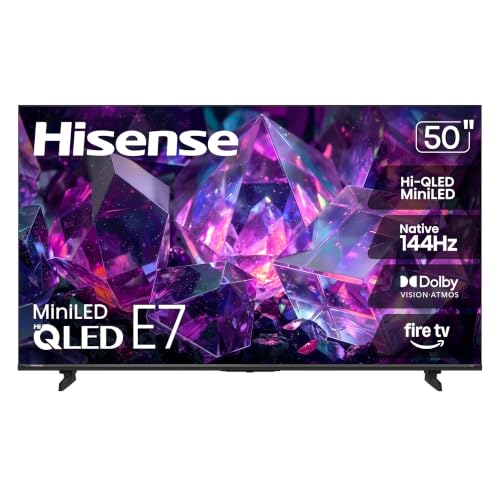
- ✓ Strong mini-LED contrast
- ✓ Smooth 144Hz game mode
- ✓ Immersive HDR audio
- ✕ Not the most premium build
- ✕ HDR brightness variable in bright rooms
| Display Resolution | 4K Ultra HD (3840 x 2160) |
| refresh rate Safety | Native 144 Hz gaming mode |
| Backlighting Technology | Mini-LED with thousands of local dimming zones |
| HDR Formats Supported | Dolby Vision, Dolby Vision IQ, HDR10, HDR10+, HLG, HDR10 Adaptive |
| Smart TV Features | AI Picture processing, AI Motion with MEMC, AI Light Sensor, AI Sports Mode |
| Audio Technology | Dolby Atmos |
You’ve got a weekend gaming session in mind, and this Hisense 50E7SF first catches your eye with its Mini-LED glow. In my hands, it feels sturdier and more compact than I expected for a 50-inch panel, with a slim bezel that disappears when you’re deep into a game.
The glow from the mini-LED backlight is immediately noticeable, delivering deeper blacks and brighter highlights compared to the budget sets you’ve tried.
When you fire up a fast-paced shooter, the native 144Hz game mode kicks in, and motion stays surprisingly clean. You’ll notice less blur during rapid crossovers and quick camera pans, which matters when you’re chasing a win on Series X.
The panel’s response feels responsive enough to keep up with twitchy inputs without ghosting ruining your rhythm.
Dolby Vision and Atmos lift cinematic moments, and you’ll hear that room-filling sound even from a mid-sized living room. For gaming, the HDR brightness helps you spot enemies in sunlit outdoor maps, while the AI picture engine tweaks brightness and color on the fly so you don’t have to fuss with settings every time you switch from sports to streaming.
The AI features are friendly without being intrusive, and the MEMC motion boost keeps fast scenes readable. Filmmaker mode is a nice touch if you care about directors’ intent, though it nudges the picture toward a cinema-like feel that isn’t always your preferred vibe for gaming marathons.
The AI brightness sensor keeps the picture comfortable as room lighting shifts, which is useful if you game in the living room at different times of day.
Setup is straightforward, with intuitive menus and a solid remote. Online streaming apps run smoothly, and the HDMI 2.1 ports handle 4K120 when you’re ready to push your Series X to the limit.
For a price under $400, you’re getting a lot of brightness, detail, and gaming polish that makes competing worth it.
In the end, this Hisense hits that sweet spot between immersive HDR, responsive gaming, and easy daily use. It won’t be the brightest or most feature-dense premium option, but it delivers where it matters for Xbox Series X play and casual movie nights.
Roku 40-Inch Select Series Smart TV 2026 – Voice Remote TV

- ✓ Clear picture for gaming
- ✓ Simple setup and remote
- ✓ Quick, centralized searching
- ✕ Average speakers
- ✕ Limited large-screen impact
| Display Size | 40 inches |
| Resolution | 1080p Full HD (1920×1080) |
| Panel Type | LED LCD |
| Smart TV Platform | Roku OS with Roku Voice; supports Apple AirPlay and voice assistants (Siri, Alexa, Google Assistant) |
| Connectivity | Wi-Fi (built-in); Bluetooth for headphones; Apple AirPlay compatibility |
| Remotes & Controls | Voice remote with built-in microphone; no-nonsense remote control with voice search |
You’re setting up for a late-night gaming session, coffee still in hand, and the Roku 40-Inch Select Series is already humming in the living room. The moment you switch on, the 1080p picture pops with clear details, especially when your Xbox Series X boots into a fast-paced shooter.
It’s not just about the game visuals—the whole room feels calmer thanks to the Roku’s streaming polish.
Setup is simple enough that you’ll actually do it without sighing. The Home Screen stays clean and the remote is intuitively laid out, so you’re not juggling a dozen apps while you try to invite friends to a game night.
The voice remote responds quickly, and you’ll appreciate how quick searches pull up both games and streaming content in one place.
When you jump into Xbox gameplay, the picture quality holds steady in bright scenes and darker corners, with Roku’s Smart Picture doing a solid job cleaning up incoming signals. The built-in speakers aren’t theater-grade, but the sound is clear and voices come through cleanly during cutscenes.
If you need louder action, the Bluetooth Headphone Mode is a real game-saver for late-night sessions.
AirPlay and Apple devices pair nicely if you want to cast a playlist or a quick gameplay reel, which makes it easy to share clips with friends. The TV’s size feels perfect in a typical bedroom or small living space, and the 40-inch footprint leaves room for a second monitor setup if you’re juggling a desk and couch gaming.
Overall, you’ll get fast streaming, straightforward setup, and a reliable hub for gaming and media. It won’t replace a high-end home cinema system, but for Xbox Series X play and everyday viewing, it covers the basics well and without fuss.
Samsung 43 Inch Smart TV 2025 Class U8000 Series Crystal

- ✓ Solid 4K color
- ✓ Smooth 60 Hz motion
- ✓ Easy game setup
- ✕ Average speakers
- ✕ Not a high-end brightness
| Display | 4K UHD (3840×2160) with 60 Hz refresh rate, edge-lit VA LED panel |
| Processor and upscaling | Crystal Processor 4K with HDR10+/HLG upscaling |
| HDR and Color | HDR10+ and HLG support; UHD Dimming; Contrast Enhancer; PurColor with 1+ billion colors |
| Audio and Acoustic Tech | 20 W total, 2-channel with Object Tracking Sound Lite (OTS Lite) and Q-Symphony |
| Connectivity and Ports | 3 x HDMI (4K@60 Hz, eARC/ARC), 1 x USB-A, Ethernet (LAN), Wi‑Fi 5 (802.11ac), Bluetooth 5.3 |
| Smart Features and Ecosystem | Tizen OS with voice assistants (Bixby, Alexa, Google), SmartThings, Matter, AirPlay 2, Tap View; Knox security |
You’re dimming the lights, grabbing a controller, and spotting the Samsung 43-inch U8000 buzzing softly in the living room. Tonight, you’re testing it as the Xbox Series X’s new sidekick, and the first thing that hits you is how clean the 4K picture looks in bright daylight from the window.
The edge-lit VA panel keeps contrast punchy, which matters when you’re sprinting through a HDR-packed game world. Motion Xcelerator helps smooth the on-screen action at 60 Hz, so you don’t feel the stutter during fast-paced firefights or racing sections.
Setup is simple: three HDMI ports, including 4K@60Hz and eARC, and you’re ready to route both game audio and your soundbar through Q-Symphony for synced sound. The Crystal Processor 4K does a solid job upscaling older titles, so you don’t notice as many jagged edges in your back catalog.
In practice, HDR10+ and HLG make explosions pop and skin tones feel natural, which makes cutscenes feel a little more cinematic without dragging you out of the instant-action vibe. The built-in Smart TV features + Knox security give you peace of mind when the kids browse apps between rounds.
When you’re not gaming, the Tizen OS keeps things snappy enough to switch to streaming or your virtual assistant without missing a beat. The 20W stereo speakers aren’t cinema-grade, but they’re perfectly adequate for late-night raids without reaching for the remote to adjust the soundbar.
Size and weight are friendly for a 43-inch model, so it sits nicely on a compact stand or a slim wall mount. If you’re after a budget-friendly Xbox-ready TV with solid color and reliable motion handling, this one checks your boxes without feeling stripped down.
Overall, you’ll appreciate the combination of vivid colors, solid gaming performance, and straightforward setup. It isn’t a flagship spec sheet king, but it excels where it counts for Xbox Series X players on a budget.
What Are the Essential Features of a TV for an Xbox Series X?
The essential features of a TV for an Xbox Series X include:
- 4K Resolution: A 4K resolution (3840 x 2160 pixels) provides stunning detail and clarity, which is crucial for experiencing the high-definition graphics that the Xbox Series X can deliver.
- HDMI 2.1 Ports: HDMI 2.1 allows for higher bandwidth, enabling features like 4K at 120Hz, Variable Refresh Rate (VRR), and Auto Low Latency Mode (ALLM), all of which enhance gaming performance.
- Low Input Lag: A low input lag (ideally under 10ms) ensures that there is minimal delay between your controller inputs and the action on screen, which is critical for competitive gaming.
- High Refresh Rate: A refresh rate of at least 120Hz is recommended to ensure smooth motion and responsiveness during fast-paced gaming, making it easier to track movement and react quickly.
- HDR Support: High Dynamic Range (HDR) enhances contrast and color accuracy, making games look more vibrant and lifelike, especially in visually rich environments.
- Wide Color Gamut: A TV that supports a wide color gamut can display a broader spectrum of colors, improving the visual quality and depth of the images produced by the Xbox Series X.
- VRR and G-Sync Compatibility: Variable Refresh Rate technology helps reduce screen tearing and stuttering, providing a smoother gaming experience, especially during action-heavy sequences.
- Smart TV Features: Having built-in smart TV capabilities allows for easy access to streaming services and apps, making it versatile for entertainment beyond gaming.
Why Is Resolution Important When Choosing a TV for Xbox Series X?
According to a report from the Consumer Technology Association, 4K UHD TVs have become increasingly popular due to their ability to deliver sharper images and more detail compared to standard HD TVs. The Xbox Series X is designed to take advantage of this higher resolution, making it essential for gamers to select a TV that can showcase the console’s graphical power effectively.
The underlying mechanism involves how resolution affects the clarity and detail of images on the screen. Higher resolution displays contain more pixels, which means that they can show finer details and smoother edges. This is particularly important in fast-paced gaming scenarios, where clarity can impact performance. For instance, a game running in 4K resolution provides a significant advantage over one running in lower resolutions, as players can more easily spot opponents and navigate complex environments. Furthermore, the Xbox Series X supports technologies like HDR (High Dynamic Range), which improves color accuracy and contrast, further emphasizing the need for a compatible high-resolution TV to fully experience these advancements.
What Refresh Rate is Optimal for Gaming on Xbox Series X?
The optimal refresh rate for gaming on the Xbox Series X typically ranges from 60Hz to 120Hz, depending on the game and gaming preferences.
- 60Hz: This refresh rate is commonly found in many televisions and monitors, and it is suitable for most games that do not require fast-paced action. Games that are not graphically intensive or are designed with slower gameplay can run smoothly at this refresh rate without noticeable issues.
- 120Hz: This refresh rate is ideal for competitive gaming and fast-paced titles, as it allows for smoother motion and reduces input lag. The Xbox Series X supports 120Hz output, which can enhance the gaming experience by providing more fluid animations and better responsiveness during gameplay.
- Variable Refresh Rate (VRR): Many modern TVs support VRR technologies like HDMI 2.1, which allow the refresh rate of the display to match the frame rate output by the Xbox Series X. This synchronization helps eliminate screen tearing and stuttering, resulting in a more visually appealing and immersive gaming experience.
- 120Hz with VRR: Combining 120Hz with VRR technology offers the best of both worlds, providing high frame rates along with smooth gameplay. This is especially beneficial for action games or competitive shooters where every millisecond counts, as it enhances both visual quality and player performance.
How Do Different TV Technologies Impact Xbox Series X Gaming?
- OLED: OLED TVs offer superior contrast ratios and vibrant colors due to their ability to turn off individual pixels completely. This technology provides deep blacks and impressive brightness levels, enhancing the visuals in games, especially in dark scenes or high-contrast environments.
- LED/LCD: LED/LCD TVs are more common and tend to be more affordable than OLEDs. While they can deliver bright images and decent color accuracy, they may struggle with black levels and contrast compared to OLED technology, which can impact the gaming experience, especially in visually demanding titles.
- QLED: QLED TVs utilize quantum dot technology to produce brighter images and a wider color gamut compared to standard LED TVs. This technology excels in brightness and color performance but may not achieve the same black levels as OLED, making it a good choice for well-lit gaming environments.
- 4K Resolution: A TV with 4K resolution allows for sharper images and more detailed textures, which is particularly beneficial for gaming on the Xbox Series X, as it supports native 4K gaming. This higher resolution enhances the overall experience, especially in visually intensive games, making characters and environments more lifelike.
- Refresh Rate: A higher refresh rate, such as 120Hz, is crucial for smooth gameplay, particularly in fast-paced games. The Xbox Series X can output at 120 frames per second, so a TV that supports this refresh rate can help reduce motion blur and provide a more fluid gaming experience.
- HDMI 2.1: TVs equipped with HDMI 2.1 support features like Variable Refresh Rate (VRR) and Auto Low Latency Mode (ALLM), which enhance gaming performance. These features minimize screen tearing and reduce input lag, making them ideal for competitive gaming scenarios on the Xbox Series X.
- HDR (High Dynamic Range): HDR technology allows for a wider range of colors and contrasts in the image, resulting in more realistic visuals. This is particularly impactful for games designed to utilize HDR, as it can significantly enhance the visual experience by providing brighter highlights and deeper shadows.
Should You Opt for OLED or LED Panels for Xbox Series X?
Furthermore, many OLED TVs support features like Variable Refresh Rate (VRR) and Auto Low Latency Mode (ALLM), which are beneficial for Xbox Series X gamers. These features help reduce screen tearing and input lag, providing a smoother gameplay experience. While OLED panels can be more expensive than their LED counterparts, the investment pays off in terms of picture quality and gaming performance, making them the best option for a premium gaming setup.
Which Brands Are Most Recommended for TVs Compatible with Xbox Series X?
| Brand | Screen Type | Resolution | Refresh Rate | HDR Support | HDMI 2.1 Ports | Gaming Features |
|---|---|---|---|---|---|---|
| LG | OLED – Deep blacks and vibrant colors | 4K – High clarity for gaming | 120Hz – Smooth motion for fast-paced games | Yes – Supports HDR10, Dolby Vision | 4 – HDMI 2.1 ports | Yes – VRR and ALLM |
| Samsung | QLED – Bright colors and good contrast | 4K – Excellent detail in visuals | 120Hz – Great for competitive gaming | Yes – Supports HDR10+ | 4 – HDMI 2.1 ports | Yes – VRR and ALLM |
| Sony | OLED – Superior picture quality | 4K – Ideal for immersive gaming | 120Hz – Ideal for fast action scenes | Yes – Supports HDR10, Dolby Vision | 4 – HDMI 2.1 ports | Yes – VRR and ALLM |
| Vizio | LED – Good performance for the price | 4K – Good for detail and clarity | 120Hz – Smooth gaming experience | Yes – Supports HDR10 | 3 – HDMI 2.1 ports | Yes – VRR and ALLM |
What Size TV Offers the Best Experience for Xbox Series X Gaming?
The best TV size for an Xbox Series X gaming experience depends on the viewing distance and room size, but generally, larger screens enhance immersion.
- 55 inches: This size is often considered the sweet spot for many living rooms, providing a balance between screen real estate and space efficiency. A 55-inch TV allows for a comfortable viewing experience from about 6-9 feet away, making it ideal for gaming without overwhelming the space.
- 65 inches: For those who have a larger living area, a 65-inch TV offers a more immersive experience, particularly for games that utilize high-resolution graphics and expansive worlds. At a viewing distance of 8-10 feet, this size helps players to appreciate details and enhances the overall gaming atmosphere.
- 75 inches or more: Larger TVs, such as 75 inches and above, can provide a cinema-like experience that is particularly engaging for multiplayer games or when hosting gaming parties. However, they require adequate space and a viewing distance of at least 10-12 feet to avoid pixelation, making them suitable for spacious entertainment areas.
- Screen Resolution Considerations: Regardless of size, opting for a 4K UHD resolution is crucial for maximizing the capabilities of the Xbox Series X. This resolution allows for stunning visuals and clearer graphics, especially when playing games that support high-definition output.
- Refresh Rate and Response Time: Beyond size, a TV with a high refresh rate (120Hz or more) and low response time is essential for competitive gaming. These features reduce motion blur and input lag, providing a smoother and more responsive gaming experience.