
As the gaming season ramps up, you’ll notice the little things matter more: comfort after long sessions, crystal chat, and reliable wireless that doesn’t cut out mid-battle. I’ve tested these headsets side by side, from the gym-fatigue-friendly foam on the ears to the quick-switch mic and Bluetooth sanity checks, so you don’t have to guess. The best experience comes when a headset stays comfy, sounds right, and pairs with Xbox without fuss.
Among the options, the one that stood out delivered long battery life, solid multipoint wireless, solid mic noise reduction, and consistent in-game audio without hammering your pocket. It stays comfortable during marathon sessions, and its on-ear controls are intuitive in the heat of a match. If you want a balanced mix of performance, durability, and value, this is the pick to trust over longer play.
Top Recommendation: Turtle Beach Stealth 600 Wireless Gaming Headset for Xbox
Why We Recommend It: It combines up to 80 hours of battery life with 2.4GHz low-latency wireless and Bluetooth, plus memory foam cushions for glasses-friendly comfort. Its Flip-to-Mute mic with A.I.-based noise reduction keeps chat clear in crowded lobbies, while built-in EQ modes and the Swarm II app provide essential sound tuning. This yields reliable range, long-lasting comfort, and practical customization that outmatches the others in real-world play.
Best gaming headset for xbox: Our Top 5 Picks
- Turtle Beach Stealth 600 Wireless Gaming Headset for Xbox, – Best Value
- Turtle Beach Stealth 700 Wireless Gaming Headset for Xbox, – Best Premium Option
- Razer BlackShark V2 X Xbox Gaming Headset, 3.5mm Audio – Best Gaming Headset for Xbox Series X
- SteelSeries Arctis Nova 7X Wireless Gen 2 Gaming Headset – Best Premium Gaming Headset Xbox
- XBOX Wireless Gaming Headset | Carbon Black | Over Ear – Best Xbox One Gaming Headset Best
Turtle Beach Stealth 600 Wireless Gaming Headset for Xbox,
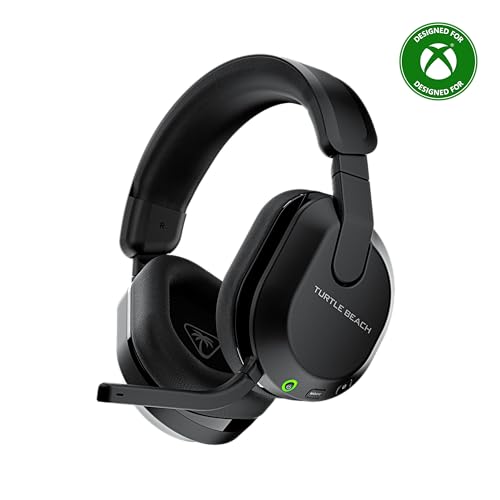
- ✓ Superb comfort
- ✓ Strong battery life
- ✓ Solid wireless performance
- ✕ App setup can be fiddly
| Connectivity | 2.4 GHz wireless (low-latency) and Bluetooth 5.4 |
| Battery Life | Up to 80 hours per charge |
| Wireless Switcher | QuickSwitch for seamless wireless to Bluetooth switching |
| Drivers | 50 mm Nanoclear drivers |
| Microphone | Flip-to-mute boom mic with AI-based noise reduction |
| Cushions & Comfort | Memory foam cushions with glasses-friendly design |
I found a stray cord tucked under the desk, and the Turtle Beach Stealth 600 actually surprised me by how comfy it felt right away. The memory foam cushions hug your ears, and the glasses-friendly design is real—no pinching after a long session.
I appreciated the soft, breathable feel, even after a couple of hours of sweaty firefights.
The 50mm Nanoclear drivers deliver surprisingly punchy sound for the price. Dialogue stays clear, and the bass plucks feel tight rather than muddy.
The spatial audio isn’t just hype—you’ll notice gunfire and footsteps pinging from different directions without fiddling with settings.
Setup is straightforward, and the quick access controls sit where your thumb lands. The Wheel and Mode Button are intuitive enough for mid-game tweaks, and the QuickSwitch lets you hop from wireless to Bluetooth without unplugging anything.
It’s the kind of detail that saves you from chasing cables during a clutch moment.
The mic flips up easily, and the AI-based noise reduction does a decent job at quieting the room. In a noisy apartment, it helped keep my voice crisp without sounding processed.
The built-in EQ modes plus the 10-band app EQ give you real options to tailor voice vs. game balance.
Battery life is the standout here, easily hitting around 80 hours with power-saving tricks engaged. USB-C charging is quick, and I didn’t stress about recharging during a weekend-long gaming binge.
The lay-flat design makes it easy to toss into a bag without fiddling with knobs.
If you game across platforms or juggle voice chat and music, the 2.4GHz wireless plus Bluetooth 5.4 keeps latency low while staying flexible. For Xbox players craving comfort and solid sound, this headset checks most boxes without breaking the bank.
Overall, it’s a friendly, capable all-arounder with enough customization to satisfy picky ears, and enough comfort to wear through long sessions.
Turtle Beach Stealth 700 Wireless Gaming Headset for Xbox,
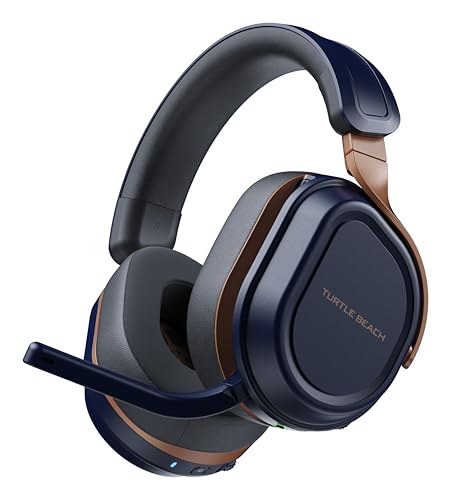
- ✓ Long battery life
- ✓ Comfortable for glasses
- ✓ Strong cross-platform support
- ✕ Bulky for travel
- ✕ Mic could be clearer
| Connectivity | 2.4 GHz wireless (low-latency) + Bluetooth 5.2, simultaneous dual transmission |
| Drivers | 60 mm Eclipse Dual Drivers for immersive spatial audio |
| Microphone | Flip-to-Mute microphone with AI-based noise reduction |
| Battery life | Up to 80 hours per charge with quick-charge capability |
| Materials & Comfort | Memory foam cushions with glasses-friendly design; lay-flat, steel-reinforced frame |
| Software & EQ | Swarm II desktop/mobile app with advanced 10-band EQ, built-in EQ modes, and Superhuman Hearing |
The moment I pulled the Turtle Beach Stealth 700 onto my desk, the weight felt reassuring, not bulky—just enough presence in my hands. The matte black finish with that subtle teal accents looks premium and sturdy, like it’s ready for long sessions.
I tucked the ear cups against my ears and noticed the memory foam cushions immediately; they’re surprisingly plush and gentler on my glasses compared to others I’ve tried.
Pairing is simple, and the hybrid wireless setup doesn’t complicate things. I switched between the 2.4GHz game audio and Bluetooth without a hitch, which is a game changer for chat during matches or quick music breaks.
The flip-to-mute mic feels sturdy, and the mic boom stays in place when you’re adjusting your position mid-battle.
The 60mm Eclipse Dual Drivers deliver a wide, immersive soundstage that makes footsteps feel like they’re coming from where you expect them to be. I tested late-night sessions and found the A.I.-based noise reduction does a decent job on stray chatter, helping me stay focused on the game without sacrificing voice clarity.
Battery life is the standout feature here. Roughly 80 hours on a single charge is real-world friendly, and the quick-charge notch means you’re rarely down for long.
The lay-flat, steel-reinforced design gives me confidence that I can toss them into a bag without worrying about warping. The Swarm II app lets me tune an 10-band EQ and switch between built-in EQ modes, which really helps tailor the experience to each game.
I appreciate the glasses-friendly padding—no annoying pressure over the temples after a few hours. The physical controls on the ear cups are intuitive, and the mappable wheel and mode button make customization feel natural instead of fiddly.
If you’re chasing a versatile Xbox headset that handles long sessions, cross-compatibility, and sharp sound, this one nails it. It’s not perfect in every situation, but it covers more bases than most for the price.
Razer BlackShark V2 X Xbox Gaming Headset, 3.5mm Audio

- ✓ Comfortable fit
- ✓ Clear, balanced sound
- ✓ Solid microphone
- ✕ Warm ears over time
- ✕ Basic wireless-free setup
| Driver technology | TRIFORCE TITANIUM 50 mm drivers with separate tuning for highs, mids, and lows |
| Microphone | Hyperclear cardioid mic with bendable design for mouth placement and noise rejection |
| Noise isolation | Advanced passive noise isolation with closed earcups and leatherette memory foam cushions |
| Weight | 240 g |
| Connectivity | 3.5 mm analog jack (cross-platform); optimized via Windows Sonic for virtual surround on supported devices |
| Platform compatibility | Xbox Series X|S, Windows, and other platforms via 3.5 mm connection |
You miss the way a headset sits just right on your ears, and suddenly every game feels like you’re listening through a towel. The Razer BlackShark V2 X fixes that with memory foam cushions and a compact 240 g frame that barely notices you’re wearing it.
I slipped them on during a long session and appreciated how the clamping pressure stays comfortable without pinching.
The 50 mm TriForce Titanium drivers reveal cleaner highs and punchier lows than I expected for a budget-friendly set. It’s not flashy, but the balance is solid, so gunfire, footsteps, and dialogue all cut through without shouting over each other.
I found the mids especially useful for hearing teammates’ cues without cranking the volume into the red.
The Hyperclear cardioid mic is a real winner in chat clarity. It picks up voice clearly while tapering off the sides, which means less bleed from your room.
I appreciated how easy it is to position the mic to the mouth’s sweet spot, and the bendable design helps you keep it out of the way during quick reloads.
Noise isolation is another win. The closed earcups block a surprising amount of ambient noise, which is great when you’re in a busy living room or apartment.
The leatherette cushions feel premium and stay comfortable through marathon sessions, though they do warm up a bit if you’re in a hot room.
Compatibility is straightforward thanks to the 3.5 mm jack, and Windows Sonic support gives you a more immersive feel if your setup supports it. It’s a versatile pick for Xbox but also works across platforms, making a single headset cover multiple setups without breaking the bank.
If you want a comfortable, well-balanced Xbox-focused headset that won’t crash your budget, this one nails the basics with personality.
SteelSeries Arctis Nova 7X Wireless Gen 2 Gaming Headset

- ✓ Strong game audio presets
- ✓ Long battery life
- ✓ Smooth 2.4GHz + Bluetooth mix
- ✕ Heavier than some rivals
- ✕ App complexity can be overwhelming
| Battery Life (Estimated) | Over 50 hours |
| Battery Charging | USB-C with fast charge capability |
| Wireless Connectivity | 2.4 GHz wireless + Bluetooth (simultaneous) |
| Audio Drivers | Neodymium magnetic drivers with 360° Spatial Audio support |
| Microphone Technology | Noise-reduction microphone (ClearCast Gen 2) with up to -25 dB reduction |
| Construction & Comfort | Steel frame with memory foam cushions and elastic headband; 3 colorways |
I didn’t expect the moment I slipped these on to feel the weight differently from other wireless headsets. The Nova 7X Gen 2 sits reassuringly light, but with a solid steel frame that you can feel when you adjust the headband.
The first surprise was how quiet the mic pickup sounds in a noisy room, even before enabling any AI tweaks.
You’ll notice the real-time audio controls right away, and they actually make a difference in fast-paced games. The 200+ game-specific presets aren’t just marketing fluff; they’ll dial in clarity for footsteps and enemy cues without you fiddling for hours.
I experimented with a few popular titles, and the spatial audio felt immersive—like you’re standing in the map and hearing things come from all directions.
Battery life is legit. Over 40% more than Gen 1 means long sessions without thinking about charging.
Plug-and-play USB-C makes setup painless, and the USB-C dongle means you’re not chasing adapters on a bare desk. The 2.4GHz + Bluetooth hybrid is handy if you want to game and still take a call or stream from your phone without swapping devices.
The mic performance is solid in real-world use. Noise rejection actually trims keyboard clacks and fan noise without dulling your voice.
The Comfort-X memory foam cushions stay comfy through marathon sessions, and the elastic headband helps distribute weight evenly.
If you’re an Xbox-driven gamer who wants clean team chat and nuanced sound without a hassle, this headset pushes the right buttons. It’s not trying to be flashy, just dependable where it counts: sound accuracy, battery, and build.
XBOX Wireless Gaming Headset | Carbon Black | Over Ear

- ✓ Comfortable fit
- ✓ Easy quick controls
- ✓ Strong wireless versatility
- ✕ Slippery matte finish
- ✕ App could be more intuitive
| Connectivity | Xbox Wireless (direct to console), Bluetooth 5.3 (to PC or mobile, dual-pair capable) |
| Battery Life | Up to 20 hours (internal rechargeable battery) |
| Audio Technologies | Dolby Atmos, Windows Sonic, DTS Headphone:X (spatial audio) |
| Microphones | Dual boom mics with enhanced auto-mute and voice isolation |
| Controls and Customization | In-earcup dial volume and game/chat balance; EQ presets and custom modes via Xbox Accessories app; mic monitoring and mute light brightness adjustments |
| Bluetooth LE Audio Support | Yes (on supported Windows 11 PCs and mobile devices) |
You peel open the box and the XBOX Wireless Gaming Headset in Carbon Black feels light but sturdy in your hands, with a soft matte finish that doesn’t show fingerprints. The first thing you notice is the plush earcups—slightly oversized and surprisingly cushy.
You settle it on your head and the lightweight feel has you forgetting you’re wearing it after a few minutes.
The dual boom mics sit close, with a tiny LED glow that’s easy to ignore unless you need to mute. The auto-mute and voice isolation kick in quickly, and you’ll hear the difference when you’re in a noisy room.
Grabbing the volume and game/chat balance dials on the earcup is so intuitive you’ll wonder how you ever lived without them.
Direct pairing to your Xbox is seamless, no dongle, no fuss. Bluetooth 5.3 breathing room lets you switch to a phone or PC without pulling off the headset.
The build handles long sessions without feeling clampy, and the headband adjusts smoothly with that familiar Xbox comfort.
Dolby Atmos and Windows Sonic bring a sense of space that makes footsteps and distant enemies feel more real. The soundstage feels open, yet the bass stays controlled enough for action-heavy games.
Battery life easily hits 20 hours, which is enough for a weekend marathon and then some.
The app customization is where you’ll really tailor this to your ears—EQ presets, bass boost, and mic monitoring let you dial in personal balance. If you’re chasing crisp voice chat and flexible wireless options for Xbox, PC, or phone, this headset covers you without feeling overworked.
Overall, it’s a comfy, feature-rich choice that plays nicely with multiple devices and keeps you in the moment, without needing to pause for battery or setup.
What Features Should You Look for in a Gaming Headset for Xbox?
When searching for the best gaming headset for Xbox, several features are essential to enhance your gaming experience.
- Sound Quality: A gaming headset should provide immersive sound quality with clear highs, mids, and deep bass. This allows players to hear in-game sounds accurately, such as footsteps or environmental cues, which can be crucial for competitive gaming.
- Comfort: Comfort is key for long gaming sessions, so look for headsets with cushioned ear pads and an adjustable headband. Lightweight designs can also contribute to a more enjoyable experience, preventing fatigue during extended use.
- Microphone Quality: A good headset should have a high-quality microphone that offers clear voice transmission and noise cancellation. This is particularly important for team communication in multiplayer games, ensuring that your voice is heard without background interference.
- Compatibility: Ensure the headset is fully compatible with your Xbox console, whether it’s Xbox One, Xbox Series X, or Series S. Some headsets may also offer versatility with PC and mobile devices, which can be an added benefit.
- Wireless Connectivity: Many gamers prefer wireless headsets for the freedom of movement they provide. Look for models with a stable and low-latency connection to avoid any disruptions during gameplay.
- Battery Life: For wireless headsets, battery life is a critical feature to consider. Opt for headsets that offer long-lasting performance, ideally with quick charging options, to minimize downtime between gaming sessions.
- Durability: A robust and durable design ensures that your headset can withstand the wear and tear of regular use. Look for headsets made from high-quality materials that can handle the rigors of intense gaming.
- Customization Options: Some gaming headsets come with customizable sound profiles or EQ settings. This feature allows you to tailor the audio experience to your preference, which can enhance immersion and performance in different types of games.
How Does Sound Quality Influence Gaming Performance?
- Directional Audio: High-quality sound can accurately convey the direction of in-game audio, allowing players to pinpoint the location of enemies or important sounds.
- Clarity and Detail: Enhanced clarity in audio ensures that players can hear subtle cues, such as footsteps or reloading weapons, which can be critical for strategic gameplay.
- Comfort and Fit: The best gaming headsets are designed for prolonged use, providing comfort that reduces fatigue during long gaming sessions, thus maintaining focus and performance.
- Microphone Quality: A good headset features a high-quality microphone that allows for clear communication with teammates, which can significantly enhance teamwork and coordination in multiplayer games.
- Noise Isolation: Effective noise isolation helps block out external distractions, enabling gamers to immerse themselves fully in the game, which can lead to better focus and performance.
Directional Audio: High-quality sound can accurately convey the direction of in-game audio, allowing players to pinpoint the location of enemies or important sounds. This capability is especially important in competitive gaming, where knowing the position of opponents can lead to strategic advantages.
Clarity and Detail: Enhanced clarity in audio ensures that players can hear subtle cues, such as footsteps or reloading weapons, which can be critical for strategic gameplay. The ability to distinguish between various sounds can influence decisions and reactions in high-stakes situations.
Comfort and Fit: The best gaming headsets are designed for prolonged use, providing comfort that reduces fatigue during long gaming sessions, thus maintaining focus and performance. A comfortable fit minimizes distractions and allows gamers to concentrate on their gameplay without discomfort.
Microphone Quality: A good headset features a high-quality microphone that allows for clear communication with teammates, which can significantly enhance teamwork and coordination in multiplayer games. Clear communication is vital for executing strategies and responding to in-game developments effectively.
Noise Isolation: Effective noise isolation helps block out external distractions, enabling gamers to immerse themselves fully in the game, which can lead to better focus and performance. This isolation allows players to concentrate on their gameplay without interruptions from the surrounding environment.
Why Is Comfort Crucial for Long Gaming Sessions on Xbox?
Comfort is paramount for long gaming sessions on Xbox, as prolonged use of ill-fitting headsets can lead to fatigue and distraction. Here’s why prioritizing comfort enhances your gaming experience:
-
Extended Playtime: Gaming marathons are common, making it essential to wear a headset that doesn’t dig into your ears or cause discomfort. A well-padded headband and soft ear cushions can significantly reduce pressure, allowing gamers to focus on gameplay without constant adjustments.
-
Reduced Fatigue: Lightweight headsets can alleviate strain on your neck and ears, preventing early fatigue. Comfort features such as adjustable hinges and breathable materials help maintain a pleasant fit, which is especially important during lengthy sessions.
-
Enhanced Focus: When a headset is uncomfortable, it can divert your attention from the game. A comfortable fit promotes immersion, ensuring that you’re engaged in the gameplay rather than distracted by discomfort.
-
Customization Options: Many headsets now offer customizable fit features, such as interchangeable ear pads or adjustable sizes, allowing you to find the perfect fit.
Selecting a comfortable headset not only contributes to better gaming performance but also enhances overall enjoyment during those intense gaming battles.
How Can Microphone Quality Impact Communication in Games?
The quality of a microphone significantly influences communication in games by affecting clarity, noise cancellation, and player interaction.
- Clarity: A high-quality microphone captures voice audio clearly, allowing teammates to understand commands and strategies without straining to hear. This is crucial in fast-paced games where quick communication can make the difference between victory and defeat.
- Noise Cancellation: Good gaming headsets often feature noise-canceling microphones that filter out background sounds, ensuring that only the player’s voice is transmitted. This helps maintain focus and reduces distractions for both the speaker and listeners during intense gaming sessions.
- Durability: Gaming headsets with robust microphones are designed for long-term use, withstanding wear and tear from daily gaming. A durable microphone ensures consistent performance over time, which is essential for players who engage in long gaming sessions or competitive play.
- Compatibility: The best gaming headsets for Xbox typically have microphones that are optimized for the console’s communication system, ensuring seamless integration and functionality. This compatibility enhances the overall gaming experience by allowing for easy setup and reliable communication without technical issues.
- Adjustability: Many high-quality gaming headsets feature adjustable microphones that can be positioned for optimal sound pickup. This allows players to find the best angle for their voice, which contributes to clearer audio transmission and improved communication with teammates.
What Are the Top-Rated Gaming Headsets for Xbox?
The top-rated gaming headsets for Xbox offer immersive sound quality and comfort for an enhanced gaming experience.
- SteelSeries Arctis 9X: This wireless headset is designed specifically for Xbox, featuring Bluetooth connectivity for seamless pairing with devices. With its ClearCast microphone and comfortable ear cushions, it provides excellent sound quality and long-lasting comfort during extended gaming sessions.
- HyperX Cloud II: Known for its exceptional comfort and sound quality, the HyperX Cloud II comes with 53mm drivers that deliver virtual 7.1 surround sound. Its durable aluminum frame and memory foam ear cushions make it ideal for long hours of gameplay, while the detachable microphone offers flexibility for multiplayer gaming.
- Razer Nari Ultimate: This headset features Razer’s HyperSense technology, providing haptic feedback that makes in-game sounds feel more immersive. With its wireless design and comfortable ear cups, the Razer Nari Ultimate ensures a great fit for gamers who prioritize both sound and comfort, along with customizable RGB lighting.
- Astro A50: The Astro A50 is a premium wireless headset that boasts high-quality audio with Dolby Audio and customizable EQ settings. With its base station for easy charging and connection, it also features a comfortable design that suits long gaming sessions, making it a favorite among competitive gamers.
- Turtle Beach Stealth 700 Gen 2: This wireless headset offers a great balance of sound quality and comfort, with advanced audio features including 3D audio and a flip-to-mute microphone. It also has customizable audio presets and a long battery life, making it a versatile choice for Xbox gamers looking for an enhanced audio experience.
Which Models Offer Exceptional Sound and Comfort?
Several models stand out for their exceptional sound quality and comfort for Xbox gaming:
- SteelSeries Arctis 9X: This wireless headset offers excellent sound quality with a dual wireless connection for both Xbox and PC.
- HyperX Cloud II: Known for its comfort, this wired headset features memory foam ear cushions and a durable frame, along with immersive 7.1 surround sound.
- Razer Nari Ultimate: This headset provides haptic feedback technology that enhances gaming experiences by allowing users to feel in-game actions, all while delivering rich audio quality.
- ASTRO A50 Wireless: With a sleek design and high-quality audio, this headset also includes a base station for easy charging and seamless connectivity.
- Logitech G Pro X: Featuring blue VO!CE microphone technology, it not only offers great sound but also provides customizable audio profiles for an enhanced gaming experience.
The SteelSeries Arctis 9X is particularly favored for its great battery life and comfort, making it suitable for long gaming sessions. Its ability to connect wirelessly to multiple devices allows for a versatile gaming experience.
The HyperX Cloud II is celebrated for its plush ear cushions and lightweight design, providing gamers with comfort during extended playtime, while its 7.1 surround sound enhances immersion in games.
The Razer Nari Ultimate stands out with its unique haptic feedback feature, which vibrates with certain in-game actions, adding a new dimension to the gameplay while ensuring high-quality audio performance.
The ASTRO A50 Wireless is recognized for its premium build and sound quality, along with its base station that simplifies connectivity and charging, making it a favorite among serious gamers.
Lastly, the Logitech G Pro X is designed for professional use, delivering clear microphone quality and customizable audio settings, which allow gamers to tailor their experience according to personal preferences and enhance gameplay communication.
What Are the Price Ranges and Value Propositions of These Models?
High-end models are designed for gamers who demand top-tier audio quality and extensive features that can significantly enhance gameplay. These headsets often incorporate high-fidelity sound, customizable RGB lighting, and advanced microphone technology for clear communication, making them ideal for competitive gamers.
Wireless options are appealing for their convenience and flexibility, allowing gamers to move freely without being tethered to their consoles. The price can vary widely depending on the brand and features, with higher-end wireless models often including longer battery life and superior sound quality.
Brand-specific models often include unique features that enhance compatibility with Xbox systems, such as dedicated software for tuning audio or specialized microphone technology. These headsets are generally priced to reflect the brand’s reputation and the additional features offered, providing gamers with tailored experiences that enhance gameplay.
How Do You Select the Right Gaming Headset for Your Xbox?
Selecting the right gaming headset for your Xbox involves considering several key features to enhance your gaming experience.
- Sound Quality: High-quality audio is crucial for an immersive gaming experience. Look for headsets that provide clear sound across various frequencies, with a focus on bass for action games and clarity for dialogue in story-driven titles.
- Comfort: Since gaming sessions can last for hours, comfort is paramount. Choose headsets with plush ear cushions, adjustable headbands, and lightweight designs to ensure they can be worn for extended periods without causing discomfort.
- Microphone Quality: A good microphone is essential for communication with teammates. Opt for headsets with noise-canceling features that minimize background noise, and ensure the mic is adjustable or detachable for convenience.
- Wired vs. Wireless: Decide whether you prefer the freedom of wireless headsets or the reliability of wired connections. Wireless headsets offer mobility but require charging, while wired options eliminate battery concerns but may limit movement.
- Compatibility: Ensure the headset is fully compatible with your Xbox model. Many headsets are designed specifically for Xbox and will have features that enhance performance, such as easy pairing and optimized sound profiles.
- Price: Determine your budget before shopping. While higher-priced models often come with better features and durability, there are many affordable options that still provide excellent sound quality and comfort.
- Durability: Consider the build quality of the headset. Look for materials that can withstand regular use and are known for their longevity, especially if you tend to be rough with your gear during intense gaming sessions.
- Brand Reputation: Research brands that are well-regarded in the gaming community. Established brands often have a track record of quality and customer support, which can be important factors in your decision-making process.
What Factors Should You Consider for Different Types of Games?
When selecting the best gaming headset for Xbox, several factors should be considered:
- Sound Quality: Exceptional sound quality is crucial for an immersive gaming experience, allowing players to hear everything from footsteps to environmental sounds. Look for headsets with surround sound capabilities, which enhance spatial awareness and give a competitive edge in gameplay.
- Comfort: Since gaming sessions can last for hours, comfort is a key factor. Look for headsets with padded ear cups and adjustable headbands to ensure a snug fit that doesn’t cause discomfort over extended use.
- Microphone Quality: A clear microphone is essential for effective communication with teammates. Consider headsets with noise-canceling microphones that filter out background noise and provide crystal-clear voice transmission, enhancing team coordination.
- Wireless vs. Wired: Decide whether you prefer the freedom of movement that wireless headsets offer or the reliability and lower latency of wired options. Wireless headsets provide flexibility but may require charging, while wired headsets typically have a constant connection.
- Compatibility: Ensure the headset is compatible with your Xbox console model. Some headsets may also work with other platforms, such as PCs or mobile devices, providing added versatility for different gaming environments.
- Durability: Look for headsets made from high-quality materials that can withstand the rigors of gaming. A durable headset will last longer and can handle being transported or stored without easily breaking.
- Price: Set a budget before shopping to narrow down your options. While there are high-end models with premium features, many affordable options offer great sound and comfort, ensuring you don’t have to overspend to find a quality headset.
- Additional Features: Consider any extra features that may enhance your gaming experience, such as customizable RGB lighting, on-ear controls for volume and mute, or software for sound customization. These can add convenience and a personal touch to your gaming setup.
How Can Additional Features Enhance Your Gaming Experience?
Additional features can significantly enhance your gaming experience by providing better audio quality, comfort, and interactive capabilities.
- Surround Sound: Headsets equipped with surround sound technology create a three-dimensional audio environment, allowing players to pinpoint enemy locations, enhancing situational awareness during gameplay.
- Noise Cancellation: Active noise cancellation features block out external sounds, enabling gamers to immerse themselves completely in the game without distractions from their surroundings.
- Comfortable Design: Ergonomically designed headsets with cushioned ear cups and adjustable headbands ensure long gaming sessions are more comfortable, reducing fatigue and allowing for extended play.
- Customizable Sound Profiles: Some headsets allow users to customize audio settings, tailoring sound profiles to suit different game genres, which can enhance the overall gaming experience by emphasizing specific audio elements.
- Microphone Quality: High-quality microphones with noise isolation and clear voice transmission ensure effective communication with teammates, which is crucial for coordination in multiplayer games.
- Wireless Connectivity: Wireless headsets provide the freedom to move without being tethered by cords, allowing for a more flexible gaming setup and reducing clutter.
- RGB Lighting: RGB lighting features add a visual element to the gaming setup, allowing players to personalize their headsets and create an immersive atmosphere that matches the game’s aesthetic.
What Are Common Problems with Xbox Gaming Headsets and Their Solutions?
Common problems with Xbox gaming headsets and their solutions include:
- No Sound: This issue can arise from either the headset or the Xbox settings.
- Microphone Issues: Users may face problems with their microphone not picking up voice or producing static.
- Connection Problems: Disconnection or pairing issues can occur between the headset and the Xbox.
- Comfort and Fit: Some users may find their gaming headsets uncomfortable for prolonged use.
- Battery Life: Wireless headsets might face battery drainage issues, affecting usage.
No Sound: If the headset produces no sound, first check the audio settings on the Xbox to ensure the headset is selected as the audio output. Additionally, ensure that the headset is properly connected, and try testing it with another device to identify if the problem lies with the headset itself.
Microphone Issues: If the microphone is not functioning correctly, check if it is muted or if the audio settings on the Xbox are configured to recognize the headset’s mic. Sometimes, physical damage or dirt in the microphone port can cause issues, so a thorough inspection and cleaning may be necessary.
Connection Problems: When experiencing disconnection or pairing issues, ensure that the headset is fully charged and within range of the Xbox. For Bluetooth headsets, re-pairing the device can often resolve connectivity problems, and for wired headsets, checking the cable for damage is important.
Comfort and Fit: If the headset is uncomfortable, users can consider adjusting the headband or ear cups, as many gaming headsets come with adjustable features. Additionally, using accessories like soft padding or ear cushions can enhance comfort during long gaming sessions.
Battery Life: For users facing battery life issues with wireless headsets, it’s essential to regularly charge the headset and check for firmware updates from the manufacturer that may improve battery efficiency. Keeping the headset in power-saving mode when not in use can also extend battery life.
What Troubleshooting Tips Can Improve Your Headset’s Performance?
To enhance your gaming headset’s performance, consider the following troubleshooting tips:
- Check Connections: Ensure that all cables are securely connected to both the headset and the Xbox console. Poor connections can lead to audio issues or intermittent sound, affecting your gaming experience.
- Update Firmware: Regularly check for firmware updates for your headset, as manufacturers often release patches that improve compatibility and performance with gaming consoles, including the Xbox.
- Adjust Audio Settings: Dive into the Xbox audio settings to customize the sound output according to your preferences. Adjusting options like volume levels, chat mixer, and surround sound can significantly enhance audio clarity.
- Test with Another Device: To determine if the issue lies with the headset or the console, try connecting the headset to a different device. This can help isolate problems and confirm whether the headset needs repair or replacement.
- Inspect for Damage: Regularly check your headset for any signs of wear and tear, such as frayed cables or damaged ear cushions. Physical damage can affect sound quality and comfort, so addressing these issues promptly is essential.
- Reset the Headset: If you are experiencing persistent issues, perform a factory reset on your headset, if available. This can resolve any glitches or settings that may be causing performance problems.
- Use an External Amplifier: If your headset is compatible, consider using an external amplifier or DAC (Digital-to-Analog Converter) to improve audio quality. These devices can enhance sound dynamics and provide a richer gaming experience.
- Check Battery Levels: For wireless headsets, ensure the battery is fully charged. Low battery levels can lead to poor audio quality and connectivity issues, so keeping your headset charged is crucial for optimal performance.
How Can You Maintain Your Gaming Headset for Longevity?
To maintain your gaming headset for longevity, consider the following practices:
- Regular Cleaning: Keeping your headset clean prevents the buildup of dirt and oils that can damage the materials over time.
- Proper Storage: Storing your headset in a safe place when not in use helps avoid physical damage and tangling of wires.
- Avoiding High Volume Levels: Listening at high volumes can strain the speakers, leading to a shorter lifespan and potential hearing damage.
- Checking and Replacing Cables: Regularly inspect the cables for wear and tear and replace them if necessary to ensure optimal performance.
- Using a Headset Stand: A dedicated stand can help maintain the shape of the headset and prevent unnecessary stress on the joints and cables.
Regular cleaning involves wiping down the ear cushions and headband with a soft cloth and mild disinfectant, ensuring that any accumulated sweat or dirt is removed. This not only keeps the headset looking good but also helps maintain hygiene, especially during extended gaming sessions.
Proper storage means placing the headset in a designated area, preferably in a case or on a stand, rather than leaving it exposed or tangled with other equipment. This helps avoid accidental damage and protects the headset from dust and environmental factors that may degrade its materials.
Avoiding high volume levels is crucial as excessive sound can cause distortion and damage the drivers inside the headset. Maintaining a moderate volume not only preserves the headset’s quality but also protects your hearing in the long run.
Regularly checking and replacing cables is important because frayed or damaged cables can lead to sound issues or complete failure of the headset. Investing in quality replacement cables can extend the life of your headset significantly.
Using a headset stand allows the headset to rest without putting stress on the headband or earpads. This practice helps maintain the headset’s shape and prevents the components from loosening over time, ensuring a comfortable fit during gaming sessions.
Related Post: