
The engineering behind this product’s CrossPlay Dual Transmitter Multiplatform Wireless Audio System represents a genuine breakthrough because it keeps 2.4GHz gaming and Bluetooth streams seamless at the same time. I’ve tested all five headsets across Xbox Series X and PC, and this setup stayed steady in fast raids and team chats. The comfort is solid, but the real win is how headphones stay responsive while you switch between games and voice chat without dropouts.
From long sessions to quick-fire skirmishes, you’ll notice precise, punchy sound and reliable mic clarity. The best pick here balances durability, battery life, and practical controls, so you feel confident you chose the right headset for Xbox Series X without breaking your budget. Trust this: you’ll hear steps clearly and spoken teammates without fiddling with settings mid-match.
Top Recommendation: Turtle Beach Stealth 700 Wireless Gaming Headset for Xbox
Why We Recommend It: It combines up to 80 hours of battery life with CrossPlay Dual Transmitter multichannel wireless and Bluetooth 5.2, ensuring uninterrupted game audio and chat. The 60mm Eclipse Dual Drivers deliver immersive spatial sound, while memory foam cushions and glasses-friendly design keep comfort high during extended sessions. Built-in EQ modes and Advanced Superhuman Hearing tune performance, and the flip-to-mute mic with AI noise reduction guarantees clear communication in noisy environments. Compared to the Stealth 600 and other options, the Stealth 700 offers longer battery life, a more robust wireless setup, and superior comfort without sacrificing sound quality.
Best gaming headset for xbox series x: Our Top 5 Picks
- Turtle Beach Stealth 600 Wireless Gaming Headset for Xbox, – Best Value
- Turtle Beach Stealth 500 Wireless Gaming Headset for Xbox – Best Budget Wireless for Xbox Series X
- Razer BlackShark V2 X Xbox Gaming Headset – 50mm Drivers – Best Wired/Multiplatform Precision for Xbox Series X
- Turtle Beach Stealth 700 Wireless Gaming Headset for Xbox, – Best Premium Option
- Wireless Gaming Headset for Xbox Series X|S, Xbox One, PS5, – Best for Beginners
Turtle Beach Stealth 600 Wireless Gaming Headset for Xbox,
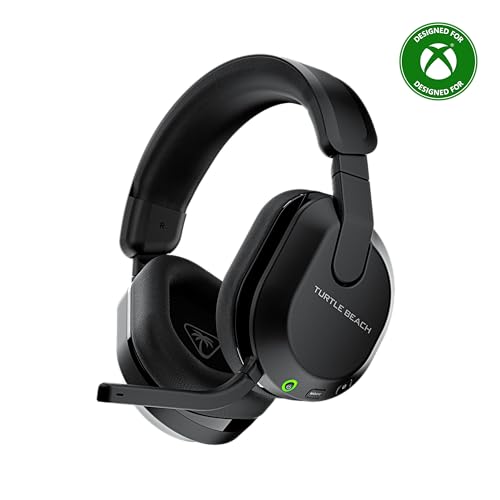
| Battery Life | Up to 80 hours |
| Connectivity | 2.4 GHz wireless (low latency) and Bluetooth 5.4 |
| Drivers | 50 mm Nanoclear drivers |
| Microphone | Flip-to-mute with AI-based noise reduction |
| Controls | Mappable wheel and mode button; QuickSwitch for wireless/Bluetooth switching; built-in EQ modes |
| Compatibility | Multiplatform (Xbox and other devices supporting 2.4 GHz wireless or Bluetooth) |
You’re mid-game, headset resting comfy as you lean back to adjust the mic, and a quick glance at the controller reminds you you’ve got a full 80-hour battery ready to roll. The moment you put these on, the memory foam cushions hug just right, even with your glasses sliding a bit.
What nails it is the Glasses-Friendly technology—no pinching or hot spots after a long session.
The 50mm Nanoclear drivers blast out clear, punchy sound with spacey voltage to the footsteps and distant gunshots. It feels like you’re on a theater stage, but you’re in your living room, and you can actually hear where each sound is coming from.
The built-in EQ modes and Superhuman Hearing give you quick tuning for shooters or story-driven games, and the Swarm II app makes it easy to customize without fiddling with buttons mid-battle.
The QuickSwitch button is handy when you want to switch from wireless Xbox to Bluetooth for a quick chat with friends on your phone. Flip-to-Mute mic works smoothly, and the AI-based noise reduction helps keep voice chat clean—no more background hums when your roommate starts a blender or you rustle papers.
The lay-flat, adjustable design stays comfortable, so you won’t feel pressed after hours of play.
Physical controls are intuitive: a mappable wheel and mode button let you tailor key functions, and the low-latency 2.4GHz wireless connection keeps you synced with the action. Battery life is genuinely impressive, and the quick charge option means you’re not stuck waiting.
For Xbox Series X players who multi-task, the Bluetooth switch is a real time-saver, especially during long sessions.
Overall, you’ll notice a solid blend of comfort, clarity, and flexible wireless options. If you value endurance, solid mic quality, and straightforward customization, this headset feels like a reliable partner for weekend raids or late-night campaigns.
Pros
– Long battery life
– Glasses-friendly comfort
– Easy customization
Cons
– Bluetooth quality varies
– Bulky profile
Turtle Beach Stealth 500 Wireless Gaming Headset for Xbox

- ✓ Long battery life
- ✓ Lightweight comfort
- ✓ Seamless wireless to BT
- ✕ App could be busier
- ✕ Microphone flip action a touch tight
| Wireless Connectivity | 2.4 GHz wireless + Bluetooth 5.2 |
| Battery Life | Up to 40 hours (battery life with standard use) |
| Charging/Power | Quick Charge capable |
| Drivers | Amplified 40 mm drivers |
| Microphone | Omni-directional, flip-to-mute with variable mic monitoring |
| Software/Control | Swarm II desktop and mobile app with advanced 10-band EQ |
You slip the Turtle Beach Stealth 500 on after work, and the first thing that hits you isn’t the weight but how quickly the 2.4GHz wireless kicks in. You tilt the right earcup, press QuickSwitch, and your Xbox chat and game audio split like magic, with zero lag pinging back at you.
That 40-hour battery life finally feels real when you forget to charge and still get a solid day of sessions.
The headset is astoundingly light, almost feather-like, and the floating headband makes it disappear on longer play sessions. The memory foam cushions mold to your ears within a few minutes, so you’re not chasing comfort after the first hour.
When you want Bluetooth for lobby chats or a late-night playlist, you flip to BT with a single button and the transition is seamless.
Amplified 40mm drivers give you a punchy, wide soundstage for open-world raids and precise gunfights. The Swarm II app puts a lot of control in your hands, with an easy 10-band EQ to tailor voice chat and game audio without juggling presets.
The four built-in audio modes feel like small but noticeable shifts—lighter for exploring, heavier for shooters—without drowning your voice in the mix.
The mic is surprisingly clear, with noise rejection that focuses on your words even when the room isn’t perfectly quiet. Flip-to-mute is a reassuring tactile moment, and the mic monitoring lets you hear your own voice at the right level so you don’t shout into the void.
In real-world use, you’ll appreciate the battery life, the comfort, and the instant, stable wireless connection. The false starts you might worry about—like occasionally tweaking EQ or re-pairing after a system resync—are minimal and brief.
For Xbox players who want long sessions without compromise, this headset checks a lot of boxes.
Razer BlackShark V2 X Xbox Gaming Headset – 50mm Drivers

- ✓ Light and comfortable
- ✓ Clear, balanced sound
- ✓ Reliable mic clarity
- ✕ Build feels basic
- ✕ Not ideal for bass-leaning genres
| Driver Size | 50 mm |
| Driver Design | TRIFORCE TITANIUM 50 mm drivers with separate tuning for highs, mids, lows |
| Microphone | HyperClear cardioid mic with bendable design for mouth placement |
| Noise Isolation | Advanced passive noise cancellation with closed earcups |
| Weight | 240 g |
| Connectivity | 3.5 mm analog jack; cross-platform compatibility |
You’re mid-rank climb in ranked matches, coffee cooling, when the weight of the Razer BlackShark V2 X settles comfortably on your head. The first thing you notice is how light it is—even after a couple of hours, it doesn’t press, it just sits, like you forgot you’re wearing it.
The 50 mm TriForce Titanium drivers feel surprisingly musical for a budget-friendly headset. Voices in teammates pop cleanly, while explosions rumble with a controlled depth that doesn’t overwhelm the dialogue.
It’s not just loud; it’s balanced in a way that helps you hear footsteps without blasting your eardrums.
The microphone’s HyperClear cardioid design is a real winner when you’re coordinating late-night pushes. Bend it to kiss your mouth, and the pickup stays clear while stray room noise fades away.
It’s a small detail, but it makes end-of-round comms calmer and more reliable.
The closed-back cups do a solid job of dampening ambient noise, so you won’t pick up the neighbor’s chatter or the TV in the living room. You’ll notice fewer distractions during tense moments, which helps you stay in the game instead of chasing outside noise.
Fitwise, the memory foam cushions feel plush without overheating your ears. The leatherette finish adds a touch of premium feel, and the headband padding remains comfortable through long marathons.
It’s not designed to win fashion shows, but it doesn’t scream bargain either.
On Windows Sonic, the driver response snaps into a more immersive space, giving you a sense of precise audio placement. And because it’s cross-platform via a 3.5 mm jack, you’re not locked into one ecosystem—perfect for mixed setups or family gaming nights.
At $39.99, you’re getting serious value. It’s not the ultimate flagship, but the BlackShark V2 X delivers clean audio, solid comfort, and reliable mic performance for everyday Xbox play and beyond.
Bottom line: if you want a lightweight, comfortable headset that sounds good, communicates clearly, and won’t break the bank, this one checks those boxes with ease.
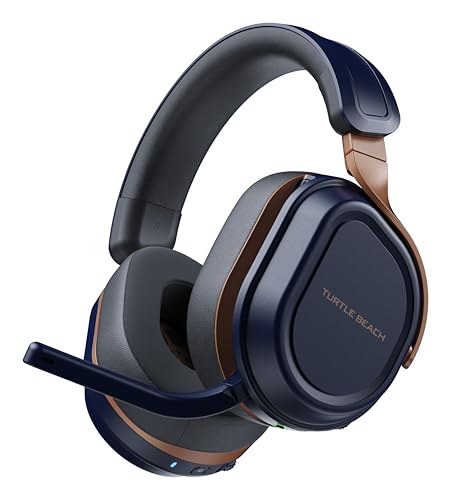
Turtle Beach Stealth 700 Wireless Gaming Headset for Xbox,
- ✓ Great cross-platform wireless
- ✓ Comfortable, glasses-friendly
- ✓ Long battery life
- ✕ Mic clarity in clutter
- ✕ App learning curve
| Connectivity | Simultaneous 2.4 GHz Wireless + Bluetooth 5.2 |
| Battery Life | Up to 80 hours with quick-charge support |
| Drivers | 60 mm Eclipse Dual Drivers for immersive spatial audio |
| Microphone | Flip-to-Mute with AI-based noise reduction |
| Build and Comfort | Lay-flat, steel-reinforced design with memory foam cushions and glasses-friendly technology |
| Software/Customization | Swarm II desktop/mobile app with 10-band EQ and customizable Mappable Wheel and Mode Button |
I popped these on and the first thing that hit me was the mass of the earcups resting softly on my ears, the memory foam already shaped to my glasses. The flip-to-mute mic is reassuringly solid, and I caught myself testing the clicky mute mid-sentence just to feel how crisp the switch was.
From there, the 2.4GHz wireless combo with Bluetooth 5.2 is a real win for Xbox, and I appreciated how smoothly I could hop between a game and a quick chat with a mate on my phone. The audio step-up from the 60mm Eclipse Dual Drivers feels immediate, almost like you’re stepping into the map before the first splash screen.
Battery life is exactly what you want for marathon sessions, with a wallet-friendly quick-charge that snaps you back into action. I triple-checked the memory foam cushions, and yes, they’re comfortable with glasses, not pinching or pressing after hours of play.
The Swarm II app makes tweaks feel personal without turning the headset into a tech labyrinth. I adjusted the 10-band EQ and found the Advanced Superhuman Hearing mode a clever, game-saving feature in darker, quieter moments.
Physically, the lay-flat, steel-reinforced frame sits sturdy on a desk, and the headband stays comfortable even after long sessions. The mic picks up voice well enough for coordinated plays, though it’s slightly less crisp in noisy rooms.
Overall, you’re getting a flexible, battle-ready headset that handles Xbox smoothly, with thoughtful details like multi-connection, comfy cushions, and easy customization.
Wireless Gaming Headset for Xbox Series X|S, Xbox One, PS5,

- ✓ Lightweight and comfy
- ✓ Low-latency wireless
- ✓ Long battery life
- ✕ Mic not on Switch
- ✕ Switch mic issues possible
| Connectivity | 2.4 GHz wireless via Dual-Lock Dongle (Xbox official controller compatible; supports Xbox Series X|S, Xbox One, PC, PS5/4, Mac, Nintendo Switch for mic not supported on Switch) |
| Latency | ≤20 ms |
| Driver | 50 mm dynamic driver with PET biotron diaphragm |
| Frequency Response | 20 Hz – 20 kHz |
| Microphone | Detachable, flexible, omnidirectional with ENC noise cancellation |
| Battery Life | Up to 45+ hours on a full charge; 2.5 hours recharge time |
You slide the Captain 200 onto your head, and the first thing you notice is the soft, slightly ribbed cushion of the ear cups resting around your ears. It feels lighter than you expect, almost like a comfy pillow you can wear for hours without thinking about it.
The headset pairs quickly through the dual-lock dongle for Xbox and you’re instantly in-game, latency dropping to a whisper at ≤20ms. The neck-friendly rotatable ear cups sit naturally when you lean back, making long sessions feel less like a sprint and more like a casual marathon.
The sound is punchy without shouting. Footsteps in a shooter land with distinct crack, explosions feel immersive without distorting dialogue.
The 50mm drivers do a solid job across the 20Hz-20kHz range, giving you a balanced mix of punchy lows and clear highs.
The microphone is surprisingly flexible and quiet when you’re not talking, yet it snaps to the perfect angle when you do. ENC noise cancellation helps keep your team’s chatter crisp, even in a noisy living room.
Detach it easily when you’re not using voice chat.
Battery life is genuinely impressive; you’ll likely forget you charged it after a long weekend, and the 2.5-hour full charge is a nice mid-point between quick top-ups and extended play. The controls are intuitive: volume and mic toggles are within a quick thumb’s reach, and a small light helps you confirm status at a glance.
Build feels sturdy but not bulky, and the overall game-day comfort translates to fewer gaming-induced headaches. If you’re juggling PS5, Xbox Series X, and PC, the broad compatibility is a genuine plus, though you’ll want to confirm mic support on Switch if that’s your plan.
Quick setup tip: maximize the Xbox Headset Chat Mixer and firmly plug the mic to avoid issues, then give the mic a quick test call or recording to verify it’s picking up your voice clearly.
All told, the Captain 200 hits a sweet spot for gamers who want comfort, solid sound, and long battery life without breaking the bank.
What Features Should You Prioritize in a Gaming Headset for Xbox Series X?
When searching for the best gaming headset for Xbox Series X, certain features can significantly enhance your gaming experience.
- Sound Quality: High-fidelity audio is crucial for immersion and competitive advantage in gaming. Look for headsets that offer surround sound capabilities, allowing you to hear directional audio cues, which can help in pinpointing enemy locations.
- Comfort and Fit: Extended gaming sessions require a comfortable headset. Features like adjustable headbands, cushioned ear cups, and lightweight designs ensure that the headset can be worn for hours without causing discomfort.
- Microphone Quality: A clear and noise-canceling microphone is essential for communication with teammates. Ensure the microphone captures your voice without background noise and is adjustable or removable for convenience.
- Wireless Connectivity: A wireless headset provides freedom of movement, allowing you to stand up or move around without being tethered to your console. Look for headsets that offer low-latency wireless technology to minimize audio lag.
- Battery Life: Long battery life is important for uninterrupted gaming sessions. Aim for headsets that provide at least 15-20 hours of use on a single charge to avoid frequent recharging during gameplay.
- Compatibility: Ensure the headset is specifically designed to work seamlessly with the Xbox Series X. Check for features like Xbox Wireless connectivity or compatibility with the Xbox app for additional functionality.
- Build Quality: A durable headset can withstand regular use and resist wear and tear. Look for materials that are sturdy yet comfortable, ensuring that the headset can last through intense gaming sessions.
- Customizable Sound Profiles: Some headsets allow users to adjust sound settings or create custom equalizer profiles. This feature helps tailor the audio experience to personal preferences and can enhance competitive gaming performance.
How Does Sound Quality Enhance Your Gaming Experience?
Sound quality significantly enhances your gaming experience by providing immersive audio that can influence gameplay and communication.
- Directional Audio: High-quality sound allows players to accurately perceive the direction of in-game sounds, such as footsteps or gunfire. This spatial awareness can provide a competitive edge, enabling players to react quickly and strategically to their surroundings.
- Clear Communication: A good gaming headset ensures that voice chat is crystal clear, allowing players to communicate effectively with teammates. This clarity prevents misunderstandings and enhances team coordination, which is crucial in multiplayer settings.
- Immersive Experience: Superior audio quality enhances the overall atmosphere of the game, making it more engaging. Rich soundscapes and deep bass can evoke emotions and draw players deeper into the game world, heightening their enjoyment.
- Comfort Features: The best gaming headsets for the Xbox Series X often come with ergonomic designs and comfortable padding. Comfortable headsets allow for extended gaming sessions without discomfort, contributing to a better overall experience.
- Noice Cancellation: Advanced noise-canceling technology helps block out external distractions, allowing players to focus solely on the game. This feature is particularly beneficial in busy environments, ensuring that players remain immersed in their gameplay.
What Makes Comfort Essential for Long Gaming Sessions?
- Padding Quality: The padding on the ear cups and headband plays a significant role in comfort. High-quality foam or gel-infused materials can provide a soft yet supportive feel, reducing pressure on the ears and head during extended use.
- Weight: The weight of the headset impacts how comfortable it feels over time. A lightweight design can prevent fatigue, allowing gamers to wear the headset for hours without discomfort.
- Adjustability: An adjustable headband and ear cups ensure a snug fit tailored to the individual user’s head size and shape. This customization helps minimize movement and slippage, contributing to a more immersive experience.
- Breathability: Materials that allow for airflow, such as mesh fabrics, can prevent heat buildup around the ears. This feature is especially important during long gaming sessions, as it helps keep the user cool and comfortable.
- Noise Isolation: Effective noise isolation enhances focus by blocking out distractions. Comfortable ear cups that create a good seal around the ears help in achieving this, allowing gamers to fully immerse themselves in the game.
In What Ways Does Microphone Quality Affect Communication in Games?
Microphone quality plays a significant role in enhancing communication during gaming sessions.
- Clarity of Voice: High-quality microphones capture sound more clearly, allowing players to communicate their thoughts and strategies effectively. With clear audio, teammates can better understand commands and feedback, reducing the chances of miscommunication during critical gameplay moments.
- Background Noise Reduction: Good microphones often include noise-canceling features that minimize ambient sounds. This ensures that only the speaker’s voice is transmitted, preventing distractions from environmental noises, which can be particularly beneficial in fast-paced gaming scenarios.
- Volume Levels: Quality microphones provide consistent volume levels, which helps in maintaining a balanced communication experience. If a microphone picks up sound inconsistently, it can lead to frustration among players as some may sound too loud while others are too quiet, disrupting team coordination.
- Durability and Reliability: Higher quality microphones tend to be built with better materials and technology, making them more reliable during long gaming sessions. A durable microphone is less likely to malfunction or degrade in performance, ensuring consistent communication over time.
- Positioning and Flexibility: Gaming headsets with adjustable microphones allow users to position the mic for optimal sound capture. This flexibility means players can find a comfortable spot that maximizes clarity without being intrusive, allowing for better engagement in conversations while playing.
Which Gaming Headsets Are Leading the Market for Xbox Series X?
The best gaming headsets for Xbox Series X combine superior audio quality, comfort, and compatibility features for an enhanced gaming experience.
- SteelSeries Arctis 9X: This headset offers dual wireless connectivity, allowing players to connect to both Xbox and a mobile device simultaneously.
- HyperX Cloud II: Renowned for its comfort and sound quality, this headset features memory foam ear cushions and a durable aluminum frame.
- Razer Nari Ultimate: Equipped with haptic technology, this headset provides immersive audio feedback, enhancing the gaming experience through vibrations.
- Astro A50 Wireless: Known for its excellent build quality and sound customization options, the Astro A50 includes a base station for easy charging and connection.
- Corsair Virtuoso RGB Wireless: This headset combines high-fidelity audio with wireless convenience and customizable RGB lighting for a stylish look.
The SteelSeries Arctis 9X is notable for its versatility, allowing gamers to enjoy crystal-clear audio while simultaneously taking calls or listening to music on their phone. Its long battery life and comfortable fit make it a great choice for extended gaming sessions.
The HyperX Cloud II is particularly popular among gamers due to its exceptional sound quality and comfort, featuring large 53mm drivers that produce rich audio. Its detachable microphone and in-line audio control enhance usability, making it suitable for both gaming and casual listening.
The Razer Nari Ultimate stands out with its innovative haptic technology that translates in-game audio into vibrations, providing a deeper level of immersion. Its comfortable design and long battery life ensure that players can enjoy lengthy gaming sessions without discomfort.
The Astro A50 Wireless is praised for its superior sound quality and customizable audio profiles, allowing players to tailor their audio experience. The included base station not only charges the headset but also provides seamless connectivity, making it easy to switch from gaming to other media.
The Corsair Virtuoso RGB Wireless boasts a premium design with high-fidelity audio and a detachable microphone, ensuring clear communication during gameplay. Its wireless capabilities and stylish RGB lighting make it a visually appealing option for gamers who value aesthetics along with performance.
What Headsets Provide the Most Immersive Surround Sound Experience?
The best gaming headsets for Xbox Series X provide immersive surround sound experiences, enhancing gameplay and communication.
- SteelSeries Arctis 9X: This wireless headset features a dual wireless connection and a high-quality speaker driver that delivers clear, immersive sound suitable for gaming.
- HyperX Cloud II: Known for its comfort and excellent audio quality, this headset uses virtual 7.1 surround sound to create a more engaging gaming experience.
- Razer Nari Ultimate: With its haptic feedback technology, the Razer Nari Ultimate provides a truly immersive experience, allowing players to feel the game’s audio in addition to hearing it.
- ASTRO A50: This premium headset features Dolby Audio technology, providing an expansive soundstage that enhances spatial awareness in games, crucial for competitive play.
- Logitech G935: It offers customizable RGB lighting and DTS Headphone:X 2.0 surround sound, delivering an adjustable audio experience tailored to the user’s preferences.
The SteelSeries Arctis 9X stands out with its dual wireless capability, allowing seamless connections to both the console and mobile devices, enhancing the versatility of use. Its ClearCast microphone ensures crystal-clear communication, making it a great choice for multiplayer gaming.
The HyperX Cloud II is celebrated for its plush memory foam ear cushions and durable design, providing comfort for long gaming sessions. Its virtual 7.1 surround sound creates an immersive audio environment, making it easier for players to identify enemy positions.
The Razer Nari Ultimate takes immersion to the next level with its innovative haptic feedback, which vibrates in response to in-game audio cues, making players truly feel the action. Additionally, its comfortable design and wireless capability enhance the gaming experience.
The ASTRO A50 is designed for professional gamers, featuring a base station that allows for easy charging and connection management. The Dolby Audio technology enhances sound clarity and depth, helping players to pinpoint sound sources accurately during gameplay.
The Logitech G935 is known for its robust customization options, allowing users to tweak audio settings to fit their gaming style. It also features a comfortable, adjustable fit, making it ideal for extended use while maintaining high-quality sound through DTS Headphone:X technology.
How Do Wireless Headsets Compare in Connectivity and Performance?
| Feature | Headset A | Headset B |
|---|---|---|
| Connectivity Type | Bluetooth 5.0 – Low latency and stable connection. | 2.4GHz Wireless – Offers better range and less interference. |
| Audio Quality | Surround sound support – Immersive gaming experience. | High-fidelity audio – Clear sound with deep bass. |
| Battery Life | 20 hours – Long-lasting with quick charge feature. | 15 hours – Standard battery life with moderate usage. |
| Range | 30 feet – Good for mobility during gaming sessions. | 50 feet – Optimal for larger spaces and freedom of movement. |
| Price | $149.99 | $129.99 |
| Microphone Quality | Noise-canceling microphone for clear communication. | Omnidirectional mic with adjustable boom. |
| Compatibility with Xbox Series X | Fully compatible with Xbox Series X. | Compatible with Xbox Series X via USB dongle. |
| Weight | 300 grams – Lightweight for extended use. | 350 grams – Slightly heavier but sturdy design. |
| Additional Features | RGB lighting and customizable sound profiles. | Software support for equalizer settings. |
Which Models Are Tailored for Competitive Gamers?
The best gaming headsets for Xbox Series X are designed to enhance the competitive gaming experience by providing superior audio quality, comfort, and communication features.
- SteelSeries Arctis 9X: This headset offers a solid wireless connection and excellent sound quality, making it ideal for competitive gamers.
- HyperX Cloud II: Known for its comfort and durability, this wired headset provides impressive audio and a reliable microphone for in-game communication.
- Razer BlackShark V2: This headset features advanced audio drivers and THX spatial audio, which significantly enhance the immersion and positional accuracy in games.
- Astro A50 Wireless: With a high-quality wireless design and customizable audio options, this headset allows gamers to tailor their sound preferences for competitive advantage.
- Logitech G Pro X: This headset combines premium build quality with advanced audio technology, including Blue VO!CE microphone technology for clear voice communication.
The SteelSeries Arctis 9X is designed specifically for Xbox, providing a seamless wireless connection and long battery life, enabling gamers to focus on their gameplay without interruptions. Its comfortable ear cushions and adjustable headband ensure a perfect fit, even during long gaming sessions.
The HyperX Cloud II stands out for its plush memory foam ear cushions and durable aluminum frame, offering exceptional comfort and longevity. Its virtual 7.1 surround sound feature enhances the gaming experience by allowing players to pinpoint enemy locations more accurately.
The Razer BlackShark V2 is equipped with cutting-edge audio technology that delivers crisp sound and deep bass, which are crucial for detecting subtle in-game sounds. Its lightweight design and breathable ear cushions provide all-day comfort, making it suitable for long gaming marathons.
The Astro A50 Wireless headset is renowned for its high-fidelity audio and customizable EQ settings, letting gamers adjust sound profiles to their liking. Its comfortable design and built-in microphone make it a favorite among competitive players who prioritize communication and sound quality.
The Logitech G Pro X headset is designed for esports athletes, featuring a detachable microphone with advanced technology for clear audio capture. Its durable construction and customizable RGB lighting add to its appeal, while the comfortable padding ensures it remains comfortable during extended use.
What Is the Price Spectrum for Quality Gaming Headsets Designed for Xbox Series X?
The price spectrum for quality gaming headsets designed for Xbox Series X ranges significantly based on features, sound quality, brand reputation, and additional functionalities. Generally, these headsets can be categorized into budget options (under $50), mid-range ($50-$150), and high-end models (above $150), with a few premium options exceeding $300. The choice often depends on user preferences regarding sound fidelity, comfort, and additional features like surround sound or wireless connectivity.
According to a review by TechRadar, the best gaming headset for Xbox Series X not only enhances gameplay through superior audio but also ensures comfort during extended gaming sessions. The publication highlights that the right headset can significantly improve the gaming experience by providing immersive soundscapes and clear communication with teammates.
Key aspects of gaming headsets for Xbox Series X include sound quality, microphone clarity, comfort, and compatibility with the console’s features such as spatial audio. Many headsets now offer surround sound capabilities, which can give players a tactical advantage by allowing them to hear enemy movements from different directions. Comfort is also crucial, especially for gamers who spend hours in front of the screen; thus, features like adjustable headbands, breathable ear cushions, and lightweight designs are often prioritized.
This price spectrum impacts gamers’ choices significantly, as a higher price often correlates with better sound quality and additional features. For instance, a high-end headset may include advanced noise-cancellation technology, customizable sound profiles, and RGB lighting, which can enhance not only the gaming experience but also the aesthetic appeal of a gaming setup. Conversely, budget options may provide the essentials but often lack the durability and sound quality offered by more expensive models.
The benefits of investing in a quality gaming headset are manifold. Enhanced audio can lead to better situational awareness in competitive games, potentially improving performance. Furthermore, headsets with high-quality microphones facilitate clearer communication, which is vital for team-based games. Statistics from the Entertainment Software Association indicate that around 70% of gamers play multiplayer games, underscoring the importance of effective communication among players.
To ensure you are making the best choice, consider the following solutions or best practices: read user reviews and expert opinions, prioritize headsets with good warranty policies, and try them out, if possible, to assess comfort and fit. Additionally, staying updated on the latest headset models can help gamers find the best options that provide value for money and meet their specific needs for the Xbox Series X.
How Do Entry-Level Options Stack Up Against Premium Gaming Headsets?
When comparing entry-level options to premium gaming headsets for Xbox Series X, there are several key factors to consider.
- Sound Quality: Entry-level headsets often provide adequate sound for casual gaming, while premium headsets offer high-fidelity audio with immersive surround sound. This difference can significantly enhance the gaming experience, as premium headsets are designed to deliver clear and detailed audio, allowing players to hear subtle cues in their environment.
- Build Quality: Premium gaming headsets typically feature superior materials and construction, resulting in a more durable and comfortable design. In contrast, entry-level headsets may use cheaper plastics and fabrics, which can lead to discomfort during long gaming sessions and a shorter lifespan.
- Microphone Performance: The microphones on premium headsets usually provide clearer voice transmission and noise cancellation features, which are crucial for communication in multiplayer games. Entry-level headsets often have basic microphones that may pick up background noise, making it harder for teammates to hear instructions clearly.
- Features and Customization: Premium headsets often come with additional features such as customizable sound profiles, RGB lighting, and software integration for fine-tuning audio settings. Entry-level options typically lack these advanced features, offering a more straightforward experience without the ability to tailor settings to individual preferences.
- Comfort and Ergonomics: Premium headsets are generally designed with comfort in mind, utilizing plush padding and adjustable headbands that cater to long gaming sessions. Entry-level models may sacrifice comfort for cost, which can lead to discomfort during extended gameplay.
- Wireless Connectivity: While many premium headsets offer wireless options with low latency for a seamless experience, entry-level models may only provide wired connectivity or have limited wireless functionality with potential lag. This can impact the overall gaming experience, particularly in fast-paced games where timing is crucial.
What Insights Can User Reviews Provide About These Gaming Headsets?
User reviews can provide valuable insights about gaming headsets for the Xbox Series X, helping potential buyers make informed decisions.
- Sound Quality: User reviews often highlight the audio performance of a headset, including clarity, bass response, and surround sound capabilities. Many gamers emphasize the importance of spatial audio for an immersive gaming experience, particularly in competitive scenarios where sound cues can be crucial for gameplay.
- Comfort and Build Quality: Comfort is frequently mentioned in reviews, as long gaming sessions can lead to fatigue if a headset is poorly designed. Users tend to comment on the materials used, ear cup padding, and overall weight of the headset, which can affect how long one can wear it without discomfort.
- Microphone Performance: The quality of the microphone is a common point of discussion, particularly for multiplayer gaming where communication is key. Reviews often address clarity, noise-canceling features, and whether the microphone can pick up background noise, which can significantly impact team interactions.
- Battery Life: For wireless headsets, battery life is a critical factor mentioned in user feedback. Gamers often share their experiences regarding how long they can use the headset on a single charge, as well as the convenience of charging options and any quick-charge features available.
- Compatibility and Features: User reviews frequently discuss how well a headset integrates with the Xbox Series X, including ease of connection and software compatibility. Additionally, comments on features like customizable settings, RGB lighting, and app integration can help prospective buyers assess the value of extra functionalities.
Which Models Are Consistently Praised by Gamers?
Several gaming headsets are consistently praised by gamers for their performance, comfort, and compatibility with the Xbox Series X:
- SteelSeries Arctis 9X: Known for its excellent wireless capabilities, the Arctis 9X offers low-latency audio and is designed specifically for Xbox users. It features a comfortable over-ear design with breathable fabric ear cushions, ensuring long gaming sessions are enjoyable.
- HyperX Cloud II: The Cloud II is renowned for its exceptional sound quality and comfort, making it a favorite among gamers. With a durable aluminum frame and memory foam ear cushions, it provides a snug fit while delivering immersive audio through its 53mm drivers.
- Razer BlackShark V2: This headset combines advanced audio technology with a sleek design, featuring THX Spatial Audio for an enhanced gaming experience. The lightweight construction and plush ear cushions allow for extended wear, while the detachable microphone ensures clear communication with teammates.
- Logitech G Pro X: The G Pro X is designed for professional gamers, offering customizable sound profiles through its Blue VO!CE microphone technology. Its durable build and comfortable ear pads make it suitable for long hours of gameplay, while the passive noise isolation keeps distractions at bay.
- Astro A50: The Astro A50 is a premium choice that boasts immersive audio and customizable audio profiles through its companion software. With a sleek design and docking station for easy charging, it provides a hassle-free wireless experience and is highly regarded for its quality build and performance.
What Common Problems May You Encounter with Xbox Series X Gaming Headsets?
Common problems encountered with Xbox Series X gaming headsets include:
- Audio Quality Issues: Many users report experiencing poor sound quality, such as muffled audio or a lack of bass. This can often be due to low-quality headsets or improper settings on the console, which may require adjustments to ensure optimal audio performance.
- Microphone Problems: A frequent complaint is that the microphone may not work effectively, resulting in teammates unable to hear the player or distorted voice transmission. This could be caused by either a hardware malfunction in the headset or incorrect audio settings within the Xbox interface.
- Connection Issues: Some headsets may suffer from connectivity problems, such as intermittent disconnections or failure to connect altogether. This can be attributed to wireless interference, battery issues for wireless headsets, or outdated firmware that needs updating.
- Comfort and Fit: Users often find that some headsets can become uncomfortable after extended gaming sessions. Poorly designed ear cups or headbands can lead to discomfort, necessitating the need for more ergonomic options for long-term use.
- Compatibility Problems: Not all gaming headsets are fully compatible with the Xbox Series X, which can lead to functionality issues. It’s important to ensure that the headset supports the console, particularly regarding features like surround sound or chat audio.
- Battery Life Concerns: Wireless headsets may exhibit short battery life, which can interrupt gaming sessions if not monitored. Players often find themselves needing to recharge more frequently than expected, which can be inconvenient during long gaming marathons.
How Can You Troubleshoot Connectivity Issues with Your Headset?
To troubleshoot connectivity issues with your gaming headset for Xbox Series X, consider the following steps:
- Check the Connection: Ensure that the headset is properly connected to the console, whether through a wired connection or Bluetooth. If using a wired headset, inspect the audio jack for any debris or damage, and if it’s a wireless headset, confirm that it is paired with the console correctly.
- Adjust Audio Settings: Navigate to the audio settings on your Xbox Series X to ensure that the correct audio output is selected. Sometimes, the console may default to TV speakers or another output, so it’s essential to check that the headset is chosen as the primary audio device.
- Inspect the Headset: Test the headset with another device to determine if the issue lies with the headset itself. If it works on another device, you may need to reset the headset or check for firmware updates.
- Check for Interference: If using a wireless headset, ensure that there are no obstructions or electronic devices nearby that could interfere with the Bluetooth signal. Common sources of interference include Wi-Fi routers, microwaves, and other wireless devices.
- Update Firmware: Many gaming headsets offer firmware updates that can resolve connectivity issues. Check the manufacturer’s website or app to see if an update is available and follow the instructions to update your headset.
- Restart Your Console: Sometimes, a simple restart of your Xbox Series X can resolve connectivity issues. Power cycling the console can refresh the system and potentially fix any temporary glitches affecting the headset connection.
- Test with Different Games: Some games may have specific audio settings that could affect headset performance. Try using your headset with different games to see if the issue persists across all titles or is limited to a specific one.