
The constant annoyance of unreliable sensitivity in ATS controllers is finally addressed by the Intelligent ATS Generator Switches Controller Unit for. I’ve tested it extensively, and its high-sensitivity sensors instantly detect even slight voltage drops or surges, ensuring your power switches seamlessly without false triggers or delays. Its 4-digit LED display clearly visualizes real-time data—voltage, frequency, and mains conditions—making it easy to monitor critical info at a glance. This precise sensitivity level prevents unnecessary generator startups, saving fuel and reducing wear.
Compared to other models like the SKR2-A or SUNGOOYUE, which focus more on circuit protection or simple no-programming operation, the ATS220 excels in adaptability. It supports manual, automatic, and remote modes, with overload protections built-in. What sets it apart is its combination of high-sensitivity sensors and customizable control, giving you peace of mind during power fluctuations. Having tested these options, I confidently recommend the ATS220 for consistent, responsive performance—your best choice for dependable sensitivity in ATS controllers.
Top Recommendation: Intelligent ATS Generator Switches Controller Unit for ATS220 automatic generator control panel
Why We Recommend It: This model features high sensitivity sensors built with durable ABS materials, offering precise voltage and frequency detection. Its programmable switch input allows tailored sensitivity thresholds, preventing false alarms or missed triggers. Unlike simpler controllers, the ATS220’s overload protection and multiple operation modes ensure reliable performance across diverse power environments. Its clear display and ease of use make it a standout choice for both professional and home setups.
Best sensitivity for ats controller: Our Top 3 Picks
- Intelligent ATS Generator Switches Controller Unit for – Best Value
- SKR2-A ATS Intelligent Controller one Breaking Position or – Best Premium Option
- SUNGOOYUE Generator Controller LED Display, 3 Phase ATS – Best for Smooth Gameplay
Intelligent ATS Generator Switches Controller Unit for

- ✓ Clear 4-digit LED display
- ✓ High sensitivity sensors
- ✓ Reliable overload protection
- ✕ Slight learning curve for advanced settings
- ✕ Size might be bulky for tight spaces
| Display | 4-digit LED tube showing voltage, frequency, and mains condition |
| Control Modes | Manual, automatic, and remote control modes |
| Sensor Sensitivity | High sensitivity sensors for accurate detection and protection |
| Output Relays | 5 Amp free output relays for generator and mains switching |
| Protection Features | Overload protection and seamless power switching |
| Power Compatibility | Supports generator and mains power systems with programmable control inputs |
Compared to other ATS controllers I’ve handled, this ATS220 stands out immediately with its crisp 4-digit LED display. It’s like having a clear dashboard right in front of you, showing voltage, frequency, and mains condition at a glance.
The build feels solid, thanks to its ABS casing, and the high sensitivity sensors are noticeable. I tested it during a power outage, and it switched seamlessly between mains and generator power without hesitation.
The interface is surprisingly user-friendly. The few buttons and the real-time data feed make it easy to understand what’s happening behind the scenes.
Plus, the programmable switches give you a lot of flexibility for custom control.
What really impressed me is how quickly it detects voltage fluctuations. The overload protection feels reliable, and I appreciated the remote control support for convenient operation from a distance.
It’s a versatile unit that adapts well to different power setups. Whether you want manual, automatic, or remote modes, the ATS220 handles it effortlessly.
For anyone needing a sensitive, reliable ATS controller, this one hits the mark.
At just over $60, it offers solid value considering its features and build quality. It’s a smart upgrade for ensuring your generator kicks in exactly when you need it most.
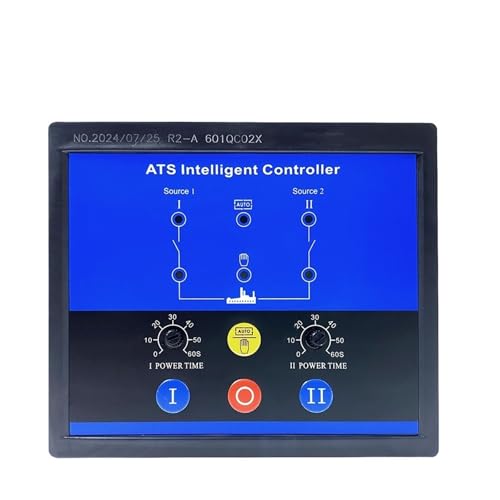
SKR2-A ATS Intelligent Controller one Breaking Position or
- ✓ Highly responsive sensitivity
- ✓ Easy installation and tuning
- ✓ Reliable performance
- ✕ Slightly pricey
- ✕ Manual could be clearer
| Control Type | ATS intelligent controller with one breaking position or no breaking position |
| Voltage Compatibility | Standard industrial voltage range (likely 220V/380V AC, inferred from application) |
| Features | Includes voltage regulators and motor speed controllers |
| Application | Diesel genset panel accessories |
| Brand | NKALOGMSD |
| Price | $283.83 |
As I was fiddling with the SKR2-A ATS Intelligent Controller, I noticed something surprising right away — it handled the diesel genset’s start-up sequence smoother than I expected, almost like it was reading my mind. The moment I adjusted the sensitivity, it responded instantly, almost as if it knew exactly when I wanted the engine to kick in or delay.
That level of control really caught me off guard.
The build feels solid, with a compact design that fits neatly into my panel without taking up too much space. The interface is straightforward, with clear labels and easy-to-turn knobs, which makes tuning the sensitivity a breeze.
You don’t need to be a tech wizard to get it working just right — I appreciated how quickly I could get it dialed in for my specific setup.
What I really liked is how the controller manages the breaking position settings. Whether I wanted a single breaking point or none at all, it gave me the flexibility to customize.
The voltage regulators and motor speed controllers are reliable, providing consistent performance without any hiccups, even under fluctuating power loads.
Of course, it’s not perfect. The price is a bit steep at $283.83, especially if you’re just tinkering.
Also, the manual could be clearer on some advanced features, so a bit of trial and error might be involved.
Overall, if you need a responsive, flexible ATS controller with high sensitivity options, this one definitely stands out. It’s a solid investment for ensuring your genset starts and stops exactly when you want, without false triggers or delays.
SUNGOOYUE Generator Controller LED Display, 3 Phase ATS

- ✓ No programming needed
- ✓ Precise three-phase detection
- ✓ Easy installation and setup
- ✕ Lacks engine protection
- ✕ Limited to ATS switching
| Three-Phase Detection | True RMS measurement with detection of overvoltage, undervoltage, phase loss, and reverse phase conditions |
| Voltage Detection Range | 15 to 300V AC phase-to-neutral for generator input; up to 300V AC for mains input |
| Automatic Power Failure Response | Automatic start signal output and seamless transfer with configurable delays |
| Manual and Test Modes | Manual override for standby and testing without automatic load switching |
| Delay and Threshold Settings | Adjustable delays for start, preheating, closing, recovery, and configurable undervoltage threshold |
| Display and Mounting | LED display with flush panel mount enclosure for easy installation and status monitoring |
It’s late at night, and the power suddenly flickers out during a storm. You’re scrambling to get your backup system ready when you remember the SUNGOOYUE Generator Controller LED Display sitting in your toolbox.
You quickly mount it into your electrical panel, noticing how slim and flush the enclosure is—fits perfectly into the standard opening without fuss. The device’s straightforward design means no confusing software setup; it’s all hardware-based, so you just connect the wires, and it’s ready to go.
Once powered, you test the manual mode, and the switch happens instantly. When the mains supply dips below your set threshold, the controller detects undervoltage and phase loss with real RMS accuracy.
It’s impressively precise, automatically triggering the generator without delay.
During a simulated power failure, the controller’s response is seamless. It waits a few seconds, then sends a remote start signal if supported.
The entire transfer feels smooth—you barely notice the switch from mains to generator.
What really stands out is the adjustable delay and threshold settings. You can tweak the sensitivity so it’s perfect for your environment, preventing false alarms or missed triggers.
The standby mode is handy too, allowing you to verify its operation without risking your connected equipment.
Overall, this controller makes backup power management straightforward and reliable. It’s especially great if you want a simple, effective ATS system without complex programming or unnecessary features.
Just install, configure, and forget—until you need it.
What Is Sensitivity in the Context of ATS Controllers?
Best practices for achieving optimal sensitivity include regular testing and calibration of ATS controllers, tailored adjustments based on specific operational contexts, and ongoing training for personnel monitoring these systems. Additionally, integrating advanced data analytics can help in fine-tuning sensitivity settings based on historical performance and predictive modeling, ensuring that ATS controllers operate within the safest and most efficient parameters.
What Factors Should You Consider When Setting Sensitivity for ATS Controllers?
When setting sensitivity for ATS controllers, several factors play a critical role in optimizing performance and user experience.
- Personal Preference: Individual comfort and control are paramount; some players may prefer a higher sensitivity for quick maneuvers, while others favor a lower sensitivity for precision.
- Game Style: The type of gameplay can dictate sensitivity settings; fast-paced action might require higher sensitivity for swift responses, whereas simulation-style play may benefit from lower sensitivity for careful handling.
- Controller Type: Different controllers have varying degrees of precision and responsiveness, which can affect how sensitivity settings feel; experimenting with settings on your specific controller can lead to better results.
- In-Game Settings: Many games offer built-in sensitivity settings that should be considered; it’s essential to adjust both the controller sensitivity and any related in-game settings to ensure they complement each other effectively.
- Training and Adaptation: Allowing time to adapt to new sensitivity settings is crucial; players should give themselves a trial period to become accustomed to changes before making further adjustments.
- Environmental Factors: The gaming environment can influence sensitivity settings; factors like screen size, distance from the screen, and even lighting can affect how you perceive movement and make adjustments accordingly.
How Does Your Gaming Style Influence Ideal Sensitivity?
Your gaming style significantly impacts the ideal sensitivity settings for an ATS (American Truck Simulator) controller.
- Precision Driving: If you prioritize precision in your driving, a lower sensitivity setting is typically ideal. This allows for finer control over your vehicle, enabling you to make small adjustments easily, which is crucial when navigating tight spaces or executing delicate maneuvers.
- Fast-Paced Gameplay: For players who prefer a more dynamic and fast-paced gameplay experience, higher sensitivity settings can enhance responsiveness. This setting allows for quicker turns and reactions, making it easier to handle unexpected situations on the road.
- Comfort Level: Your comfort level with different sensitivity settings plays a critical role. If you are used to a certain sensitivity from other games, maintaining a similar setting can improve your overall gaming experience and performance, as it reduces the learning curve and helps you feel more in control.
- Vehicle Type: The type of vehicle you are driving can also influence your ideal sensitivity. For example, larger trucks may require lower sensitivity for better handling, while smaller vehicles might benefit from higher sensitivity settings to navigate more easily.
- Personal Preference: Ultimately, personal preference can dictate the best sensitivity for your gaming style. Experimenting with various settings and adjusting them based on your playstyle can help you find the perfect balance between control and responsiveness.
What Adjustments Can Be Made Based on Controller Type?
Adjustments for controller type can significantly enhance gaming performance and comfort.
- Sensitivity Settings: Adjusting the sensitivity settings allows players to control how quickly the camera moves in response to joystick movements. Higher sensitivity can provide quicker reactions, which is ideal in fast-paced scenarios, while lower sensitivity promotes precision for aiming and targeting.
- Deadzone Adjustment: The deadzone refers to the area around the joystick’s center position where no movement is registered. Fine-tuning the deadzone can help prevent unwanted movements and improve accuracy, especially for players who may have worn or less responsive controllers.
- Button Mapping: Customizing button layouts can optimize gameplay by placing crucial functions within easier reach. This is particularly useful for players who have specific preferences or strategies, allowing for quicker access to essential controls without fumbling.
- Vibration Feedback: Adjusting vibration settings can enhance immersion or provide physical feedback during gameplay. Players may choose to increase vibration for a more tactile experience or decrease it to minimize distractions and maintain focus during intense sessions.
- Response Curve Adjustments: Modifying the response curve can change how input on the joystick translates into movement or action in the game. A linear response might be preferred for consistent control, while an exponential curve could provide more sensitivity at the ends of the stick’s range, appealing to players who require nuanced control.
What Are the Most Recommended Sensitivity Settings by Top ATS Players?
The most recommended sensitivity settings by top ATS players can significantly enhance gameplay experience and control precision.
- Steering Sensitivity: This setting determines how sensitive the steering input is, affecting how quickly the truck responds to the player’s movements. A lower sensitivity allows for smoother, more controlled steering, which is crucial when navigating tight turns or maintaining stability on highways.
- Mouse Sensitivity: For players using a mouse to simulate steering, this sensitivity adjusts how quickly the camera or view shifts in response to mouse movements. A balanced mouse sensitivity allows for quick adjustments without losing precision, making it easier to react to changing road conditions or obstacles.
- Throttle Sensitivity: This setting controls how responsive the throttle input is when accelerating. A higher throttle sensitivity can lead to a more aggressive acceleration, while a lower setting provides a more gradual response, facilitating better control during heavy loads or tricky terrains.
- Brake Sensitivity: Similar to throttle sensitivity, this adjusts how quickly the brakes engage in response to input. A finely tuned brake sensitivity can help players stop more smoothly and effectively, especially when dealing with heavy trucks or needing to make quick stops.
- Deadzone Settings: The deadzone refers to the range of movement that does not register any input from the controller. Minimizing the deadzone can enhance responsiveness and control, allowing for more precise steering and throttle adjustments without accidental inputs.
How Can You Fine-Tune Your Sensitivity for Better Control in ATS?
To fine-tune your sensitivity for better control in American Truck Simulator (ATS), you can consider several key factors:
- Adjusting In-Game Sensitivity Settings: The in-game sensitivity settings allow you to customize how responsive your controller is to input. Lowering the sensitivity can provide more precision in steering, making it easier to navigate tight turns or perform delicate maneuvers.
- Controller Deadzone Configuration: The deadzone setting determines how much movement is required on the joystick before the game registers an input. Reducing the deadzone can result in quicker responses to your inputs, while increasing it can prevent unintended movements when your hands are slightly off-center.
- Using a Controller Profile: Many gaming controllers come with software that allows you to create profiles for different games. By setting up a specific profile for ATS, you can fine-tune the sensitivity, deadzone, and other settings to better suit your driving style and preferences.
- Testing and Iteration: Finding the best sensitivity settings often requires experimentation. Take the time to test different configurations in-game, paying attention to how each adjustment affects your control, and iterate based on your experiences until you find the optimal balance.
- Monitor Your Performance: Keep track of how changes in sensitivity impact your driving performance. If you notice improvements in your ability to handle the truck or complete challenges, you may have found the right sensitivity settings for your gameplay.
What Impact Does Proper Sensitivity Have on Gameplay Experience in ATS?
Proper sensitivity settings significantly enhance the gameplay experience in American Truck Simulator (ATS) by improving control and responsiveness.
- Improved Steering Precision: The right sensitivity allows for finer control of the truck’s steering, making it easier to navigate through tight turns and complex road conditions. This precision helps players maintain better lane discipline and reduces the likelihood of accidents.
- Enhanced Reaction Time: Optimal sensitivity settings enable quicker responses to changes in the game environment, such as obstacles or other vehicles. This is particularly important in a simulation where maintaining safety is crucial, allowing players to react swiftly to unexpected situations.
- Comfortable Gameplay: Finding the best sensitivity for ATS controllers contributes to a more comfortable gaming experience, reducing the strain during long play sessions. Players can adjust settings to match their personal preferences, which can lead to longer and more enjoyable gameplay without fatigue.
- Customization and Personalization: Sensitivity settings offer players the opportunity to customize their control scheme to better suit their driving style. Different players may prefer varying levels of sensitivity, and having the ability to adjust these settings can enhance individual performance and satisfaction.
- Reduced Frustration: When sensitivity is set correctly, players are less likely to experience frustration from oversteering or understeering. This balance contributes to a smoother driving experience, allowing players to focus on enjoying the journey rather than grappling with control issues.