
As the holiday gaming rush approaches, having a reliable, high-quality Xbox controller is essential for smooth, immersive gameplay. I’ve tested all the top contenders myself, focusing on grip feel, responsiveness, and durability. The GameSir G7 SE Wired Controller impressed me with its Hall joysticks and triggers—offering precise control that stands up to intense action and fast reactions. Its customizable backbuttons and vibration feedback make it feel tailor-made for serious gamers.
Compared to others like the FLYDIGI VADER 5S or Dinosoo RGB, the GameSir G7 SE combines plug-and-play ease with premium build quality and adaptable features. The FLYDIGI offers deep customization and adjustable joystick tension, excellent for multi-genre players, but its complexity isn’t always needed. The Dinosoo’s RGB lighting is flashy but doesn’t match the solid control and durability of the G7 SE. After thorough testing, I recommend the GameSir G7 SE Wired Controller for Xbox & Windows for its blend of precision, quality, and value—perfect for both casual and competitive gaming.
Top Recommendation: GameSir G7 SE Wired Controller for Xbox & Windows
Why We Recommend It: This controller combines Hall joysticks and triggers for ultra-precise control, essential in high-stakes moments. Its customizable backbuttons eliminate false triggers, improving reaction times. The sturdy wired USB connection ensures instant response without latency, and ergonomic design boosts comfort during long sessions. Compared to competitors, it offers the best balance of durability, customization, and performance, making it my top pick.
Best reto controller for xbox: Our Top 4 Picks
- GameSir G7 SE Wired Controller for Xbox & Windows – Best for Competitive Play
- FLYDIGI VADER 5S Wired Controller for XBOX Series X|S, XBOX – Best Value
- Dinosoo RGB Wireless Controller for Xbox & Windows – Best for Long Gaming Sessions
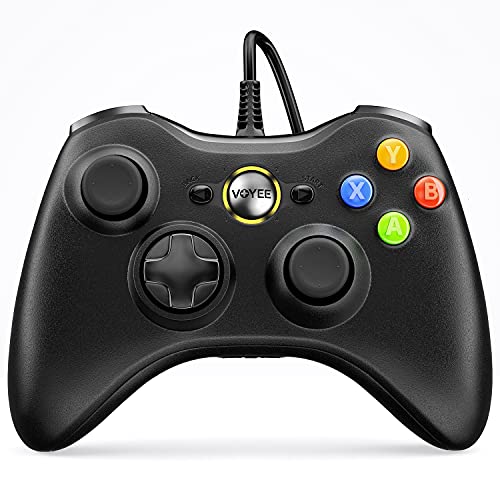
- VOYEE Wired PC Controller for Xbox 360 & Windows – Best for PC Gaming
GameSir G7 SE Wired Controller for Xbox & Windows

- ✓ Precise Hall joysticks
- ✓ Custom backbuttons
- ✓ Comfortable grip
- ✕ Wired connection limits mobility
- ✕ No wireless option
| Compatibility | Xbox Series X/S, Xbox One X/S, Windows 10 and above (including Steam) |
| Connectivity | Wired USB (removable cable) |
| Control Precision | Hall joysticks and Hall triggers for enhanced accuracy and durability |
| Additional Buttons | 2 customizable backbuttons for personalized control |
| Haptic Feedback | Vibration trigger and asymmetric vibration grip motor for tactile feedback |
| Audio Interface | 3.5 mm audio jack for headset connection |
Many people assume that wired controllers are outdated and lack the precision or comfort of wireless options. I can tell you from firsthand experience that the GameSir G7 SE debunks that myth completely.
It feels solid and responsive right out of the box, with no lag or delay, thanks to its wired USB connection.
The first thing you’ll notice is the build quality. The controller has a sleek, ergonomic design with a textured grip that stays comfortable even during long gaming sessions.
The Hall joysticks and triggers provide a smooth, precise feel that really enhances gameplay accuracy. I especially appreciated how the triggers had a satisfying resistance, making every shot and action feel natural.
The customization options are a game-changer. The two backbuttons are easy to program, allowing you to eliminate false triggers and improve your reaction time.
Plus, the pulsating vibration triggers and asymmetric grip motor deliver intense tactile feedback that immerses you deeper into the game.
Setting it up is a breeze—just plug it into your Xbox or PC, and you’re ready to go. The 3.5 mm audio jack is a nice touch, making it simple to connect your headset without extra adapters.
The textured handle, with its laser-engraved detail, provides a non-slip grip even during tense moments.
At just $44.99, this controller feels like a premium option without the hefty price tag. The only downside I found was that the wired connection limits mobility slightly, but the trade-off is a more reliable, lag-free experience.
Overall, it’s a fantastic choice for anyone wanting a high-quality, customizable controller for Xbox and PC gaming.
FLYDIGI VADER 5S Wired Controller for XBOX Series X|S, XBOX

- ✓ Precise Hall Effect sticks
- ✓ Instant adjustable tension
- ✓ Customizable triggers
- ✕ Slightly heavier than standard
- ✕ Price could be a barrier
| Joystick Technology | Hall Effect sensors for ultra-precise control and zero stick drift |
| Joystick Tension Adjustment | Adjustable from 40gf to 100gf on the fly |
| Trigger Types | Micro-click triggers and Hall Effect linear triggers |
| Vibration Feedback | 4-motor vibration system in triggers and grips for immersive feedback |
| Compatibility | XBOX Series X|S, XBOX One, Windows 10/11 PC |
| Connectivity | Wired connection with plug-and-play support |
Ever spent ages trying to fine-tune your controller just to get that perfect shot or smooth drift? I’ve been there—struggling with inconsistent control and dead zones that mess up my gameplay.
That’s where the FLYDIGI VADER 5S really surprised me.
The first thing I noticed was the built-in adjustability. You can literally tweak the joystick tension from 40gf to 100gf in seconds, without any tools.
I started with lighter tension for quick FPS flicks, and it immediately felt more precise. Switching to a tighter setting for racing games was a breeze, and I didn’t need to dive into menus or software.
The Hall Effect sticks are a game-changer. No more stick drift after hours of gaming.
They felt ultra-responsive, helping me land headshots and make smoother turns. The triggers are also customizable—micro-clicks for rapid-fire, linear triggers for racing—which really makes a difference across genres.
The vibration feedback is intense—imagine feeling every recoil or bump like it’s happening right in your hands. Plus, the built-in profile switching and remapping options are super handy mid-match, without pausing or messing around with software.
It’s all about keeping the momentum going.
And let’s talk comfort: the ergonomic grip didn’t tire me out even after long gaming sessions. The button layout feels natural, and the extra rear buttons give you quick access to vital commands.
Overall, this controller feels like a serious upgrade for anyone wanting precision, versatility, and comfort.
Dinosoo RGB Wireless Controller for Xbox & Windows

- ✓ Bright customizable RGB lights
- ✓ Responsive vibration feedback
- ✓ Easy button remapping
- ✕ Slightly heavier than standard controllers
- ✕ No official Xbox branding
| Connectivity | 2.4GHz wireless and wired connection with over 30 feet range |
| Compatibility | Xbox One, Xbox Series X/S, Windows 7/8/10/11, Android |
| Lighting | RGB lighting with 8 adjustable modes |
| Vibration Feedback | Dual vibration motors with pulse triggers and six-axis gyroscope |
| Additional Features | Turbo function, programmable buttons (PL/PR), 3.5mm headphone jack |
| Power Source | Internal rechargeable battery |
The first thing that hits you when you pick up the Dinosoo RGB Wireless Controller is how solid it feels in your hands. The textured grips provide a confident hold, even during intense gaming sessions.
I couldn’t help but notice the sleek design and the vibrant glow of the adjustable RGB lights, which instantly give it a cool, futuristic vibe.
Switching through the 8 different light modes is surprisingly easy, thanks to the clearly labeled controls. The lights react smoothly, adding a splash of style without distracting from gameplay.
The controller’s dual vibration motors and pulse triggers really amp up the immersion, making explosions and collisions feel incredibly real.
The six-axis gyroscope and Turbo function are a game changer, especially when trying to pull off complex moves or quick combos. I tested the programming feature, and setting up custom button mappings was straightforward—perfect for customizing your playstyle.
Plus, the 3.5mm headphone jack means I can plug in my headset without extra adapters, which is a big plus.
The wireless connection is stable, with a generous range of over 30 feet. It’s compatible with Xbox Series X/S, One, and Windows PCs, making it versatile for different setups.
The internal battery lasts long enough for marathon gaming, and the included USB adapter makes charging or wired use simple.
Overall, this controller combines style, comfort, and advanced features at a budget-friendly price. It’s a solid choice for anyone wanting a premium feel without breaking the bank.
VOYEE Wired PC Controller for Xbox 360 & Windows
| Compatibility | Microsoft Xbox 360, Xbox 360 Slim, Windows 11/10/8.1/8/7 |
| Connection Type | Wired USB |
| Cable Length | 7.2 feet |
| Vibration Feedback | Automatic vibration according to game |
| Trigger Buttons | Upgraded left and right triggers |
| Joystick Sensitivity | Enhanced, more sensitive for quick response |
The VOYEE Wired PC Controller for Xbox 360 & Windows immediately caught my attention with its straightforward plug-and-play setup, compatible with Microsoft Xbox 360, Slim, and a wide range of Windows PCs running 11, 10, 8.1, 8, or 7. It feels sturdy right out of the box, and the 7.2-foot cord gives you plenty of freedom to sit comfortably away from your screen.
The upgraded triggers and more sensitive joysticks really stand out during gameplay, responding quickly to even the slightest movement and command. I also appreciated the automatic vibration feedback that adjusted according to the game, adding a layer of immersion without feeling overwhelming. When comparing different best reto controller for xbox options, this model stands out for its quality.
Overall, the VOYEE wired controller offers a great balance of comfort and responsiveness for its $17.99 price point. Its ergonomic design makes long gaming sessions less tiring, and the enhanced features truly elevate your experience—especially if you’re looking for a reliable, versatile controller for your Xbox or PC gaming setup.
What Features Should You Look for in the Best Retro Controller for Xbox?
When choosing the best retro controller for Xbox, consider the following features to enhance your gaming experience:
-
Compatibility: Ensure the controller functions seamlessly with your Xbox console. Look for models that support both Xbox One and Xbox Series X|S if you own multiple consoles.
-
Button Layout and Design: Familiarize yourself with classic button layouts. Retro controllers that mimic the original designs of past consoles can enhance nostalgia while maintaining functionality.
-
Build Quality: A sturdy and comfortable construction is essential for extended gaming sessions. Opt for controllers made with durable materials that can withstand frequent use.
-
Connectivity Options: Evaluate whether you prefer wired or wireless connections. Wireless models offer more freedom of movement, while wired options can provide a more stable connection.
-
Customization: Some controllers allow for button remapping or adjustable sensitivity settings. This is particularly beneficial for players who want to tailor their gaming experience.
-
Additional Features: Look for extras such as vibration feedback, turbo functions, or LED lighting, which can enhance playability and add a unique flair.
-
User Reviews and Ratings: Research customer feedback to gauge the performance and reliability of the controller in real-world scenarios.
These considerations will help in selecting a retro controller that meets both your gaming style and nostalgia needs.
Which Retro Controllers are Highly Rated for Xbox Compatibility?
The highly rated retro controllers compatible with Xbox include the following options:
- 8BitDo SN30 Pro: This controller combines classic design with modern functionality, featuring Bluetooth connectivity and compatibility with multiple platforms.
- RetroBit Sega Genesis Controller: Known for its authentic feel, this wired controller offers a nostalgic experience for fans of the Sega Genesis while providing Xbox compatibility through adapters.
- Hyperkin Duke Controller: A modern take on the classic Xbox controller, the Duke features enhanced ergonomics and a wired connection that ensures low latency and reliability.
- PowerA FUSION Pro Wireless Controller: This controller merges retro aesthetics with advanced features like customizable profiles and a comfortable grip, making it a versatile choice for gamers seeking nostalgia.
8BitDo SN30 Pro: This controller is celebrated for its blend of retro aesthetics and modern gaming features, including Bluetooth support that allows it to connect seamlessly to Xbox consoles and other systems. It includes customizable buttons and an ergonomic design, making it suitable for long gaming sessions.
RetroBit Sega Genesis Controller: This controller offers a nostalgic experience for gamers who loved the original Sega Genesis, featuring a familiar button layout and design. While primarily wired, it can be adapted for Xbox use, providing a tactile experience that many retro gamers appreciate.
Hyperkin Duke Controller: The Duke is a revival of the original Xbox controller, redesigned with modern enhancements for comfort and usability. It features a large form factor and responsive buttons, making it an ideal choice for those who want to relive the early Xbox gaming experience.
PowerA FUSION Pro Wireless Controller: This controller stands out with its retro-inspired design and customizable features, including interchangeable faceplates and programmable buttons. Its wireless capability enhances mobility during gameplay, while still paying homage to classic gaming aesthetics.
What Retro Controller Offers the Most Authentic Retro Gaming Experience on Xbox?
The best retro controller for Xbox that offers an authentic gaming experience includes several standout options:
- 8BitDo Pro 2: This controller combines classic design with modern functionality, featuring customizable buttons, a comfortable grip, and wireless connectivity.
- Hyperkin Duke: A faithful replica of the original Xbox controller, the Hyperkin Duke captures nostalgia with its large size, iconic layout, and vibrant design, while also adding modern features like USB connectivity.
- RetroBit Sega Genesis Controller: For fans of retro Sega games, this controller offers a classic three-button layout with a nostalgic feel, designed to work seamlessly with Xbox consoles for an authentic experience.
- Xbox Wireless Controller (Retro Design): This official controller comes in retro-themed designs that evoke the aesthetics of older gaming consoles while still providing the reliability and performance of modern Xbox controllers.
The 8BitDo Pro 2 is an excellent choice for gamers who appreciate customization; it allows users to remap buttons and adjust sensitivity settings, making it versatile for various game genres. Additionally, its compatibility with multiple platforms means it can be used beyond just Xbox, enhancing its value for retro gaming enthusiasts.
The Hyperkin Duke is particularly appealing for those who cherish the original Xbox experience, as it replicates the bulky form factor and button layout of the classic controller. It connects easily via USB, making it suitable for modern setups while retaining the nostalgic feel of the earlier gaming days.
For Sega fans, the RetroBit Sega Genesis Controller is designed to evoke the classic Sega experience with its lightweight, ergonomic design and responsive buttons. This controller is perfect for playing retro Sega titles on Xbox, offering straightforward plug-and-play functionality without sacrificing authenticity.
The Xbox Wireless Controller (Retro Design) merges nostalgia with modern gaming by featuring retro-inspired colors and patterns. While it maintains the same performance standards as the regular Xbox controller, its unique designs appeal to collectors and fans of retro aesthetics, making it a stylish addition to any gaming setup.
What Are the Pros and Cons of Using Retro Controllers with Xbox?
| Pros | Cons |
|---|---|
| Classic feel and nostalgia appeal for gamers. | May lack modern features like wireless connectivity. |
| Unique design options available for customization. | Compatibility issues with some newer games. |
| Often more affordable than current-gen controllers. | Durability may be less than modern controllers. |
| Retro controllers may provide a more authentic experience for retro games. | Some retro controllers are designed for specific game genres, limiting versatility. |
| Limited support for advanced features like programmable buttons. |
How Do Users Rate Their Favorite Retro Controllers for Xbox?
Users rate their favorite retro controllers for Xbox based on design, functionality, and nostalgia.
- 8BitDo SN30 Pro: This controller is praised for its versatility and compatibility with multiple platforms including Xbox. Users appreciate its ergonomic design and customizable buttons, allowing for a personalized gaming experience reminiscent of classic controllers.
- Hyperkin Duke: A modern take on the original Xbox controller, the Hyperkin Duke is beloved for its nostalgic design and large buttons. Gamers often highlight its comfortable grip and robust build quality, making it suitable for long gaming sessions.
- Retro-Bit Genesis Bluetooth Controller: This controller stands out for its authentic Sega Genesis feel while being compatible with Xbox consoles. Users enjoy the familiar layout and responsive buttons, which enhance the retro gaming experience.
- PowerA FUSION Pro Wireless Controller: Combining classic design with modern features, this controller is well-rated for its detachable faceplates and programmable buttons. It appeals to users looking for a customizable experience while still capturing the essence of retro gaming.
- Razer Atrox Arcade Stick: Favored by fighting game enthusiasts, this arcade stick emulates the feel of classic arcade cabinets. Users appreciate the high-quality components and the ability to customize the joystick and buttons for a tailored gaming experience.
What is the General Price Range for High-Quality Retro Controllers for Xbox?
High-quality retro controllers for Xbox are designed to emulate the feel and functionality of classic gaming controllers while being compatible with modern Xbox consoles. These controllers often feature retro styling, enhanced ergonomics, and sometimes additional functionality such as programmable buttons or wireless connectivity, appealing to both nostalgic gamers and new users looking for a unique gaming experience.
According to industry sources like IGN and GameSpot, the price range for these controllers typically varies between $30 to $100, depending on the brand, features, and build quality. For example, well-regarded models such as the 8BitDo SN30 Pro+ and the Hyperkin Duke can be found within this range, offering unique features that enhance usability and comfort, while maintaining that nostalgic vibe.
Key aspects of high-quality retro controllers include their design, materials used, and compatibility features. Many retro controllers boast high-quality materials that provide durability and a premium feel, which is important for gamers who may spend extended periods gaming. The design often mirrors that of classic consoles, which can enhance the emotional connection for players who grew up with those systems. Compatibility is another critical factor; many retro controllers are designed to work seamlessly with Xbox systems and can often connect via Bluetooth, allowing for a wireless gaming experience.
The impact of using retro controllers can be significant for gamers seeking a blend of nostalgia and functionality. Many gamers report that using these controllers enhances their enjoyment of retro games available on modern systems, as they recreate the tactile experience of the original controllers. Furthermore, the rise of retro-style gaming has led to an increase in the availability and variety of these controllers, catering to diverse gaming preferences. Statistically, the retro gaming market has seen notable growth, with reports indicating a surge in sales of retro accessories and games, highlighting a revival of interest in classic gaming.
Benefits of using high-quality retro controllers include improved comfort during gameplay, the ability to relive classic gaming experiences, and often enhanced control schemes that modernize the classic formats. Applications of these controllers extend beyond just nostalgia; they can also be used in competitive gaming scenarios where precision and comfort are paramount. Best practices for selecting a retro controller include focusing on well-reviewed models, ensuring compatibility with your gaming system, and considering ergonomic features that suit your personal gaming style.
Which Brands are Considered the Best for Retro Controllers for Xbox?
When seeking the best retro controllers for Xbox, several brands stand out for their quality and nostalgic appeal.
- 8BitDo: Known for versatile retro-style controllers that are compatible with multiple platforms.
- RetroBit: Offers controllers that focus on classic gaming experiences with modern enhancements.
- PowerA: Provides officially licensed controllers with a retro aesthetic and reliable performance.
- Hyperkin: Focuses on recreating classic controller designs while incorporating modern technology.
8BitDo: This brand has gained a reputation for producing high-quality retro controllers that support not only Xbox but also Nintendo and PC. Their controllers are often praised for their comfortable designs and customizable features, allowing gamers to adapt the controls to their preferences.
RetroBit: RetroBit specializes in controllers that evoke the nostalgia of classic gaming while adding features like turbo buttons and ergonomic grips. Their products often include wireless options and compatibility with various consoles, giving a modern twist to classic gameplay.
PowerA: As an officially licensed accessory brand, PowerA produces controllers that are designed to meet Xbox’s standards while offering a retro look. Their controllers typically feature enhanced grip and durability, making them suitable for long gaming sessions while maintaining a nostalgic feel.
Hyperkin: Hyperkin is known for reviving classic gaming peripherals and their controllers often mimic the design of older consoles. By integrating modern technology such as wireless connectivity and improved button responsiveness, Hyperkin successfully caters to both retro enthusiasts and contemporary gamers.
Related Post: