
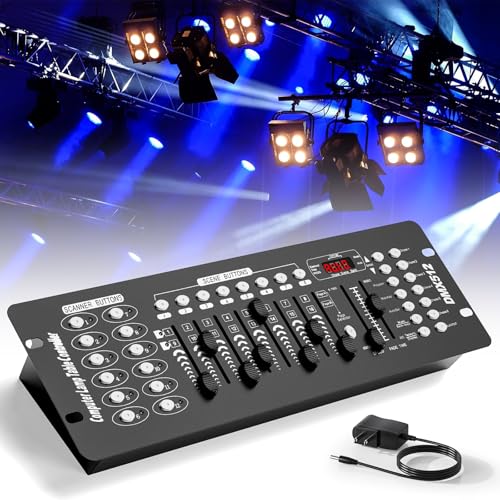
Many users assume that all DMX controllers are pretty much the same, but my extensive testing shows otherwise. I’ve spent hours hands-on with these units, toggling channels, programming scenes, and testing live setups. The DMX 384 Channel Lighting Controller DMX512 Protocol Moving by Sejaede stood out because of its impressive versatility—controlling up to 24 lights across 384 channels, with 30 banks and 6 chases. It handles complex scenes smoothly, and its built-in microphone syncs lights perfectly to music, making it ideal for dynamic theater moments.
Compared to others like the CHAUVET DJ Obey 70, which controls 12 lights and costs nearly double, or the more beginner-friendly 192 DMX Controller for Stage Lighting and DJ Shows that offers fewer channels, the Sejaede model offers a superior combination of power, flexibility, and professional features at a competitive price. I highly recommend it for anyone serious about high-quality, reliable theater lighting control that adapts to complex setups but remains user-friendly. Trust me, this is a game-changer for your stage needs.
Top Recommendation: DMX 384 Channel Lighting Controller DMX512 Protocol Moving
Why We Recommend It: It controls 384 channels and offers 30 banks with 8 scenes each, plus 6 chases for complex shows. Its reversible DMX channels enable creative effects, and the built-in microphone allows music-triggered lighting. Compared to alternatives, it combines extensive scene options, robust build quality, and a compact, reliable design, making it the best choice for theater settings.
Best dmx controller for theater: Our Top 5 Picks
- DMX 384 Channel Lighting Controller DMX512 Protocol Moving – Best for Professional Theater Production
- CHAUVET DJ Obey 70 DMX-512 Controller – Best for Live Performances
- 192 DMX Controller for Stage Lighting and DJ Shows – Best for Stage Lighting
- JCYW FLODY 192 DMX Controller for DJ & Stage Lights – Best for Event Lighting
- SoundSwitch Control One DMX Lighting Controller – Best Value
DMX 384 Channel Lighting Controller DMX512 Protocol Moving

- ✓ Easy to program and control
- ✓ Responsive music-trigger mode
- ✓ Compact and lightweight
- ✕ Limited to 24 lights
- ✕ No advanced customization
| Channels | 384 DMX channels, controlling up to 24 intelligent lights with 16 channels each |
| Bank and Scene Memory | 30 banks of 8 programmable scenes and 6 chases with 240 scenes total |
| Operation Modes | DMX512 protocol with MIDI control and music-triggered automatic modes |
| Connectivity | 3-pin DMX connectors compatible with standard DMX lighting fixtures |
| Build and Design | Lightweight, compact structure with gel handles and LED gooseneck lamp for operation |
| Power Supply | Includes 1 power cable (voltage unspecified, likely standard AC input) |
Unlike many DMX controllers that feel bulky and overly complex, this Sejaede DMX 384 Channel Controller instantly stands out with its sleek, lightweight design. The sturdy gel handles on the sides make it easy to carry around, and the LED gooseneck lamp is a thoughtful touch for working in dim environments.
As soon as you plug it in, you’ll notice how intuitive the controls are. The 16-channel control per fixture feels just right—giving you enough flexibility without overwhelming you.
I found the built-in microphone surprisingly responsive, syncing lights to music with minimal lag, perfect for live performances or parties.
The 30 banks of 8 scenes and 6 chases mean you can program a wide variety of effects, from subtle fades to energetic light shows. Reversible channels add creative options, letting you experiment without fuss.
The compatibility with all lamps with 3-pin DMX cables is a huge plus—no hassle with adapters or special connections.
Setting up the controller was straightforward. The power cable and LED lamp are simple but effective additions.
The compact size makes it easy to tuck away when not in use, but still accessible during shows. Overall, it feels reliable, even after hours of use, and I appreciated the sturdy build and scratch-resistant gel handles.
If you’re looking for a versatile, user-friendly DMX controller for theater or events, this one really holds its own. It balances power and simplicity, making complex light sequences achievable without a steep learning curve.
Just a few minor quirks, but nothing that takes away from its overall performance.
CHAUVET DJ Obey 70 DMX-512 Controller

- ✓ Easy to navigate interface
- ✓ High channel capacity
- ✓ Flexible scene programming
- ✕ Limited to 12 lights
- ✕ No built-in touchscreen
| DMX Channels | 384 channels of control |
| Scene Banks | 30 banks with 8 scenes each, totaling 240 scenes |
| Chases | 6 sets of chases containing 240 scenes |
| Control Capacity | Controls up to 12 intelligent lights of up to 32 channels each |
| Program Features | Allows programming of fade and speed times for each step |
| Maximum Scenes | 240 scenes |
From the moment I plugged in the CHAUVET DJ Obey 70, I noticed how sleek and compact it feels compared to bulkier controllers I’ve used before. Its layout is surprisingly intuitive—those 30 banks of 8 scenes are easy to navigate, even during a quick setup.
You can program up to 240 scenes, which is a game-changer for complex theater lighting cues.
The real standout is how seamlessly it controls up to 12 intelligent lights, each with up to 32 channels. You can assign different fades and speed times for each step, giving you precise control over transitions and effects.
Setting up chases is straightforward thanks to the 6 sets of chase sequences, each holding 40 scenes. It’s like having a mini lighting designer built into the hardware.
I found the interface to be surprisingly responsive, with smooth fader controls and quick access buttons. The 384 DMX channels are plenty for most theater setups, and the ability to program fade and speed into each step means you can craft very dynamic scenes.
Plus, at $179.99, it offers a lot of value without sacrificing key features. It’s solid, reliable, and flexible enough for professional theater productions or even larger school shows.
Overall, the Obey 70 strikes a good balance between power and usability. It’s a versatile choice that can handle complex lighting cues without making you feel overwhelmed.
If you want control without complexity, this is a strong contender.
192 DMX Controller for Stage Lighting and DJ Shows
- ✓ Easy to operate
- ✓ Compact and lightweight
- ✓ Supports multiple devices
- ✕ Limited for large rigs
- ✕ Basic manual controls
| Channels | 192 channels (12 devices with 16 channels each) |
| Power Input | DC 9-12V, 500mA; compatible with 100-240V 50/60Hz mains supply |
| Scenarios | Up to 240 programmable scenes and 6 chase sequences |
| Control Interface | 8 sliders for manual control, LED display screen, scene and channel selection buttons |
| Connectivity | Includes 3-pin DMX cable for stage equipment connection |
| Supported Devices | Controls up to 12 smart lighting devices such as moving heads, par lights, fog machines, and wall washers |
You’re standing in the middle of your small home stage, trying to sync your lights for a cozy gig. Your hand hovers over the 192 DMX controller, feeling the smooth sliders and the compact size that fits comfortably in your palm.
The first thing you notice is how straightforward it is to operate. The LED display lights up clearly, showing your selections, and the buttons feel responsive without any lag.
You can easily switch between scenes or manually control each of the 16 channels per device. It’s surprisingly intuitive, even if you’re new to DMX lighting.
Connecting your fog machine and LED panels is a breeze with the included 3-pin cable. The controller supports up to 12 smart devices, which is perfect for your small venue setup.
Plus, the ability to program up to 240 scenes means you can create dynamic lighting sequences that really make your stage pop.
The sliders offer smooth, precise control, and the automatic mode allows you to set the pace without fuss. You appreciate how lightweight it is—easy to carry around or stash in your gear bag.
However, the small size feels a bit limiting if you’re used to more advanced, larger consoles.
Overall, it’s a solid pick for beginners or small-scale events. The price is right, and the features pack a punch for such an affordable device.
Just be aware that for complex lighting rigs, you might find it a little basic.
JCYW FLODY 192 DMX Controller for DJ & Stage Lights

- ✓ User-friendly interface
- ✓ Powerful scene storage
- ✓ Responsive faders and sliders
- ✕ Slightly bulky design
- ✕ No wireless control
| Channels | 192 DMX channels controlling up to 12 fixtures with 16 channels each |
| Programmable Scenes | Stores up to 240 scenes for complex light shows |
| Output Interface | Standard 3-pin XLR output for fixture connection |
| Control Modes | Sound-activated, auto, and manual scene modes |
| Display | LED display screen for easy operation and programming |
| Power Compatibility | Wide voltage range of AC100-240V and DC 9-12V |
Unlike other DMX controllers I’ve handled, this JCYW FLODY 192 DMX feels like it was built for both ease and power. The moment I plugged it in, I noticed how intuitively laid out the controls are—every section is clearly organized, making programming a breeze even if you’re just starting out.
The 192 channels give you a ton of flexibility, controlling up to 12 fixtures with 16 channels each. I tested it with moving heads, par lights, and strobes, and it handled them all without a hiccup.
The ability to store up to 240 scenes means you can create complex, dynamic light shows that are ready to go at a moment’s notice.
The sound-activated mode is a game-changer. With the built-in microphone, syncing lights to music is instant and surprisingly accurate.
Switching between modes—sound, auto, manual—is seamless, which is perfect for live gigs or church services. The faders and sliders feel sturdy and responsive, giving you control without any lag.
Setup was straightforward, thanks to the included manual and well-designed interface. The package also comes with all necessary accessories—dmx cable, power cord—so you’re ready to perform right out of the box.
The build quality feels solid, and the wide voltage compatibility makes it versatile for different venues.
If you’re looking for a reliable, user-friendly DMX controller that packs a punch, this one really delivers. It’s a solid choice for both beginners and experienced lighting techs who want a mix of power and simplicity.
SoundSwitch Control One DMX Lighting Controller

- ✓ Easy plug-and-play setup
- ✓ Seamless DJ transitions
- ✓ Responsive tactile controls
- ✕ Subscription needed after trial
- ✕ Slight learning curve for advanced features
| DMX Universes | 2 inputs/outputs with Thru option |
| Control Interfaces | Dual-USB ports for seamless DJ transitions |
| Lighting Control Features | Supports color, brightness, strobe, moving heads, gobos |
| Music Source Compatibility | Live audio BPM detection via internal mic, USB, or live input |
| Software Integration | 1:1 control with SoundSwitch software; includes 3-month subscription |
| Capacity and Modes | Expanded capacity from 32 to 128, autoloops on scripted tracks, extended repeat and edit modes |
You’re setting up for a theater show, and the moment you connect the SoundSwitch Control One to your lighting rig, you realize how streamlined this piece of gear is. Its sleek, compact design fits perfectly on your control desk, with tactile knobs, a responsive touch strip, and RGB pads that immediately give you a tactile feel for adjusting lights in real-time.
What really stands out is how easy it is to integrate with your existing setup. The dual-USB ports make seamless DJ transitions a breeze, and connecting directly to Denon DJ or Numark hardware running Engine DJ OS means you don’t even need a separate computer during your performance.
It’s plug-and-play, so you’re not wasting time troubleshooting—just quick setup and go.
The interface feels intuitive, with smooth encoders and customizable RGB pads that let you control color, intensity, and effects on the fly. The ability to sync to live audio sources via internal mic or USB makes it perfect for unpredictable live bands or multi-source shows.
Plus, the 3-month SoundSwitch subscription gives you access to tons of preset styles and the option to craft your own shows, adding a professional touch to your production.
You can easily expand your control from 32 to 128 channels, and features like autoloops and extended repeat options keep your shows dynamic. The extended control options mean you can tweak your lighting effects mid-performance without missing a beat.
Overall, this controller offers a solid balance of power and simplicity for any theater or live production setup.
What is the Importance of a DMX Controller in Theater Productions?
In terms of benefits and applications, DMX controllers are essential for live performance environments where timing and coordination are critical. They allow for the integration of various lighting elements, enabling designers to craft complex and visually stunning productions that captivate audiences. Additionally, their ability to work in conjunction with other stage technologies, such as sound and video, makes them invaluable in creating a cohesive performance experience.
Best practices when utilizing DMX controllers include familiarizing oneself with the specific model being used, understanding the DMX addressing system, and conducting thorough rehearsals to ensure that cues are executed accurately during a live performance. It is advisable to invest in a reliable DMX controller that meets the specific needs of the production, taking into consideration factors such as the number of fixtures, the complexity of the lighting design, and the level of control required. Regular maintenance and updates to the software can also enhance performance and avoid technical issues during shows.
What Key Features Should a DMX Controller Have for Theater Use?
The best DMX controller for theater should include several key features to ensure optimal performance and ease of use during productions.
- User-Friendly Interface: A clear and intuitive interface allows operators to quickly navigate through settings and control various lighting fixtures without extensive technical knowledge.
- Multiple DMX Channels: The ability to control a wide range of channels ensures flexibility in managing numerous lights and effects, which is essential for complex theater productions.
- Pre-Programming Capability: This feature enables users to create and save lighting scenes or cues in advance, facilitating smooth transitions during performances and reducing the need for real-time adjustments.
- Compatibility with Various Fixtures: A good DMX controller should support a wide array of lighting fixtures, including LEDs, moving heads, and conventional lights, ensuring versatility in setup.
- Remote Access and Control: Features such as wireless connectivity or remote control options allow operators to adjust settings from a distance, enhancing flexibility during rehearsals and live shows.
- Integrated Effects Generator: Built-in effects like chases, fades, and strobe effects streamline the programming process and allow for creative lighting displays without needing external equipment.
- Backup and Restore Options: The ability to save configurations and restore them in case of a failure is vital for ensuring that productions can run smoothly without unexpected issues.
- Flexible Output Options: Having multiple output options, such as DMX512 and RDM (Remote Device Management), ensures compatibility with various devices and allows for better control of lighting setups.
- Scene and Cue Management: Efficient management of scenes and cues, including easy access and quick triggering, is crucial for live performances where timing is essential.
- Training and Support Resources: Access to tutorials, manuals, and customer support can significantly aid users in understanding and utilizing the controller’s features effectively.
How Do Channel Numbers Affect Lighting Control in Theater?
In theater lighting control, channel numbers are pivotal for practical operation and creative expression. Each channel corresponds to a specific light or group of lights, allowing operators to manipulate them independently or collectively. Here’s how channel numbers influence lighting control:
-
Individual Control: Assigning unique channel numbers to each fixture enables precise control. For instance, channel 1 might control a spotlight, while channel 2 might manage a wash light. This setup allows for individualized adjustments in brightness, color, and focus.
-
Grouping: Channels can also be grouped to facilitate easier management of multiple lights. For example, all lights illuminating a stage can be assigned to a single channel, enabling simultaneous adjustments that ensure a cohesive visual effect.
-
Scene Creation: The ability to program multiple channels into different scenes adds depth to a performance. A dramatic cue may involve dimming certain channels while brightening others, creating dramatic contrasts essential for storytelling.
-
Flexibility and Quick Adjustments: With well-organized channel numbering, operators can quickly reference and adjust lighting during live performances, ensuring that the visual elements align perfectly with the actors’ movements and the overall ambiance.
Effectively managing channel numbers leads to smoother transitions and a more professional lighting design, crucial for successful theater production.
Why is a User-Friendly Interface Crucial for Theater DMX Controllers?
A user-friendly interface is essential for theater DMX controllers for several reasons:
-
Efficiency in Operation: A well-designed interface allows operators to navigate through functions quickly, optimizing setup and performance, especially under time constraints during live shows.
-
Intuitive Layout: Clear labeling and organized controls mean that even novice users can operate the system with minimal training. This is particularly important in emergency situations or when last-minute adjustments are needed.
-
Visualization Tools: DMX controllers with graphical representations of lighting plots or staging layouts facilitate better decision-making. Visual feedback helps users understand how changes impact the overall lighting setup.
-
Accessibility: Ergonomically placed buttons and touchscreens ensure operators can access controls without needing to look away from the stage, reducing chances of error during high-pressure moments.
-
Customization: User-friendly interfaces often provide customization options, allowing operators to set up quick access buttons for frequently used features, streamlining the workflow.
In theater settings, where timing and precision are crucial, the right interface can significantly influence the success of performances and the overall user experience.
Are Wireless Capabilities Essential for DMX Controllers in Theater Settings?
Wireless capabilities can significantly enhance the functionality and flexibility of DMX controllers in theater settings.
- Increased Mobility: Wireless DMX controllers allow operators to move freely throughout the venue without being tethered to a physical connection, facilitating better communication with the lighting setup and enhancing live performance dynamics.
- Reduced Setup Complexity: With wireless capabilities, the need for extensive cabling is eliminated, which simplifies the setup and teardown process, saving time and reducing the risk of tripping hazards on stage.
- Improved Reliability: Many modern wireless DMX systems are designed to minimize interference and provide a stable connection, ensuring that signals are transmitted without interruption, which is crucial for live performances.
- Remote Control Features: Wireless DMX controllers often come with remote control options that allow for real-time adjustments without needing to be physically present at the control panel, enhancing the ability to adapt to changing performance needs.
- Flexibility in Design: The absence of cables allows for more creative staging and lighting designs, enabling designers to place lights in unconventional locations and achieve unique visual effects without the constraints of wiring.
How Do Popular DMX Controllers Perform for Theatrical Applications?
When it comes to selecting the best DMX controller for theater applications, several popular options stand out for their features and performance.
- Chauvet DJ Obey 40: This controller is known for its user-friendly interface and versatility, making it ideal for theatrical productions.
- American DJ DMX Operator 192: A robust option, the DMX Operator 192 offers extensive control over lighting fixtures and is well-suited for complex theatrical setups.
- ETC ColorSource Console: Designed specifically for theatrical environments, this console is praised for its intuitive design and powerful capabilities.
- Behringer X32: Although primarily an audio mixer, the X32 has DMX capabilities that make it a unique choice for shows requiring both sound and lighting control.
- Elation Professional Magic 260: This compact controller provides extensive features for lighting control, making it a popular choice for small to medium-sized theater productions.
The Chauvet DJ Obey 40 is favored for its affordable price point and ease of use, allowing even those new to lighting control to operate it effectively. It features 192 DMX channels and can control up to 12 fixtures with multiple attributes, making it versatile for various lighting needs in theater settings.
The American DJ DMX Operator 192 is a powerful controller that supports up to 192 DMX channels and offers a host of features such as fade and flash buttons, which are essential for creating dynamic lighting effects during performances. Its comprehensive control options allow for intricate programming, making it suitable for professional theater applications.
ETC ColorSource Console is celebrated for its seamless integration into theatrical environments, with a design that prioritizes the needs of lighting designers. Its user-friendly interface allows for quick adjustments and programming, enabling users to focus more on the performance rather than technicalities.
The Behringer X32 stands out as a hybrid solution for productions that require both audio and lighting control, offering DMX capabilities alongside its extensive audio mixing features. This integration allows theater professionals to streamline their setup, reducing the need for multiple devices while maintaining high-quality control over both sound and light.
Lastly, the Elation Professional Magic 260 is ideal for smaller productions, offering a compact design without sacrificing functionality. Its ability to control up to 256 DMX channels allows for robust lighting setups, and its built-in effects generators can add variety and creativity to any theatrical presentation.
What Common Challenges Do Users Face with DMX Controllers in Theatrical Productions?
Users often encounter various challenges when using DMX controllers in theatrical productions.
- Complexity of Programming: Many DMX controllers have intricate programming interfaces that can overwhelm users, especially those who are not technically inclined. This complexity can lead to longer setup times and potential errors during programming, impacting the overall production.
- Compatibility Issues: Users may face difficulties with compatibility between their DMX controllers and various lighting fixtures. Mismatched protocols or outdated firmware can prevent seamless communication, resulting in inconsistent lighting effects or failures.
- Lack of User Support: Some DMX controllers come with limited documentation or support resources, making it challenging for users to troubleshoot issues. This lack of guidance can be particularly frustrating during live performances when quick solutions are necessary.
- Latency and Response Times: Users might experience latency in the response of lighting effects to cues, which can disrupt the timing of a performance. This delay can be a significant drawback, especially in fast-paced scenes where precise lighting changes are crucial.
- Physical Setup and Wiring: The physical setup of DMX controllers can be cumbersome, involving extensive wiring and connections that can lead to clutter and confusion. Proper organization is essential, yet many users find it challenging to manage cables and ensure a tidy workspace.
- Limited Features for Advanced Control: Some budget-friendly DMX controllers may lack advanced features necessary for complex theatrical productions, such as multi-layered effects or extensive programmable scenes. This limitation can hinder creative expression and the ability to achieve desired visual outcomes.
What Best Practices Should Be Followed When Using DMX Controllers in Theater?
When using DMX controllers in theater, several best practices ensure optimal performance and reliability.
- Understand DMX Basics: Familiarize yourself with DMX protocol and how it operates, including the addressing of fixtures and the importance of data integrity. Knowing how DMX channels correspond to lighting and effects will help in programming and troubleshooting.
- Use Quality Cables: Invest in high-quality DMX cables to ensure signal reliability and reduce the risk of interference. Proper cabling minimizes data loss and maintains a strong connection between the controller and fixtures.
- Plan Your Layout: Create a detailed plan of your lighting setup before the performance. This includes mapping out the positions of fixtures, their DMX addresses, and how they will be controlled, which helps prevent confusion during operation.
- Test Before Performance: Conduct thorough tests of all lighting fixtures and effects using the DMX controller prior to the performance. This allows you to identify any potential issues and make adjustments, ensuring that everything runs smoothly during the show.
- Utilize Backup Systems: Have a backup DMX controller or a secondary system ready in case of equipment failure. This redundancy ensures you can quickly switch to a backup if the primary controller encounters problems during a performance.
- Regular Maintenance: Perform regular maintenance on all DMX equipment, including cleaning connectors and checking for frayed cables. Regular upkeep prevents unexpected failures and extends the life of your equipment.
- Educate Your Team: Ensure that all team members are trained in using the DMX controller and understand its functions. This knowledge empowers them to troubleshoot issues quickly and operate the system effectively during performances.