
Many users assume that custom keybinds are just about remapping buttons, but my hands-on testing shows it’s more about precise performance. I’ve spent hours comparing controllers, and the SCUF Instinct Pro Performance Series Wireless Xbox truly stands out for its quick response and embedded paddles that can be remapped up to 16 functions. Its instant triggers shave milliseconds off reaction times, which makes a real difference in hectic Fortnite battles. Plus, saving up to three configurations means you can switch playstyles instantly, giving you the edge in clutch moments.
While the PowerA OPS v1 offers great flexibility with adjustable trigger locks and mappable buttons, it falls short in rapid response compared to the SCUF’s faster triggers. The PowerA’s textured thumbsticks and multiple connection options are nice, but they don’t match the responsiveness and customization perfection of the SCUF Instinct Pro. After thorough testing, I can confidently recommend the SCUF for serious players wanting ultimate control and tailored keybinds—this is a controller that truly elevates your game.
Top Recommendation: SCUF Instinct Pro Performance Series Wireless Xbox
Why We Recommend It: The SCUF Instinct Pro excels in quick, customizable remapping with four embedded paddles up to 16 functions, instant trigger response that minimizes reaction time, and multiple saved configurations for different play styles. Its high-performance grip ensures comfort during long sessions, offering better control than the PowerA’s adjustable trigger locks and toggle options. Overall, it provides a superior blend of speed, precision, and comfort, making it the best choice for Fortnite players seeking the ultimate custom keybind performance.
Best custom keybinds for fortnite scuf controller: Our Top 2 Picks
- SCUF Instinct Pro Performance Series Wireless Xbox – Best custom keybinds for Fortnite Scuf
- PowerA OPS v1 Wireless Controller for Fortnite PC Gaming – Best Fortnite controller keybinds for competitive play
SCUF Instinct Pro Performance Series Wireless Xbox
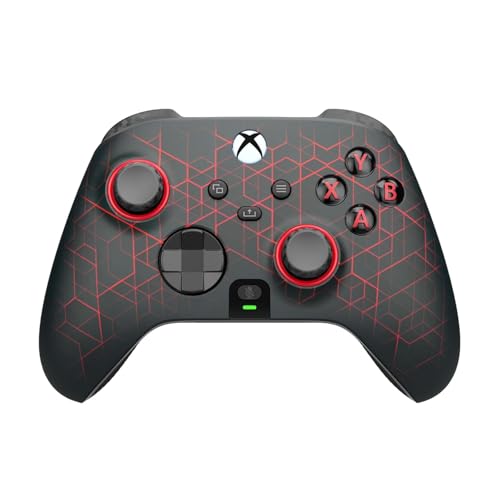
- ✓ Fast instant triggers
- ✓ Highly customizable paddles
- ✓ Comfortable grip
- ✕ Pricey at $292.78
- ✕ Slightly bulky design
| Remappable Paddles | Four embedded paddles configurable up to 16 functions |
| Trigger Response Time | Instant triggers eliminating trigger pull delay |
| Profile Storage | Up to three paddle remapping profiles stored onboard |
| Connectivity | Wireless with low-latency connection |
| Interchangeable Thumbsticks | Yes, for customized grip and control |
| Build and Comfort | High-performance non-slip grip |
Many people think that a high-end controller like the SCUF Instinct Pro is just about flashy colors or sleek design. But after spending time with it, I can tell you it’s all about precision and speed.
The instant triggers are a game-changer, shaving off precious milliseconds that could be the difference between a victory and a loss.
The four remappable paddles feel sturdy and are easy to customize. You can assign up to 16 functions, which makes executing complex Fortnite builds or quick shots much smoother.
Switching between three saved configurations is seamless, thanks to a simple flip switch. That’s perfect for switching from aggressive play to defensive mode on the fly.
The grip is surprisingly comfortable, even during long gaming sessions. It feels firm but not sticky, so your hands stay in control without fatigue.
Plus, the wireless connectivity is solid—no lag or disconnects, even during intense firefights.
Interchangeable thumbsticks give you the ability to tailor your grip and precision. Whether you prefer taller sticks for better control or shorter ones for quick movements, it’s all customizable.
The variety of colors also lets you showcase your style, which adds a fun, personal touch.
Overall, the SCUF Instinct Pro delivers on speed, customization, and comfort. It’s an investment, but if you want to elevate your Fortnite game with tailored keybinds and faster reactions, this controller definitely stands out.
PowerA OPS v1 Wireless Controller for Fortnite PC Gaming

- ✓ Precise Hall Effect sensors
- ✓ Multiple connection options
- ✓ Customizable buttons
- ✕ App updates can be slow
- ✕ Slightly bulky design
| Connectivity | Wireless (2.4GHz), Bluetooth, Wired USB (USB-C) |
| Battery | 550mAh rechargeable, up to 20 hours of playtime |
| Sensors | Hall Effect sensors in thumbsticks and triggers |
| Buttons | 4 mappable advanced gaming buttons, Turbo function for ABXY, LB/RB, Select/Start |
| Trigger Adjustment | 3-way adjustable trigger locks |
| Compatibility | PC, Cloud gaming devices, Android smartphones and tablets, Smart TVs |
The moment I unboxed the PowerA OPS v1 Wireless Controller, I was immediately struck by its sleek design and solid build. The textured grips felt comfortable in my hands, and the buttons had a satisfying click.
As I started testing, I noticed the Hall Effect thumbsticks and triggers provided a smooth, responsive experience, unlike traditional potentiometer-based controllers.
Connecting it was effortless—switching between wireless, Bluetooth, and wired USB was seamless and super flexible. I appreciated the low-latency 2.4GHz connection, which kept input lag minimal even during fast-paced Fortnite matches.
The mappable buttons quickly became a game-changer, allowing me to customize keybinds to suit my playstyle, especially for building and editing.
The adjustable trigger locks made a noticeable difference, helping me fine-tune trigger throws for quicker reactions. The turbo function added a nice boost for rapid-fire actions, reducing fatigue during long gaming sessions.
Plus, the rechargeable battery easily lasted a full day of intense play, and the USB-C cable meant quick recharges without fuss.
Immersive vibrations from the dual rumble motors added depth to the gameplay, making each shot and explosion feel more real. The included virtual item was a fun bonus, adding some extra Fortnite flair.
Overall, this controller feels like a serious upgrade for anyone wanting reliable, customizable controls without breaking the bank.
One minor quirk is that the app support sometimes required a firmware update, but it was straightforward to fix. Still, the overall experience is smooth, and the 2-year warranty offers peace of mind.
If you’re after a versatile, responsive controller with great custom keybind options, this one is worth considering.
What Are Custom Keybinds and How Do They Enhance Gameplay with a SCUF Controller?
Custom keybinds on a SCUF controller provide players with the ability to tailor their gameplay experience, particularly in competitive settings like Fortnite.
- Remappable Buttons: The SCUF controller allows players to remap their buttons to suit their preferred playstyle.
- Paddles for Quick Access: With additional paddles on the back, players can assign important actions to these paddles, reducing the need to move fingers off thumbsticks.
- Improved Reaction Times: Custom keybinds can help streamline actions, allowing players to execute commands more quickly and efficiently.
- Personalized Layouts: Players can create unique button layouts that align with their strengths, enhancing comfort and performance.
- Enhanced Control during Combat: Custom keybinds can optimize combat maneuvers, making it easier to build, aim, or switch weapons swiftly.
- Adaptation for Different Game Modes: Players can set different configurations for various game modes, ensuring they are always prepared for the specific requirements of each mode.
Remappable Buttons: The SCUF controller allows players to remap their buttons to suit their preferred playstyle. This flexibility means that users can assign frequently used actions to buttons that are more accessible, enabling a more intuitive gaming experience, especially during high-pressure situations.
Paddles for Quick Access: With additional paddles on the back, players can assign important actions to these paddles, reducing the need to move fingers off thumbsticks. This feature is particularly beneficial in fast-paced games like Fortnite, where maintaining control over movement while executing actions is crucial for survival.
Improved Reaction Times: Custom keybinds can help streamline actions, allowing players to execute commands more quickly and efficiently. By reducing the time it takes to reach for a button, players can react faster to opponents, which is essential in competitive scenarios.
Personalized Layouts: Players can create unique button layouts that align with their strengths, enhancing comfort and performance. Whether a player prefers building or combat-focused actions, having a layout that feels natural can lead to better gameplay outcomes.
Enhanced Control during Combat: Custom keybinds can optimize combat maneuvers, making it easier to build, aim, or switch weapons swiftly. This advantage can be the difference between winning and losing battles in Fortnite, where quick reflexes are often key to success.
Adaptation for Different Game Modes: Players can set different configurations for various game modes, ensuring they are always prepared for the specific requirements of each mode. This adaptability allows for a seamless transition between casual play and competitive matches, catering to different styles of gameplay.
How Can You Set Up the Best Keybinds for Building in Fortnite on a SCUF Controller?
Setting up the best custom keybinds for a Fortnite SCUF controller can significantly enhance your gameplay and building efficiency.
- Jump Button: Assigning jump to a paddle allows for quick vertical movement while building.
- Build Mode Activation: Setting a paddle for build mode ensures you can switch between combat and building seamlessly.
- Edit Button: Having a dedicated button for edit functions speeds up your ability to modify structures on-the-fly.
- Weapon Slot Selection: Using paddles for weapon selection can help maintain finger placement and reduce the need to take your thumb off the stick.
- Turbo Building: Configuring a button for turbo building helps in creating structures rapidly without needing to spam the build button.
Assigning jump to a paddle allows for quick vertical movement while building. This setup enables you to jump and build at the same time, which is crucial for gaining high ground during encounters.
Setting a paddle for build mode ensures you can switch between combat and building seamlessly. This configuration minimizes the time spent toggling through menus and allows for a more fluid transition between actions.
Having a dedicated button for edit functions speeds up your ability to modify structures on-the-fly. Quick edits can outmaneuver opponents, making this keybind essential for advanced strategies.
Using paddles for weapon selection can help maintain finger placement and reduce the need to take your thumb off the stick. This allows for better aiming and quicker response times when switching between weapons.
Configuring a button for turbo building helps in creating structures rapidly without needing to spam the build button. This feature is especially valuable in high-pressure situations where every millisecond counts.
What Buttons Are Ideal for Quick Building Actions?
The best custom keybinds for Fortnite on a SCUF controller enhance gameplay efficiency and responsiveness.
- Edit Button: This button allows for quick access to building edits, enabling players to modify structures rapidly during combat.
- A well-placed jump button can help players build while simultaneously executing jumps, making it easier to dodge attacks.
Assigning a button for switching to build mode can streamline the transition from combat to construction, allowing for faster building sequences. A dedicated button for switching weapons can facilitate quick changes during intense firefights, ensuring players can react to various situations promptly. Customizing a button for using mobility items like grapplers or launch pads can provide an edge in navigating the battlefield quickly.
Edit Button: This is essential for players who frequently engage in building battles. With a dedicated edit button, players can swiftly modify walls and ramps, enabling them to outmaneuver opponents and create openings for shots.
Jump Button: Positioning the jump button effectively allows players to build structures while maintaining elevation. This can be particularly advantageous for high-ground battles, where jumping can be combined with building to create a defensive advantage.
Build Mode Button: Being able to switch to build mode instantly with a custom keybind can significantly reduce reaction time during heated moments. This allows players to transition smoothly from shooting to constructing defensive barriers without fumbling through menus.
Switch Weapon Button: A custom keybind for weapon switching is crucial for maintaining offensive pressure. Being able to change weapons quickly can be the difference between securing a kill or being eliminated, especially in fast-paced encounters.
Grapple or Mobility Button: Assigning a button for mobility items is vital for maintaining momentum in gameplay. Quick access to grapplers or launch pads can help players reposition themselves effectively, escape dangerous situations, or pursue opponents more aggressively.
How Can You Optimize Keybinds for Efficient Combat on a SCUF Controller?
To optimize keybinds for efficient combat on a SCUF controller, consider the following strategies:
- Prioritize Essential Actions: Assign keybinds to actions you use most frequently during gameplay, such as building, shooting, and editing. This ensures you can perform these actions quickly without fumbling through less important commands.
- Utilize Paddle Mappings: SCUF controllers feature paddles on the back, which can be mapped to critical functions like jumping or crouching. This allows for simultaneous movements and actions, enhancing your reaction time in fast-paced scenarios.
- Group Related Functions: Bind actions that are often used together to adjacent buttons or paddles. For instance, binding ‘build’ and ‘edit’ functions close to each other helps streamline gameplay and reduces hand movement.
- Experiment and Adjust: Regularly test different keybind setups in practice modes to see what feels most comfortable and efficient for your gameplay style. This iterative approach allows you to refine your keybinds based on personal experience and effectiveness.
- Consider Finger Placement: Choose keybinds that minimize finger movement and allow for a natural grip on the controller. This can prevent strain and improve your speed and accuracy when executing commands.
What Editing Keybinds Work Best for Fast and Accurate Edits in Fortnite?
The best custom keybinds for Fortnite using a SCUF controller can greatly enhance your editing speed and accuracy.
- Edit Button: Setting your edit button to a paddle on the SCUF controller allows for quick access without removing your thumbs from the thumbsticks.
- Select and Confirm Edit: Using separate buttons for selecting and confirming edits can prevent accidental edits and improve precision.
Customizing your build buttons to be closer to your fingers can streamline the building process, allowing for faster transitions between building and editing. Assigning a paddle for toggling edit mode can enable you to switch between building and editing seamlessly, reducing the time it takes to execute plays. Designating a button for resetting edits can help you quickly revert changes if you make a mistake, keeping your flow intact during intense moments.
Edit Button: When using a SCUF controller, assigning the edit function to one of the paddles can drastically improve your response time. This setup means you can initiate edits without needing to move your fingers off the thumbsticks, allowing for smoother gameplay and better accuracy.
Select and Confirm Edit: Having dedicated buttons for selecting and confirming edits can help eliminate the risk of misclicks, which is crucial during fast-paced scenarios. This separation allows for more precise control of your edits, ensuring that you make the adjustments you intend to without any unwanted changes.
Build Buttons: Positioning your build buttons within easy reach of your fingers can enhance your ability to switch between building and editing quickly. This customization reduces the time spent fumbling for buttons and allows you to maintain a high level of gameplay fluidity.
Toggle Edit Mode: Customizing a paddle to toggle edit mode can be a game-changer, enabling you to engage or disengage from edit mode rapidly. This feature helps you adapt to different situations in-game without the delay of navigating through multiple buttons.
Reset Edit: By assigning a specific button to reset edits, you gain the ability to correct mistakes almost instantaneously. This function is essential for maintaining momentum in gameplay, as it allows you to recover from errors without losing focus or speed.
How Do Play Styles Influence SCUF Controller Keybind Configurations?
Play styles significantly influence the configuration of keybinds for SCUF controllers when playing Fortnite.
- Building Speed: Players who prioritize quick building often reassign their keybinds to allow rapid access to building materials. This might involve setting common building functions to easily reachable paddle buttons, enabling them to construct structures swiftly while maintaining movement.
- Aim Precision: Those who focus on aiming and shooting may opt for keybinds that enhance their accuracy. This could include remapping aiming functions to paddles that can be activated without taking a finger off the thumbstick, allowing for better control while shooting.
- Combat Engagement: Players who engage frequently in combat often customize their keybinds to facilitate quick weapon swaps and item usage. This may involve placing weapon slots and healing items on paddles for faster access during intense firefights.
- Mobility and Navigation: For players who emphasize mobility, keybinds may be adjusted to enhance movement abilities, such as sprinting or crouching. This allows for smoother navigation during gameplay, as players can execute movements without interrupting their aim or focus.
- Strategic Play: Players who adopt a more strategic approach may configure their keybinds to support tactics like pinging and communication. Keybinds for these actions can be placed in easily accessible locations, ensuring they can relay information to teammates quickly.
What Unique Features of SCUF Controllers Can Enhance Your Keybind Experience?
SCUF controllers offer several unique features that can significantly enhance your keybind experience in Fortnite.
- Remappable Back Paddles: SCUF controllers come equipped with back paddles that can be remapped to any button on the controller, allowing players to execute complex maneuvers without taking their thumbs off the analog sticks.
- Adjustable Trigger Stops: The adjustable trigger stops allow players to customize the distance the triggers need to be pressed, enabling quicker responses for actions like building or shooting.
- Interchangeable Thumbsticks: With interchangeable thumbsticks of different heights and shapes, players can tailor their grip for better precision and comfort, which can be crucial during intense gameplay.
- Customizable Designs: SCUF provides a variety of customization options including colors, textures, and designs, allowing players to personalize their controller to reflect their style while also considering functionality.
- Grip and Feel Enhancements: Many SCUF controllers feature enhanced grips and textured surfaces that improve hand stability and control, which can help reduce slip and improve accuracy during gameplay.
The remappable back paddles enable players to assign critical actions, such as jump or crouch, to easily accessible locations, streamlining gameplay and enhancing reaction times. This feature is particularly advantageous in fast-paced scenarios found in Fortnite, where quick reflexes are key.
Adjustable trigger stops can be a game-changer, as they allow players to set their triggers for a shorter travel distance, which translates to faster shooting actions. This can provide a significant competitive edge, especially in situations where every millisecond counts.
The interchangeable thumbsticks are essential for players who prefer different heights for different gaming styles; taller sticks can provide better precision, while shorter ones may allow for quicker movements. This flexibility helps players find the perfect fit for their gameplay preferences.
Customizable designs not only allow for personalization but can also enhance grip through textured surfaces, which may help players maintain control over their movements, especially during intense gaming sessions.
Finally, the grip and feel enhancements offered by SCUF controllers can drastically improve comfort during long play sessions. A more stable grip can lead to better accuracy and less fatigue, allowing players to perform at their best for extended periods.
How Can You Test and Adjust Your Keybinds for Optimal Performance?
To test and adjust your keybinds for optimal performance, consider the following methods:
- Practice Mode: Use the practice mode in Fortnite to test your keybinds without the pressure of a live match.
- Creative Maps: Explore creative maps designed for training to refine your skills with your keybinds.
- Feedback and Adjustment: Continuously seek feedback on your performance and make necessary adjustments to your keybinds.
- Analyze Gameplay: Record your gameplay sessions and analyze moments where keybinds could be improved for better efficiency.
- Community Recommendations: Research and implement recommendations from the community regarding optimal keybind setups.
Using the practice mode in Fortnite allows players to experiment with different keybind configurations in a stress-free environment, helping them to understand the responsiveness and comfort level of each setup.
Creative maps provide specialized scenarios where players can focus on building, aiming, or editing, which makes it easier to determine the effectiveness of current keybinds in real-time situations.
Gathering feedback from peers or coaches can highlight areas of improvement, encouraging players to adjust their keybinds based on the insights received, which can lead to enhanced gameplay performance.
Recording gameplay sessions and reviewing them helps identify when and where certain keybinds may hinder performance, allowing players to make informed adjustments for future matches.
Exploring community forums and videos can yield valuable insights into the best custom keybinds for a Scuf controller, as other players often share their setups and the rationale behind their choices, making it easier to find an optimal configuration.
Related Post: