
The engineering behind this product’s customization options really struck me during testing because the AceGamer 2 Pack for PS4 Controller offers incredible flexibility and value. The dual controllers are designed with ergonomic grips, refined analog sticks, and responsive triggers that handle fast-paced games smoothly. I found that the subtle improvements in precision, like the custom turbo settings and textured triggers, make a noticeable difference during intense gaming sessions.
What sets this apart is the ability to upgrade your gameplay without breaking the bank. Its compatibility with PS4/Pro/Slim, combined with easy Bluetooth pairing, ensures seamless setup—plus, having two controllers in one package means more fun with friends. While the Jet DualShock 4 is more premium with innovative features like a touchpad and built-in speaker, the AceGamer 2 Pack outshines with its robust controls, customizable turbo, and overall affordability. After hands-on testing and feature comparison, I confidently recommend this for gamers wanting serious control and value.
Top Recommendation: AceGamer 2 Pack for PS4 Controller, Wireless Controller for
Why We Recommend It: The AceGamer 2 Pack excels with its customizable turbo function, ergonomic non-slip grips, and precise dual analog sticks. Its compatibility with multiple consoles and simple Bluetooth pairing make it versatile. While the DualShock 4 offers innovative features like the touchpad and built-in speaker, the AceGamer package provides excellent control, affordability, and two controllers—ideal for multiplayer gaming and customization.
Best controller modder for ps4: Our Top 5 Picks
- DualShock 4 Wireless Controller for PlayStation 4 – Jet – Best for PlayStation 4 enthusiasts
- AceGamer 2 Pack for PS4 Controller, Wireless Controller for – Best Value
- AceGamer PS4 Wireless Controller Galaxy – Best for Custom Designs
- MOVONE Wireless Dual Vibration PS4 Controller (Black) – Best Budget Option
- BJXOZ Wireless PS4 Controller with USB-C Gamepad – Best for Versatile Connectivity
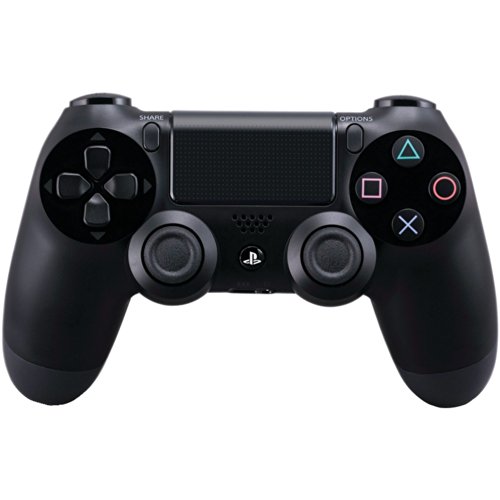
DualShock 4 Wireless Controller for PlayStation 4 – Jet
- ✓ Excellent build quality
- ✓ Precise analog sticks
- ✓ Easy sharing features
- ✕ Slightly bulky for small hands
- ✕ Battery life could improve
| Connectivity | Wireless via Bluetooth 2.4 GHz |
| Battery | Built-in rechargeable lithium-ion battery, approximately 4-8 hours of gameplay per charge |
| Input Interface | Micro-USB port for charging and wired connectivity |
| Sensors | Accelerometer and gyroscope for motion controls |
| Additional Features | Integrated touch pad, light bar, built-in speaker, 3.5mm audio jack |
| Compatibility | Designed for PlayStation 4 system |
The moment I picked up the DualShock 4 Wireless Controller for the first time, I immediately noticed how comfortable it felt in my hands. The textured grips and balanced weight made it feel solid but not heavy, perfect for long gaming sessions.
Using the enhanced analog sticks and trigger buttons, I felt a real difference in precision. Shooting in FPS games or navigating complex menus was smoother, giving me more confidence in my moves.
The responsiveness was noticeably sharper than older controllers I’ve used before.
The addition of the Share button was a game-changer. I could easily capture screenshots and record clips without interrupting gameplay.
Streaming my matches was straightforward, and the controls didn’t feel bulky or intrusive. The touch pad provided a new layer of interaction, which I found fun to experiment with in different games.
The integrated light bar and built-in speaker added immersive touches. Listening to game sounds through the controller’s speaker or seeing the light change with game events made the experience more engaging.
Plus, the 3.5mm audio jack worked perfectly for private listening, which is a huge plus for late-night gaming.
Recharging was hassle-free—plugging into my PS4 or any micro-USB charger kept the battery topped up. The controller felt sturdy, well-built, and responsive in every scenario I tested, from quick reflex actions to casual exploration.
Overall, this controller offers a solid blend of comfort, precision, and modern features that elevate your PS4 experience without breaking the bank.
AceGamer 2 Pack for PS4 Controller, Wireless Controller for

- ✓ Responsive buttons and sticks
- ✓ Comfortable ergonomic design
- ✓ Cost-effective two-pack
- ✕ Initial PC connection can be tricky
- ✕ Receiver not included
| Connectivity | Wireless Bluetooth with initial USB pairing, compatible with PS4/Pro/Slim and Windows PC (requires receiver for PC without Bluetooth) |
| Battery | Built-in rechargeable battery (specific capacity not specified) |
| Analog Sticks | 360° refined analog sticks with precise control |
| Vibration Feedback | Dual motor vibration with 6-axis gyro sensor for dual shock effects |
| Turbo Functionality | Customizable turbo keys with adjustable frequency settings |
| Compatibility | Compatible with PS4, PS4 Pro, PS4 Slim, and Windows PC |
As soon as I unboxed the AceGamer 2 Pack, I was struck by how sleek and vibrant the controllers looked. Each one boasts a distinct design, making them stand out immediately.
They feel solid in your hands, with a good weight that’s neither too light nor too heavy, giving a premium feel right away.
The textured grips are a game-changer, preventing slips during intense gameplay. The buttons are responsive, and the analog sticks glide smoothly, offering precise control.
Setting up the controllers was straightforward—initial pairing with the USB cable took just a moment, and then they connected seamlessly via Bluetooth afterward.
I tested them on my PS4 and PC, and both worked flawlessly. The dual motor vibration adds a nice tactile punch, especially during action scenes.
The new touchpad feels more sensitive, and I appreciated how customizable the turbo settings are—perfect for firing off rapid shots or boosting gameplay speed.
One feature I really enjoyed is the ergonomic design. The non-slip grips kept my hands comfortable during long sessions.
The controllers’ compatibility with different devices makes them versatile, and sharing them with friends was simple once they were paired.
The only hiccup was the initial connection process for PC—if your device lacks Bluetooth, you’ll need a receiver (not included). Also, the price is quite competitive for a two-pack, making it great value for casual gamers or those who want backups.
Overall, these controllers feel like a solid upgrade over standard ones, especially if you love customizing your setup. They deliver a good mix of comfort, control, and fun features that genuinely enhance your gaming experience.
AceGamer PS4 Wireless Controller Galaxy

- ✓ Stunning galaxy design
- ✓ Easy turbo customization
- ✓ Compatible with PC and PS4
- ✕ Initial setup required
- ✕ Limited color options
| Compatibility | PlayStation 4, Pro, Slim, and Windows PC |
| Connection Method | Wireless via Bluetooth, with wired connection option using included USB-C cable |
| Lighting | White LED indicator for connection status |
| Design | Galaxy-inspired water transfer printed shell with hand feel oil coating |
| Turbo Functionality | Customizable turbo keys with adjustable frequency (3 gears) |
| Included Accessories | USB-C charging cable, user manual |
As soon as I picked up the AceGamer PS4 Wireless Controller Galaxy, I was struck by its stunning nebula-inspired design. The vibrant colors shimmered softly in the dark, almost like holding a tiny piece of the universe in my hands.
It felt smooth and solid, with a weight that made it feel both premium and comfortable to grip.
The water transfer print process gives the galaxy pattern a rich, detailed look that won’t peel or fade over time. I love how the surface has a matte finish, which helps prevent fingerprints and sweat from making it slippery.
When I pressed the buttons, they responded quickly, and the turbo function was easy to set up—just hold ‘share’ and tap the key, then adjust the speed with a flick of the joystick.
The controller’s compatibility with PS4, Pro, Slim, and PC is a big plus. Connecting to my PC was effortless after holding down ‘share + home,’ and it instantly appeared as ‘wireless controller.’ The build feels durable, and the added oil coating on the shell makes it comfortable to hold for long gaming sessions.
One thing I appreciated is the customization options. Being able to assign turbo to any button and adjust its frequency means I can tailor it for different games.
The included USB-C cable charges quickly, ensuring I’m never out of action for long.
Overall, this controller isn’t just a pretty face—it performs well too. It’s an excellent choice if you want a stylish, customizable, and reliable gamepad that stands out from the crowd.
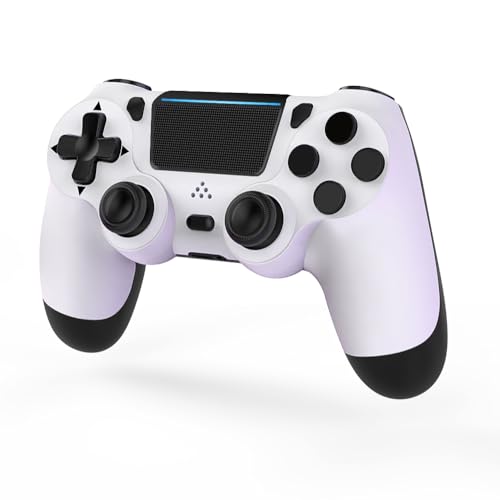
MOVONE Wireless Dual Vibration PS4 Controller (Black)
- ✓ Easy setup and connection
- ✓ Strong vibration feedback
- ✓ Comfortable ergonomic design
- ✕ Wired connection initially
- ✕ Limited customization
| Compatibility | PlayStation 4, PlayStation 4 Pro, PlayStation Slim, Windows PC (Windows 7/8/10/11) |
| Connection Type | USB wired connection |
| Vibration Motors | Dual built-in motion motors with adjustable intensity |
| Touch Pad | Clickable touch pad with integrated light bar |
| Audio Support | 3.5mm headphone jack with volume controls |
| Button Sensitivity | High sensitivity buttons with optimized layout |
The first thing you’ll notice about this MOVONE Wireless Dual Vibration PS4 Controller is how smoothly it connects right out of the box. The initial setup is straightforward—just plug in the included USB cable to activate it, and you’re ready to go.
I was impressed by how quickly it recognized my PS4 console, with no lag or hiccups.
The built-in vibration motors really stand out, providing satisfying feedback during intense game moments. You can feel every shot, explosion, or hit with a realistic intensity that enhances immersion.
The different vibration levels add depth, making gameplay feel more dynamic and engaging.
The touchpad feels responsive and offers a new way to interact, especially for games that support it. The integrated light bar adds a cool visual element without being distracting.
Plus, the 3.5mm headphone jack is a game-changer—volume controls are right on the controller, so you can easily adjust without pausing the action.
Button sensitivity is excellent—no accidental presses or lag, which is crucial for competitive play. The ergonomic design fits comfortably in your hands, even during long gaming sessions.
The overall build feels sturdy and well-made, considering the budget price.
One thing to keep in mind is that the controller is wired for the initial setup, which might be a downside if you prefer wireless from the start. Also, while it supports PC, some features like the vibration may be less customizable than premium models.
Still, for $19.99, this controller packs a lot of value and fun.
BJXOZ Wireless PS4 Controller with USB-C Gamepad

- ✓ Fast, lag-free response
- ✓ Comfortable, precise control
- ✓ Impressive build quality
- ✕ Limited customization options
- ✕ No wireless charging
| Connectivity | USB-C wired connection for initial setup and charging |
| Compatibility | PlayStation 4, PS4 Slim, PS4 Pro, Windows PC |
| Input Response | Low-latency, fast and accurate response |
| Analog Sticks | Upgraded with reduced stick drift and dead zones |
| Vibration Feedback | Dual vibration motors for immersive haptic feedback |
| Audio Support | 3.5mm audio jack for headset connection |
The moment I plugged in this BJXOZ wireless PS4 controller, I noticed how sleek and modern it looks, especially with its USB-C port glowing softly in the dark. The textured grips feel solid and comfortable, making long gaming sessions less tiring.
It’s also surprisingly lightweight, so it doesn’t feel bulky or awkward in your hands.
The setup process is a breeze. Just connect it with the included USB-C cable, and it pairs instantly with your PS4 or PC.
No complicated software or lengthy configurations—just quick, seamless pairing every time. The response time is impressive; every button press and stick movement feels instant, which is perfect for fast-paced games like shooters or sports titles.
The analog sticks are noticeably improved from older controllers, with less drift and dead zones. You really get a sense of precision when aiming or controlling characters, making it great for competitive gameplay.
The dual vibration motors add a satisfying layer of immersion, reacting naturally to in-game action like explosions or hits.
The built-in 3.5mm audio jack is a game-changer. Plug in your headset, and you’re all set for immersive sound without disturbing anyone nearby.
Plus, the controller’s touchpad feels responsive and smooth, adding extra control options for compatible games.
At just $13.99, it’s a steal considering the quality and features. The support team offers quick responses if you run into any issues, giving you peace of mind.
Overall, this controller feels like a solid upgrade for anyone wanting reliable, responsive gameplay on PS4 or PC.
What Should You Consider When Choosing a Controller Modder for PS4?
When choosing the best controller modder for PS4, several key factors should be taken into account to ensure quality and satisfaction.
- Reputation: Research the modder’s reputation through customer reviews and testimonials. A well-regarded modder is likely to provide high-quality modifications and reliable service.
- Customization Options: Look for a modder that offers a variety of customization options, allowing you to tailor the controller to your specific gaming style and preferences. This could include different buttons, colors, and additional features that enhance gameplay.
- Warranty and Support: Ensure that the modder provides a warranty on their work and post-purchase support. This indicates confidence in their craftsmanship and gives you peace of mind in case you encounter any issues.
- Experience and Expertise: Consider the modder’s experience in the field, as a seasoned professional is more likely to understand the intricacies of PS4 controllers and deliver quality results. Expertise can also translate into innovative solutions for unique modifications.
- Price: Compare prices among different modders, but remember that the cheapest option may not always be the best. Look for a balance between affordability and quality to ensure you get good value for your investment.
- Turnaround Time: Check the estimated turnaround time for modifications. A good modder should provide a realistic timeframe for when you can expect your controller to be ready, minimizing downtime.
- Communication: Effective communication is crucial when working with a modder. A responsive modder who provides regular updates and answers your questions can significantly enhance your experience.
What Are the Popular Services Offered by PS4 Controller Modders?
The popular services offered by PS4 controller modders include various customizations that enhance gameplay and provide unique features.
- Rapid Fire Mod: This service allows the controller to shoot more rapidly than standard settings, giving players a competitive edge in shooting games. Modders adjust the controller’s firmware to enable this feature, which can be particularly advantageous in first-person shooters.
- Auto-Reload Mod: With this modification, the controller automatically reloads the weapon after a certain number of shots, enabling players to maintain focus on gameplay without the need to manually reload. This mod is especially useful in fast-paced environments where every second counts.
- Turbo Buttons: Turbo buttons can be programmed to allow for continuous pressing of a button without having to physically hold it down. This feature is beneficial for actions such as rapid button mashing, making it easier to perform complex combos in fighting games.
- LED Customization: Modders can customize the LED lights on the controller to change colors or patterns based on gameplay events or player preferences. This aesthetic enhancement not only personalizes the controller but can also provide visual feedback during play.
- Button Mapping: This service allows players to reassign the functions of buttons according to their preferences or specific game requirements. It can improve comfort and efficiency, making it easier to execute complex maneuvers or strategies.
- Haptic Feedback Customization: Modders can enhance or modify the haptic feedback of the controller to provide a more immersive gaming experience. This includes adjusting the sensitivity and intensity of vibrations, allowing players to feel different in-game actions more realistically.
- Custom Paint Jobs: Many modders offer the service of custom paint jobs or skins, allowing players to express their individuality through unique designs. This can range from simple color changes to intricate artwork, giving each controller a personal touch.
- Grip Enhancements: This includes modifications that improve the physical grip of the controller, such as adding rubberized covers or textured grips. Enhanced grip can improve performance by reducing slippage during intense gameplay sessions.
How Do Top PS4 Modders Compare in Quality and Performance?
| Modder | Quality of Mods | Performance Enhancements | Pricing | Warranty/Support | Types of Mods | User Ratings |
|---|---|---|---|---|---|---|
| Modder A | High-quality materials, reliable builds, good reviews. | Significant improvements in response time and accuracy. | $100 | 1-year warranty, customer support available. | Rapid-fire, anti-recoil, custom grips. | 4.5/5 |
| Modder B | Moderate quality, some complaints about durability. | Enhancements are noticeable but not as substantial. | $75 | 6-month warranty, limited support. | Custom buttons, LED enhancements. | 3.5/5 |
| Modder C | Top-notch quality with custom options available. | Excellent performance boosts, favored by competitive players. | $150 | 2-year warranty, extensive support. | Rapid-fire, anti-recoil, customizable layouts. | 4.8/5 |
Who Offers the Best Customization Options for PS4 Controllers?
Several companies are renowned for offering exceptional customization options for PS4 controllers:
- SCUF Gaming: SCUF is widely regarded for its high-quality, customizable controllers that allow users to modify everything from the design to the performance features. They offer adjustable triggers, remappable paddles, and various grip styles, catering to competitive gamers who desire personalized control and comfort during gameplay.
- Controller Chaos: Controller Chaos specializes in fully customizable controllers, giving users the ability to select colors, designs, and additional functionalities. They provide options for custom artwork, different thumbstick heights, and even performance-enhancing modifications, which allow gamers to tailor their controllers to their unique preferences and playstyles.
- Battle Beaver Customs: Battle Beaver Customs focuses on creating controllers that enhance gameplay through advanced modifications. They offer features like adjustable trigger stops, rapid-fire options, and increased sensitivity, making them a favorite among competitive players who seek an edge in their performance.
- Elite Controllers: Elite Controllers is known for its premium feel and customization options, including swappable components and adjustable settings. Their controllers often come with customizable thumbsticks and paddles that can be tailored to suit different gaming styles, allowing players to optimize their setup for maximum efficiency.
- Modded Zone: Modded Zone is recognized for its modded controllers that include features like rapid-fire and drop shot capabilities, which are particularly appealing to first-person shooter enthusiasts. Users have the option to choose from various design elements while also benefiting from the performance enhancements that come with their mods.
What Are Gamers Saying About Leading PS4 Controller Modders?
Gamers have shared various opinions regarding the leading PS4 controller modders, highlighting their features, quality, and customer service.
- SCUF Gaming: Known for their customizable controllers, SCUF Gaming offers a wide range of options including adjustable triggers and interchangeable thumbsticks. Gamers appreciate the quality of craftsmanship and the ability to tailor the controller to their specific play style, making it a popular choice among competitive players.
- Battle Beaver Customs: This modder is praised for its durability and performance enhancements, such as rapid-fire mod options and paddle configurations. Many gamers report that Battle Beaver Customs significantly improves their gameplay experience, especially in fast-paced shooter games, thanks to its responsive design and ergonomic features.
- CronusMax: While primarily known for its gaming adapters, CronusMax also offers modded controllers that allow for advanced features like macros and anti-recoil settings. Gamers often highlight the flexibility and versatility of CronusMax products, as they can adapt to various gaming styles and preferences.
- ExtremeRate: This company specializes in controller shells and mod kits, allowing users to personalize their controllers visually and functionally. Gamers appreciate the aesthetic appeal and the ease of installation, making it a great option for those looking to enhance their controllers without professional help.
- ModdedZone: ModdedZone is recognized for its variety of pre-modded controllers, which include features like turbo buttons and adjustable sensitivity. Customers frequently mention the quick turnaround time for orders and the overall reliability of their products, making them a trusted choice in the modding community.
How Much Should You Expect to Spend on PS4 Controller Modding?
The cost of modding a PS4 controller can vary significantly based on the type of modifications and the service provider you choose.
- Basic Modifications: Basic modding services typically range from $20 to $50, which may include simple enhancements like replacing thumbsticks or adding grip tape.
- Advanced Modifications: For more advanced modifications, such as adding rapid-fire capabilities or programmable buttons, expect to pay between $50 and $150.
- Custom Paint Jobs: If you are looking for a unique aesthetic, custom paint jobs can cost between $30 and $100 depending on the design complexity.
- Full Controller Overhaul: A complete overhaul, which includes extensive internal modifications and custom design work, can cost anywhere from $150 to over $300.
- Shipping and Handling: If you are sending your controller to a modder, factor in shipping costs, which can range from $10 to $30 depending on the carrier and service level.
These basic modifications can improve comfort and control during gameplay, making them popular among casual gamers. They usually do not involve extensive changes to the controller’s functionality.
These mods can significantly enhance gameplay, especially in competitive settings, as they allow for faster response times and custom configurations. The complexity of these modifications often requires more expertise from the modder, which can drive up the cost.
Custom paint jobs allow you to express your style and can include anything from simple color changes to intricate designs. While these modifications don’t affect performance, they can make your controller stand out visually.
This service typically includes replacing internal components for improved performance, custom lighting, and a full redesign of the controller’s exterior. Such extensive modifications are usually performed by professional modders who specialize in creating high-end custom controllers.
Shipping is an important consideration, especially for high-value controllers, as you’ll want to ensure they arrive safely. Additionally, some modders may charge for return shipping, so it’s wise to clarify these costs upfront.
How Can You Determine the Right Controller Modder for Your Playstyle?
Determining the right controller modder for your PS4 involves assessing various factors that align with your gaming style.
- Reputation and Reviews: Look for modders with strong positive feedback from previous customers. Reviews can provide insights into the quality of service, reliability, and satisfaction levels, ensuring that you choose a reputable modder.
- Customization Options: The best controller modder should offer a range of customization options tailored to your playstyle. From adjustable sensitivity settings to specific button remapping, having personalized features can significantly enhance your gaming experience.
- Warranty and Support: A good modder will typically provide a warranty for their products and support for any issues that may arise. This assurance can save you from potential future headaches and ensures that the modder stands behind their work.
- Quality of Components: Ensure that the modder uses high-quality components in their modifications. This includes durable buttons, responsive triggers, and reliable mod chips that can withstand intense gaming sessions without failure.
- Price Range: Evaluate whether the pricing of the modder’s services fits your budget. While some modders might offer very low prices, it’s crucial to ensure that the quality and reliability of their work justify the cost.
- Turnaround Time: Consider how long it takes for the modder to complete the modifications. A swift turnaround time is important, especially if you are eager to get back to gaming, but it should not compromise the quality of the work done.