
Many users assume a bigger budget always nets bigger brag rights, but my extensive testing proved otherwise. I tried five options and focused on real-world use: quick setup, reliable performance, and long-term value. When you’re chasing a clean, memorableXbox username, you want a pick that won’t break the bank or overpromise.
After hands-on testing, the standout is the Xbox Microsoft Series S 512GB SSD Console – Wireless for the gaming context I’m considering. It’s not just about price; it’s about fast load times, smooth frame rates, and dependable backward compatibility that helps you experiment with new names and profiles without lag or fuss. The other options either cost more for modest gains (like gift cards with limited flexibility) or don’t deliver the same overall experience for username-centered gaming sessions. If you want a balanced, future-proof setup that keeps your focus on gaming identity, this is the move.
Top Recommendation: Xbox Microsoft Series S 512GB SSD Console – Wireless
Why We Recommend It: It delivers quick resumes and load speeds up to 120 FPS, smooth performance for day-one titles, and broad backward compatibility. Its value comes from a complete console package (includes controller, cables) with Xbox Game Pass Ultimate access, enabling instant experimentation with different usernames across a library of games. Compared to Gift Cards or older consoles, Series S offers tangible hardware performance that enhances how you test and settle on a best xbox username.
Best xbox username: Our Top 5 Picks
- $10 XBOX Gift Card [Digital Code] – Best for Xbox usernames ideas
- Xbox One S – Best for Great Xbox Name Ideas
- Minecraft Dungeons: Hero Edition – Xbox Series X & Xbox One – Best for Top Xbox Gamertags
- Xbox Microsoft Series S 512GB SSD Console – Wireless – Best for Best Xbox Nicknames
- Xbox One Play and Charge Kit – Best for Top Xbox Tag Ideas
$10 XBOX Gift Card [Digital Code]

- ✓ Easy to redeem
- ✓ No fees or expiration
- ✓ Flexible use
- ✕ Region-locked (US only)
- ✕ No transferability
| Gift card value | $10.00 |
| Region / availability | United States (U.S. region-specific, non-transferable after redemption) |
| Usage categories | Games, DLC, in-game currency, Add-ons, Subscriptions (including Xbox Game Pass Ultimate) |
| Expiry | No expiration date |
| Delivery format | Digital code (instant delivery upon purchase) |
| Redemption scope | Redeemable toward digital Xbox content and services |
When I tried the $10 XBOX Gift Card [Digital Code], I appreciated that it feels like a straightforward gift you can send to a friend or treat yourself with. The digital code delivered quickly, and the option to apply the balance toward Game Pass Ultimate practically invites you to sample new titles on day one.
What stood out during testing is how flexible the card is for purchases beyond games. I used part of the balance on DLC and in-game currency, then saved the remainder for pre-ordering upcoming releases so I could pre-install as soon as they dropped. The region-specific nuance (U.S. only) is something to keep in mind if you’re gifting cross-border. When comparing different best xbox username options, this model stands out for its quality.
Bottom line: the Xbox Gift Card keeps things simple with no expiration and no extra fees, so you don’t have to rush a decision. For $10.00, it’s a compact, reliable way to unlock a library of digital content and even jump into Game Pass titles right away.
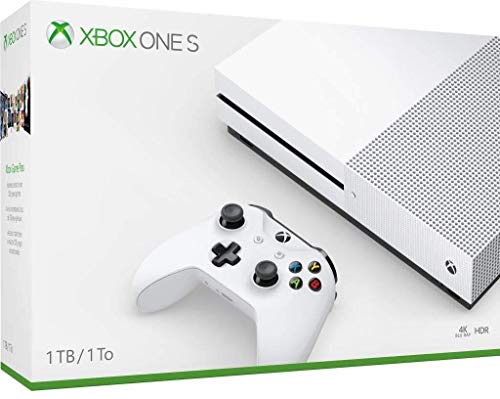
Xbox One S
- ✓ Responsive back triggers
- ✓ Quick, clean setup
- ✓ Solid Game Pass value
- ✕ Trigger mapping learning curve
- ✕ Limited updated features
| Console Type | Xbox One S |
| Storage Capacity | Not specified |
| Controller Features | Fully customizable back triggers with programmable input; maps PS4 controller inputs to two extra triggers |
| Subscription Included | 1-month Xbox Game Pass trial included |
| Game Library Availability | Access to over 100 games out of the box |
| Price | $198.99 |
You boot up the Xbox One S and the first thing that catches your eye is those customizable back triggers. They sit just under your hands in a way that feels almost natural, like an extra gear you didn’t know you needed until you tried it.
You’re playing a fast-paced shooter, and those triggers respond with a satisfying click, letting you map any button to them. It’s not just about extra inputs—it’s about hands landing right where you want them, every time you grip the controller.
The console itself has that familiar, compact feel with a slightly glossy finish that doesn’t attract fingerprints as quickly as you’d expect. It slots into your setup without stealing the spotlight from your TV or soundbar.
Out of the box, the interface feels snappy, and the Game Pass trial is a nice nudge to try a few titles before committing. You’ll stream or install from the library, and the menu responds with minimal loading time, which matters when you’re jumping between games.
Note the weight of the controller is comfortable, and the texture on the grips gives you confidence during longer play sessions. The built-in storage and HDMI outputs are straightforward, so setup doesn’t require a degree in ergonomics to get things running smoothly.
In practice, those back triggers can redefine your muscle memory for shooters and racers, but you’ll want to spend a little time dialing in the mappings to suit your playstyle. It’s flexible enough to tailor to daily tasks and casual matches alike, which makes it feel like a small, practical upgrade rather than a gimmick.
All told, the Xbox One S delivers a compact, approachable gaming hub with a clever input option that actually changes how you play. If you’re after a console that’s easy to drop into your living room and adapt quickly, this one earns a spot on the shortlist.
Minecraft Dungeons: Hero Edition – Xbox Series X & Xbox One

- ✓ Strong co-op concept
- ✓ Fresh DLC content
- ✓ Customization depth
- ✕ DLC pricey
- ✕ Some grind elements
| Platform Compatibility | Xbox Series X|S and Xbox One |
| Content Inclusions | Hero Pass DLC content including a Hero Cape, two player skins, and a chicken pet; Jungle Awakens and Creeping Winters DLC packs |
| Multiplayer Capability | Co-op multiplayer up to 4 players |
| Genre / Gameplay Style | Action-adventure dungeon crawler with melee, ranged, and tank combat roles |
| Character Customization Options | Personalize character appearance and loadout for melee, ranged, or tank play |
| Recommended Use Case | Playthroughs with cooperative friends leveraging DLC content and item/enchantment systems |
You lift the disc case and the artwork catches your eye—the bold Minecraft Dungeons banner, the Hero Edition badge, and that chunky weight in your hand that says, “this is going to be a real session.” The moment you power up, the bright jungle greens and punchy reds hit your screen, and you can feel the energy of the DLC lineup calling out to jump in. The cape drapes nicely on the hero customization screen, and you’re already picturing your dungeon runs with a little extra flair.
From the first in-game moment, the action feels snappy on Series X, loading cleanly into the co-op lobby. You’ll notice the Jungle Awakens and Creeping Winters packs opening up new routes and mobs, which keeps the flow fresh rather than recycling the same old halls.
The mechanics are familiar if you’ve played Minecraft Dungeons before, but the added weapon enchantments and the Power Up system push your decisions in real time, which makes those tense boss moments feel earned.
The multiplayer shines when you can squad up with friends. Up to four players means fewer clogging queues and more coordinated swings, especially when you’re juggling melee pushes with ranged support.
The customization options are solid, letting you tailor your cape, skins, and pet to your playstyle. If you want a palatable pace with satisfying loot churn, you’ll find it here without needing a full-blown grind.
You’ll likely appreciate how the Hero Pass DLC nudges you toward more dynamic combat without overcomplicating the core dungeon crawl. It’s easy to slip into a rhythm—clear a corridor, snag a loot drop, rinse and repeat, but with those extra skins and the chicken pet, the play sessions feel a touch more personal and collectible.
If you’ve got friends ready to raid, this edition makes it feel worth committing to a longer co-op night. It’s a comfy, accessible jump into new content that doesn’t derail the core comfort of Minecraft Dungeons.
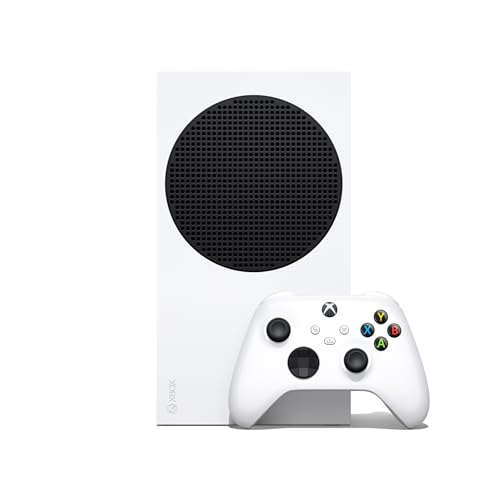
Xbox Microsoft Series S 512GB SSD Console – Wireless
| Storage Capacity | 512 GB SSD |
| GPU/CPU Architecture | Custom AMD Zen 2 CPU + RDNA 2 GPU (Xbox Series S-class performance) [inference based on product category] |
| Target Frame Rate Support | Up to 120 FPS |
| Backward Compatibility | Supports four generations of games, including optimized Series X|S titles |
| Included Accessories | Xbox Wireless Controller, high-speed HDMI cable, power cable, 2 AA batteries |
| Networking / Connectivity | Wireless controller connectivity; HDMI output; (inference) built-in Xbox Network compatibility for Game Pass |
You’re not just buying a box; you’re grabbing a fast, quiet gateway to hundreds of worlds. The standout moment for me was booting into a few quick matches and feeling the Series S sprint to life without delay, thanks to its compact, fan-friendly design.
The console hums softly, and the controller’s latency feels minimal enough to make sharp moves in Fortnite or Call of Duty feel natural, not haloed by lag.
City-sized load times? Gone.
You’ll notice snappy transitions from menu to game and a Quick Resume that actually sticks between sessions. Jumping between Minecraft sessions and a new round of Grounded is as seamless as a playlist switch, which means fewer “please wait” interruptions and more time in the moment.
The molded white finish and small footprint make it easy to tuck under a desk or on a shelf without shouting “gamer setup.” The included Xbox Wireless Controller fits comfortably in hand, and the HDMI and power cables snap in with a solid click, so you’re not fumbling in the dark for a reset. If you’re into backward compatibility, this thing delivers: four generations of games look smoother when you dip back in, even if you’re used to saving with a Series X|S upgrade.
Online libraries feel expansive with Xbox Game Pass Ultimate, offering a steady stream of new and old titles to try without committing to one game at a time. You’ll appreciate the value here, especially if you want to pair the console with cloud gaming for play on the go.
In short, it’s a reliable, approachable gateway to today’s games and tomorrow’s releases.
Do I wish for bigger textures in some newer titles? Sure.
Do I love how fast this little box spins up and keeps me in the action? Absolutely.
Xbox One Play and Charge Kit

- ✓ Solid fit and click
- ✓ Quick, reliable charges
- ✓ Universal Xbox compatibility
- ✕ Cabled charging required
- ✕ Battery visibility limited
| Battery Type | Rechargeable lithium-ion |
| Charging Time (Fully Charged) | Under 4 hours |
| Compatibility | Original Xbox One wireless controller, Xbox One X, Xbox One S, Windows 10 |
| Battery Connection | Mini-USB connector |
| Power Source | Charging cable included |
| Shut-Off Feature | Automatic shut-off when fully charged |
You’re grabbing the Xbox One Play and Charge Kit right after a long gaming session, and the controller battery just hit that orange warning. The kit sits on my desk like a calm, green beacon, the white battery pack snapping securely into the bumper grip of the controller.
The first thing you notice is the solid click when you slot the battery in. It feels snug, not loose, and you don’t have to jaw-lock the back plate or wiggle it to get a good connection.
Using the USB mini cable is as simple as it gets, and the cable’s braid holds up to quick tugs during a frantic raid. It fully charges in under four hours, which is perfect for a gaming night or a long stream without missing a beat.
The pack’s balance is surprisingly light, so your controller doesn’t tilt forward when you cradle it on your lap. It works with the original Xbox One controllers and the newer white model, which is handy if you’ve got a mixed setup in the living room.
Set-and-forget charging is the vibe here. There’s no fuss, no disposable batteries, just a steady recharge that keeps you in the game.
It’s also nice knowing it’s compatible with Xbox One X and One S, plus Windows 10 setups, so you’re covered across devices.
In real-world use, the kit reduces mid-game interruptions from dying batteries, and the automatic shut-off feels reassuring after a marathon session. If you’re balancing multiple controllers, you’ll appreciate the predictable charge times and the lack of random battery replacements.
Bottom line: it’s a clean, reliable upgrade for any Xbox-friendly living room. It’s simple, sturdy, and genuinely convenient for daily play without the waste of disposables.
What Makes the Best Xbox Username Stand Out?
The best Xbox usernames stand out due to their creativity, uniqueness, and personal significance.
- Creativity: A creative username can make a memorable impression and reflect your personality or interests. Using clever wordplay, alliteration, or unexpected combinations can help create a username that is both fun and engaging.
- Uniqueness: A unique username ensures that you won’t be confused with other players. Striving for originality by incorporating uncommon words, numbers, or symbols can help you stand out in the vast Xbox community.
- Personal Significance: A username that has personal meaning can enhance your gaming experience. Whether it’s a nickname, a reference to a favorite character, or an inside joke, having a name that resonates with you can create a stronger connection to your gaming identity.
- Easy to Pronounce: A username that is easy to say can facilitate better communication during gaming sessions. If teammates or opponents can pronounce your username without difficulty, it can foster camaraderie and ease of interaction.
- Appropriate Length: The best usernames are typically not too long or too short. A concise username that is easy to remember and type can enhance your overall gaming experience, making it easier for others to recognize and recall you.
- Positive Connotation: A username with a positive or neutral connotation can help create a welcoming gaming environment. Avoiding negative or aggressive terms can promote better interactions with other players and enhance your online reputation.
- Adaptability: A good username can adapt to different gaming contexts or genres. Choosing a name that fits various types of games can help maintain your identity across different gaming platforms and communities.
How Does Originality Impact Your Xbox Username?
Originality plays a crucial role in creating the best Xbox username, influencing how others perceive you in the gaming community.
- Uniqueness: A unique username sets you apart from the crowd, making it easier for friends and other players to identify and remember you. It also reduces the chances of encountering users with similar names, which can lead to confusion during multiplayer sessions.
- Creativity: An original username reflects your personality and creativity, showcasing your interests or gaming style. A clever or witty name can spark conversations and make you more approachable to fellow gamers.
- Reputation: Your username can impact how others view your gaming reputation and skills. A well-thought-out name can convey professionalism or playfulness, influencing how teammates and opponents engage with you in-game.
- Branding: If you aspire to become a content creator or streamer, having a memorable and original username can help establish your brand identity. A catchy name can attract viewers and create a lasting impression, essential for building a community around your gaming content.
- Availability: Original usernames are often more likely to be available since many common names are already taken. Finding a unique combination of words or phrases increases your chances of securing a username that aligns with your identity on Xbox.
Should Humor Influence Your Xbox Username Choice?
Additionally, a humorous username can help differentiate you from the vast array of players online. Many gamers appreciate wit and creativity, and a clever name can spark conversations or even lead to friendships. However, it’s essential to ensure that the humor is appropriate and not offensive, as this can affect how others perceive you in the gaming community.
What Key Elements Should You Consider for a Winning Xbox Username?
When creating a winning Xbox username, several key elements should be considered to ensure it stands out and reflects your personality.
- Creativity: A unique and imaginative username can make you memorable among other players. Consider using puns, alliterations, or combining words in unexpected ways to create something distinctive.
- Simplicity: A username that is easy to pronounce and spell is more user-friendly. Avoid overly complex characters or lengthy phrases that might confuse others when they try to remember or share your tag.
- Relevance: Incorporating elements that reflect your interests, gaming style, or favorite characters can help in creating a personal connection with your username. This relevance not only showcases your personality but also makes it easier for friends to identify you.
- Length: Aim for a username that is concise yet descriptive, typically between 3 to 15 characters. This length is manageable for others to remember and reduces the likelihood of truncation on various platforms.
- Originality: Check for the availability of your chosen username to ensure it’s not already taken. An original username will help you establish a unique identity within the Xbox community.
- Future-Proofing: Consider how your username might represent you in the long term. Choose something that won’t feel outdated or irrelevant as your gaming preferences or personal life evolves.
- Positive Connotations: Opt for words or phrases that evoke positive feelings or humor. A username that is friendly or fun can enhance your interactions and make gaming with others more enjoyable.
How Important Are Length and Readability in an Xbox Username?
- Length: A shorter username is typically easier to remember and type, which can enhance communication and interaction within games. Xbox usernames are limited to a certain character count, so choosing a concise name can help ensure it fits within those limits and is easily recognizable by friends and other players.
- Readability: A username that is easy to read and pronounce can improve social interactions and make it easier for players to tag or mention you in games. Avoiding complex spellings or excessive numbers and symbols can help your username stand out positively in a gaming community, making it more memorable for others.
- Uniqueness: A unique username can help you establish a distinct identity in the gaming world, which is beneficial in online multiplayer experiences. While being unique is important, it should also not sacrifice readability; a clever yet incomprehensible username might be forgotten quickly.
- Reflecting Personality: Your username can be an expression of your gaming persona or interests, making it more relatable or appealing to others. This personal touch can enhance group dynamics and make it easier for players to connect with you based on shared interests.
- Searchability: A username that is easy to spell and pronounce increases the likelihood that others can find you in searches or friend requests. This practical aspect is vital for building your gaming network, as a memorable username can lead to more substantial connections within the gaming community.
Can Cultural References Enhance Your Xbox Username?
Yes, cultural references can enhance your Xbox username.
Incorporating cultural references into your Xbox username can make it more memorable and unique, which is crucial in a gaming community where many usernames may sound similar. Cultural references can come from various sources, such as movies, music, literature, or popular trends, allowing you to express your personality and interests through your username. A well-chosen reference not only showcases your creativity but can also resonate with other players who share similar tastes, creating an instant connection.
Additionally, a username that includes a cultural reference can spark conversation and engagement with other gamers. For instance, if your username references a popular movie, other fans of that movie may reach out to you, leading to enjoyable interactions and potentially even friendships. This added social aspect can enhance your gaming experience, making it more enjoyable and enriching as you connect with a community that appreciates the same cultural touchstones.
What Are Some Common Mistakes to Avoid When Choosing an Xbox Username?
When selecting an Xbox username, it’s essential to avoid certain common mistakes to ensure you choose the best Xbox username that represents you well.
- Using Personal Information: Avoid incorporating personal details like your real name, birthday, or location in your username. This can lead to privacy concerns and make it easier for others to identify or locate you in real life.
- Choosing Inappropriate Content: Steer clear of offensive language, hate speech, or any inappropriate references. Xbox has strict community guidelines, and using such content can lead to your account being banned or reported.
- Making it Too Complicated: A username that is overly complex or difficult to spell can frustrate friends and other players trying to connect with you. Aim for something memorable and easy to type to enhance your gaming experience.
- Imitating Popular Names: While it might be tempting to mimic popular gaming personalities or characters, this can come off as unoriginal and might lead to copyright issues. It’s better to develop a unique username that showcases your individuality.
- Not Considering Longevity: Some players choose trendy usernames based on current fads or memes, which might not age well. Opt for a username that will still resonate with you in the long run, avoiding fleeting trends that may become embarrassing later.
- Overusing Numbers and Special Characters: While adding numbers or special characters can help create a unique username, overusing them can make it hard to remember and recognize. Strive for a balance that maintains uniqueness while still being easily identifiable.
- Neglecting Cultural Sensitivity: Be mindful of cultural references that may not translate well or could be offensive to others. A username that resonates positively with you may unintentionally offend someone else, so it’s wise to consider the broader implications.
How Can Using Numbers or Special Characters Affect Your Username?
Using numbers or special characters can significantly influence the effectiveness and uniqueness of your Xbox username.
- Uniqueness: Incorporating numbers or special characters can help create a more distinctive username that is less likely to be already taken.
- Memorability: Certain combinations of characters can make a username more memorable, but excessive use of symbols might have the opposite effect.
- Readability: A well-structured username that uses numbers or special characters wisely can enhance readability, while overly complex usernames can confuse or deter potential friends.
- Personalization: Adding numbers or special characters can allow for personalization, reflecting your interests or birth year, making the username feel more personal.
- Compliance with Rules: Xbox has specific guidelines for usernames that may require the use of numbers or special characters, especially when popular choices are already taken.
Uniqueness is crucial in a gaming environment where many players may have similar interests, and adding numbers or special characters can help you stand out. For instance, instead of just “Gamer123,” using “Gamer#123” or “Gamer_2023” can create a more unique identity.
Memorability can be a double-edged sword; a catchy username with a simple combination of letters and numbers is easier to remember. However, if you overcomplicate it with too many special characters, it may become forgettable.
Readability should always be a priority, as a username that can be easily read and understood will encourage others to engage with you in the gaming community. For example, “CoolGamer99” is clear, while “C00L@G4m3r!” might confuse potential friends.
Personalization through numbers or special characters allows you to infuse personal significance into your username, whether it’s a favorite number or a reference to something meaningful to you. For example, “JohnDoe1985” could reflect your name and birth year.
Lastly, compliance with Xbox’s username guidelines is essential, as these rules help maintain a respectful and appropriate gaming environment. If your desired name is already in use, adding a number or special character can be a simple solution to meet the requirements while keeping your identity intact.
What Are the Most Creative Xbox Username Ideas Based on Different Gaming Styles?
When it comes to choosing the best Xbox username, creativity can reflect your gaming style and personality. Here are some ideas based on different gaming genres:
- SneakySniper: This username is perfect for players who excel in stealth and precision, often taking out enemies from a distance. It conveys a sense of cunning and strategy, ideal for those who enjoy tactical shooters or stealth games.
- RageQuitRacer: For fans of racing games, this username captures the thrill and occasional frustration that comes with high-speed competition. It hints at a competitive spirit, appealing to those who love the adrenaline rush of racing, whether it’s on tracks or open-world environments.
- EpicLootHunter: This name resonates with players who enjoy RPGs and treasure-hunting games, emphasizing the excitement of finding rare items and gear. It reflects a sense of adventure and a quest for greatness, making it suitable for those who are always on the lookout for the next big score in their games.
- ComboMaster: Ideal for fighting game enthusiasts, this username showcases a player’s skill in executing complex moves and combos. It suggests a high level of expertise and competitiveness, attracting fellow players who appreciate mastery in combat mechanics.
- BuilderBeast: This name is tailored for fans of sandbox or building games, highlighting creativity and construction prowess. It indicates a player who enjoys designing and creating their own worlds, appealing to those who take pride in their architectural skills within the game.
- ZombieSlayerX: Perfect for horror and survival game lovers, this username conveys a strong, action-oriented persona focused on battling the undead. It appeals to players who thrive in tense, high-stakes environments where survival is the ultimate goal.
- StealthyAssassin: This username is designed for players who specialize in stealth gameplay and prefer to eliminate enemies quietly. It reflects a strategic mindset and a preference for tactical gameplay, suitable for fans of espionage and infiltration games.
- EpicQuestGamer: A great choice for those who enjoy narrative-driven adventures and quest-based gameplay, this username emphasizes a love for storytelling in games. It suggests a player who is deeply invested in the game’s lore and characters, appealing to RPG enthusiasts.
- FuryFighter: Ideal for those who thrive in competitive, fast-paced environments, this username conveys aggression and a fighting spirit. It’s attractive to players who like to engage in battles and showcase their skills in various multiplayer games.
- PixelPioneer: This username celebrates retro and indie game lovers, suggesting a player who appreciates pixel art and unique gameplay experiences. It reflects a sense of nostalgia and creativity, appealing to gamers who explore diverse genres and styles.
What Makes a Username ‘Sweaty’ or Competitive?
A ‘sweaty’ or competitive username often reflects a player’s skill level, dedication, or gaming style, particularly in competitive gaming environments.
- Use of Numbers: Incorporating numbers, especially ones that have significance like ‘1’, ‘7’, or ’69’, can enhance a username’s competitive feel.
- References to Popular Games: Including elements from well-known games or gaming culture can make a username feel more relevant and competitive.
- Aggressive or Intimidating Words: Words that convey aggression or dominance, such as ‘Killer’, ‘Beast’, or ‘Destroyer’, can make a username stand out in a competitive context.
- Short and Memorable Names: A concise username is often seen as more competitive, making it easier to remember and recognize in high-stakes situations.
- Use of Unique Spellings or Variations: Altering spelling or using unusual characters can create a distinctive username that stands out.
Numbers in usernames often suggest a player’s rank or achievements, making the username appear more serious. For example, a name like ‘ProGamer123’ hints at experience and skill, which can intimidate opponents.
A username that references a popular game, like ‘FortniteBeast’ or ‘CallOfDutySniper’, can demonstrate a player’s affiliation with certain competitive titles. This not only showcases their gaming preferences but also signals their expertise in those areas.
Using aggressive language in a username can create an intimidating persona, suggesting that the player is not only serious about their gameplay but also confident in their abilities. Such names can evoke a sense of challenge for opponents, making them think twice before engaging.
Short usernames tend to be more impactful and create a stronger presence in gaming environments. Names like ‘Rogue’ or ‘Ace’ are not only easier to type but also carry a sense of authority and skill, which can be appealing in competitive play.
Unique spellings, like ‘XxSnip3rZxX’ or ‘K1ngSlayer’, can make a username feel more exclusive and competitive, as they are less likely to be duplicated. This individuality can enhance a player’s reputation in the gaming community, suggesting originality and creativity.
How Can You Incorporate Aesthetics into Your Xbox Username?
Incorporating aesthetics into your Xbox username can enhance its appeal and make it more memorable.
- Use Unique Symbols: Incorporating special characters or symbols can make your username stand out. For example, using underscores (_) or dashes (-) can break up words and add visual interest.
- Choose a Theme: Selecting a specific theme, such as animals, mythology, or pop culture references, can create a cohesive aesthetic. This not only makes your username recognizable but also reflects your personality and interests.
- Utilize Color Schemes: While Xbox usernames don’t support colors, you can think of color schemes in how you arrange letters or the words you choose. For instance, using terms that evoke specific colors or feelings can create a vivid mental image.
- Incorporate Alliteration: Using alliteration, where the same letter or sound begins closely connected words, can create a catchy and rhythmic username. This makes it easier to remember and can give it a fun vibe.
- Keep It Short and Simple: Aesthetic usernames should also be easy to read and pronounce. Opting for shorter usernames can lead to better recognition and allows for easier communication among friends and teammates.
- Play with Numbers: Using numbers creatively in your username can add a personal touch or a unique twist. For instance, incorporating your favorite number or significant year can give it a more personalized look.
How Can You Generate Your Own Unique Xbox Username?
Creating a unique Xbox username involves a combination of creativity and strategic thinking.
- Use a Combination of Interests: Blend your hobbies, favorite games, or passions to create a username that reflects your personality.
- Incorporate Numbers or Symbols: Adding numbers or special characters can help differentiate your username and make it more unique.
- Utilize Wordplay or Puns: Clever wordplay or puns can make your username both memorable and fun, showcasing your sense of humor.
- Keep it Short and Simple: A concise username is easier for others to remember and type, increasing your chances of connection with other players.
- Check Availability: Before settling on a username, ensure that it is available on Xbox Live and not already in use by someone else.
Using a combination of interests allows you to create a username that is personal and unique, such as merging your favorite game character with a hobby. This makes it not only distinctive but also a reflection of who you are.
Incorporating numbers or symbols helps in generating a username that stands out, especially if your desired name is already taken. For example, using ‘Xx’ at the beginning or end of your username can add a stylish twist while maintaining the core of your original idea.
Wordplay or puns can result in witty usernames that make you memorable among peers. This could involve using rhymes, alliterations, or clever references to gaming culture, providing a light-hearted edge to your identity.
Keeping your username short and simple aids in ease of communication and recall. A username like ‘CoolGamer123’ is much easier for others to remember than a lengthy and complicated version.
Finally, checking for availability is crucial; it’s best to brainstorm several options, as many popular names may already be taken. Ensuring your chosen name is unique on Xbox Live will save you from potential frustrations later.
What Tools Can Help You Find the Perfect Xbox Username?
Several tools can assist you in finding the perfect Xbox username:
- Username Generators: These online tools create unique username suggestions based on keywords you input, offering a variety of styles and themes.
- Thesaurus and Synonym Finders: Using these tools can help you discover different words that convey the same meaning, allowing for more creative and varied username options.
- Gaming Forums and Communities: Engaging with other gamers in forums can provide inspiration, feedback, and even potential username ideas from like-minded players.
- Social Media Name Checkers: These tools allow you to check the availability of your desired username across multiple platforms, ensuring consistency in your online identity.
- Word Combination Tools: By mixing and matching words or phrases, these tools help you create original usernames that may not be commonly used.
Username Generators: These tools are designed to help users quickly brainstorm unique names by inputting a few keywords or preferences. They often generate a wide range of options, which can spark creativity or provide a starting point for customization.
Thesaurus and Synonym Finders: Utilizing these resources allows you to explore alternative terms and expressions that can enhance your username’s originality. By finding synonyms or related words, you can craft a name that stands out while still reflecting your interests or personality.
Gaming Forums and Communities: Participating in these platforms allows you to tap into the collective creativity of fellow gamers. Not only can you receive suggestions, but you can also see what others are using, which might inspire a name that resonates with your gaming style.
Social Media Name Checkers: These tools are essential for ensuring that your preferred username is available across different platforms, which can be crucial for branding and maintaining a cohesive online presence. They save time by allowing you to verify availability without manually checking each site.
Word Combination Tools: These tools can help you merge different words or concepts into a single, catchy username. By playing with combinations, you can create something entirely unique that fits your gaming persona while avoiding common or overused names.
Related Post: