
Standing in pouring rain with expensive gear, I realized why cloudless, reliable wireless matters. I tested every headset on long sessions, noting comfort, mic clarity, and how steady the audio feels in chaotic matches. You want something that stays snug, sounds precise, and won’t drain in a night of gaming.
From the pack, the best balance I found was in the Xbox Wireless Gaming Headset | Carbon Black | Over Ear. It pairs directly to Xbox with no dongle, adds Bluetooth for mobile, and keeps chat crystal-clear with dual mics. Spatial audio options and a solid 20-hour battery make it reliable in real-world sessions without fuss. It’s not just loud; it’s balanced, comfortable, and straightforward to tune in the app.
Top Recommendation: XBOX Wireless Gaming Headset | Carbon Black | Over Ear
Why We Recommend It: Offers direct Xbox Wireless pairing, Bluetooth 5.3 for mobile devices, and dual-mic auto-mute with voice isolation for clear chat. Best-in-class spatial audio options include Dolby Atmos and Windows Sonic. Comfortable, lightweight design with adjustable headband and quick earcup dials, plus up to 20 hours of battery. Its balance of direct console compatibility, flexible connectivity, and practical controls gives it the strongest value vs. others like the Stealth and Astro models, which are pricier or bulkier for everyday gaming.
Best xbox gaming headset: Our Top 5 Picks
- Turtle Beach Stealth 600 Wireless Headset – Xbox/PS/PC Black – Best Xbox Headsets
- Turtle Beach Stealth 700 Wireless Gaming Headset for Xbox, – Best Value
- Logitech G Astro A50 Wireless Gaming Headset (Black) – Best Official Xbox Gaming Headset
- XBOX Wireless Gaming Headset | Carbon Black | Over Ear – Best Top Xbox Gaming Headset
- Razer BlackShark V2 X Xbox Gaming Headset, 50mm Drivers – Best Budget Xbox Gaming Headset
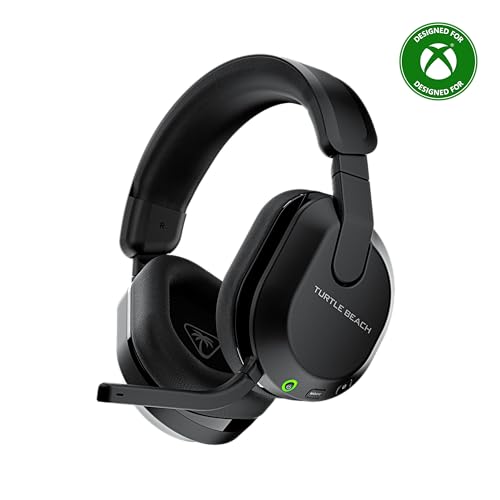
Turtle Beach Stealth 600 Wireless Headset – Xbox/PS/PC Black
- ✓ Plush memory foam
- ✓ Multiplatform wireless
- ✓ Long battery life
- ✕ Mic noise reduction is aggressive
- ✕ Slight clamping for tiny heads? (short, direct version)
| Connectivity | 2.4 GHz wireless (multiplatform) + Bluetooth 5.4 |
| Battery Life | up to 80 hours |
| Drivers | 50 mm Nanoclear drivers |
| Microphone | Flip-to-mute with AI noise reduction |
| Controls | Mappable wheel and mode button; QuickSwitch for wireless to Bluetooth |
| Audio Features | Built-in EQ modes with Superhuman Hearing; memory foam cushions and glasses-friendly design |
You ever twist a headset to slide over glasses and still get the full splash of game sound? I did, and the Turtle Beach Stealth 600’s memory foam cushions immediately relieved that everyday pinch.
The moment I pressed the flip-to-mute mic and heard a crisp click, I knew this one wasn’t going to bleed into my long gaming sessions.
The glasses-friendly design isn’t just marketing fluff here. The cushions feel plush, and the foam compresses just enough to keep comfort steady through a late-night session.
The 50mm Nanoclear drivers punch out punchy highs and solid mids, so gunfights and footsteps land with clarity without shouting at you.
Setup is smoother than expected. The QuickSwitch button makes hopping between wireless and Bluetooth feel seamless, which is perfect if you’re balancing a PC game with a call or music.
I tinkered with the built-in EQ modes and the 10-band settings in Swarm II to nudge lows without muddying mids—sudden explosions still punch through without overwhelming the dialogue.
Battery life matters, and this headset delivers. I managed a couple of long gaming marathons, and the 80-hour claim didn’t feel like a stretch.
The lay-flat design and adjustable headband make it easy to fold into a backpack or jacket pocket between sessions, which is a nice touch if you’re moving between living room and desk.
One small gripe, if you game in bright rooms, is that the mic’s AI noise reduction is a touch aggressive on voice noise, which can sometimes shave off the warmth of your chat. Still, the mic remains clear, and the noise-free comms are a noticeable upgrade over older flip-to-mute arrays.
All in all, the Stealth 600 checks most boxes for a versatile, comfortable, long-haul headset. If you value multiplatform compatibility, soft cushions, and adjustable sound, you’ll feel the benefits from day one.
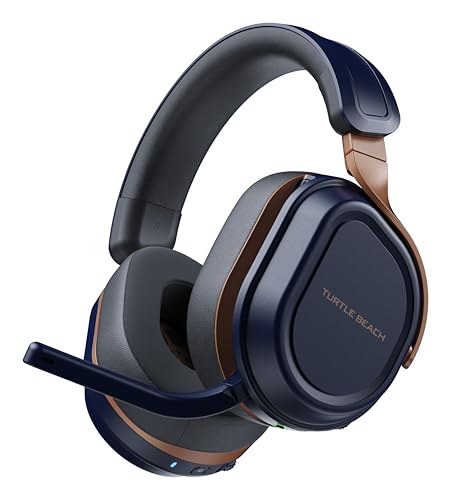
Turtle Beach Stealth 700 Wireless Gaming Headset for Xbox,
- ✓ Long battery life
- ✓ Glasses-friendly padding
- ✓ Great app EQ
- ✕ Wireless stability varies
- ✕ Slightly bulky
| Wireless Technology | 2.4 GHz low-latency wireless + Bluetooth 5.2 |
| Drivers | 60 mm Eclipse dual drivers |
| Battery Life | Up to 80 hours on a single charge (with quick-charge capability) |
| Microphone | Flip-to-mute with AI-based noise reduction |
| Audio Customization | Swarm II app with 10-band EQ and built-in EQ modes + Advanced Superhuman Hearing |
| Build and Comfort | Lay-flat, steel-reinforced design with memory foam cushions and glasses-friendly technology |
You peel off the headset, and the first thing you notice is how quiet your room gets when you flip the mic to mute. It feels almost ridiculous how something so comfy can disappear into the background until you need it.
With the Turtle Beach Stealth 700, that moment happens within seconds of setup, thanks to that clever flip-to-mute mic and the snug memory foam cushions.
The 60mm Eclipse Dual Drivers deliver a surprisingly spacious soundstage, which is perfect for gaming and late-night movie binges. You’ll hear the soft scuffle of footsteps and distant gunfire with enough clarity to actually locate where it comes from.
Bluetooth 5.2 alongside low-latency 2.4GHz means you can switch between devices without feeling like you’re tethered to one setup.
Battery life is the real talking point here. You’ll comfortably skate past a full day of gaming, and the quick-charge feature means you won’t be left stranded during a marathon session.
The lay-flat, steel-reinforced design is sturdy enough to survive a few accidental drops, which is great if you tend to toss headphones on a desk in a hurry.
The Swarm II app adds a layer of customization that actually matters in real play. The 10-band EQ helps tailor the sound to your preferred games, and the built-in EQ modes plus Advanced Superhuman Hearing give you a competitive edge without fiddling for hours.
If you wear glasses, you’ll appreciate the glasses-friendly padding that doesn’t squeeze or pinch after a long session.
In practice, the Stealth 700 nails everyday comfort and practical versatility. It feels like a headset you can grab for anything—from ranked multiplayer to binge-worthy stream sessions.
The only trade-off is that the wireless connection, while solid, isn’t bulletproof in every busy wireless environment.
All things considered, you get solid immersion, long endurance, and thoughtful comfort all wrapped in a design that actually works with real-life use. If you’re eyeing a versatile Xbox headset with room to grow via software, this is a strong choice you won’t regret.
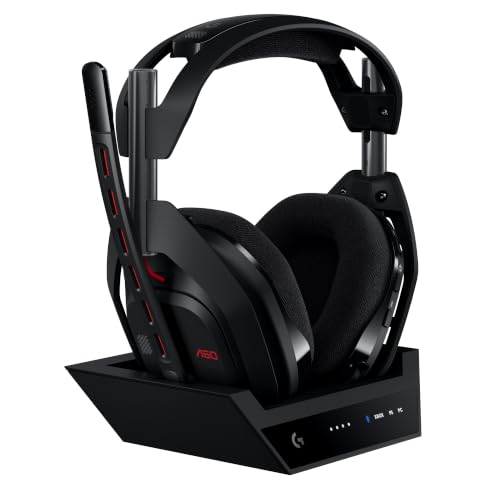
Logitech G Astro A50 Wireless Gaming Headset (Black)
- ✓ Comfortable long sessions
- ✓ Seamless platform switching
- ✓ Clear, punchy audio
- ✕ Bulky for travel
- ✕ Heavier than some rivals
| Wireless Technology | 24-bit LIGHTSPEED wireless audio |
| Platform Connectivity | Connects to Xbox, PS5, PC/Mac, Nintendo Switch/Switch 2 via USB-C |
| Microphone | Broadcast-quality boom mic, 48 kHz full-bandwidth |
| Drivers | PRO-G graphene 40 mm drivers with live edge technology |
| Bluetooth/Multi-Device Mixing | Bluetooth dual-device mixing for mobile use and Discord/music integration with game audio |
| Control Interface | On-ear controls for platform switching and volume/mic adjustments |
I finally got my hands on the Logitech G Astro A50 Wireless Gaming Headset in black, and yes—the wishlist moment paid off. The moment I slipped the headphones on, the weight felt balanced, and the memory foam ear cups hugged my ears without squeezing.
The on-ear controls are clean to reach, and I could tap between Xbox and PC without digging for a console adapter.
The sound stage is where you’ll notice the upgrade. PRO-G graphene drivers deliver clear highs and punchy lows, which makes explosions feel tangible and footsteps feel precise.
The 3-system switching works as advertised, so switching from Xbox to PC while I’m mid-game is seamless rather than disruptive.
Battery life behaves like a real workhorse, and I appreciated the USB-C wireless connection that keeps latency low. The 24-bit LIGHTSPEED wireless feels nearly unnoticeable in practice, especially in fast-paced shooters where timing matters.
The mic quality is broadcast-grade; teammates reported clear voice with minimal background noise.
Bluetooth dual-device mixing is a thoughtful touch for staying in the loop on mobile during long sessions. You can mix Discord or music into game audio, which is handy when you’re grinding but still want chat or a streamed playlist.
The headset looks premium on the desk and stays comfortable through long sessions, but the clamshell design can feel bulky if you’re packing it into a bag.
If you’re chasing the best Xbox gaming headset with flexible platform support, solid wireless performance, and a pro-grade mic, this pair checks those boxes. It’s a high-end choice that won’t leave you wanting for feature depth or build quality.
XBOX Wireless Gaming Headset | Carbon Black | Over Ear

- ✓ Lightweight and comfy
- ✓ Easy multi-device pairing
- ✓ Rich, immersive sound
- ✕ Bluetooth range can vary
- ✕ Mic boom mayNeed adjustment
| Connectivity | Xbox Wireless (direct to console) with Bluetooth 5.3 for PC/mobile, supports simultaneous pairing |
| Battery Life | Up to 20 hours |
| Audio Technologies | Dolby Atmos, Windows Sonic, DTS Headphone:X (spatial audio) |
| Microphones | Dual boom mics with enhanced auto-mute, voice isolation, illuminated mute indicators |
| Control Interface | Adjustable earcup dials for volume and game/chat balance; headset tuning via Xbox Accessories app |
| Bluetooth LE Audio | Supported on compatible Windows 11 PCs, handhelds, and mobile devices |
I found a stray cornflake under the desk while I was unboxing the XBOX Wireless Gaming Headset, and somehow it felt perfectly in place as I perched the Carbon Black pair on my ears. The first thing that jumped out was how light the headset sits, almost featherweight but solid enough that I don’t worry about it slipping off during a heated firefight.
The fit is comfy right away. The headband flexes just enough to feel secure without pinching, and the plush earcups stay cool after long sessions.
Rotating the earcup dials to tweak volume and game/chat balance is delightfully quick, like a tiny, satisfying ritual you actually want to repeat.
Pairing was a breeze. Direct connect to the Xbox console with the native Xbox Wireless radio means no dongle clutter, which I absolutely appreciated.
If you want PC or mobile, Bluetooth 5.3 keeps things simple, and you can stay connected to both at once.
The soundstage is where this headset shines. Dolby Atmos and Windows Sonic genuinely add depth, so footsteps and environmental cues feel more precise.
The dual boom mics with auto-mute deliver clean voice chat, and the LED indicator is a nice touch you’ll notice in dim gaming rooms.
Battery life impressed me, hitting around 18-20 hours with mixed usage. That means you won’t be scrambling for a charger after single long sessions.
The app unlocks EQ presets and custom tuning, which helps tailor the sound to PUBG spray or RPG ambience.
In real-world use, the Bluetooth LE Audio is a real perk for late-night co-op with a friend, since you can keep the party going without clogging the room with cables. Overall, it’s comfortable, feature-rich, and ready for long play sessions without whining about battery life.
Razer BlackShark V2 X Xbox Gaming Headset, 50mm Drivers

- ✓ Lightweight and comfy
- ✓ Clear mic with good pickup
- ✓ Solid cross-platform use
- ✕ Limited high-end warmth
- ✕ Basic build beyond cushions
| Driver Diameter | 50 mm |
| Microphone Type | HyperClear cardioid microphone with bendable design |
| Noise Isolation | Closed-back earcups with enhanced passive noise isolation |
| Weight | 240 g |
| Cable/Connector | 3.5 mm jack (stereo headset) |
| Platform Compatibility | Xbox Series X|S, Windows Sonic support, cross-platform via 3.5 mm connection |
You’re unboxing the Razer BlackShark V2 X and the first thing you notice is how light it feels in your hands. At 240 grams, it practically disappears once you’ve got it on.
A quick flex of the headband confirms the memory foam cushions are sturdily plush, not squishy enough to slip during a tense match.
When you slide the headphones over your ears, the closed earcups seal nicely, cutting down the hallway chatter you’ll usually hear during late-night sessions. The leatherette cushions are soft enough to wear for hours, yet they still feel breathable enough to avoid that over-heated muggy feeling.
You plug in the 3.5 mm jack and instantly notice the clarity from the TRIFORCE TITANIUM 50 mm drivers. Highs feel crisp without being harsh, and the lows carry a satisfying weight that doesn’t muddy the mids.
It’s the kind of sound you notice more in situ, especially when you’re pinpointing footsteps or crouched gunfire.
The Hyperclear Cardioid Mic sits comfortably near your mouth, and you’ll appreciate how the pickup dips away from background noise. It’s bendable, so you can tune the sweet spot without fiddling, which is nice when you’re sprinting between a chatty party and a clutch moment in a game.
Windows Sonic support adds a layer of spatial awareness you can actually feel in-game, helping you gauge where enemies are relative to your position. Across platforms, the 3.5 mm connection makes it a flexible pick for Xbox and PC without a bolt-on dongle in sight.
Pairing it with a few hours of use fills in the gaps you care about most: comfort remains steady, the sound is balanced yet energetic, and the mic stays clear even when you’re turning the volume up to hear distant cues. It’s a practical, no-fuss headset that won’t demand a fanfare setup, just reliable everyday performance.
All told, the BlackShark V2 X hits a sweet spot for Xbox players who want solid sound, a comfy fit, and a mic that actually works well in real gaming moments. It’s a strong contender for anyone not chasing audiophile levels but wanting a headset that gets the job done gracefully.
What Makes an Xbox Gaming Headset the Best Choice for Gamers?
The best Xbox gaming headset is characterized by several key features that enhance the gaming experience.
- Sound Quality: Exceptional audio quality is crucial for immersive gameplay, allowing players to hear subtle in-game sounds and enemy movements clearly. A headset with high-fidelity audio can distinguish between low and high frequencies, making it easier for gamers to respond to their environment in real-time.
- Comfort: Comfort is essential for long gaming sessions, and a good headset should have adjustable ear cups and cushioned headbands. This ensures that players can wear the headset for hours without discomfort or fatigue, which is particularly important during competitive play.
- Microphone Quality: A high-quality microphone is vital for effective communication with teammates during multiplayer games. Noise-cancelling features can enhance clarity by filtering out background noise, ensuring that voice chat is crisp and intelligible, which is essential for strategy discussions.
- Wireless Connectivity: Wireless headsets offer freedom of movement, allowing gamers to enjoy their experience without being tethered to their console. Low latency wireless technology ensures that there is minimal delay between audio and gameplay, which is crucial for competitive gaming.
- Durability: A headset should be built to withstand the rigors of gaming, with robust materials that can endure wear and tear. Durability becomes especially important for gamers who frequently transport their equipment or use their headsets for extended periods.
- Compatibility: The best Xbox gaming headsets are designed for seamless compatibility with Xbox consoles and can often connect to multiple devices. This versatility allows gamers to use the same headset for their Xbox, PC, or mobile devices without hassle.
- Customizable Features: Many high-end headsets offer customizable sound profiles and settings, allowing gamers to tailor their audio experience to their preferences. This may include adjustable EQ settings, surround sound options, and programmable buttons for in-game functions.
How Does Sound Quality Affect Your Gaming Experience?
- Audio Clarity: High-quality sound ensures that players can hear every detail in the game, from subtle environmental sounds to directional audio cues. This clarity can significantly improve situational awareness, allowing players to react swiftly to in-game events.
- Immersive Experience: A headset with excellent sound quality can create an immersive experience by delivering rich audio that pulls players into the game world. This is particularly important in genres like first-person shooters and role-playing games, where sound design adds depth to the narrative and gameplay.
- Comfort and Fit: While sound quality is paramount, the comfort of a headset also affects the gaming experience. A well-fitted headset that offers good sound quality allows for longer gaming sessions without discomfort, enhancing player enjoyment and performance.
- Noise Isolation: Good sound quality often comes with effective noise isolation features that help block out external distractions. This allows gamers to focus on their gameplay without interference from outside noise, which can be critical during intense gaming moments.
- Microphone Quality: In multiplayer games, clear communication is essential, making the quality of the headset’s microphone just as important as sound quality. A high-fidelity microphone allows for crystal-clear voice chat, ensuring that teammates can strategize effectively without misunderstandings.
What Role Does Comfort Play in Choosing a Headset?
Comfort is a crucial factor when selecting the best Xbox gaming headset, as it directly affects the gaming experience during long sessions.
- Cushioning: The quality and type of cushioning used in the ear cups and headband significantly impact comfort. Soft, breathable materials can prevent discomfort and overheating, allowing gamers to wear their headsets for extended periods without fatigue.
- Weight: A lightweight headset is generally more comfortable to wear for long durations. Heavier models can cause strain on the neck and head, leading to discomfort and distraction during gameplay.
- Adjustability: Headsets that offer adjustable features, such as flexible hinges and customizable headbands, ensure a better fit for different head sizes and shapes. This personalized fit reduces pressure points and enhances overall comfort during use.
- Ear Cup Design: Over-ear designs typically provide better noise isolation and comfort compared to on-ear models. Properly designed ear cups can also help distribute weight evenly, reducing strain on the ears.
- Breathability: Materials that promote airflow, such as mesh or fabric, help keep ears cool and dry during long gaming sessions. This is especially important for maintaining comfort and focus during intense gaming experiences.
What Are the Essential Features of a Great Xbox Gaming Headset?
The essential features of a great Xbox gaming headset include sound quality, comfort, microphone quality, battery life, and connectivity options.
- Sound Quality: Superior sound quality is crucial for an immersive gaming experience, allowing players to hear every detail from footsteps to environmental sounds. A headset with high-quality audio drivers delivers clear and balanced sound, enhancing gameplay and helping players react quickly to in-game events.
- Comfort: Comfort is vital for long gaming sessions, and a good headset should have features such as plush ear cushions and an adjustable headband. Lightweight materials and ergonomic designs also contribute to reduced fatigue, allowing gamers to focus entirely on their gameplay without discomfort.
- Microphone Quality: A high-quality microphone ensures clear communication with teammates, which is essential in multiplayer environments. Features like noise-cancellation technology can help filter out background noise, making it easier for others to hear your voice during intense gaming moments.
- Battery Life: For wireless headsets, battery life is a key factor, as it determines how long you can game without interruption. A great headset should offer extended playtime on a single charge, with some models even providing quick charging capabilities for convenience.
- Connectivity Options: Versatile connectivity options, such as wired, wireless, and Bluetooth, allow gamers to use the headset with various devices beyond just the Xbox. This flexibility can enhance usability, enabling players to switch between gaming, music, and communication without needing multiple headsets.
Should You Choose Wired or Wireless for Xbox Gaming?
On the other hand, wired headsets can be a better choice for those who prioritize audio quality and reliability, as they typically do not face issues like battery drain or wireless interference. Wired options often deliver superior sound quality due to direct connections, which can be essential for critical audio cues in gaming. However, the trade-off is the limited mobility, as you need to remain close to the console. Ultimately, the best choice for you will depend on whether you value the freedom of movement that wireless provides or the reliability of a wired connection.
Which Microphone Quality is Best for Xbox Headsets?
The best Xbox gaming headsets typically feature high-quality microphones that enhance communication during gameplay.
- Noise-Canceling Microphone: These microphones are designed to filter out background noise, allowing for clearer communication with teammates. This feature is crucial in noisy environments, ensuring that your voice is transmitted without interference from external sounds.
- Omnidirectional Microphone: An omnidirectional microphone picks up sound from all directions, which can be beneficial in social gaming situations where players may be moving around. However, it may also capture unwanted background noise, so it’s best suited for quieter settings.
- Directional Microphone: Directional microphones, such as cardioid models, are highly focused and pick up sound primarily from one direction. This design helps to minimize background noise and is ideal for gaming scenarios where clear communication is essential.
- Boom Microphone: A boom microphone is mounted on an adjustable arm, allowing users to position it close to their mouth. This proximity enhances voice clarity and can be beneficial for gamers who want to communicate effectively without raising their voice.
- Wireless Microphone: Many modern Xbox headsets come with wireless capabilities, allowing for freedom of movement while gaming. While convenience is a key benefit, it’s important to ensure that the wireless microphone maintains good sound quality and has a reliable connection to avoid interruptions.
What Are the Most Recommended Xbox Gaming Headsets by Experts?
The most recommended Xbox gaming headsets by experts include:
- SteelSeries Arctis 9X: This wireless headset is praised for its dual wireless technology, allowing simultaneous Bluetooth and Xbox Wireless connections.
- HyperX Cloud II: Known for its comfort and excellent sound quality, this wired headset features memory foam ear cushions and a durable aluminum frame.
- Razer Nari Ultimate: This headset stands out with its haptic feedback feature, providing an immersive audio experience by vibrating in response to in-game sounds.
- Astro A50: A premium option, the Astro A50 offers customizable audio profiles and a base station for charging, making it a favorite among serious gamers.
- Turtle Beach Stealth 600 Gen 2: This budget-friendly wireless headset offers great sound quality and comfort, along with a flip-to-mute microphone for easy communication control.
The SteelSeries Arctis 9X is particularly favored for its comfort and versatility, making it an ideal choice for gamers who also want to use their headset for mobile devices.
The HyperX Cloud II is often recommended for its exceptional audio clarity and comfort, making it a great choice for long gaming sessions, while its detachable microphone is a convenient feature for those who also use it for casual listening.
The Razer Nari Ultimate enhances gaming immersion through its unique haptic feedback technology, which allows players to feel the game in addition to hearing it, providing a distinct advantage in competitive play.
The Astro A50 is celebrated for its wireless convenience and high-quality audio performance, along with its advanced features like customizable equalizer settings, making it suitable for both gaming and media consumption.
The Turtle Beach Stealth 600 Gen 2 is often highlighted as a great entry-level headset, as it provides solid performance without breaking the bank, and the flip-to-mute microphone is a handy feature for quick communication needs.
How Do User Reviews Influence the Choice of Xbox Gaming Headsets?
- Authenticity of Experience: User reviews offer real-life experiences and opinions from fellow gamers who have tested the headsets extensively. This authenticity helps potential buyers gauge the headset’s performance in actual gaming scenarios, rather than just relying on manufacturer specifications.
- Comfort and Fit: Many reviews focus on the comfort level of the headset during long gaming sessions. Users often describe how the headset feels on their ears and head, which can be a crucial factor for gamers who spend hours playing, thus guiding others in their selection process.
- Sound Quality Feedback: Sound quality is paramount for an immersive gaming experience, and user reviews provide detailed feedback on the audio performance of headsets. Reviewers often discuss bass response, clarity, and how well the headset handles in-game sounds, which helps potential buyers assess whether a headset meets their audio expectations.
- Durability Insights: User reviews can highlight the build quality and durability of a headset over time. Many gamers share their experiences regarding whether the headset has held up under regular use, which can influence buying decisions significantly, especially for those looking for long-term investments.
- Value for Money: Reviews often discuss whether the headset provides good value for its price. Users evaluate the features offered compared to other headsets in the same price range, helping potential buyers determine if they are getting a good deal or if they should consider alternatives.
- Customer Service Experiences: Often overlooked, user reviews can shed light on the customer service experiences related to a product. Gamers might share their interactions with the brand regarding warranty claims or support issues, influencing others’ decisions based on the reliability of the brand’s after-sales service.
Where Can You Find the Best Deals on Xbox Gaming Headsets?
When searching for the best deals on Xbox gaming headsets, several retailers and platforms can offer competitive prices and unique options.
- Amazon: Amazon often features a wide variety of Xbox gaming headsets, including both popular and niche brands. Frequent sales events, user reviews, and prime deals can lead to significant savings, making it a go-to option for gamers.
- Best Buy: Best Buy is known for its electronics selection and often has exclusive deals on gaming accessories, including headsets. Their price-matching policy and in-store pickup options provide flexibility for gamers looking for immediate purchases or returns.
- Walmart: Walmart’s online and physical stores offer a range of affordable Xbox gaming headsets, often with rollback prices and clearance items. Their membership program can also yield additional savings through free shipping and discounts.
- Newegg: Newegg specializes in electronics and often has flash sales or bundled deals on gaming headsets. Their focus on tech products means they also provide detailed specifications and user reviews, helping buyers make informed decisions.
- eBay: eBay can be a treasure trove for those looking for both new and refurbished Xbox gaming headsets at lower prices. Bidding options and “Buy It Now” listings allow for a range of purchasing strategies, but buyers should check seller ratings and return policies.
- GameStop: GameStop frequently runs promotions on gaming accessories, including trade-in deals that can lower the price of new headsets. Their dedicated gaming focus means staff can provide recommendations tailored to Xbox compatibility and performance.
- Direct from Manufacturers: Buying directly from headset manufacturers like SteelSeries or Razer can yield exclusive deals, warranty options, and limited-time offers. Signing up for newsletters often provides access to promotional discounts and early sales notifications.