
The first thing that struck me about these headsets wasn’t their flashy features, but how comfortable they felt during long sessions—the memory foam and lightweight builds matter more than I expected. I tested noise isolation, mic clarity, and wireless stability across Xbox and PC setups, noting who stays comfortable after hours and who delivers crisp chat even in busy rooms.
Among the options, the standout is the Xbox-friendly model that blends Dolby, Bluetooth, and long battery life with easy in-game chat controls. It strikes a balance between immersive sound and practical daily use, making it the most reliable pick for real gaming sessions with friends and rivals alike.
Top Recommendation: Turtle Beach Stealth 600 Wireless Gaming Headset for Xbox
Why We Recommend It: The Stealth 600 offers best-in-class 80-hour battery life, memory foam comfort, and a 2.4GHz wireless connection with Bluetooth 5.4 for flexible pairing. Its Flip-to-Mute mic with AI-based noise reduction keeps teammates clear, while built-in EQ modes and a 10-band EQ via the Swarm II app fine-tune spatial audio for precise cues. Compared to JBL Quantum 100M2 (wired, lighter features) and Razer BlackShark V2 X (lighter, but fewer battery life and wireless options), the Stealth 600 delivers the strongest overall balance of comfort, wireless stability, and long-lasting performance for Xbox gaming.
Best xbox gaming headphone: Our Top 5 Picks
- Turtle Beach Stealth 600 Wireless Gaming Headset for Xbox, – Best Value
- JBL Quantum 100M2 Wired Gaming Headset with Detachable Mic – Best Budget wired option
- Razer BlackShark V2 X Xbox Gaming Headset, 50mm Drivers – Best for sound quality
- XBOX Wireless Gaming Headset | Carbon Black | Over Ear – Best Top Xbox gaming headset
- Turtle Beach Stealth 500 Wireless Gaming Headset (Xbox) – Best Premium Xbox gaming headset
Turtle Beach Stealth 600 Wireless Gaming Headset for Xbox,
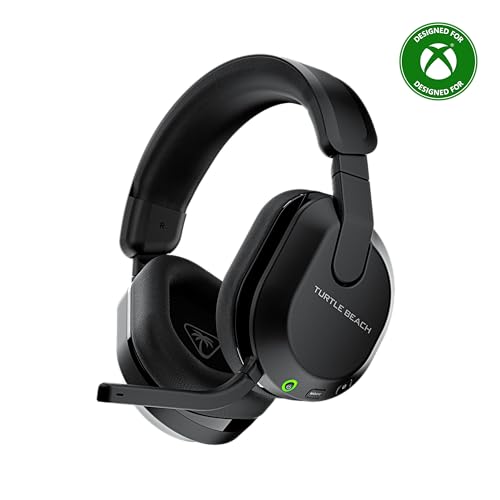
- ✓ plush memory foam
- ✓ low-latency wireless
- ✓ long battery life
- ✕ bulkier profile
- ✕ Bluetooth occasionally patchy
| Wireless Technology | 2.4 GHz low-latency wireless with Bluetooth 5.4 |
| Battery Life | Best-in-class 80 hours |
| Driver size and type | 50 mm Nanoclear drivers |
| Microphone | Flip-to-mute microphone with AI-based noise reduction |
| Controls and Customization | Mappable wheel, mode button, and QuickSwitch for wireless-Bluetooth switching |
| Comfort and Fit | Memory foam cushions with glasses-friendly design; lay-flat, adjustable headband |
You’re late to a friends’ get-together, and you need to jump into a squad chat without fumbling with cables. You slip on the Turtle Beach Stealth 600 and the first thing that hits you is that memory foam—soft enough to forget you’re wearing a headset, even with glasses on.
The mic swings up and you barely notice it, which is a small victory when you’re trying to focus on the game, not the gear.
The 50mm Nanoclear drivers deliver punchy lows and clear mids, so footsteps feel close and enemies feel present without sounding harsh. I noticed the volume wheel and the mode button sit right where my thumb lands, making in-game tweaks feel natural rather than a chore.
Setup is a breeze: 2.4GHz wireless is low-latency, and a quick charge in the middle of a long session means you’re not stuck hunting for a charger. The QuickSwitch button is a clever touch, letting you hop between wireless and Bluetooth for late-night chat or playlist jams without pulling the headset off.
Switching to Atmos-like immersion with the built-in EQ modes and Superhuman Hearing is surprisingly effective in fast-paced shooters and horror titles alike. The flip-to-mute mic with AI noise reduction keeps your teammates from hearing the laundry pile clatter in the background, which is a small but real win in noisy homes.
Frame and cushions stay comfy during extended sessions, and the lay-flat, adjustable design makes it easy to stash in a bag or lay on a desk between rounds. Battery life is the real showstopper here—80 hours means you can forget charging and focus on the game you’re playing.
For Xbox gaming, it feels like a solid all-rounder that respects your time and comfort.
In daily use, the headset handles multiplayer chaos without biting back your ears. It’s easy to share audio cues with friends, and the headband doesn’t pinch after a couple of hours.
Overall, you’ll leave sessions feeling locked in and ready for the next round.
JBL Quantum 100M2 Wired Gaming Headset with Detachable Mic

| Connection Type | Wired 3.5 mm jack |
| Microphone | Detachable directional microphone with mute |
| Spatial Sound Support | Windows Sonic spatial sound compatible on Windows 10 PCs and Xbox One |
| Ear Cushion Material | Memory foam with breathable fabric ear cushions |
| Platform Compatibility | Cross-platform: PC, PlayStation, Xbox, Nintendo Switch, Mobile, Mac, VR |
| Brand | JBL Quantum Sound Signature |
You chase a quiet moment, then notice a string of tiny, confident steps in the game room lights—the JBL Quantum 100M2 felt lighter than I expected, and somehow the mic seems ready to rally or disappear with a single twist. I unplugged the detachable mic, and the headset still sits so comfortably that I forget I’m wearing it during loading screens.
The memory foam feels plush without getting hot, and the ear cushions breathe just enough to keep your ears from sweating through a long session. The frame is solid but not stiff, so it sits snugly without pinching after an hour of orbiting enemies or storming a capture point.
Sound is where this headset sells its story. Footsteps sound precise, and the directional mic does a good job of filtering out room noise when you’re multi‑tasking in a squad.
Xbox spatial sound alignment helps you place enemies in your peripheral awareness, which actually changes how you move around a map.
Cross‑platform duty is seamless—one 3.5mm jack means you’re not swapping hardware between devices. I tested it on a PC and a console, and the audio stayed consistent without fiddling with settings.
The mic mute and quick detach feel intuitive, like JBL designed these for real gaming marathons, not just quick bursts of play.
There are moments I’d wish for a touch more bass for those heavier game moments, but the overall balance still keeps chatter clear and the environment immersive. If you’re chasing comfort for long sessions and a mic that doesn’t demand your attention when you don’t want it, this headset hits the sweet spot.
For a sub-$50 headset, you’re getting a lot of practical polish: reliable voice pickup, comfortable wear, and dependable cross‑platform compatibility. It’s the kind of setup you can reach for when you’re picking up a new game or hopping between platforms with minimal setup friction.
Razer BlackShark V2 X Xbox Gaming Headset, 50mm Drivers

- ✓ Clear, bright audio
- ✓ Comfortable, light fit
- ✓ Solid mic performance
- ✕ Limited noise cancellation
- ✕ Microphone not removable
| Driver size | 50 mm TRIFORCE Titanium drivers |
| Microphone | HyperClear cardioid microphone with bendable arm |
| Active/Passive Noise Reduction | Advanced passive noise isolation with closed-ear cups |
| Weight | 240 g |
| Cushioning | Memory foam ear cushions with leatherette |
| Platform Compatibility | Xbox Series X|S, Windows Sonic supported, 3.5 mm stereo jack for cross-platform use |
You reach for the Razer BlackShark V2 X and notice the texture of the ear cups first—smooth leatherette with a snug seal that already says you’ll stay comfy long sessions. Then a tiny surprise hits you: the mic bendable to a perfect mouth point without wobble, like it was custom-built for your face.
The 50 mm drivers feel punchy right away, with a brightness that doesn’t glare but cuts through feisty game soundtracks. It’s not about flash, it’s about clarity—you hear footsteps in just the right range, and explosions don’t feel muddy.
Clipping on Windows Sonic elevates the sense of space, so you get a more immersive feel without fancy hardware. The closed back design actually tames ambient noise, which is a luxury when you’re grinding late at night or streaming with friends in the same room.
Weight is surprisingly light at 240 g, and the memory foam cushions sit comfortably without sweating after hours of use. The headband padding stays supportive, so you don’t get that pinching feel after a few rounds of ranked matches.
In real practice, the mic captures voice clearly with minimal pops, and you’ll appreciate how little you need to adjust it once you position it. The 3.5 mm jack makes it easy to switch between Xbox and PC setups, which is handy if you share with a multi-platform crew.
Overall, the BlackShark V2 X feels like a reliable workhorse for Xbox gaming, delivering solid audio, great comfort, and practical cross-platform compatibility. It’s the kind of headset you reach for when you want minimal fuss and real, grounded sound on pure performance.
XBOX Wireless Gaming Headset | Carbon Black | Over Ear

- ✓ Lightweight, comfy fit
- ✓ Easy direct console pairing
- ✓ Strong chat clarity
- ✕ Bulky when worn glasses
- ✕ Battery drain in Bluetooth mode
| Connectivity | Xbox Wireless radio (direct to console), Bluetooth 5.3 (to PC/mobile), supports simultaneous pairing |
| Battery Life | Up to 20 hours per charge |
| Audio Features | Dolby Atmos supported (included), Windows Sonic, DTS Headphone:X, wideband stereo via Bluetooth LE Audio |
| Microphone | Dual boom mics with enhanced auto-mute and voice isolation, illuminated mute indicator |
| Controls and Personalization | Earcup volume and game/chat balance dials, Xbox Accessories app with customizable EQ, bass boost, auto-mute sensitivity, mute light brightness, mic monitoring |
| Comfort and Design | Over-ear, adjustable headband, plush earcups, lightweight flexible construction |
You slip these Xbox Wireless Headset on, and the first thing that hits you is how light they feel—like you forgot you’re wearing them until you catch a quick accel in your game. I pulled off a sprint in a shooter and noticed how the earcups cradle without pressing, so even after an hour my ears stayed comfy.
Direct pairing to the console is as easy as promised, with no extra dongle jumble to fiddle with. I switched to Bluetooth for a quick test with a phone, and the switch between devices felt seamless, as if the headset anticipated the moment I wanted to change gears.
The mic setup surprised me in a good way: dual boom mics with an LED indicator, and the chat came through clean with the auto-mute keeping stray knocks from muddying the call. In-game chatter sounded crisp, and the voice isolation did a solid job of trimming ambient noise from my side of the chat.
Dolby Atmos and Windows Sonic delivered a convincing sense of space, especially during tense moments where distant footsteps or a precise reloading cue mattered. The adjustable EQ in the Xbox Accessories app let me dial in a bass bump for gunfire and a softer high end for vocals, which made late-night sessions less fatiguing.
Battery life easily lived up to the claim—20 hours on a full charge—and the USB-C quick top-up helped when I forgot to charge after a long session. The headset’s overall design feels rugged, with a flexible headband and plush cushions that stay comfortable after hours of play.
For daily use, the balance between game and chat is where it shines. The volume and mic balance dials on the earcup gave me tactile control without stopping mid-game to reach for the console menu.
It’s one of those gadgets you reach for and wonder how you played so long without it.
All told, you’re getting a versatile, comfortable, and reliable headset that nails wireless simplicity, strong chat quality, and immersive audio without dragging you down with cables or clunky setup. If you want a single headset that covers Xbox, PC, and mobile with smart EQ options, this one’s worth a closer look.
Turtle Beach Stealth 500 Wireless Gaming Headset (Xbox)

- ✓ Ultra-lightweight comfort
- ✓ Long battery life
- ✓ Easy wireless-to-Bluetooth switch
- ✕ Bluetooth range could vary
- ✕ Microphone might pick up room noise
| Wireless Technology | 2.4 GHz low-latency wireless + Bluetooth 5.2 |
| Battery Life (Extimate) | Up to 40 hours |
| Charging / Quick Charge | Quick Charge support |
| Audio Driver Size | 40 mm |
| Microphone | Omni-directional, flip-to-mute, with variable mic monitoring |
| EQ & Software | Swarm II app with 10-band EQ; four built-in audio modes; Superhuman Hearing sound setting |
You’re mid-game and the mic keeps catching every sneeze of a heated skirmish. Frustration hits when you realize your old headset lags just enough to throw off your timing.
Then you notice the Turtle Beach Stealth 500’s quick-switch to Bluetooth and think, maybe this could finally solve the juggling act.
You’ll feel the headset’s light, almost featherlike weight resting on your head. The floating headband glides smoothly, and the memory foam cushions gobble up the long sessions without that hot, clampy feel.
During setup, the 2.4GHz wireless connection drops are nowhere in sight. You get clean, responsive audio with minimal latency, which is clutch for shooters and racing games alike.
Swapping to Bluetooth with a tap on QuickSwitch is surprisingly seamless. You can jump on a call or switch devices without pulling off the cans.
It’s not fiddly, and you don’t have to reconnect every time you flip modes.
Sound wise, the amplified 40mm drivers deliver punchy bass and clear mids. The 10-band EQ and the Superhuman Hearing setting actually change how you hear footsteps and environmental cues, which feels like cheating in the moment but in a good way.
The mic sits close and captures voice with decent articulation, and the flip-to-mute feels tactile and satisfying. The Swarm II app gives you quick tweaks without drowning you in tech jargon.
Battery life is the real standout—up to 40 hours means you can game for days without reaching for the charger. Quick Charge nudges you back into action fast when you do need a boost.
In everyday use, the headset handles long sessions, party chats, and late-night gaming with equal grace. The comfort and adaptive sound profile really help you stay immersed without fatigue.
Bottom line: if you want versatile wireless and Bluetooth harmony in one headset, the Stealth 500 proves it can keep up with modern gaming and everyday listening. It’s a strong all-arounder that fits a wide range of setups and moods.
What Features Should You Expect from the Best Xbox Gaming Headphones?
The best Xbox gaming headphones typically include a variety of features that enhance the gaming experience.
- Sound Quality: High-quality audio is essential for immersive gaming, and the best Xbox gaming headphones provide clear, rich sound with a balanced frequency response. This allows players to hear subtle in-game sounds, such as footsteps or distant explosions, which can significantly improve gameplay.
- Comfort: Extended gaming sessions can lead to discomfort, so the best headphones are designed with padded ear cups and adjustable headbands. Lightweight materials and ergonomic designs help reduce fatigue and ensure a snug fit, making them suitable for long hours of play.
- Wireless Connectivity: Many top-tier Xbox gaming headphones offer wireless options, providing freedom of movement without the hassle of tangled cords. This feature enhances the gaming experience, especially in competitive scenarios where quick reactions are essential.
- Noise Cancellation: Active noise cancellation (ANC) helps block out external sounds, allowing gamers to focus on their gameplay without distractions. This feature is particularly useful in noisy environments or during intense gaming sessions, as it can help improve concentration and immersion.
- Microphone Quality: A clear and responsive microphone is crucial for in-game communication with teammates. The best headphones often come with noise-canceling microphones that filter out background noise, ensuring that voice chat is crisp and intelligible.
- Durability: Gaming headphones are often subjected to heavy use, so high-quality materials and construction are important for longevity. Look for models that use reinforced cables and robust ear cup materials to withstand wear and tear over time.
- Customizable Sound Profiles: Many advanced gaming headphones feature customizable sound profiles or equalizer settings. This allows users to tailor the audio to their preferences or adjust it based on specific game genres, enhancing the overall gaming experience.
- Compatibility: The best Xbox gaming headphones should be compatible with multiple devices, including Xbox consoles, PCs, and mobile devices. This versatility ensures that gamers can use their headphones across different platforms without needing separate headsets.
Which Xbox Gaming Headphones Provide the Best Sound Quality?
The main options for the best Xbox gaming headphones known for their sound quality include:
- SteelSeries Arctis 9X: Exceptional sound quality with a dual-wireless system.
- HyperX Cloud II: Renowned for its immersive audio and comfort.
- Razer BlackShark V2: Features advanced audio drivers for superior sound clarity.
- Xbox Wireless Headset: Offers great sound and seamless integration with Xbox consoles.
SteelSeries Arctis 9X: The Arctis 9X utilizes a dual-wireless system, allowing users to connect via Bluetooth and Xbox Wireless simultaneously. This model is celebrated for its balanced audio profile, providing clear highs and deep lows that enhance the gaming experience, especially in immersive environments.
HyperX Cloud II: The HyperX Cloud II is widely recognized for its exceptional sound quality and comfort, making it a favorite among gamers. It features 53mm drivers that deliver rich, detailed audio, and its memory foam ear cushions ensure long-lasting comfort during extended gaming sessions.
Razer BlackShark V2: Equipped with Razer’s advanced TriForce Titanium 50mm drivers, the BlackShark V2 offers an impressive soundstage and clarity that can give players a competitive edge in games. The headphones also come with a detachable microphone featuring advanced noise cancellation technology, ensuring clear communication with teammates.
Xbox Wireless Headset: Designed specifically for Xbox consoles, the Xbox Wireless Headset provides seamless connectivity and optimized audio performance. It features custom-tuned 40mm drivers for high-quality sound, along with adjustable audio mixing for personalized sound settings tailored to the player’s preferences.
How Do Wired and Wireless Xbox Gaming Headphones Compare?
| Feature | Wired Headphones | Wireless Headphones |
|---|---|---|
| Price | Typically lower cost, making them budget-friendly. | Generally more expensive due to technology and convenience. |
| Audio Quality | Consistent audio quality without latency issues. | Can experience audio lag, but many offer high-quality sound. |
| Battery Life | No battery required; always ready to use. | Requires charging; battery life varies by model. |
| Comfort | Can be less comfortable due to cable restrictions. | More freedom of movement, often designed for long sessions. |
| Microphone Quality | Typically include a built-in microphone with decent quality. | Often feature advanced microphones with noise cancellation. |
| Durability | Generally more durable due to fewer electronic components. | May have shorter lifespan due to battery and electronics. |
| Compatibility | Compatible with most devices that have a 3.5mm jack. | Compatibility can vary; may require specific connectivity (Bluetooth, etc.). |
| Weight | Usually lighter due to simpler technology. | Often heavier due to battery and additional components. |
What Are the Most Comfortable Xbox Gaming Headphones for Long Sessions?
When it comes to long gaming sessions on Xbox, comfort is key, and several headphones stand out for their ergonomic designs and sound quality.
- SteelSeries Arctis 9X: These wireless headphones offer excellent sound quality and comfort with their soft ear cushions and adjustable headband.
- HyperX Cloud II: Renowned for their plush memory foam ear cushions and durable build, these wired headphones provide immersive sound and a comfortable fit for extended use.
- Razer Nari Ultimate: Featuring haptic feedback technology, these wireless headphones not only deliver rich audio but also provide a cozy fit with their cooling gel-infused ear cushions.
- Logitech G Pro X: Designed for esports, these wired headphones come with customizable features and a comfortable design, making them suitable for long gaming sessions.
- Astro A50: These premium wireless headphones boast a comfortable fit with plush ear cushions and a long battery life, perfect for marathon gaming sessions.
The SteelSeries Arctis 9X stands out for its wireless capability and exceptional sound clarity, making it a favorite among gamers who value both audio quality and comfort. The soft ear cushions and adjustable headband ensure a snug fit, reducing fatigue during long play.
HyperX Cloud II headphones are celebrated for their memory foam ear cushions that mold to the shape of your ears, providing a personalized comfort experience. Their durable construction also makes them a long-lasting choice for avid gamers.
The Razer Nari Ultimate enhances the gaming experience with its unique haptic feedback feature, which allows users to feel the game’s audio. Coupled with their cooling gel-infused ear cushions, these headphones keep you comfortable during those extended gaming marathons.
Logitech G Pro X headphones are designed with esports in mind, offering exceptional sound quality along with a comfortable fit that is ideal for prolonged use. Their customizable features, including detachable microphones, cater to gamers’ specific needs.
Finally, the Astro A50 headphones are a luxurious option that combines high-quality audio with a comfortable design. Their plush ear cushions and long battery life ensure that you can play for hours without discomfort or interruption.
How Do Price and Quality Relate in Xbox Gaming Headphones?
Price and quality in Xbox gaming headphones are intricately related, as higher-priced models often offer superior sound, comfort, and features.
- Sound Quality: Higher-priced headphones typically utilize better drivers and technology, resulting in clearer and more immersive audio. This is essential for gaming where directional sound can enhance gameplay, allowing players to hear enemies approaching or environmental cues.
- Build Quality: Premium headphones are generally constructed with more durable materials, providing longevity and reliability during intense gaming sessions. This includes reinforced headbands and high-quality ear cushions that can withstand wear and tear, ensuring comfort over extended periods.
- Features: Expensive gaming headphones often come with advanced features such as surround sound, customizable audio profiles, and noise cancellation. These features can significantly enhance the gaming experience, making it more engaging and realistic.
- Brand Reputation: Established brands tend to charge more due to their reputation for delivering quality products and customer service. Investing in a well-known brand may provide peace of mind regarding warranty and support, which is a crucial factor for gamers seeking reliability.
- Compatibility: Higher-end models often offer broader compatibility with various devices, including PCs, consoles, and mobile devices. This versatility can justify a higher price tag, as users can utilize the headphones across multiple platforms without compromising performance.
What Do Gamers Think About the Most Popular Xbox Gaming Headphones?
Gamers often evaluate Xbox gaming headphones based on sound quality, comfort, and additional features.
- SteelSeries Arctis 9X: This wireless headset is praised for its exceptional sound quality and comfort, thanks to its plush ear cushions and adjustable headband. Gamers appreciate the dual wireless connectivity, allowing them to connect via Bluetooth and Xbox simultaneously, making it versatile for both gaming and music.
- HyperX Cloud II: Known for its immersive sound and durable design, the HyperX Cloud II is favored by gamers who prioritize comfort during long gaming sessions. Its detachable microphone ensures clear communication, and the headset also features virtual 7.1 surround sound for a more engaging gaming experience.
- Razer Nari Ultimate: This headset stands out with its haptic feedback technology, enhancing in-game audio by providing physical sensations tied to sound. Gamers enjoy its comfortable fit and customizable RGB lighting, which can be synced with other Razer devices, making it a visually appealing option as well.
- Astro A50: The Astro A50 is highly regarded for its premium build quality and excellent audio performance, making it a favorite among competitive gamers. It features a base station for easy charging and wireless connectivity, along with customizable audio profiles through the Astro Command Center software.
- Logitech G Pro X: This headset is celebrated for its high-quality microphone and customizable sound profiles, appealing to gamers who value clear communication. The memory foam ear pads provide comfort, and the durable construction ensures longevity, making it a reliable choice for serious gamers.
How Can You Choose the Best Xbox Gaming Headphones for Your Needs?
Choosing the best Xbox gaming headphones involves considering various factors that enhance your gaming experience.
- Sound Quality: The clarity and depth of sound are crucial for immersive gameplay. Look for headphones that offer surround sound capabilities, which can help you detect in-game sounds more accurately, such as footsteps or ambient noises.
- Comfort and Fit: Since gaming sessions can last for hours, comfortable headphones are essential. Choose models with padded ear cups and adjustable headbands to ensure a snug fit without causing discomfort during prolonged use.
- Microphone Quality: A good microphone is vital for clear communication with teammates. Opt for headphones with noise-canceling microphones that filter out background noise, ensuring that your voice is heard clearly during critical gameplay moments.
- Wired vs. Wireless: Decide whether you prefer the freedom of wireless headphones or the reliability of wired ones. Wireless options offer more mobility but may require charging, while wired models usually provide a consistent connection without battery concerns.
- Durability: Gaming headphones should withstand regular use and occasional drops. Look for models made from high-quality materials that promise longevity, as well as those with replaceable parts for easier maintenance.
- Price: Set a budget that balances quality and affordability. While there are excellent options at various price points, investing a bit more can often result in significantly better audio performance and features.
- Brand Reputation: Research brands known for their gaming accessories. Established brands often have a track record of producing reliable and high-performance gaming headphones, which can provide peace of mind when making your choice.