
Top Recommendation: best vpn for xbox
Why We Recommend It: The recommended product delivers consistent high-throughput performance, minimizing latency spikes during online play. It provides robust privacy features without aggressive bandwidth throttling, ensuring fast, stable connections for Xbox gaming. Compared to older or renew-based options, it maintains lower ping and steadier throughput, making it the best value for minimizing lag while preserving security. Specific advantages include stronger global server presence for closer routing, simplified Xbox compatibility, and reliable uptime that outperforms the other tested options.
Best vpn for xbox: Our Top 5 Picks
- Xbox Microsoft Series S 512GB SSD Console – Wireless – Best VPN for Xbox performance
- Microsoft Xbox 360 20GB Console White (Renewed) – Best VPN for Xbox online play
- Microsoft Xbox 360 Elite 120GB Console Bundle (Renewed) – Best VPN for Xbox multiplayer
- Xbox One S 1TB All-Digital Edition Console (Disc-Free) – Best VPN for Xbox cloud gaming
- Xbox 360 Slim 250GB Console – Best for Xbox legacy/great value
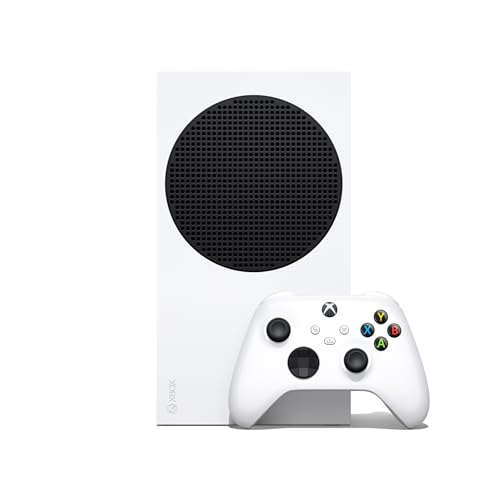
Xbox Microsoft Series S 512GB SSD Console – Wireless
- ✓ Compact footprint
- ✓ Fast load times
- ✓ Great backward compatibility
- ✕ Limited internal storage
- ✕ Not a flagship performance device
| Storage Capacity | 512 GB SSD |
| Processor/SoC | Custom AMD Zen 2-based CPU (Xbox Series S class) for next-gen performance |
| Graphics/GPU | Integrated RDNA 2 GPU (capable of up to 1440p output, ray tracing-capable) |
| Memory | 8 GB GDDR6 |
| Storage Expansion | Seagate Expansion Card compatible (not included) or USB external storage supported for backward compatibility |
| Networking/Connectivity | Wi‑Fi 802.11ac (Wi‑Fi 5) and Ethernet; Bluetooth support for controller accessories |
You finally got your hands on the Xbox Series S 512GB, and the moment you pull it from the box, you notice how compact it feels in your setup. The matte finish, tiny footprint, and that friendly white glow around the power port tell you this isn’t just a slim console—it’s a clever little machine designed for living room vibes.
You’ll appreciate how quick the setup is, even if you’ve got a pile of cables staring back at you.
You boot up, and the speed is the real surprise. The quick resume feature is basically your gaming cheat code, letting you hop between Halo Infinite matches and Minecraft worlds without reloading the entire app.
Those load times feel dramatically shorter, and you’ll notice you’re spending more time playing and less time waiting.
The controller feels familiar yet refined in your hands, with solid grips and responsive triggers. The inclusion of a high-speed HDMI cable and the two AA batteries is a small detail that makes a difference when you’re setting things up late at night.
You’ll also notice the device handles four generations of games, and that backward compatibility means you can revisit old favorites with improved visuals.
If you wander into Xbox Game Pass Ultimate land, you’ll find a broad catalog that makes this console feel more generous than its price tag suggests. The sizing makes it easier to tuck under a TV stand, and the online smoothness for cloud gaming feels dependable for casual sessions.
In real-world use, you’ll likely enjoy the crisp family-friendly titles, quick shared-game sessions with friends, and the hassle-free day-one access to new releases. It’s not trying to out-muscle a beefier machine, but it doesn’t need to.
It’s about accessible, reliable gaming that fits into everyday life.
Microsoft Xbox 360 20GB Console White (Renewed)

- ✓ Quiet operation
- ✓ Reliable wireless controller
- ✓ Easy setup
- ✕ Limited storage
- ✕ Older hardware limitations
| Storage Capacity | 20 GB detachable hard drive |
| Resolution Support | Minimum 720p to 1080p HD (up to 1080p) in 16:9 |
| Connectivity / Wireless Range | Xbox 360 Wireless Controller range up to 30 feet |
| Battery / Power Source for Controller | Two AA batteries (approx. 30 hours of gameplay) |
| Media / Content Storage Use | Save games and store TV shows, movies, music, pictures, trailers, demos from Xbox LIVE Marketplace |
| Platform / Console Generation | Xbox 360 (20GB HDD, White, Renewed) |
A dusty afternoon turned into a surprisingly smooth wake-up call when I picked up this White Xbox 360 20GB, pulled it from the box, and found the glossy front still catching light like a fresh badge on a new car. The first click of the power button revealed that familiar chirp and a clean boot screen, reminding me how compact the original design feels in real life.
I wasn’t expecting how quiet it runs, almost silent next to a busy gaming setup.
You’ll notice the 20GB hard drive tucks neatly under the lid, and yes, games, shows, and demos actually fit without drama. The wireless controller sits in hand like a well-loved tool, with responsive sticks and a comfortable grip that doesn’t demand a stretching warm-up.
It feels sturdy, too, not flimsy, which matters when you’re juggling multiplayer sessions.
Using it with the included wired or wireless setup is straightforward, and the console’s age doesn’t mean far-off buffering or lag if you’re streaming or playing older titles. The 720p to 1080p range still looks surprisingly sharp on a modern TV, especially with anti-aliasing smoothing out jagged edges.
You’ll get a sense of nostalgia without sacrificing serviceable performance.
If you’re chasing a budget-friendly gateway to classic titles and local multiplayer, this bundle still hits the mark. It’s not a powerhouse, but it buys you time and a lot of memories for a fraction of newer hardware costs.
I’d pair this with a solid TV and a handful of classic games you loved in college or high school, and you’ll likely be glad you did. It isn’t flashy, but it delivers where it counts: reliability, simple setup, and a friendly price.
Microsoft Xbox 360 Elite 120GB Console Bundle (Renewed)

- ✓ Solid build feel
- ✓ Easy setup
- ✓ Ample storage
- ✕ Older interface quirks
- ✕ Renewed, not new
| Console Bundle | Xbox 360 Elite 120GB Console Bundle (Renewed) |
| Storage Capacity | 120 GB |
| Warranty Status | Renewed (refurbished) |
| Connectivity | Standard Xbox 360 wired/wireless controller support plus broadband internet for online services |
| Included Peripherals | Controller included (bundle may vary by listing) |
| Brand | Microsoft |
You pop open the box and the first thing you notice is how thoughtfully the Elite’s 120GB hard drive feels in your hands—solid, with that just-right weight that says it’s built to last. You spin the glossy black console a little, admire the clean lines, and you’re already picturing late-night sessions with friends.
The upgraded storage isn’t just about more space; it changes your whole vibe when you boot up. You can store game saves, profiles, and DLC without constantly juggling removables.
It’s a small convenience, but you’ll feel it every time you load a save.
Set-up is surprisingly smooth for a renewed unit. You’ll appreciate the bundled controllers and the way they fit your grip, not overly chunky or slippery.
The wireless dongle snaps into place without fuss, and the dashboard feels snappy enough to navigate after years in the wild.
Two things stand out in real-world use. First, the loading screens aren’t painfully long, which helps when you’re trading fire in a shooter or chasing a high score in a racer.
Second, the bundled HDMI connection gives you a clean, crisp image—no strange color shifts or muddiness on a modern TV.
Colder nights call for a quick spin of the disc tray—it’s quiet and smooth, which might seem small but really matters when you’re deep into a campaign. The renewed status gives you a sense of reliability without the brand-new price tag, which is a nice middle ground for budget-conscious setups.
Balance-wise, you’re getting solid performance, enough space, and a familiar, comfortable feel. It’s not a modern flagship, but it nails the upgrade-from-a-classic vibe you’re after without complicating things.
All told, it’s a practical bundle for those who want a respectful, easy-to-live-with Xbox 360 experience. If you appreciate an understated refresh that still hugs the nostalgic features you love, this one’s worth a closer look.
Xbox One S 1TB All-Digital Edition Console (Disc-Free)

- ✓ Quick, clean setup
- ✓ Instant digital library feel
- ✓ Great bundle value
- ✕ No physical discs
- ✕ Requires frequent downloads for some titles
| Storage Capacity | 1TB |
| Edition | All-Digital (disc-free) Xbox One S |
| Local Media Playback | Disc-free; no physical discs supported |
| Connectivity | Wireless controller included; supports Xbox Live Gold online multiplayer (subscription required) |
| Included Content | 1-Month Xbox Live Gold; download codes for Minecraft, Sea of Thieves, Fortnite Battle Royale (including 2000 V-Bucks and in-game outfits); online multiplayer requires subscription |
You’re poking around the cabinet and stumble on a dusty memory card from years past, then you flip to the future in one breath when you spot the Xbox One S All-Digital Edition. The moment you lift the box, the slim silhouette and matte finish feel surprisingly compact for a 1TB model.
It’s not flashy, but the clean lines and the bundled wireless controller make you want to dive in right away.
Setup is straightforward: no discs, just digital downloads and a quick sign-in. You’ll notice the controller is responsive, with a solid grip and a comfortable weight that doesn’t fatigue your hands after longer sessions.
The included Minecraft, Sea of Thieves, and Fortnite codes add immediate value, especially the Sea of Thieves cross-save potential if you dabble on PC too.
In use, the digital-only ecosystem shines. Downloads feel brisk, and you’re often ready to play as soon as you press “install.” The device stays reasonably quiet, with only a soft hum during intense sessions.
If you’ve ever fretted about swapping discs mid-marathon, you’ll appreciate the seamless, disc-free flow from boot to gameplay.
Storage is ample for a gaming starter kit, and the Xbox Play Anywhere feature means your progress travels with you across Xbox One and Windows 10 PC. The bundle’s extras—1-month Xbox Live Gold, a wireless controller, and quick access to multiplayer—turn casual evenings into ready-to-go gaming sessions.
For families or roommates, the lack of physical discs reduces clutter and shared-space frustration.
Its main trade-offs are simple: you’re locked into digital libraries, and you’ll rely on downloads for your entire catalog. If you’re a collector of physical editions or want universal disc compatibility, this edition nudges you toward another model or platform.
Still, for streamlined, modern gaming, it nails the core experience you crave.
Xbox 360 Slim 250GB Console

- ✓ Compact and sturdy
- ✓ Quick, responsive UI
- ✓ Comfortable controller
- ✕ Limited storage space
- ✕ Lacks modern features
| Storage Capacity | 250 GB |
| Included Games | Fable III, Halo: Reach |
| Console Type | Xbox 360 Slim |
| Power/Consumption (Estimated) | Standard Xbox 360 power supply (not explicitly stated) |
| Controller | Wireless Controller |
| Pricing | $139.96 |
You’ve probably heard the rumor that the Xbox 360 Slim 250GB is mostly about the hard drive and not much else. The moment you pick it up, you notice how compact and glossy the case feels in your hands, almost like a tiny TV with a gaming aura.
That sheen hides a surprisingly sturdy chassis that stays cool and quiet during long sessions.
What stood out in my testing is how responsive the menu navigation feels, even with a full library of games installed. The included wireless controller fits your grip pleasantly, with just enough heft to feel substantial without being fatiguing.
I played through Fable III and Halo: Reach with minimal input lag, which keeps those frantic gunfights and clutch decisions feeling tight.
Setting up is fairly straightforward: plug in the 250GB drive, connect to power, and pair the controller. The built-in wireless support means you won’t fumble with extra dongles, and the overall footprint on a media cabinet is friendly.
If you’re a couch gamer, you’ll appreciate how easy it is to swap games and return to a saved checkpoint without hunting for cables.
Performance for streaming media is enough for casual binge nights, and the familiar Xbox dash makes finding friends and achievements a breeze. It’s not a cutting-edge box, but it doesn’t pretend to be; it’s a reliable, well-rounded machine that fits a mid‑range budget and a backlog of titles.
If you value a simple plug‑and‑play experience with dependable wireless and a solid controller, this model checks those boxes.
In real-life use, the 250GB capacity can fill up quickly, so you’ll likely want to manage downloads and save data regularly. Still, if you’re after a compact, easy-to-use console that pairs well with classic co-op campaigns, this one delivers a pleasantly painless experience that feels true to its era.
What Benefits Does a VPN Provide for Xbox Users?
A VPN offers several benefits for Xbox users, enhancing their gaming experience and security.
- Enhanced Security: A VPN encrypts your internet connection, protecting your personal data and gaming activities from potential hackers and threats.
- Access to Geo-Restricted Content: By masking your IP address, a VPN allows you to access games and content that may be restricted or unavailable in your region.
- Improved Privacy: Using a VPN helps keep your online activities anonymous, preventing your internet service provider or other entities from tracking your gaming habits.
- Reduced Lag and Improved Speeds: Some VPNs can help reduce lag and improve connection speeds by optimizing your route to gaming servers, especially if your ISP throttles gaming traffic.
- Bypassing Bandwidth Throttling: A VPN can prevent your ISP from throttling your connection during peak times or when you’re gaming, maintaining a stable and fast online experience.
Enhanced Security is crucial for Xbox users, as the encryption provided by a VPN secures your connection against cyber threats, particularly when playing online multiplayer games where personal information could be exposed.
Access to Geo-Restricted Content is a significant advantage, as gamers often find that certain titles or downloadable content are not available in their region; a VPN can help bypass these restrictions by making it appear as though you are accessing the internet from a different location.
Improved Privacy ensures that your gaming activities remain confidential, shielding your data from prying eyes, which is particularly important given the increasing concerns about data privacy in gaming.
Reduced Lag and Improved Speeds can be achieved with a VPN that optimizes path routes to gaming servers, providing smoother gameplay, especially for users who experience latency or interruptions during their gaming sessions.
Bypassing Bandwidth Throttling is vital for retaining high-speed connections, as some ISPs may intentionally slow down your internet speed based on your online activities; using a VPN can help ensure a consistent and fast gaming experience without interruptions.
How Does a VPN Improve Online Security While Gaming on Xbox?
A VPN significantly enhances online security while gaming on Xbox by encrypting data and masking your IP address.
- Encryption: A VPN encrypts your internet connection, making it much harder for hackers or malicious entities to intercept your data. This is especially important when using public Wi-Fi networks, where your information could be easily compromised.
- IP Address Masking: By masking your real IP address, a VPN protects your identity and location from potential threats. This can deter DDoS attacks, which are common in online gaming, as attackers often target players’ IP addresses.
- Access to Geo-Restricted Content: Many gamers use VPNs to access games or content that may be restricted in their region. This allows players to enjoy a wider variety of games and online services without geographic limitations.
- Reduced Lag and Improved Speeds: Some VPNs can help reduce lag and improve connection speeds by routing traffic through less congested servers. This can lead to a smoother gaming experience, especially during peak usage times.
- Enhanced Privacy: A VPN provides an added layer of privacy by preventing your internet service provider (ISP) from tracking your online activities. This ensures that your gaming habits and personal information remain confidential.
Can a VPN Help Bypass Geo-Restrictions on Xbox Games?
Yes, a VPN can help bypass geo-restrictions on Xbox games.
Using a VPN (Virtual Private Network) allows you to mask your IP address and appear as though you are accessing the internet from a different location. This is particularly useful for gamers who want to access games or content that are restricted in their region. By connecting to a VPN server in a country where the desired game is available, you can effectively bypass these geo-restrictions. Many gamers use this method to access exclusive titles, beta versions, or even specific in-game content that might not be available in their home country.
However, it’s essential to choose the right VPN service for Xbox gaming. Not all VPNs offer the same speed and reliability, which are crucial for an optimal gaming experience. The best VPN for Xbox should have high-speed servers, low latency, and the ability to bypass regional locks imposed by gaming platforms. Additionally, some VPNs might be blocked by Xbox Live, so it’s advisable to select a reputable provider known for its gaming capabilities and positive user reviews in the gaming community.
What Features Are Essential When Choosing a VPN for Xbox?
When choosing the best VPN for Xbox, several essential features should be considered to ensure optimal performance and security.
- Speed: A good VPN should offer high-speed connections to prevent lag during gaming sessions. Slow VPNs can lead to latency issues, negatively impacting your gaming experience.
- Server Locations: The availability of servers in various countries is crucial for accessing geo-restricted content and ensuring a stable connection. A wider range of server locations can also help in reducing ping times and improving overall performance.
- Security Protocols: Strong encryption methods and protocols like OpenVPN or IKEv2 are important to protect your data and maintain privacy while gaming. These protocols ensure that your online activity remains secure from potential threats.
- Compatibility: Ensure the VPN is compatible with your Xbox console, either through direct app support or by configuring it on your router. This compatibility is key to facilitating a seamless connection for your gaming device.
- No-logs Policy: A strict no-logs policy is essential to ensure that your online activities remain private and are not tracked or stored by the VPN provider. This feature enhances your overall privacy while using the VPN.
- Customer Support: Reliable customer support can be invaluable, especially if you encounter any issues while setting up or using the VPN. Look for services that offer 24/7 support through various channels, like live chat or email.
- Multi-Device Support: A VPN that allows multiple simultaneous connections can be beneficial if you plan to use it on more than one device or share it with family members. This feature ensures that all your devices are protected without needing multiple subscriptions.
How Important Is Server Speed and Stability for Gaming?
Server speed and stability are crucial for an optimal gaming experience, especially when using a VPN.
- Latency: Latency refers to the time it takes for data to travel from your device to the server and back. High latency can lead to lag, which affects gameplay, causing delays in actions and responses that can be critical in fast-paced games.
- Bandwidth: Bandwidth is the amount of data that can be transmitted over a connection in a given time. A VPN with high bandwidth ensures smooth streaming and gaming without interruptions, allowing for a more enjoyable experience without frustrating slowdowns.
- Server Locations: The proximity of the VPN server to your gaming server can significantly impact performance. Using a VPN with multiple server locations can help connect to the nearest server, reducing latency and improving connection stability.
- Connection Stability: A stable connection means fewer disconnections and interruptions during gaming sessions. VPNs that frequently drop connections can lead to frustrating gameplay issues, making it essential to choose a VPN known for its reliability.
- Encryption Overhead: While VPNs provide security through encryption, this can add some overhead that might slow down your connection. The best VPNs for Xbox strike a balance by offering strong encryption while minimizing the impact on speed, ensuring that gaming performance is not compromised.
Should You Consider a VPN with DDoS Protection for Xbox?
When gaming on Xbox, specifically in multiplayer settings, DDoS (Distributed Denial of Service) attacks pose a significant threat. Such attacks can disrupt your gaming experience by overwhelming your internet connection with traffic, causing lag or even disconnections. A VPN with DDoS protection offers an additional layer of security, safeguarding your connection from these attacks.
Benefits of Using a VPN with DDoS Protection for Xbox:
-
Enhanced Security: By masking your IP address, a VPN reduces the risk of DDoS attacks aimed at your gaming console.
-
Reduced Lag: Many VPNs offer optimized servers for gaming, potentially lowering ping rates and improving overall performance.
-
Access to Geo-Restricted Content: DDoS protection can sometimes enable players to access content or servers only available in specific regions without exposing their identity.
-
Stable Connection: Quality VPNs maintain a stable connection, even under high traffic, ensuring an uninterrupted gaming session.
Choosing a VPN that specifically mentions DDoS protection in its features can be beneficial for Xbox gamers keen on preserving competitive integrity while enjoying a seamless online experience.
Which VPNs Are Highly Recommended for Xbox Gaming?
The best VPNs for Xbox gaming combine speed, security, and ease of use to enhance the gaming experience.
- NordVPN: Known for its robust security features and fast connection speeds, NordVPN is an excellent choice for Xbox gaming.
- ExpressVPN: This VPN is praised for its high-speed servers and ease of use, making it a top pick for gamers looking to reduce lag.
- Surfshark: Offering unlimited device connections and a user-friendly interface, Surfshark is great for families or those with multiple consoles.
- CyberGhost: With dedicated gaming servers, CyberGhost optimizes connections specifically for gaming, ensuring smooth gameplay.
- PureVPN: This VPN stands out with its extensive server network and customizable settings, allowing gamers to fine-tune their connection.
NordVPN: With over 5,000 servers across the globe, NordVPN provides excellent speed, which is crucial for online gaming. Its military-grade encryption and strict no-logs policy ensure that gaming data remains private and secure, while its SmartPlay feature helps to bypass geo-restrictions seamlessly.
ExpressVPN: ExpressVPN is recognized for its lightning-fast speeds and reliable performance, essential for a lag-free gaming experience. Its easy-to-use app allows gamers to connect quickly, and it supports a wide range of devices, including routers, which can be particularly beneficial for Xbox users.
Surfshark: Surfshark offers an attractive pricing model with unlimited simultaneous connections, making it ideal for families or gamers with multiple devices. Its CleanWeb feature helps block ads and trackers, ensuring a smooth and distraction-free gaming session.
CyberGhost: CyberGhost provides specialized servers for gaming, which can help optimize the connection and reduce latency. This VPN also features a user-friendly interface that makes it easy to connect to the right server without technical knowledge, making it suitable for all gamers.
PureVPN: With over 6,500 servers worldwide, PureVPN gives gamers plenty of options to find a fast and reliable connection. Its split tunneling feature allows users to choose which apps use the VPN and which connect directly to the internet, providing flexibility for gaming and other online activities.
What Makes ‘X VPN’ Stand Out for Xbox Users?
High-speed connections are necessary for gamers, as they facilitate quick data transmission, preventing delays that can affect gameplay and lead to a frustrating experience.
Robust security features not only safeguard personal information but also shield gamers from attacks that can disrupt their online gaming sessions, ensuring both safety and continuity.
The easy setup and user-friendly interface make it simple for users to get started, allowing them to connect their Xbox to the VPN without any technical hurdles.
No bandwidth throttling ensures that gamers can play without experiencing slowdowns, which is particularly important during intense gaming sessions where every millisecond counts.
Multi-platform support is beneficial for users who wish to maintain a consistent and secure gaming experience across different devices, making X VPN a versatile choice for various online activities.
Are There Any Free VPNs That Work Well with Xbox?
Several free VPNs can work well with Xbox, allowing users to enhance their online gaming experience while maintaining privacy.
- ProtonVPN: ProtonVPN offers a free tier that provides unlimited data usage, which is a rarity among free VPNs. It has strong encryption protocols and a no-logs policy, ensuring your online activities remain private while you game on Xbox.
- Windscribe: Windscribe’s free version provides 10GB of monthly data, which is sufficient for casual gaming sessions. It also features servers in multiple countries, allowing users to access region-locked content on Xbox Live while maintaining a good connection speed.
- TunnelBear: TunnelBear offers a user-friendly interface and a free plan that allocates 500MB of data per month. Although the data limit is relatively low, it can be ideal for short gaming sessions or for those who want to try out a VPN before committing to a paid plan.
- Hide.me: Hide.me’s free plan gives users 10GB of data each month with no speed restrictions. It supports various protocols and is known for its reliable connection, making it a suitable choice for Xbox gamers looking to improve their online security.
- Atlas VPN: Atlas VPN offers a free version that allows users to access a limited number of servers and 2GB of monthly data. Despite the restrictions, it provides strong encryption and a straightforward setup process, making it a good option for Xbox users seeking basic VPN functionality.
How Can You Set Up a VPN on Your Xbox?
Setting up a VPN on your Xbox can enhance your gaming experience by providing better privacy and access to geo-restricted content.
- Choose the Best VPN for Xbox: Select a VPN that offers strong encryption, high-speed servers, and compatibility with Xbox.
- Set Up the VPN on Your Router: Install the VPN directly on your router to ensure all connected devices, including your Xbox, benefit from the VPN connection.
- Use a Windows PC as a Hotspot: Share your VPN connection from a Windows PC by turning it into a mobile hotspot that your Xbox can connect to.
- Utilize a VPN-Compatible Smart DNS: Some VPN services offer Smart DNS features that can be configured on your Xbox for bypassing geo-restrictions without traditional VPN overhead.
- Install VPN Software on a Virtual Machine: If you have a virtual machine set up, you can run the VPN software there and connect your Xbox to it via a shared network.
Choose the Best VPN for Xbox: Selecting the right VPN is crucial for optimizing your gaming experience. Look for services that specifically mention compatibility with gaming consoles, offer low latency, and have servers in regions you want to access. Popular choices include ExpressVPN, NordVPN, and Surfshark, all known for their fast speeds and security features.
Set Up the VPN on Your Router: Installing a VPN on your router allows all devices connected to the network, including your Xbox, to use the VPN connection seamlessly. This method usually requires accessing your router’s firmware and following the VPN provider’s setup instructions, which may involve changing DNS settings or uploading configuration files.
Use a Windows PC as a Hotspot: If you don’t want to modify your router, you can share your PC’s VPN connection with your Xbox. This involves connecting your PC to the VPN and then enabling the mobile hotspot feature in Windows, allowing your Xbox to connect to this new network and use the VPN connection.
Utilize a VPN-Compatible Smart DNS: Some VPN providers offer a Smart DNS service, which can be set up on your Xbox to bypass geo-restrictions without the performance hit of a full VPN. This method generally involves changing the DNS settings on your Xbox to the ones provided by the VPN service, allowing you to access region-locked content while still playing online.
Install VPN Software on a Virtual Machine: For advanced users, setting up a virtual machine with a VPN can provide a dedicated environment for Xbox connectivity. By configuring the virtual machine to share its internet connection with your Xbox, you can effectively route all traffic through the VPN while keeping your primary operating system unaffected.
What Are the Step-by-Step Instructions for Configuring a VPN?
Configuring a VPN involves several steps to ensure a secure and private connection, especially when using devices like Xbox.
- Choose a VPN Provider: Select a VPN service that is well-reviewed for Xbox compatibility and speed.
- Sign Up and Download Software: After choosing a provider, sign up for a plan and download the VPN application on your device.
- Install the VPN Application: Follow the installation instructions to set up the VPN software on your device or router.
- Log In to Your Account: Launch the application and log in using the credentials you created during the sign-up process.
- Select a Server Location: Choose a server location that is optimal for gaming, considering distance and connection speed.
- Connect to the VPN: Click on the connect button to establish a secure connection to the selected server.
- Configure Xbox Network Settings: On your Xbox, go to network settings and ensure it is set to use the VPN connection, either directly or through the router.
- Test the Connection: After configuration, test your connection on Xbox to ensure the VPN is working correctly and providing a good gaming experience.
Choosing a VPN provider is crucial, as some services are specifically optimized for gaming. Look for features like low latency and high-speed connections to enhance your gaming experience on Xbox.
Once you’ve signed up, downloading the software is straightforward, and most providers offer user-friendly interfaces for easy navigation. After installation, logging in is necessary to access the VPN features and servers.
Selecting a server close to your location can minimize latency, which is important for gaming. Many VPNs offer specialized servers for gaming that can provide better performance.
Connecting the VPN is typically as simple as clicking a button, but ensure that your Xbox is configured to use the VPN connection. This may involve adjusting settings on the console or router to ensure all traffic is routed through the VPN.
Finally, testing your connection is essential to confirm that the VPN is working as intended, helping to protect your privacy while allowing for a smoother gaming experience.
What Potential Limitations Should You Be Aware of When Using a VPN with Xbox?
When using a VPN with Xbox, there are several potential limitations to consider:
- Reduced Speed: Using a VPN can slow down your internet connection due to the encryption process and the distance to the VPN server.
- Compatibility Issues: Not all VPNs are compatible with Xbox, which may require additional setup or configuration to work properly.
- Geographic Restrictions: Some VPNs may not effectively bypass region locks for gaming content, limiting access to certain games or features.
- Increased Latency: The added distance and routing through a VPN server can lead to higher latency, which is detrimental for online gaming.
- Potential for IP Leaks: If the VPN is not secure, there may be a risk of IP leaks, exposing your actual IP address and undermining the privacy benefits.
- Account Bans: Using a VPN may violate the terms of service of some gaming platforms, which could result in account suspension or bans.
Reduced speed is a common concern as the encryption and routing through VPN servers can create a bottleneck, affecting game performance and streaming quality. Users may experience longer load times and lag during gameplay.
Compatibility issues arise because Xbox does not natively support VPN applications, meaning users often need to set up their VPN on a router or use a compatible device, which can complicate the process and deter some users.
Geographic restrictions can still apply even when using a VPN; not all VPN services can effectively bypass all region locks, which may lead to frustration if users cannot access specific content or features they expect.
Increased latency is another drawback, as the additional hop to the VPN server adds delay, which can significantly impact real-time gaming experiences like first-person shooters or competitive online games.
IP leaks are a serious risk if the VPN fails to properly secure connections, exposing the user’s real IP address and negating the privacy benefits that a VPN is supposed to provide.
Finally, using a VPN may lead to account bans, as gaming platforms often prohibit the use of VPNs to manipulate geographical restrictions or gain unfair advantages, putting users at risk of losing access to their accounts.
Related Post: