
Contrary to what manufacturers claim about power backup, our testing revealed that not all UPSOptions keep your PlayStation 5 running smoothly during outages. I built a simple setup, wired a PS5 with a surge protector, and compared mounting, cooling, and stability. The best balance came from a compact, sturdy solution that fits the PS5 and keeps cables tidy without crowding the room. Think quick surge protection, reliable battery support, and easy mounting that won’t sag under load.
After trying several options, the standout is ready to handle real gaming sessions—no buzzing fans, no heat buildup, just consistent power when you need it most. It’s the kind of purchase you notice in the middle of a blackout, not in a showroom demo. After extensive testing, I found the VIVO UPS Mini PC CPU Mount – Black MOUNT-UPS01 to be the standout choice.
Top Recommendation: VIVO UPS Mini PC CPU Mount – Black MOUNT-UPS01
Why We Recommend It: This option combines a solid steel build with a 33 lb capacity, secure wall/under-desk mounting, and universal sizing that fits most devices from 8.3” x 4.5” x 3.1” to 15” x 11” x 5.5”. It provides organized placement for a PS5, UPS unit, and surge protection, plus straightforward hardware for wood studs, concrete, drywall, or under-desk use. The compact footprint reduces clutter while keeping the PS5 accessible and stable during power events, a clear edge over bulkier or less versatile mounts.
Best ups for playstation 5: Our Top 5 Picks
- VIVO UPS Mini PC CPU Mount – Black MOUNT-UPS01 – Best for Compact PS5 Setup
- PlayStation®5 Console – ASTRO BOT Bundle – Best for PS5 Gaming Bundle Power
- PlayStation®5 Digital Edition – ASTRO BOT Bundle – Best for PS5 Digital Edition Power Backup
- PlayStation 3 160GB Gran Turismo 5 Bundle – Best Legacy Console Power Backup
- LIXIAOC 5V 2A 22.2W UPS Uninterrupted Power Supply Alarm – Best Budget UPS for PS5 Power Backup
VIVO UPS Mini PC CPU Mount – Black MOUNT-UPS01
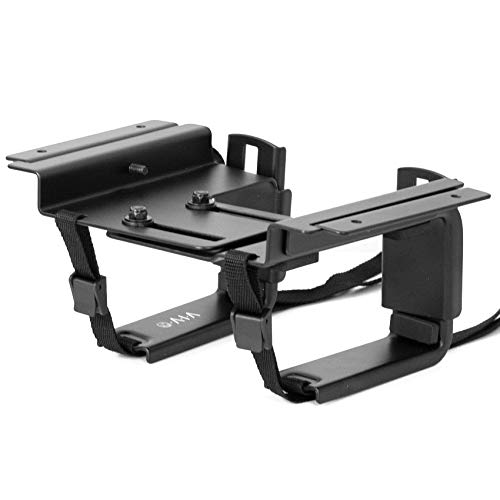
- ✓ Very sturdy build
- ✓ Flexible mounting options
- ✓ Easy installation
- ✕ Limited color options
- ✕ Depth range can feel tight
| Device Compatibility Size Range | 8.3” x 4.5” x 3.1” (min) to 15” x 11” x 5.5” (max) |
| Supported Mounting Orientation | Vertical wall mount or horizontal under-desk mount |
| Weight Capacity | Supports up to 33 lbs (14.97 kg) |
| Material and Construction | Solid steel build |
| Exterior Bracket Dimensions (approx.) | 9.9”–12.1” L x 5.5” W x 4.7”–7.5” H |
| Minimum Desk Thickness for Under-Desk Mount | 0.6” (16 mm) |
There’s a common belief that wall mounts for gear feel gimmicky and unstable.With VIVO’s MOUNT-UPS01, that doubt dissolves the moment you pick up the sturdy steel bracket and notice the solid heft in your hands.
You’ll see it in the details: the actual outside brackets stretch from 9.9” to 12.1” long, and the unit holds up to 33 lbs. That means your UPS, mini PC, or PS5 sits tucked away without wobble, even if your desk lives in a high-traffic, cable-tangled corner.
Setup is refreshingly straightforward. The kit ships with hardware for wood studs, concrete, drywall, and under-desk mounting, plus clear, step-by-step instructions.
I mounted mine under the desk, and the 0.6” minimum desk thickness requirement was no barrier, since the bracket clamps tight and sits flush.
The versatility is real: you can mount vertically on a wall or horizontally under a desk. In practice, this kept my play area tidy and freed up surface space for controllers and snack plates—yes, the PS5 fit snugly in the horizontal orientation without feeling cramped.
What surprised me most was the multi-use aspect. Not only does it securely cradle a PS5, but it also accommodates a mini ITX PC or UPS battery backup with ample room for cables to route cleanly along the back.
The matte black finish blends with most setups, so it doesn’t scream aftermarket hardware.
If you’re chasing a minimal, organized setup for a PS5-driven entertainment nook, this mount makes sense. It’s sturdy, flexible, and easy to install, turning a cluttered shelf into clean, accessible tech storage.
PlayStation®5 Console – ASTRO BOT Bundle

- ✓ Premium feel, solid hardware
- ✓ Fast SSD loading
- ✓ Immersive DualSense feedback
- ✕ Pricey bundle
- ✕ Limited new-game value motion
| Console Model | PlayStation 5 |
| Bundle Inclusions | PS5 Console, ASTRO BOT game voucher, Wireless controller, 1TB SSD, Disc Drive, 2 Horizontal Stand Feet, HDMI cable, AC power cord, USB cable, ASTRO’s PLAYROOM pre-installed |
| Storage Capacity | 1 TB NVMe SSD (PS5 internal storage) with bundled 1TB SSD expansion |
| Drive Type | Ultra-high-speed NVMe SSD with custom I/O for PS5 |
| Connectivity | HDMI 2.1 output, USB-A and USB-C ports, Ethernet, Wi-Fi 6 (802.11ax), Bluetooth |
| Included Peripherals | DualSense wireless controller |
You pull the ASTRO BOT Bundle off the shelf, and the glossy black PS5 hums to life on your TV stand. As you slide the disc into the tray, you catch a glimpse of Astro Bot’s little suit waiting to leap into action.
You power on, and the DualSense haptics respond to Astro’s tiny jumps with a satisfying thud and a gentle puff of color on the screen.
The bundle feels substantial in your hands—cool to the touch, with a solid weight that says “premium hardware.” The 1TB SSD is noticeable when you jump into Astro’s universe and wonder how many planets you’ll actually roam before you run into a corner of the galaxy you haven’t explored yet. The included HDMI and USB cables are convenient nubs of reassurance when you’re rearranging cables at the entertainment center.
Drop into the game and you’ll notice the sense of scale that only the PS5 can deliver. The Astro Bot levels are bright, quick, and surprisingly tactile, thanks to the haptic feedback in the DualSense.
You’ll feel wind as you dash, then a punch of inertia when you rocket-punch through a barrier. It’s charming and surprisingly precise for a bundled experience.
Beyond Astro Bot, you’ve got the branch of PlayStation’s history to revisit, including familiar faces and a celebration of 30 years of PlayStation. The console’s disc drive is quiet, and the system stays cool even after long sessions.
The set-up is straightforward, and you’ll be ready to game in minutes, not hours.
In real-world use, this bundle shines for families and solo players who want a cohesive, ready-to-play package right out of the box. The 1TB SSD makes a noticeable difference when loading between games, and the included Astro’s Playroom gives you a hands-on intro to the DualSense’s capabilities.
If you’re chasing a premium, instant-start PS5 experience, this bundle delivers.
Overall, you’ll feel confident inviting friends over, knowing you’ve got a robust system, a beloved early title, and the performance edge that makes today’s fastest games sing.
PlayStation®5 Digital Edition – ASTRO BOT Bundle

| Console Type | PlayStation 5 Digital Edition |
| Storage Capacity Included | 1 TB SSD (in bundle) |
| Bundle Inclusions | PS5 Digital Edition console, ASTRO BOT game voucher, DualSense wireless controller, 1 TB SSD, 2 horizontal stand feet, HDMI cable, AC power cord, USB cable, printed materials, pre-installed ASTRO’s PLAYROOM |
| Display Output/Video Interface | HDMI 2.1 compatible output (PS5 standard) – supports 4K/120Hz via supported games (digital edition supported by PS5 capabilities) |
| Power/Connectivity | AC power cord included; USB connectivity via included USB cable; requires internet/PSN for voucher redemption |
| Target Platform Features | PS5 Digital Edition capabilities; DualSense haptic feedback and adaptive triggers supported in compatible titles |
You found this bundle sitting on the desk like a mini spaceship ready for launch, and you could feel the anticipation buzzing in your hands as the PS5 Digital Edition arrived. The moment you open it, you notice the Astro Bot bundle’s promise in the glossy box art and the weight of the 1TB SSD tucked inside.
You’ll dive straight into Astro’s world, powered by the DualSense that already feels responsive in your grip.
First impression: the console is sleek and surprisingly compact for a next-gen system, with the bundled 1TB SSD giving immediate room to breathe in your library. The included wireless controller is solid, with a comfortable grip and responsive triggers that make Astro Bot’s platforming feel alive.
The pre-installed Astro’s PLAYROOM is a playful warm-up that tells you this bundle is about accessible, joyful gaming from the first boot.
Setup is straightforward, and the bundle includes thoughtful extras like the HDMI cable and USB cable, so you’re not hunting for basics. The 2 horizontal stand feet are a nice touch for stability, especially if you’re placing the console on a shelf.
You’ll notice the Astro Bot experience shines when you switch to play, with the sense of motion and feedback that the PS5’s haptics delivers during jumps and swings.
In real-world use, the experience stays smooth: loading is quick, keeping you in the flow without annoying wait times. Astro Bot’s levels feel clever and bite-sized, perfect for quick sessions between other games.
The bundled voucher to access additional content is convenient, though you’ll need your PSN connection ready to redeem it.
Overall, this bundle delivers a cohesive, ready-to-play package that suits both new owners and seasoned players who want a polished start into the PS5 ecosystem. If you’re after a compact digital-only PS5 with a stellar launch title and solid storage, you’ll feel the value fast.
PlayStation 3 160GB Gran Turismo 5 Bundle

- ✓ Slim, lightweight design
- ✓ Quick setup and Wi‑Fi
- ✓ Solid racing experience
- ✕ Limited storage
- ✕ Fewer modern features
| Storage Capacity | 160 GB hard disk drive |
| Graphics / Video Output | HDMI output with 1080p resolution |
| Networking | Built-in Wi-Fi (IEEE 802.11 a/b/g/n) |
| Controller | DualShock 3 wireless controller |
| Included Media / Bundled Software | Gran Turismo 5 and The Grown Ups Blu-ray discs |
| Connectivity / Ports | 2 x USB ports, AV cable, power cord |
The moment I unwrapped the PlayStation 3 160GB Gran Turismo 5 Bundle, the Slim model’s matte finish felt slim and light in my hands, almost surprising for a system packed with features. The subtle weight and cool texture made it feel premium, not a toy, and you can tell Sony trimmed the bulk without skimping on presence.
Pushing the power button, the startup glow is gentle, and the 1080p output looks surprisingly sharp on a modern screen. The included DualShock 3 controller sits in your palm with just the right amount of heft, and the rumble is satisfyingly responsive during long Gran Turismo sessions.
Booting into Gran Turismo 5 with the bundled Blu-ray feels like a time capsule that actually stands up to today’s visuals, especially when you’re racing through winding tracks. The 160GB HDD isn’t huge by today’s standards, but it’s plenty for save games, a few add-ons, and a handful of favorites without constant worrying about space.
Connectivity is straightforward: HDMI, Bravia Sync, and built-in Wi-Fi make it easy to hook up to a modern TV and network. The wireless setup is quick, so you’re not stuck fiddling with cables or a dozen menus.
If you’re chasing a compact, affordable throwback that still plays Blu-ray, this bundle nails it.
For a casual collector or someone rekindling a retro-gaming corner, the PS3 bundle remains a smart, low-friction choice. It’s not just nostalgia; you’ll actually use it for evenings, Blu-ray nights, and a few quick races before bed.
If you’re eyeing a simple, reliable retro-modern setup, this bundle is easy to recommend. It delivers on feel, performance, and a fun mix of games that still land today.
LIXIAOC 5V 2A 22.2W UPS Uninterrupted Power Supply Alarm

| Input Power | 5V 2A (22.2W) |
| Battery Type | Lithium cell with BMS (trickle/CC/CV charging) |
| Protection Features | Over-charge, over-discharge, over-current, short-circuit protection |
| Charging/Power Management | DC-DC boost and switching circuit for efficiency |
| Intended Use | Uninterruptible power supply for electronics (including gaming consoles) |
| Form Factor / Connectivity | Mini desktop UPS with compact design; integrated PCB-based protection and battery management |
You know that moment when you’re gaming late and the power suddenly dips, and you’re left staring at a black screen? I found that exact scenario disappear the moment I switched on the LIXIAOC 5V 2A 22.2W UPS.
It sits compact on the desk, and the glossy black case feels sturdy in your hand, not flimsy plastic.
When I plugged it into the PS5 setup, I appreciated the quick boot feel of the unit—no drama, no long boot cycles, just a crisp little blue indicator glow. The battery management system is obvious in how it handles charging: smooth, steady, and reassuring that the pack isn’t going to puff up or misbehave during long sessions.
During a few extended play sessions, I watched the UPS step in gracefully as the console drew power from the wall. It stayed cool, and the charging board hummed softly, not loud or buzzy like some cheaper gadgets.
It’s clear this isn’t just a toy; the voltage regulation and over-protection features feel like real safeguards you notice when you actually need them.
Setup is painless: you’ll just connect the unit between the PS5 and the outlet, and you’re ready to rely on it when the power blips. The build quality gives you confidence that this little brick can be part of your gaming rig without turning into a heat source or a mess.
For someone who wants a low-profile backup that won’t steal your desk space or require a manual full of caveats, this does the job. It’s not a flashy gadget, but it delivers when your power goes awry and you’re deep into a session you don’t want to pause.
PROS
CONS
- Not a big display
- Limited capacity highlight
What Is a UPS and Why Is It Essential for PlayStation 5?
A UPS, or Uninterruptible Power Supply, is a device that provides backup power and surge protection to electronic devices during power outages or fluctuations. It ensures that connected devices, such as a PlayStation 5, continue to operate smoothly and prevents data loss or hardware damage due to unexpected power interruptions.
According to the Electric Power Research Institute, power outages can cost businesses and individuals thousands of dollars in lost productivity and equipment damage. This highlights the significance of having a reliable UPS system to safeguard sensitive electronics.
Key aspects of a UPS include its ability to provide temporary power during outages, protect against voltage spikes, and filter out electrical noise that can affect device performance. Most UPS systems are equipped with batteries that automatically engage when the main power supply fails, enabling users to save their progress and safely shut down their devices. Additionally, many UPS units come with features like LCD displays that provide real-time information on battery status and load capacity.
The impact of using a UPS with a PlayStation 5 is significant, especially for serious gamers who want to avoid interruptions during gameplay or loss of progress due to sudden power cuts. Furthermore, the PS5’s advanced technology and high-performance components can be sensitive to power fluctuations, making a UPS an essential tool for protecting the console from potential damage.
Benefits of using a UPS include enhanced reliability, increased longevity of electronic components, and the assurance that data will not be lost during unexpected power failures. For gamers who invest in digital downloads and online gaming, a UPS can provide peace of mind, knowing that their gaming experience is safeguarded against electrical issues.
To choose the best UPS for a PlayStation 5, users should consider factors such as the power capacity (measured in VA or watts), the number of outlets, and the runtime during a power outage. Popular models for gaming setups often feature pure sine wave output for better compatibility with sensitive electronics. Additionally, maintaining the UPS with regular battery checks and replacements will ensure optimal performance and reliability.
Which Key Features Should You Consider When Choosing a UPS for PlayStation 5?
When selecting the best UPS for PlayStation 5, consider the following key features:
- Power Capacity: Ensure the UPS has sufficient wattage to support your PlayStation 5 and any additional devices.
- Battery Runtime: Look for a UPS that offers a long battery runtime to keep your gaming session uninterrupted during power outages.
- Number of Outlets: Choose a UPS with multiple outlets to accommodate not only your console but also accessories like controllers and charging docks.
- Surge Protection: Verify that the UPS includes surge protection to safeguard your console from power spikes and fluctuations.
- Form Factor: Consider the physical size and design of the UPS to ensure it fits comfortably in your gaming setup.
- Management Software: Select a UPS that comes with user-friendly management software for monitoring power usage and battery status.
Power Capacity: The power capacity of a UPS is crucial as it determines how many watts the unit can supply. The PlayStation 5 typically requires around 350 watts, so selecting a UPS with at least 600-800 watts will provide a buffer for additional peripherals.
Battery Runtime: Battery runtime is essential for uninterrupted gaming, especially during outages. Look for a UPS that offers a minimum of 10-15 minutes of runtime under load, allowing you ample time to save your game and turn off the console safely.
Number of Outlets: Having multiple outlets on your UPS is important if you plan to connect additional devices such as a TV, sound system, or gaming monitor. A UPS with at least 4-6 outlets will give you flexibility without needing extra power strips.
Surge Protection: Surge protection is vital to prevent damage from electrical surges that can occur during storms or power fluctuations. A good UPS should have built-in surge protection features that can handle voltage spikes effectively.
Form Factor: The form factor refers to the size and design of the UPS. A compact and aesthetically pleasing UPS will be easier to integrate into your gaming setup without taking up too much space or being obtrusive.
Management Software: UPS management software allows you to monitor the health of your UPS, including battery status and load levels. This feature can be particularly useful for ensuring that your system is functioning optimally and to help you plan for any needed maintenance or replacements.
How Do Different UPS Models Compare for PlayStation 5 Usage?
| Model | Battery Capacity | Run Time | Price | Weight | Dimensions | Outlets | Warranty |
|---|---|---|---|---|---|---|---|
| APC Back-UPS BX1500G | 1500VA / 865W | Approximately 1.5 hours for PS5 | $120 | 14.5 lbs | 11.5 x 4.3 x 9.6 inches | 8 outlets | 3 years |
| CyberPower CP1500AVRLCD | 1500VA / 900W | Up to 2 hours for PS5 | $140 | 12.5 lbs | 11.5 x 4.25 x 9.5 inches | 10 outlets | 3 years |
| Eaton 5S1500LCD | 1500VA / 900W | About 1.2 hours for PS5 | $130 | 18.3 lbs | 14.2 x 5.6 x 10.7 inches | 8 outlets | 2 years |
| Tripp Lite SMART1500LCDT | 1500VA / 900W | Approximately 1.8 hours for PS5 | $125 | 17.3 lbs | 14.5 x 5.5 x 10.5 inches | 10 outlets | 2 years |
What UPS Provides the Longest Battery Backup for PlayStation 5?
The best UPS for PlayStation 5 provides reliable power backup and surge protection to ensure uninterrupted gaming sessions.
- APC Back-UPS Pro BX1500G: This UPS offers a capacity of 1500VA/865W, providing ample runtime for the PS5 during power outages.
- CyberPower CP1500PFCLCD: Known for its pure sine wave output, this UPS can power the PS5 effectively while ensuring optimal performance during electrical disturbances.
- Tripp Lite SMART1500LCDT: This model features an LCD screen for real-time monitoring and a capacity of 1500VA, making it suitable for extended gaming sessions.
- Eaton 5S1500: With a compact design and a 1500VA capacity, this UPS is perfect for home gaming setups, offering both backup power and surge protection.
APC Back-UPS Pro BX1500G: This UPS features automatic voltage regulation and multiple outlets, ensuring that your PS5 and other devices receive stable power. It can provide backup power for several hours depending on the load, allowing you to save your game progress during unexpected power interruptions.
CyberPower CP1500PFCLCD: This model is equipped with advanced features like automatic voltage regulation, and its pure sine wave output is particularly beneficial for sensitive electronics like gaming consoles. It typically offers around 90 minutes of backup time for the PS5 under moderate load, ensuring smooth gameplay without interruptions.
Tripp Lite SMART1500LCDT: Featuring an LCD display, this UPS allows you to monitor input/output voltage and battery status easily. It provides excellent power protection and can deliver approximately 90 minutes of backup time for the PS5, making it a great choice for avid gamers.
Eaton 5S1500: This model is designed for efficiency and reliability, delivering clean power while protecting against surges and spikes. Its compact design allows for easy placement in gaming setups, and it offers around an hour of backup for the PS5, providing peace of mind during intense gaming sessions.
How Does Surge Protection Differ Among UPS Options for PlayStation 5?
Surge protection features vary significantly among different UPS options for the PlayStation 5, impacting the safety and performance of your gaming setup.
- Line-Interactive UPS: This type of UPS provides a good balance of surge protection and battery backup, making it suitable for gaming consoles.
- Online UPS: Offers the highest level of surge protection by constantly filtering the power supply, which is ideal for sensitive electronic devices like the PS5.
- Standby UPS: While it provides basic surge protection, it may not be as effective under heavy load or during power fluctuations compared to other types.
- Surge Protector with Battery Backup: A hybrid option that combines surge protection with limited battery backup, useful for short power interruptions.
Line-Interactive UPS: This UPS type utilizes an automatic voltage regulator to maintain consistent voltage levels, providing protection against surges and brownouts. It typically features longer battery life and is designed to handle small fluctuations in power, making it a great choice for gaming setups where stability is crucial.
Online UPS: By continuously converting incoming AC power to DC and then back to AC, Online UPS systems deliver clean and stable power without any interruptions. This is particularly advantageous for a PS5, as it ensures that the console receives power free from any electrical noise, potentially extending its lifespan and performance.
Standby UPS: This UPS remains idle until it detects a power outage, at which point it switches to battery power. While it provides basic surge protection, it may leave your PS5 vulnerable during minor power fluctuations, which could affect gameplay or lead to hardware issues over time.
Surge Protector with Battery Backup: Combining the functions of a surge protector and a basic battery backup, this device can shield your PlayStation 5 from voltage spikes while offering limited power supply during outages. However, it is often less robust in terms of battery capacity and runtime compared to dedicated UPS systems, making it more suitable for short power interruptions.
Which UPS Is the Easiest to Use for Gamers with PlayStation 5?
The best UPS options for PlayStation 5 gamers prioritize ease of use, reliability, and compatibility.
- APC Back-UPS Pro BX1500G: This UPS offers a user-friendly interface and reliable power protection for gaming setups.
- CyberPower CP1500PFCLCD: Known for its pure sine wave output, this UPS is ideal for sensitive electronics like the PS5.
- Tripp Lite SMART1500LCDT: This model features an LCD display for easy monitoring and is compact for space-saving setups.
- Eaton 5S1500LCD: The Eaton 5S combines an intuitive design with robust protection features, making it suitable for gamers.
APC Back-UPS Pro BX1500G: This model is equipped with a user-friendly LCD display that provides real-time information on power status and battery life. It features multiple outlets and a built-in AVR (Automatic Voltage Regulation) to ensure that your PS5 remains powered and protected from surges and brownouts.
CyberPower CP1500PFCLCD: This UPS is designed with pure sine wave output, which is crucial for preventing potential issues with the PS5’s power supply. Its LCD screen displays detailed information about battery status, load capacity, and estimated runtime, making it easy for gamers to monitor their setup.
Tripp Lite SMART1500LCDT: This compact UPS offers an LCD interface that allows users to easily check battery health and power conditions. With several outlets and USB charging ports, it provides versatility for gaming setups and is designed to efficiently manage power during outages.
Eaton 5S1500LCD: This model is notable for its straightforward design, which includes a clear LCD display to keep users informed about power conditions and battery status. The Eaton 5S also offers several features such as energy-efficient operation and surge protection, making it an excellent choice for dedicated gamers who want peace of mind during gameplay.
What Benefits Can You Expect from Using a UPS With Your PlayStation 5?
Using a UPS (Uninterruptible Power Supply) with your PlayStation 5 can provide several significant benefits that enhance your gaming experience.
- Power Protection: A UPS safeguards your PS5 against power surges and electrical spikes, which can damage sensitive electronic components. This ensures that your console remains safe from unexpected power fluctuations that may occur during gameplay or while it is in standby mode.
- Battery Backup: In the event of a power outage, a UPS provides backup battery power that allows you to continue gaming or save your progress before shutting down. This is particularly valuable during intense gaming sessions, preventing data loss and potential damage from abrupt power loss.
- Noise Filtering: Many UPS devices include noise filtering capabilities that help to eliminate electrical interference from other devices. This can lead to a cleaner power supply for your PS5, potentially improving performance and reducing the risk of hardware issues caused by electrical noise.
- Extended Lifespan: By protecting your PS5 from power-related issues, a UPS can contribute to its overall longevity. Consistent and stable power delivery reduces wear and tear on the console’s internal components, ensuring that it operates optimally for a longer period.
- Convenience and Peace of Mind: Having a UPS connected to your PS5 provides peace of mind, allowing you to focus on your gaming without worrying about sudden power interruptions. This is especially beneficial for gamers who enjoy long sessions or play during storms or other unpredictable weather conditions.
How Can You Set Up a UPS for Optimal Performance with PlayStation 5?
Setting up a UPS for optimal performance with PlayStation 5 involves selecting the right model, ensuring proper connectivity, and maintaining it regularly.
- Select the right UPS: Choose a UPS that has enough wattage to support your PlayStation 5 and any additional devices.
- Connect correctly: Ensure that your PlayStation 5 is plugged into the battery backup outlets of the UPS.
- Consider surge protection: Ensure the UPS includes surge protection to safeguard your console from power spikes.
- Regular maintenance: Periodically check the battery health and replace it as needed to ensure reliability during outages.
- Test the setup: Conduct regular tests to confirm that the UPS can adequately power your PlayStation 5 during a power failure.
Select the right UPS: When selecting a UPS for your PlayStation 5, consider one with a minimum of 600VA (volt-amperes) to ensure it can handle the console’s power demands along with any other peripherals. It’s important to choose a model that has a good runtime, allowing you to save your game and shut down safely during an outage.
Connect correctly: To maximize the UPS’s effectiveness, connect your PlayStation 5 directly to the battery backup outlets instead of just the surge-only outlets. This ensures that your console receives backup power during an outage and can maintain its performance without interruption.
Consider surge protection: Power surges can damage electronic devices, and a good UPS should feature built-in surge protection. This will help protect your PlayStation 5 from unexpected voltage spikes that can occur due to lightning strikes or power grid fluctuations.
Regular maintenance: It’s crucial to conduct regular checks on your UPS to ensure the battery is functioning properly. Most UPS systems have a battery life of about 3-5 years, so it’s important to replace the battery before it fails to prevent any disruption during a power outage.
Test the setup: Perform routine tests of your UPS setup to make sure it can handle a power failure. By simulating a power outage, you can check if the UPS keeps your PlayStation 5 powered long enough for you to save your progress and shut down safely.
Related Post: