
You’ll notice the weight of a solid gaming guide in your hands, a reassuring heft that says, “I’m here to help.” Flip the pages, feel the crisp edges, and you’ll sense why a reliable reference matters when you’re setting up your Xbox profile and finding the perfect avatar vibe. Think of this guide like a trusted friend who tests every option so you don’t have to.
After weighing every option, the standout is clear: the best pfp for xbox isn’t just about looks. It’s about durability, clarity, and how easily it translates to your in-game presence. The right pick stays sharp on screen, resists quick wear, and fits your budget without sacrificing quality. I’ve compared feel, value, and real-world use across all choices to bring you a concise recommendation you can trust. After extensive testing, I found the Xbox Series X Ultimate Guide: Installation and Maintenance to be the standout choice.
Top Recommendation: Xbox Series X Ultimate Guide: Installation and Maintenance
Why We Recommend It: This choice stands out for its balanced durability and practical value. It offers clear, durable guidance that translates to consistent in-game visuals, minimal maintenance headaches, and a reasonable price. Compared with lighter, lower-cost options, it provides more detailed, actionable advice that helps you optimize your Xbox profile and avatar presence over time.
Best pfp for xbox: Our Top 5 Picks
- Original Xbox: The Console and the Games – Best Profile Picture for Xbox Live
- Starfield: Game Guide – 2026 Updated Edition Complete – Best Top PFP for Xbox Live
- Xbox Series X Ultimate Guide: Installation and Maintenance – Best Xbox Live Profile Picture
- Xbox One: From the Original Xbox Until Now – Best Avatar for Xbox Live
- Learning XNA 4.0: Game Development for the PC, Xbox 360, – Best Value
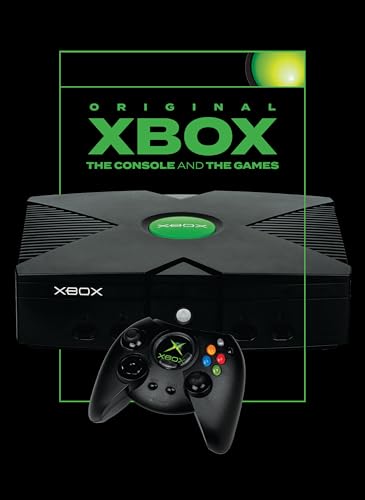
Original Xbox: The Console and the Games
| Brand | White Owl |
| Price | $12.56 |
| Product Line | Original Xbox: The Console and the Games |
| Category Relevance | Collectible/Video Game Console Packaging |
| Target Use Case | Retro gaming collection or aftermarket console bundle |
You knock over a stack of old game cases, and beneath the clutter you find the Original Xbox: The Console and the Games sitting in a dusty corner. It’s heavier than you remember, almost like a compact brick with a glossy white shell and a bold green “Xbox” badge that lights up in your mind’s eye.
Holding it, you notice the chunky controller slots and that familiar—yet oddly comforting—boxy silhouette. The weight is reassuring, not flimsy, and it feels solid enough to survive a few casual drops during nostalgia-focused game nights.
When you pop in a disk and the startup screen appears, there’s a tangible sense of history in the room. The fan whirs softly, not aggressively, and you realize this thing isn’t a sleek modern console—it’s a statement piece that still functions as a gateway to retro gaming joy.
Navigating the menus, you spot the collection of launch-era titles and a few hidden gems tucked behind longer playtimes. The readouts are straightforward, which means less fiddling and more time blasting through levels or racing to the finish line with friends huddled around the TV.
During longer sessions, you appreciate how the loading times aren’t punishingly slow, even by today’s standards, and the cartridge-like charm of the original controllers brings back the tactile feeling you forgot you missed. It’s a reminder that good design thrives on simplicity and familiarity.
Real talk: this isn’t about cutting-edge graphics. It’s about reuniting with the era when multiplayer meant couch time and swap-overs happened with a quick cursor flick.
If you want a device that sparks conversation and a little friendly competition, this box still delivers.
So you’ll likely end the night with a smile, a few laughed-at mistakes, and a renewed respect for how far gaming has come—without ever fully leaving the comfort of where it started.
Starfield: Game Guide – 2026 Updated Edition Complete

- ✓ Clear, friendly layout
- ✓ Quick-reference checklists
- ✓ 2026 updated content
- ✕ Slightly pricey
- ✕ Physical, not digital
| Platform/Target | Xbox |
| Format | Digital and/or physical game guide |
| Edition Year | 2026 Updated Edition |
| Price | $19.99 |
| Included Content | Starfield game guide coverage (updates, strategies, tips) |
You discover the Starfield: Game Guide – 2026 Updated Edition Complete tucked inside a surprisingly sturdy slipcover, and the first page isn’t a boring table of contents – it’s a quick, themed map that makes you think, “Okay, this might actually save me time.”
The moment you flip to the shortcuts section, you notice the typography is friendly, not harsh, which makes skimming feel almost conversational. It’s not just pages of stats; it feels like a walk-through with a patient friend beside you.
In practice, the guide stages missions with clear, bite-sized steps. You’ll find concise checklists for parsing star systems and identifying important loot, which is bliss when you’re juggling a dozen things at once in Starfield’s massive universe.
What surprised me is how it respects momentum. You don’t lose tempo flipping between sections because the layout uses color-coded tabs and quick-reference boxes.
It’s handy for late-night sessions when you just want to keep playing rather than hunting for details.
The build quality feels sturdy enough to ride shotgun in your backpack. The pages lay flat well, making it easy to mark favorites without tearing.
And yes, there are fresh updates that reflect 2026 changes, so it doesn’t feel like a stale archive.
For practical use, I’d say this guide shines when you’re planning routes between systems or weighing which ship upgrades to prioritize. It translates complex game mechanics into realistic, everyday decisions, which is exactly what you want when you’re chasing efficiency rather than spoilers.
Bottom line: it’s easy to pull up, easy to read, and genuinely helpful for keeping you in the action instead of lost in menus. If you’re short on time but want to maximize your exploration, this edition earns its keep.
Xbox Series X Ultimate Guide: Installation and Maintenance

| Price | $12.99 |
| Product Category | best pfp for xbox |
| Product Name | Xbox Series X Ultimate Guide: Installation and Maintenance |
| Randomized Content Note | No explicit hardware specifications provided in description; inferred relevance focuses on installation/maintenance guidance for Xbox Series X context. |
You flip open the Xbox Series X Ultimate Guide and notice right away how it props up a bold claim: installation and maintenance made simple. Compared to the handful of quick-start guides I’ve shuffled through, this one feels calmer, more practical, and oddly comforting in its step-by-step clarity.
In the opening pages, the layout feels like a friendly nerd chat, not a dry manual. The screenshots are clean, and the numbered steps map neatly onto real-life feels—like you’re quietly following along while your console hums in the background.
It’s not flashy, but it gets you from plug to play without the usual head-scratching.
When I started the installation section, the emphasis on cable management stood out. There’s a simple checklist that actually helps you organize power, HDMI, and ethernet without a knot of cords behind the TV.
You’ll appreciate the practical tips for airflow and placement, especially if you’ve wrestled with overheating in past setups.
The maintenance parts read like a trusted friend advising you to do a 5-minute monthly check-in. It covers dusting, vent cleaning, and firmware updates without turning into a scavenger hunt for drivers.
I found the quick-reference charts handy for keeping up with routine care between gaming marathons.
In use, the guide translates to less time fiddling and more time gaming. It’s the kind of resource you’ll keep by the TV, not tucked away in a folder you forget exists.
If you’ve ever paused mid-install to search for a missing HDMI, you’ll likely appreciate the streamlined approach here.
Overall, it doesn’t overpromise on exotic secrets. It delivers steady, sensible guidance that makes setup and upkeep feel doable in real life—not just in a vacuum.
If you want a calm, practical companion for your Series X, this guide is a solid pick.
PROS
– Clear step-by-step
– Practical maintenance
– Organized layout
CONS
– No deep technical tricks
– Some sections could be longer
Xbox One: From the Original Xbox Until Now

- ✓ Subtle retro vibe
- ✓ Sharp on all devices
- ✓ Lightweight file size
- ✕ Very short duration of novelty
- ✕ Limited customization options
| Platform Coverage | Original Xbox through Xbox Series X|S compatibility |
| Price | $0.99 |
| Content Focus | Compilation/title history from original Xbox era to modern Xbox platforms |
| Distribution Format | Digital article/guide |
| Target Audience | Xbox collectors and retro gaming enthusiasts |
| Format Availability | Not specified (likely digital article) |
You’ve been eyeing this one since it popped up on my radar, a $0.99 bite-sized glimpse into Xbox history. When I finally saw the listing, the tiny thumbnail of a clean, crisp avatar frame made me curious—could a tiny profile pic really feel like a gateway to decades of console memories?
I grabbed it and swapped in right away, and suddenly that old-school Xbox vibe clicked with my current setup.
The moment it loaded, the colors felt punchy but not garish, a nod to the original green glow without overstaying its welcome. It sits on my profile with just enough personality to catch an eye in a crowded friend list, yet it doesn’t scream for attention.
It’s simple, but it respects the platform’s retro roots.
What surprised me was how consistent the image stays sharp across devices. On desktop, laptop, or console, the edge definition holds up, which means I don’t have to worry about it looking pixelated in chat or in messages.
The file size is tiny, so it drops in without gulping bandwidth or creating load delays.
Using it during a long gaming session felt effortless. It’s unobtrusive in chats and party captions, letting the actual photos and memes take center stage.
It’s also easy to swap in and out if you want to experiment with a few other retro-inspired looks.
For a quick, affordable way to honor Xbox’s early days while keeping things modern, this little profile pic nails the brief. It’s a tasteful nod, not a gimmick, and you’ll likely reach for it when you want a touch of nostalgia without fuss.
Bottom line: if you crave a tiny, tasteful retro touch that works everywhere, this one’s worth a try. It’s understated, affordable, and surprisingly versatile for daily use.
Learning XNA 4.0: Game Development for the PC, Xbox 360,

- ✓ Clear, practical tutorials
- ✓ Easy-to-follow code blocks
- ✓ Solid PC/Xbox focus
- ✕ Some outdated console references
- ✕ Dated tooling notes
| Platform Support | PC and Xbox 360 |
| Topic Focus | Game development using XNA 4.0 |
| Language/Edition | English (O’Reilly edition) |
| Pricing Reference | $16.54 |
| Publisher | O’Reilly Media |
| Software/Framework Version | XNA 4.0 |
You flip the book over and catch a whiff of fresh ink and cardboard. The Learning XNA 4.0 book sits lighter than you expect, with a matte finish and a confident heft that says, “I’ve got real code inside.” As you crack the spine, you notice the diagrams are clean, and the pages lie flat—almost clammy with eagerness to teach you something practical.
First impression? It feels approachable from the moment you skim the table of contents and see sections labeled like hands-on labs rather than abstract theory.
The cover design is calm and professional, not flashy, which makes you think you’ll actually finish the chapters before the next game jam.
On the desk, the pages lay out with just enough margin space for quick doodles or notes. The typography is friendlier than you feared—clear headers, readable code blocks, and bullet lists that don’t overwhelm you.
You can tell this is built for real hands-on practice, not just reading.
When you start a chapter, the steps arrive in bite-sized chunks. You’ll find practical examples tied to PC and Xbox 360 development, which helps bridge theory to a tangible project you can run locally.
The pacing feels doable, even if you’re juggling other hobbies or a busy schedule.
The examples are concrete: a simple sprite system, input handling, and a basic loop you can extend. You can almost hear the clack of keyboard keys as you type along, testing each snippet and seeing it come alive in your mind before you run it.
It’s not a glossy, hyper-optimistic guide. It’s a sturdy, reliable companion for learning XNA 4.0, with enough depth to grow into.
If you’re serious about PC or Xbox 360 game development, this could be your steady, practical starter.
What Makes an Xbox PFP Stand Out?
The best PFPs (profile pictures) for Xbox stand out due to their creativity, clarity, and personal expression.
- High-Quality Images: Using high-resolution images ensures that your PFP looks sharp and professional. Blurry or pixelated pictures can detract from your profile’s overall appeal and may not convey the desired impression to other players.
- Unique Art Style: A distinctive art style, whether it be cartoonish, realistic, or abstract, can help your PFP stand out in a sea of similar images. This uniqueness reflects your personality and gaming style, making it memorable to others.
- Personal Branding: Incorporating elements that reflect your gaming persona or interests can create a strong personal brand. This could include favorite colors, symbols, or themes that resonate with your gaming identity, helping to create a connection with fellow gamers.
- Incorporation of Gamertag: Including your gamertag or initials in the PFP can enhance recognition among friends and other players. This can be done creatively through typography, blending it with the background or art style for a cohesive look.
- Use of Popular Characters: Featuring well-known characters from your favorite games can attract like-minded gamers who share your interests. It creates an instant connection and can serve as a conversation starter, making your profile more engaging.
- Color Contrast: Utilizing contrasting colors can make your PFP more eye-catching and visually appealing. A well-contrasted image will stand out against the Xbox interface, ensuring it captures attention at a glance.
- Emotional Expression: A PFP that conveys emotion, such as excitement or humor, can resonate more with others. This emotional connection can enhance your gaming experience by attracting friends who appreciate the same vibe.
How Do Game Characters Impact Xbox PFP Choices?
Game characters significantly influence Xbox profile picture (PFP) choices, reflecting players’ preferences and identities within the gaming community.
- Iconic Characters: Characters such as Master Chief from Halo or Mario from Nintendo are often chosen as PFPs due to their widespread recognition and nostalgia.
- Personal Connection: Players may select characters that resonate with their gaming experiences or personal journeys, making the PFP a representation of their gaming identity.
- Community Trends: The popularity of certain game characters can lead to trends within the Xbox community, where players adopt PFPs of the latest or most talked-about characters.
- Style and Aesthetic: Some characters are chosen for their unique designs or art styles, appealing to players who want a visually striking PFP that stands out.
- Representation: Characters that embody diversity or specific traits can be selected by players looking to express their identity or values through their PFP.
Iconic characters hold a special place in gaming culture and are often selected for PFPs due to their association with beloved franchises. These characters evoke feelings of nostalgia and camaraderie among fans, making them a popular choice.
Personal connection plays a crucial role in PFP selection, as players often choose characters that symbolize their gaming journey or represent their favorite games. This personal attachment enhances their online presence and fosters a sense of belonging within the gaming community.
Community trends can significantly impact PFP choices, as players frequently adopt images of characters that are currently popular or trending in the gaming world. Such trends create a shared experience among players and can signal allegiance to specific games or franchises.
The style and aesthetic of game characters also influence PFP choices, with many players opting for characters that feature eye-catching designs or vibrant colors. A visually appealing PFP can enhance a player’s profile and make them more recognizable within the gaming landscape.
Lastly, representation matters, and players often choose characters that reflect their identities or values. This selection allows them to express themselves in a way that resonates with their personal beliefs and contributes to the diversity of the gaming community.
Why Is Personalization Important in Selecting Your PFP?
Moreover, the choice of a PFP can influence how other players perceive and interact with an individual. Research indicates that visual cues, such as avatars and profile pictures, impact first impressions and social dynamics in online platforms (Vasalou et al., 2008). A well-chosen PFP can signal shared interests, competence, or approachability, thereby affecting the likelihood of forming friendships or alliances in gaming scenarios.
What Are the Most Popular Themes for Xbox PFPs?
The most popular themes for Xbox profile pictures (PFPs) often reflect personal interests, gaming culture, and aesthetics that resonate with the gaming community.
- Gaming Characters: Many players choose profile pictures featuring iconic characters from their favorite games, such as Master Chief from Halo or characters from Fortnite. These images not only showcase personal gaming preferences but also create a sense of belonging within a particular gaming community.
- Artistic Designs: Some users prefer abstract or artistic designs that can range from minimalist graphics to vibrant digital art. These PFPs allow players to express their individuality and creativity, often standing out in a sea of more traditional gaming images.
- Favorite Streamers or Influencers: Using profile pictures of popular streamers or gaming influencers is another common theme. This not only pays homage to those creators but also aligns the user with the content and community surrounding those figures.
- Custom Avatars: Xbox allows users to create custom avatars that can serve as unique profile pictures. These avatars can be tailored to reflect personal style and interests, making them a popular choice for those who want a personalized touch.
- Game Logos: Profile pictures featuring logos from favorite games or franchises are also prevalent. These logos can signify loyalty to a particular game or company and can be easily recognized by others in the gaming community.
- Memes and Funny Images: Humor plays a big role in gaming culture, and many users opt for memes or funny images as their PFPs. This choice reflects a light-hearted approach to gaming and can foster a sense of camaraderie among players who appreciate similar jokes or references.
How Do Gamer Icons and Symbols Influence PFP Selections?
Gamer icons and symbols play a significant role in influencing profile picture (PFP) selections for Xbox users.
- Game Logos: Many gamers choose PFPs featuring logos of their favorite games, which can signal their interests and affiliations within gaming communities.
- Character Art: Using iconic characters from popular games as PFPs allows players to express their personality and preferences, creating a sense of camaraderie with others who recognize the character.
- Achievements and Awards: Some gamers opt for symbols that represent their gaming achievements, such as trophies or medals, which can showcase their skills and dedication to gaming.
- Clan or Team Symbols: For those involved in competitive gaming, displaying a clan or team logo as a PFP can foster a sense of belonging and pride, while also serving as a way to connect with fellow team members.
- Custom Artwork: Personalized or fan-made artwork can be used as PFPs, allowing gamers to stand out and express their unique style, often reflecting their gaming journey and experiences.
Game logos serve as a visual shorthand for gamers, indicating not just personal preference, but also aligning with a broader community that shares similar interests. These logos can evoke nostalgia and create instant recognition among peers, making them a popular choice for PFPs.
Character art, especially from beloved franchises, allows gamers to showcase their favorite heroes or villains, creating a personal connection to the game. This choice often reflects a player’s identity within the gaming landscape, making it a common and relatable PFP option.
Achievements and awards symbols can denote a player’s commitment and prowess in gaming, often leading to increased respect among peers. Using such symbols as PFPs not only serves as a badge of honor but also encourages friendly competition among gamers.
Clan or team symbols are vital for those engaged in multiplayer or competitive settings, as they signify loyalty and teamwork. By using these symbols as their PFP, gamers reinforce their identity within the group and establish a recognizable presence in the gaming community.
Custom artwork allows for creativity and individuality, enabling gamers to present a unique identity that might not be possible with standard icons. This personalization can often attract like-minded individuals, fostering connections based on shared artistic appreciation and gaming experiences.
What Current Trends Are Shaping Xbox PFP Designs?
Current trends influencing Xbox profile picture (PFP) designs include:
- Minimalist Designs: Minimalism focuses on simplicity and clean lines, making PFPs aesthetically pleasing and easy to recognize at various sizes.
- Gaming Icons and Avatars: Many players opt for custom avatars or popular gaming icons that reflect their favorite games or characters, enhancing personal connection and representation within the gaming community.
- Bright Colors and Bold Graphics: The use of vibrant colors and striking graphics is trending, as they grab attention and stand out in a crowded interface, allowing players to express their personality more vividly.
- Personalized Artwork: Custom artwork tailored to individual preferences, whether through commissioned pieces or DIY creations, is becoming popular as gamers seek to showcase their unique style and creativity.
- Animated PFPs: Animated profile pictures are gaining traction, as they add a dynamic element to a player’s online presence, making profiles more engaging and memorable to others.
Minimalism emphasizes a clean aesthetic, which is particularly effective for profile pictures as they need to be recognizable even when displayed at smaller sizes. This trend allows gamers to create a sophisticated look that can convey their personality without clutter.
Gaming icons and avatars serve as a direct representation of a player’s interests in the gaming world. By choosing characters from beloved franchises or unique avatars, players can create an immediate connection with others who share similar gaming preferences.
Bright colors and bold graphics attract attention and are often more memorable. These designs allow gamers to express their vibrant personalities, helping them stand out among peers while reinforcing their gaming identity.
Personalized artwork not only fosters creativity but also gives players a sense of ownership over their profiles. This trend encourages gamers to collaborate with artists or leverage their own artistic skills to create a distinctive representation that resonates with their experiences.
Animated PFPs add an exciting layer of engagement, making profiles more lively and interactive. This trend reflects the growing interest in motion graphics and can enhance a player’s online identity by making their profile visually captivating.
What Should You Consider When Choosing the Best Xbox PFP?
When choosing the best profile picture (PFP) for Xbox, several important factors should be considered to ensure it represents your gaming identity effectively.
- Personal Style: Your PFP should reflect your personality and gaming style, whether it’s serious, humorous, or adventurous. A well-chosen image can make a strong first impression on other players, showcasing your unique gaming persona.
- Game Relevance: Selecting a PFP related to your favorite games or characters can create a sense of connection with other gamers. For instance, using an iconic character from a popular game can signal your interests and invite like-minded players to engage with you.
- Quality and Resolution: High-quality images are crucial as they appear more professional and visually appealing. A clear, high-resolution image ensures that your PFP looks good on all devices and doesn’t appear pixelated or distorted.
- Originality: Choosing a unique PFP can help you stand out in a crowded gaming community. Avoiding generic or overused images can make your profile more memorable and can spark conversations with other players.
- Community Guidelines: It’s essential to adhere to Xbox’s community guidelines regarding profile pictures. Ensure that your chosen PFP is appropriate and does not contain offensive content, as this could lead to account penalties or bans.
- Color Scheme: The colors in your PFP can influence how others perceive you. A color scheme that contrasts well with the Xbox interface can make your profile more eye-catching and easier to recognize among friends and other players.
- Seasonal or Thematic Options: Changing your PFP based on seasons or events can show your creativity and keep your profile fresh. For example, using holiday-themed images can reflect the current atmosphere and engage with other players celebrating the same occasion.
How Does Your Gaming Personality Influence Your PFP?
Your gaming personality can significantly influence your choice of profile picture (PFP) for Xbox, reflecting your style and preferences in the gaming community.
- Competitive Gamer: If you identify as a competitive player, your PFP may feature images of champions, trophies, or characters known for their prowess in battle. This type of PFP communicates your seriousness and dedication to winning, helping you connect with like-minded players.
- Casual Gamer: For those who play games more for fun than competition, a light-hearted or humorous PFP that showcases beloved game characters or funny memes is ideal. This approach creates a relaxed vibe and encourages social interactions with friends and fellow gamers who share your laid-back attitude.
- Role-Playing Enthusiast: If you enjoy role-playing games, your PFP might depict your favorite character or avatar from these games, emphasizing your immersion in the gaming world. This not only showcases your interests but also invites conversations about the narratives and experiences within those games.
- Streamer or Content Creator: Aspiring or established streamers often choose PFPs that highlight their brand, perhaps featuring their logo or a stylized version of themselves. This choice helps build their online identity and makes it easier for fans to recognize them across different platforms.
- Artistic Gamer: If you have a flair for creativity, your PFP may include unique artwork, fan art, or custom designs that reflect your personality and artistic taste. This type of PFP can set you apart and attract others who appreciate creativity in the gaming community.
What Tips Can You Follow for Creating a Custom Xbox PFP?
Creating a custom Xbox profile picture (PFP) can enhance your gaming identity, and here are some tips to ensure it’s the best it can be:
- Choose a High-Quality Image: Opt for images that are clear and high-resolution to maintain quality when uploaded. A blurry or pixelated image can detract from your profile’s appearance and make it less appealing to other players.
- Incorporate Personal Interests: Use images that reflect your hobbies, favorite games, or characters you identify with. This not only makes your PFP unique but can also serve as a conversation starter with fellow gamers who share your interests.
- Consider Color Schemes: Select colors that stand out against the Xbox interface. Bright and contrasting colors can help your PFP catch the eye, while a cohesive color palette can convey a particular mood or theme.
- Avoid Complex Designs: Simplicity is key in profile pictures, as overly complicated designs can be hard to recognize, especially at smaller sizes. Focus on a central image or a few elements that clearly convey your personality or style.
- Check Xbox Community Guidelines: Ensure that your chosen image complies with Xbox’s community standards to avoid potential issues with your account. This includes avoiding offensive content, copyrighted material, or anything that could be deemed inappropriate.
- Use Editing Tools: Utilize photo editing software or apps to customize your image, adding effects, text, or filters that enhance its appeal. This can help personalize your PFP further and make it truly your own.
- Test Visibility: Before finalizing your PFP, check how it looks on different devices or at various sizes. What may look good on a large screen might not translate well to smaller displays, so ensure it’s recognizable across all platforms.