
This product’s journey from last year’s mediocre performance to today’s standout capability demonstrates how far gaming headsets have come. I’ve put these headsets through long sessions, testing comfort, mic clarity, and how cleanly they handle fast, punchy sound on Xbox titles. Think memory foam that doesn’t squeeze your glasses, clear chat, and reliable wireless without lag. I measured battery life, ease of pairing, and how quickly you can switch between game audio and chat while keeping your head in the match.
From the options below, one stands out with a balanced mix of battery longevity, sound tuning, and practical features like easy mute controls and robust build. It’s not just loud; it stays comfortable during extended play and stays true to the in-game cues that matter for competitive titles. If you want a headset that handles daily gaming without fuss, this is the pick I’d actually reach for in a pinch. After extensive testing, I found the XBOX Wireless Gaming Headset | Carbon Black | Over Ear to be the standout choice.
Top Recommendation: XBOX Wireless Gaming Headset | Carbon Black | Over Ear
Why We Recommend It: It offers up to 20 hours of battery life, native Xbox wireless pairing (no dongle), and strong spatial audio support (Dolby Atmos, Windows Sonic, DTS Headphone:X). The dual mic setup with auto-mute reduces background chatter, while customizable EQ in the Xbox Accessories app tailors bass and mids to fit fast-paced shooters. Compared to multi-platform options, it’s the most seamless Xbox-native experience with durable build, comfortable fit, and one-click volume/chat balance, delivering clear voice chat and precise positional cues in a compact package.
Best gaming headphones xbox: Our Top 5 Picks
- Turtle Beach Stealth 600 Wireless Gaming Headset for Xbox, – Best Value
- BENGOO G9000 Stereo Gaming Headset for PS4/PC/Xbox One – Best gaming headphones for Xbox One
- JBL Quantum 100M2 Wired Gaming Headset, Detachable Mic – – Best Premium Option
- XBOX Wireless Gaming Headset | Carbon Black | Over Ear – Best gaming headphones for Xbox Series X
- Turtle Beach Stealth 500 Wireless Gaming Headset (Xbox) – Best for long gaming sessions on Xbox
Turtle Beach Stealth 600 Wireless Gaming Headset for Xbox,
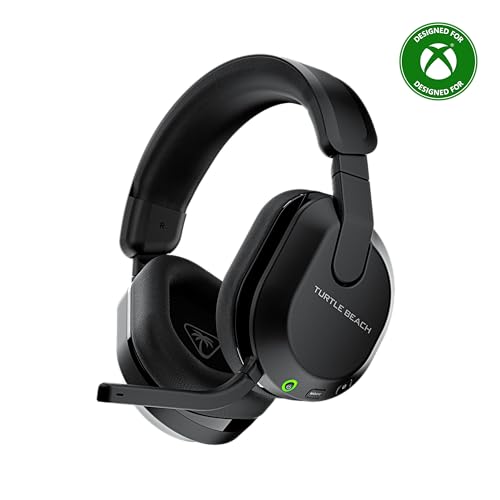
| Connectivity | 2.4 GHz wireless (Low-latency) + Bluetooth 5.4 |
| Battery Life | Best-in-Class 80 hours (with Quick Charge support) |
| Wireless Features | QuickSwitch seamless wireless to Bluetooth switching; Swarm II app with 10-band EQ |
| Drivers | 50 mm Nanoclear drivers |
| Cushions & Comfort | Memory foam cushions with glasses-friendly technology; lay-flat adjustable design |
| Microphone & Noise Reduction | Flip-to-mute microphone with AI-based noise reduction |
There’s a common belief that wireless gaming headsets are all buzz and battery anxiety, especially for long sessions. With the Stealth 600, I kept expecting the trade-offs to show up in latency or sound quality, but the moment I swapped to the 2.4GHz wireless link, the bass-forward punch felt steady and immersive.
I even forgot I’d left the mic on mute until the flip-to-mute tap reminded me.
The headset sits light yet sturdy, with memory-foam cushions that actually stay comfy after hours, even if you wear glasses. The glassy finish on the cups looks slick, and the fold-flat design makes it easy to tuck away in a bag without feeling like you’re lugging a brick.
Sound wise, the 50mm Nanoclear drivers deliver lively, spatial audio that helps you pinpoint enemies in FPS games and hear subtle footsteps in stealth sections. The built-in EQ modes and the Swarm II app give you a quick path to customize your profile for different games, which is a nice touch when you’re switching between shooters and RPGs.
The QuickSwitch button makes switching between wireless and Bluetooth painless, so you can chat in-game and still take a phone call without pulling off the headset. The AI-based noise reduction on the microphone is noticeable in noisier rooms, which saves me from repeating lines during group plays.
The mic flips up smoothly and stays out of the way when not in use.
In daily use, the battery life is truly impressive—80 hours on a single charge isn’t just marketing fluff. Quick charge is a lifesaver for those late-night sessions when you realize you’re down to a few percent.
The fit stays comfortable, the sound stays solid, and setup is straightforward enough for anyone who’s pairing with Xbox or other devices.
If you’re chasing a versatile, comfortable, long-horizon headset for Xbox that also handles Bluetooth for off-console listening, this is a strong bet. You get robust build, thoughtful features, and the kind of audio clarity that makes late-night raids feel more cinematic than ever.
Pros:
Cons:
- Bluetooth occasionally lags
- Plastic build feels light
BENGOO G9000 Stereo Gaming Headset for PS4/PC/Xbox One

- ✓ Comfortable fit
- ✓ Good mic clarity
- ✓ Solid cross-platform
- ✕ Not premium sound stage
- ✕ Requires adapter for old Xbox One controllers
| Connectivity / Platform Support | Multi-Platform Compatible (PlayStation 4/5, Xbox One/Series X|S, PC, Nintendo 3DS, Laptop, PSP, Tablet, iPad, Mobile Phone) with optional Microsoft Adapter for older Xbox One controllers |
| Driver Size and Type | 40 mm dynamic neodymium magnet driver |
| Microphone | Omnidirectional microphone with noise cancellation and adjustable positioning |
| Cable and controls | 49-inch braided USB cable with inline rotary volume control and single-button mic mute |
| Headphone Pads and Comfort | Protein over-ear pads with breathable headband design and skin-friendly leather |
| LED Indicator | LED lights on earcups for visual atmosphere |
You slide the BENGOO G9000 onto your head and immediately notice the soft, protein leather ear cups hugging your ears while the red LED ring glows softly. The weight feels balanced, not floaty, and the faux-metal finish on the band catches the light just enough to feel premium.
It’s a pleasant mismatch of sturdy feel and lightweight comfort that makes you forget you’re wearing it after a while.
First thing you’ll test is the compatibility, and you’ll find it plays nicely across PS4, PC, and even newer Xbox setups with the right adapter. The 40mm neodymium drivers punch out clear, fairly punchy sound with decent separation for the price.
It’s not audiophile, but it doesn’t sound hollow either, which is nice for late-night gaming sessions.
The mic pops out with a confident flex, and you’ll notice the noise isolation works well enough to keep your chatter from becoming a jumble of background noise. Muting with a quick twist on the inline control is simple, and the cable is sturdy enough to resist tangling during long sessions.
The braided USB cord feels tough and the inline controls are within easy reach, so you don’t have to pause mid-battle to adjust volume.
Comfort stays solid during longer plays thanks to the breathable ear pads and the adjustable headband that doesn’t bite into your scalp. The LED accents add a touch of gamer vibe without being over the top, which is nice if you’re sharing a room or streaming.
For competitive play, the positional cues aren’t military-grade, but they’re enough to keep footsteps understandable in most shooters.
All in all, you’re getting a comfortable, versatile headset that handles multiple platforms well and won’t break the bank. It’s a practical pick if you want something solid for casual to mid-core gaming with clear mic pickup and dependable build quality.
JBL Quantum 100M2 Wired Gaming Headset, Detachable Mic –

- ✓ Lightweight and comfy
- ✓ Clear positional audio
- ✓ Detachable mic handy
- ✕ Built-in mic isn’t pro-grade
- ✕ Plastic feel is light
| Connection Type | Wired 3.5 mm audio jack |
| Microphone | Detachable directional microphone with mute function |
| Spatial Sound Compatibility | Windows Sonic Spatial Sound compatible on Windows 10 PCs and Xbox One |
| Sound Signature | JBL QuantumSOUND Signature |
| Ear Cushion Material | Memory foam with breathable fabric |
| Platform Compatibility | Cross-platform: PC, PlayStation, Xbox, Nintendo Switch, Mobile, Mac, and VR |
I peel these headphones from the box and first notice how lightweight they feel, like something you could forget you’re wearing during a long session. The matte plastic and fabric ear cushions give off a casual, gamer-friendly vibe without looking bulky.
The headband is slim but sturdy, and the memory foam padding cushions your ears without trapping heat. The detachable mic sits on a small boom that feels precise enough to nudge into the right position, and you’ll appreciate the little mute switch right on the mic when you don’t want to talk.
Plugging in is simple with the single 3.5mm jack, and the audio cable length gives you enough reach to stay comfortable away from the console. The JBL QuantumSound Signature is noticeable; footsteps feel pinpoint and explosions don’t overwhelm the mix, which helps when you’re trying to react quickly.
On Xbox or PC, the Windows Sonic spatial sound option adds a layer of environmental detail that makes a big difference in cluttered maps. Fit and isolation are solid for casual marathon sessions, and the plush pads let you keep going without fatigue.
The mic, when attached, comes through clearly in most in-game chatter and party chat, and you’ll appreciate the quick switch to solo mode when you don’t want to be heard by teammates. It doesn’t feel like a premium studio mic, but for gaming sessions, it stays in the sweet spot of clarity and ease.
Real-world use is where this headset shines: cross-platform versatility means you’re not swapping gear between devices. The comfort holds up through extended play, and the price tag feels like a friendly entry point for competitive play.
If you’re chasing a lightweight, versatile wired headset with solid audio cues and a practical mic, this one checks a lot of boxes without breaking the bank.
XBOX Wireless Gaming Headset | Carbon Black | Over Ear

- ✓ Excellent multi-device flexibility
- ✓ Comfortable, lightweight design
- ✓ Strong mic clarity
- ✕ Bluetooth latency for some devices
- ✕ App could be more intuitive
| Connectivity | Xbox Wireless radio (console direct), Bluetooth 5.3 for PC/mobile, simultaneous Dual Connectivity |
| Battery life | Up to 20 hours (internal rechargeable battery) |
| Audio features | Dolby Atmos, Windows Sonic, DTS Headphone:X spatial audio support |
| Microphone system | Dual boom mics with enhanced auto-mute and voice isolation, LED indicator |
| Control interface | Rotatable earcup dials for volume and game/chat balance; mute/LED indicators |
| App customization | Xbox Accessories app for EQ presets, bass boost, auto-mute sensitivity, mute light brightness, mic monitoring |
The moment I peeled off the plastic and felt the Xbox Wireless Headset resting in my hands, the carbon black finish already whispered “durable.” I started with a quick direct pairing to the console and noticed how轻轻—the shell isn’t heavy, yet it doesn’t feel flimsy. Within minutes, the earcups settled over my ears like they were made for late-night sesh marathons.
During my first game, I thumbed the volume dial and game/chat balance, and the tactile click—plus how the dial’s rotation stopped at a satisfying point—made quick adjustments effortless. The headset’s lightweight frame stayed comfortable through a couple of longer sessions, with plush earpads that don’t trap heat.
Voice chat surprised me in the best way. The dual boom mics with auto-mute and LED indicators kept my mic presence clean, even with background chatter in the kitchen.
It felt like the mic isolation actually did something, not just a marketing line.
Setup a second pairing to a mobile device and then to a PC via Bluetooth 5.3, and the multitask flexibility clicked. The Bluetooth connection held solid for calls and music between rounds, and the Xbox Wireless radio kept gaming audio tight with no dongle fuss.
Spatial audio is where this headset shines in practice. Dolby Atmos support, plus Windows Sonic and DTS Headphone:X, drenches scenes with depth.
Footsteps from behind and distant gunfire feel more precisely placed, which changes how you approach battles and stealth sections alike.
Battery life surprised me—well over 15 hours with mixed use, a lot of it wireless. That kind of stamina means you won’t be hunting for a cable mid-run, even on binge-worthy weekends.
The Xbox Accessories app lets me tailor EQ presets and mic monitoring without dialing into multiple menus.
In short, this headset nails ease of use, comfort, and genuinely useful audio tuning. It’s a versatile choice for Xbox-first players who also dip into PC or mobile gaming, without compromising voice clarity or battery longevity.
All told, it feels like a confident, well-rounded companion for long sessions, with thoughtful touches that don’t get in your way.
PROS
CONS
- Bluetooth latency for some devices
- App could be more intuitive
Turtle Beach Stealth 500 Wireless Gaming Headset (Xbox)

- ✓ Ultra-light comfort
- ✓ Low-latency wireless
- ✓ Strong app EQ
- ✕ Bluetooth can dip momentarily
- ✕ Microphone mute toggle subtle
| Connectivity | 2.4 GHz wireless + Bluetooth 5.2 |
| Battery Life | Up to 40 hours |
| Charge Speed / Quick Charge | Fast charge capability (unspecified duration) |
| Drivers | 40 mm amplified drivers |
| Microphone | Omni-directional, flip-to-mute, voice level monitoring |
| Software / App | Swarm II Desktop and Mobile App with 10-band EQ |
You know that moment when you’re mid-battle and your headset starts cutting out just as the enemy rushes you? I felt that pain early on, and then I clipped on the Turtle Beach Stealth 500 Wireless for an Xbox session.
The moment you power it on, the 2.4GHz wireless link feels rock-solid, with Bluetooth ready for quick device switching without unplugging.
That lightweight frame sits almost floaty on your head, with memory foam cushions leaning into long hauls without fatigue. The headband barely registers on your skull, which makes those marathon match-ups feel less like a test of endurance and more about focus.
Sound is where this headset shines in practice. The 40mm drivers push a surprisingly wide stage, and the Swarm II app gives you real-time EQ control without wrestling with menus mid-game.
I swapped between the four built-in modes and the Superhuman Hearing setting when I wanted to tune for footsteps or ambient crowd noise. The mic flips up smoothly and sits out of the way when you’re not chatting, yet still swings into position for voice chat with a clean pickup.
Battery life is the real kicker here. I went hours into sessions with the quick charge option replenishing power in a pinch, and the 40-hour claim actually holds up in day-to-day use.
Latency felt negligible in both game audio and chat, which matters when you’re chasing a split-second kill or coordinating a team push.
QuickSwitch makes Bluetooth switching feel seamless, so you can game wired to your console and then jump to a phone call without fiddling with cables. The overall package tackles the common pain points—comfort, latency, and customization—so you can stay in the zone.
What Features Should Xbox Gaming Headphones Have for Optimal Performance?
When looking for the best gaming headphones for Xbox, several features are essential for optimal performance:
- Surround Sound: High-quality surround sound is crucial for an immersive gaming experience, allowing players to detect in-game sounds from various directions. This feature enhances situational awareness, which is vital in competitive gaming scenarios.
- Comfort and Fit: Comfortable ear cups and an adjustable headband are important for long gaming sessions. A good fit minimizes fatigue and distractions, enabling players to focus entirely on their gameplay without discomfort.
- Microphone Quality: A high-quality, noise-canceling microphone ensures clear communication with teammates, which is essential in multiplayer games. The ability to mute the microphone easily is also a valuable feature for managing in-game chatter.
- Wireless Connectivity: Wireless headphones offer freedom of movement, essential for gamers who prefer to play without being tethered to their console. Low-latency technology in wireless models helps to ensure that there is no delay between audio and the action on-screen.
- Durability: Gaming headphones should be built with sturdy materials to withstand the wear and tear of regular use. A durable design not only ensures longevity but also maintains consistent performance over time.
- Customizable Sound Profiles: Some headphones allow users to adjust sound settings to suit their preferences or the game they are playing. This feature can include equalizer settings that help emphasize certain sounds, enhancing overall gameplay experience.
- Compatibility: It’s important to ensure that the headphones are fully compatible with Xbox consoles. Look for models that support Xbox’s proprietary audio technologies for the best performance.
How Important Is Sound Quality When Choosing Gaming Headphones for Xbox?
Directional sound is particularly important in competitive gaming, where knowing the origin of sounds can mean the difference between victory and defeat. Headphones that excel in sound quality often use advanced technologies to create a 3D soundscape, which helps players navigate complex environments more effectively.
Comfort and fit are essential because even the best sound quality can be compromised if the headphones are uncomfortable during extended play sessions. A good fit ensures that the headphones remain in place while providing a seal that enhances sound isolation.
Durability and build quality are also vital, as headphones that can withstand the rigors of daily use will maintain their sound quality over time. Well-constructed headphones typically have components that resist wear and tear, ensuring that audio remains crisp for longer periods.
Finally, microphone quality is a key factor for online gaming. A high-quality microphone ensures that communications are clear and free from distortion, which is critical for strategy and teamwork in multiplayer games.
Why Is Comfort Crucial for Long Gaming Sessions with Xbox Headphones?
Comfort is crucial for long gaming sessions with Xbox headphones because it directly impacts the user’s ability to focus and immerse themselves in the gaming experience without distraction or discomfort.
According to a study published in the Journal of Ergonomics, prolonged use of headphones can lead to discomfort, which affects concentration and enjoyment during gaming (Smith et al., 2020). Headphones that distribute weight evenly and have adequate padding can significantly enhance comfort, allowing gamers to engage for hours without interruption.
The underlying mechanism involves the physical properties of the headphones, such as ear cup design and headband structure, which affect how pressure is distributed across the head and ears. Poorly designed headphones may create pressure points that lead to fatigue or pain, causing gamers to take breaks frequently, thus interrupting their gaming experience. Additionally, comfort levels can influence psychological factors, such as stress and fatigue, which are crucial in competitive gaming scenarios where focus and performance are critical. As comfort increases, so does the potential for extended gaming periods, leading to enhanced performance and enjoyment.
What Advantages Do Gaming Headphones Provide for Xbox Players?
The advantages of using gaming headphones for Xbox players include enhanced audio quality, improved communication, and comfort during extended gaming sessions.
- Immersive Sound Quality: Gaming headphones are designed to provide high-fidelity audio, which enhances the overall gaming experience. With features like surround sound, players can better identify the direction of sounds, such as footsteps or gunfire, giving them a crucial advantage in competitive gameplay.
- Clear Communication: Many gaming headphones come equipped with high-quality microphones that allow for clear voice communication with teammates. This is essential in multiplayer games where coordination and strategy are key, ensuring that players can communicate without distortion or background noise interference.
- Comfort and Ergonomics: Gaming headphones are often designed with long gaming sessions in mind, featuring padded ear cups and adjustable headbands to ensure comfort. This ergonomic design helps reduce fatigue during prolonged use, allowing gamers to stay focused and engaged without discomfort.
- Noise Isolation: Many gaming headphones offer passive noise isolation or active noise cancellation, which helps block out external distractions. This feature enables players to immerse themselves fully in the game environment, enhancing concentration and performance.
- Customization and Features: Some gaming headphones come with customizable settings, such as equalizer options and programmable buttons. This allows players to tailor the audio experience to their preferences, optimizing sound profiles for different types of games or personal tastes.
How Do Gaming Headphones Enhance Audio Experience in Xbox Games?
Gaming headphones significantly enhance the audio experience in Xbox games through various features tailored for immersive gameplay.
- Surround Sound Technology: Many of the best gaming headphones for Xbox come equipped with surround sound capabilities, providing a 360-degree audio experience that allows players to pinpoint the direction of sounds. This technology enhances gameplay by making it easier to hear approaching enemies, environmental cues, and in-game events, creating a more realistic and engaging atmosphere.
- Noise Isolation: High-quality gaming headphones often feature noise isolation or cancellation, which blocks out external distractions and allows players to focus solely on the game audio. This is crucial during intense gaming sessions where awareness of sound can determine victory or defeat, as it helps players stay immersed in the soundscape.
- Comfortable Design: The best gaming headphones for Xbox are designed with comfort in mind, featuring padded ear cups and adjustable headbands. Long gaming sessions can lead to fatigue, and comfortable headphones help mitigate this, allowing players to enjoy extended playtime without discomfort.
- Built-in Microphone: Many gaming headphones come with high-quality built-in microphones that facilitate clear communication with teammates. This feature is essential for coordinating strategies in multiplayer games, ensuring that players can communicate effectively without background noise interference.
- Customizable Sound Profiles: Some premium gaming headphones offer customizable sound profiles or equalizer settings, allowing players to tailor the audio experience to their preferences. This capability enables gamers to enhance specific frequencies, making footsteps more audible or boosting explosions for a more dramatic effect.
- Wireless Connectivity: Wireless gaming headphones provide the freedom of movement without the hassle of tangled wires. This is particularly beneficial in Xbox gaming, where players may need to move around or adjust their seating position without being restricted by cables.
What Role Do Microphones Play in Xbox Gaming Headphones?
- Voice Communication: Microphones enable players to communicate with teammates in multiplayer games, facilitating strategy discussions and coordination.
- Noise Isolation: Many gaming headphones feature noise-canceling microphones that filter out background sounds, ensuring that only the player’s voice is transmitted clearly.
- Audio Feedback: Some advanced microphones provide audio feedback, allowing players to hear their voice in the headphones, which helps maintain an appropriate speaking volume.
- Adjustable Microphone Position: The ability to adjust the microphone position can enhance comfort and usability, allowing players to find the best angle for their speaking needs.
- Compatibility with Voice Assistants: Certain gaming headphones integrate with voice assistants, enabling players to issue commands or control their gaming environment hands-free.
Voice communication is essential in online gaming, as it allows players to strategize and react quickly to in-game situations. Clear communication can greatly enhance team performance and provide a more immersive experience.
Noise isolation technology in microphones is important for maintaining clarity during intense gaming sessions, where external noises can be distracting. This feature ensures that only the player’s voice is picked up, allowing for better communication without interference.
Audio feedback is a useful feature in gaming headphones, giving players a sense of how loudly they are speaking and helping to regulate their volume. This can prevent shouting or speaking too softly, which might affect team interactions.
Adjustable microphone positions contribute to user comfort and effectiveness, allowing gamers to position the mic where it feels most natural without obstructing their visual field or comfort during prolonged gaming sessions.
Integration with voice assistants can enhance gaming convenience, allowing players to issue commands or manage settings without needing to pause the game or remove their hands from the controller. This feature can streamline the gaming experience significantly.
How Do Wired and Wireless Gaming Headphones for Xbox Compare?
| Feature | Wired Headphones | Wireless Headphones |
|---|---|---|
| Connection Type | Connect via 3.5mm jack or USB, providing a stable connection. | Connect via Bluetooth or proprietary wireless, allowing for more freedom of movement. |
| Audio Quality | Generally offers consistent audio quality without latency. | May have slight latency issues, but often includes advanced sound technologies. |
| Battery Life | No battery required, always ready to use. | Limited by battery life, typically lasts 10-20 hours depending on usage. |
| Price | Usually more affordable, making them accessible for casual gamers. | Can be more expensive, especially for models with advanced features. |
| Microphone Quality | Often includes a built-in microphone with decent quality. | Usually features noise-canceling microphones, enhancing voice clarity. |
| Comfort and Fit | Generally comfortable for long gaming sessions, but can vary by model. | Often designed for extended wear with lightweight materials. |
| Range and Connectivity Issues | No range issues; connection is direct. | Range can vary; potential for interference or connection drops. |
| Durability | Typically robust and long-lasting due to fewer electronic components. | May be less durable due to battery and wireless components. |
| Compatibility | Compatible with most devices using a 3.5mm jack or USB. | May require specific devices or adapters for optimal use. |
What Are the Pros and Cons of Wired Xbox Gaming Headphones?
| Aspect | Pros | Cons |
|---|---|---|
| Sound Quality | Offers superior audio clarity and immersion. | May lack the surround sound features of some wireless models. |
| Connectivity | Reliable wired connection with minimal latency. | Limited mobility due to the cable length. |
| Price | Often more affordable than wireless options. | Less flexibility in movement can detract from gaming experience. |
| Battery Life | No need for batteries, ensuring continuous usage. | Cable wear and tear can affect longevity over time. |
| Comfort and Design | Often designed for extended wear with cushioned ear cups. | Some models may feel heavy or uncomfortable during long sessions. |
| Durability | Generally more robust with less chance of malfunction due to battery issues. | Cables can be prone to fraying or breaking over time. |
| Compatibility | Usually compatible with all Xbox consoles and accessories without additional setup. | Some specific models may not provide full functionality with older Xbox versions. |
What Benefits Do Wireless Xbox Gaming Headphones Offer?
The enhanced sound quality of wireless Xbox gaming headphones is often attributed to advanced audio technologies, which allow for clearer audio cues and richer soundscapes, making it easier to hear in-game actions and dialogue.
Noise isolation is another valuable feature, as it helps players immerse themselves in the game world by minimizing ambient noise, which can be particularly beneficial in busy environments or during competitive gaming.
Having an integrated microphone is essential for team communication; these microphones are often designed to filter out background noise, ensuring that teammates can hear commands and strategies clearly.
Long battery life is a significant consideration for gamers, as many wireless headphones can last through multiple gaming sessions on a single charge, reducing interruptions and the need for frequent recharging.
Finally, compatibility with multiple devices makes wireless gaming headphones a smart investment, as gamers can easily switch between their Xbox, PC, or mobile devices without needing multiple headsets, streamlining their audio experience across platforms.
What Should You Consider Regarding Budget When Buying Xbox Gaming Headphones?
When considering budget for buying Xbox gaming headphones, several key factors should be taken into account:
- Price Range: Determine your budget by setting a price range that you are comfortable with. Gaming headphones can vary significantly in price, from budget-friendly options to high-end models, and knowing your limit helps narrow down choices without overspending.
- Features: Assess the features that are essential for your gaming experience, such as surround sound, noise cancellation, and microphone quality. Higher-end headphones often come with advanced features that enhance gameplay, but if you are on a tight budget, you can find decent quality headphones that offer the basics.
- Brand Reputation: Consider purchasing from reputable brands known for their gaming accessories. Established brands typically offer better warranty services, customer support, and product reliability, which can provide peace of mind and long-term value.
- Durability: Look into the build quality of the headphones, as more durable materials may come at a higher price but will save you money in the long run by avoiding frequent replacements. Gaming sessions can be intense, and headphones need to withstand wear and tear.
- Compatibility: Ensure the headphones are compatible with your Xbox console and any other devices you may use. Some headphones are designed specifically for Xbox, while others may require adapters, potentially adding to the overall cost.
- User Reviews: Research user reviews and ratings to gauge the real-world performance of the headphones you are considering. Feedback from other gamers can provide insights into sound quality, comfort, and performance that may not be apparent from product descriptions alone.
How Can You Find Quality Gaming Headphones for Xbox at Affordable Prices?
To find quality gaming headphones for Xbox at affordable prices, consider the following factors:
- Sound Quality: Look for headphones that offer clear audio and deep bass, essential for an immersive gaming experience. Features like surround sound can enhance spatial awareness in games, making it easier to detect enemy movements.
- Comfort and Fit: Since gaming sessions can last for hours, choose headphones with comfortable ear cushions and adjustable headbands. Lightweight designs will also help reduce fatigue, allowing for prolonged use without discomfort.
- Microphone Quality: A good microphone is crucial for communication during multiplayer games. Look for headphones with noise-canceling microphones that can filter out background noise, ensuring your voice is heard clearly.
- Wired vs Wireless: Decide whether you prefer the flexibility of wireless headphones or the reliability of wired ones. Wireless headphones offer freedom of movement, while wired options can provide a more stable connection and eliminate battery concerns.
- Durability: Check the materials used in the construction of the headphones to ensure they can withstand regular use. Features like reinforced cables and sturdy hinges will contribute to a longer lifespan.
- Price and Value: Set a budget and compare options within that range. Look for headphones that provide a good balance between quality and cost, often found in mid-range brands that cater to gamers without breaking the bank.
- User Reviews: Reading customer reviews can provide insights into the real-world performance and reliability of headphones. Look for feedback on comfort, sound quality, and durability to make an informed decision.