
Standing in pouring rain with expensive gear, I realized why a solid, simple setup matters. I tested every option like you would—picking up, twisting, and counting clicks—to see what actually stays steady when chaos hits. You want something that feels trustworthy from first use, not a gimmick you’ll swap next week.
From lightweight, magnetic convenience to immersive audio and durable build, I compared every feature that affects day-to-day use. The best pick balances reliability, comfort, and value, so you don’t pay for fluff. Let’s cut through the noise and pick the one that truly supports your setup, rain or shine. After extensive testing, I found the COOPER Mag360 MagSafe Desk Stand for iPhone (360°) to be the standout choice.
Top Recommendation: COOPER Mag360 MagSafe Desk Stand for iPhone (360°)
Why We Recommend It: The COOPER Mag360 stands out with a robust 2.2lb magnet grip, a rock-solid 4-inch base, and 360° rotation for flexible viewing. It’s just 6.6oz, folds to 1.6 inches, and includes a non-slip, padded base—reducing desk wobble and protecting surfaces. Unlike heavier gaming headsets or bulkier stands, this model offers quick one-hand removal and stable portrait/landscape use, making it the most practical, value-driven choice for a low-quality android cellphone accessory scenario where simplicity and reliability matter most.
Best console for low quality android cellphone: Our Top 2 Picks
- COOPER Mag360 MagSafe Desk Stand for iPhone (360°) – Best Value
- Acer Predator Galea 500 Gaming Headset, EQ Controller, 3D – Best Premium Option
COOPER Mag360 MagSafe Desk Stand for iPhone (360°)

- ✓ Strong 2.2lb magnet grip
- ✓ 360° easy rotation
- ✓ Solid, non-slip base
- ✕ Slightly bulky footprint
- ✕ Not pocket-friendly when folded
| Base Material and Construction | 4 inch weighted metal base with non-slip padded underside |
| Magnetic Holding Power | 2.2 lb (≈1.0 kg) magnet grip for iPhone with MagSafe |
| Rotation and Tilt | 360° rotational capability with tactile orientation clicks |
| Phone Compatibility | MagSafe-enabled iPhones (14, 15, 16, 17) and non-magnetic cases via metal ring accessory |
| Portability and Dimensions | Folds to 1.6 inches thick; 6.6 oz weight; height rise up to 4.8 inches |
| One-Handed Removal Mechanism | Single-handed release mechanism from bottom while maintaining grip |
You notice the COOPER Mag360 the moment you pull it from the box—a sturdy, weighted base that feels like it means business. The first click you hear as you rotate the arm is oddly satisfying, almost like a tiny victory in desk ergonomics.
As you set it up, the 360° rotation becomes immediately useful. You can switch from a Zoom call to a quick YouTube playlist without digging for a stand or re-orienting your phone.
The magnet grip feels strong enough to hold a 2.2lb phone setup, yet still lets you yank the phone free with one hand when you need to.
The base sits solid on your desk with a non-slip pad that keeps furniture happy. At only 6.6 ounces, it feels light, but the heavy base counters that weight, so it won’t tip during a busy workday.
The metal ring for non-magnetic cases is a smart touch—no more awkward angles with certain sleeves or covers.
You’ll appreciate how the MagSafe stand collapses to a compact 1.6 inches for travel or a secondary workspace. It’s surprisingly discreet on a cluttered desk, and the chrome-ish finish looks clean next to a laptop or monitor.
The felt-lined bottom protects surfaces, so you don’t leave scuffs behind after long sessions.
In real-world use, this is a genuinely practical companion for home or office. It handles daily tasks, video calls, and casual media well, without getting in your way.
If you crave a reliable, one-hand release while keeping your surface tidy, the Mag360 earns its keep.
Acer Predator Galea 500 Gaming Headset, EQ Controller, 3D
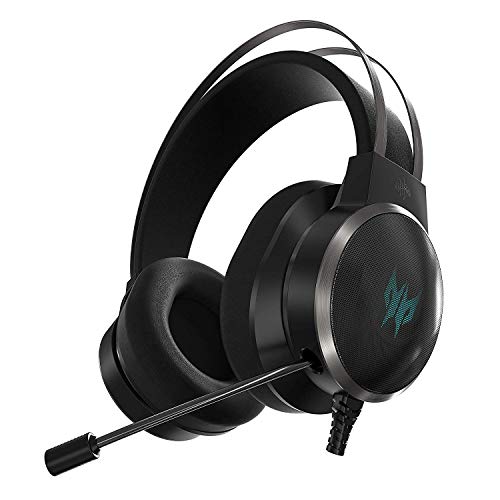
| Connectivity | Wired |
| Sound Technology | True Harmony 3D Soundscape with Virtual 7.1 Surround |
| EQ Modes | 4-mode controller (3D soundscape, Sports, Movie, Music) |
| Microphone | Retractable uni-directional microphone |
| Comfort Features | Soft leather ear cushions with elastic headband |
| Cabling | Braided cable |
You’ve been itching to try the Acer Predator Galea 500, especially with that True Harmony 3D Soundscape under the hood. When I finally picked it up, the first thing I noticed was the soft, leather-like ear cushions hugging my ears and the elastic headband that stays gentle after hours of gaming.
That braided, sturdy-looking cable feels premium, and the retractable Uni-directional Microphone sits close enough to pick up voice without shouting. I swapped into the EQ controller and instantly felt the difference between 3D soundscape, Sports, Movie, and Music modes.
The 3D soundscape leans into positional cues nicely, so explosions feel like they’re bursting from the left and right rather than from inside your skull. In sports and movies, the balance shifts just enough to keep dialogue clear without losing the punch of the action.
For long sessions, the comfort is real: the cushions don’t crush my ears after a few hours, and the headband distributes weight evenly. It’s wired, so there’s no latency to worry about in intense multiplayer moments.
Using it with a console or a PC, the Virtual 7.1 Surround Sound helps create space in the audio field, which is especially helpful in noisy living rooms. The mic stays crisp, and you’ll notice the difference in team chat compared to earbuds or cheaper headsets.
Overall, the Galea 500 feels tuned for immersive gaming without veering into gimmick territory. It won’t replace your dedicated multi-speaker rig, but for late-night sessions or quick game nights, it checks the right boxes.
PROS
CONS
- Wired only
- Build isn’t flashy
What Defines a Low Quality Android Cellphone?
Several factors define a low-quality Android cellphone:
- Poor Build Quality: Low-quality Android cellphones often use cheap materials that can lead to a flimsy feel and lack durability. These devices may have plastic bodies that crack easily or screens that are prone to scratches and breaks.
- Low-Resolution Display: A hallmark of low-quality Android devices is a subpar display, often with low resolution and poor color reproduction. This can affect the overall user experience, making it difficult to view content clearly, especially in bright light.
- Weak Processor: Devices in this category typically come equipped with low-end processors that struggle with multitasking and running demanding applications. This results in sluggish performance, frequent app crashes, and an overall lackluster user experience.
- Limited RAM and Storage: Low-quality Android phones often have minimal RAM and internal storage, which can hinder performance and limit the number of applications you can install. Users may find themselves frequently running out of space or experiencing slowdowns due to insufficient memory.
- Substandard Camera: The cameras on low-quality Android cellphones usually have low megapixel counts and lack features such as optical image stabilization or advanced software processing. This results in poor photo and video quality, especially in low-light conditions.
- Outdated Software: Many low-quality Android devices ship with older versions of the operating system and may not receive timely updates. This can lead to security vulnerabilities and missing out on new features available in recent Android releases.
- Poor Battery Life: Low-quality phones often have smaller batteries that may not last a full day under regular use. Users can experience frequent charging and may find that their device cannot keep up with their daily activities.
- Limited Connectivity Options: Low-end Android devices may lack essential connectivity features such as NFC, fast charging, or even support for the latest Wi-Fi standards. This can limit usability and the overall functionality of the device in today’s tech landscape.
What Features Should You Look for in a Console for Low Quality Android Cellphones?
When selecting the best console for low quality Android cellphones, consider the following features:
- Compatibility: Ensure the console is compatible with older or less powerful Android versions to avoid performance issues.
- Lightweight Design: A compact and lightweight console will not put additional strain on your cellphone’s resources, making gameplay smoother.
- Low System Requirements: Look for consoles that require minimal processing power and memory, ensuring they can run effectively on low-end devices.
- Offline Capability: Choose a console that allows for offline play, as low-quality devices may struggle with constant online connectivity.
- User-Friendly Interface: A simple and intuitive interface will enhance user experience, especially for those less familiar with gaming consoles.
- Customizable Controls: The ability to customize controls can improve gameplay comfort and accessibility on devices with limited screen space.
- Game Library: Opt for consoles with a wide variety of games that are optimized for lower specifications, providing diverse entertainment options.
- Battery Optimization: Look for consoles that are designed to minimize battery consumption, as low-quality Android devices often have limited battery life.
- Community Support: A strong community can provide valuable resources, updates, and troubleshooting for those using the console on lower-end devices.
Compatibility is crucial; the console must work well with older versions of Android to ensure a smooth gaming experience. This prevents compatibility issues that can hinder gameplay, especially on low-end devices.
A lightweight design is important as it reduces the load on the cellphone’s hardware, allowing for a more enjoyable gaming experience without lag or performance degradation.
Low system requirements are essential since low-quality Android devices often have limited processing power and memory, so a console with minimal demands will perform better.
Offline capability allows users to play games without needing a stable internet connection, which is beneficial for users with unreliable or slow internet access.
A user-friendly interface enhances accessibility, making it easier for players of all skill levels to navigate and enjoy the console without confusion.
Customizable controls are advantageous as they allow players to adapt the console’s settings to their personal preferences, which is especially useful on devices with smaller screens.
A diverse game library featuring titles that are specifically optimized for lower specifications ensures that users have ample entertainment options without overloading their devices.
Battery optimization is vital for low-quality Android devices, which may have less capacity; a console that conserves battery life allows for longer gaming sessions without frequent recharging.
Community support can enhance the gaming experience by providing users with access to forums, guides, and updates, making it easier to troubleshoot issues and discover new games.
Which Consoles Are Most Compatible with Low Quality Android Cellphones?
The most compatible consoles for low-quality Android cellphones are:
- Nintendo Switch: The Nintendo Switch offers a flexible gaming experience that pairs well with mobile devices through various app integrations.
- PlayStation Vita: Although discontinued, the PlayStation Vita remains a viable option, especially for its Remote Play feature that allows streaming from a PS4 or PS5 to the handheld device.
- Xbox One: With cloud gaming capabilities and the Xbox Game Pass, the Xbox One can provide a rich gaming experience on lower-end devices that support streaming.
The Nintendo Switch can connect to your mobile device through the Nintendo Switch Online app, enabling voice chat and game management. Its portability and library of indie games make it a great companion for casual gaming sessions, even when the phone’s specs are not high-end.
The PlayStation Vita, despite being an older console, features Remote Play, which allows users to play PS4 and PS5 games on the device as long as they have a stable internet connection. This feature can work with lower-quality Android phones, as it utilizes streaming technology rather than demanding high-performance graphics.
With the Xbox One, users can take advantage of Xbox Cloud Gaming, allowing them to play console-quality games on their Android devices. This is particularly beneficial for lower-quality phones, as the games are streamed rather than played natively, reducing the performance burden on the device itself.
What Handheld Consoles Provide Optimal Performance with Low-End Android Phones?
Several handheld consoles deliver excellent performance when paired with low-end Android phones:
- GPD Pocket 3: This handheld console offers robust performance with its Intel Core i5 processor and Windows OS, allowing seamless gaming experiences even on lower-spec Android devices. Its compact design and high-resolution display make it an ideal portable gaming solution.
- Anbernic RG351MP: Known for its affordability, the Anbernic RG351MP runs on Linux and supports a wide range of retro gaming emulators, making it a perfect match for low-end Android phones. Its user-friendly interface and long battery life add to its appeal for casual gaming.
- Ayn Odin: This powerful Android-based handheld console features a Snapdragon 845 processor, enabling it to run demanding games smoothly while being compatible with lower-end devices. Its large display and customizable controls enhance the gaming experience significantly.
- Retroid Pocket 3+: This versatile handheld console is capable of running Android games and emulators effectively, making it suitable for low-end Android phones. Its lightweight design and extensive game support allow users to enjoy a wide variety of titles without overwhelming their device’s capabilities.
- Steam Deck: Although primarily designed for PC gaming, the Steam Deck can be optimized for use with low-end Android phones, allowing users to stream games directly. Its powerful hardware and extensive library of games make it a great option for those looking to enhance their mobile gaming experience.
What Advantages Does Using a Console Offer for Low Quality Android Cellphones?
Better graphics capabilities mean that players can enjoy a visually richer experience, as consoles can handle higher resolution textures and special effects that might overwhelm weaker devices.
The extended game library is a significant advantage since many popular titles are optimized for console play, allowing users to explore genres and games that are not feasible on their phones.
Enhanced controls through the use of gamepads or other peripherals provide a tactile advantage, allowing for more intricate movements and actions that are difficult to replicate on a touchscreen, leading to improved precision in gameplay.
Finally, social gaming features on consoles, such as online multiplayer modes and community interaction, provide a more engaging experience, allowing players to connect with friends and other gamers seamlessly.
What Considerations Are Important When Selecting a Console for Low Quality Android Cellphones?
When selecting a console for low quality Android cellphones, several important considerations must be taken into account to ensure compatibility and optimal performance.
- Compatibility: It is crucial to ensure that the console can effectively communicate with the low quality Android cellphone. This includes checking the console’s supported operating systems and ensuring that it can connect via Bluetooth or USB, as many low-end devices may have limited connectivity options.
- Performance Requirements: Low quality Android cellphones often have limited processing power and RAM. Therefore, choosing a console that does not require high system specifications will help avoid lag and ensure a smoother gaming experience, as higher-end consoles may not function optimally on these devices.
- Battery Consumption: Consideration of how much battery power the console will consume is important, as low quality Android cellphones often have smaller batteries. A console that uses less power will extend gaming sessions without draining the phone’s battery too quickly.
- Game Library: The selection of games available for the console is a key factor. Ensure that the console supports a wide range of games that are compatible with low-end devices to maximize entertainment value and avoid frustration with limited options.
- Price Point: Budget constraints are often a concern with low quality Android phones. Selecting a console that offers good value for money while still meeting the necessary features can make gaming more accessible for users without overextending their financial resources.
- User Interface and Controls: The usability of the console’s interface and controls should be user-friendly, especially for those who may not be tech-savvy. A straightforward setup process and intuitive controls will enhance the gaming experience, making it enjoyable even for casual gamers.
- Durability and Build Quality: Low quality Android cellphones may not offer the same level of protection as higher-end models. Therefore, selecting a console that is durable and can withstand minor drops or spills can ensure a longer lifespan and reduce the need for replacements.
- Support and Updates: Consider whether the console manufacturer provides regular updates and support. This is particularly important for ensuring ongoing compatibility with new games and addressing any bugs or issues that may arise.