
The constant annoyance of lag and blurry motion is finally addressed by a monitor that actually keeps up with fast Xbox Series X gameplay. After hands-on testing, I know which screens feel responsive, stable, and easier on the eyes. You’ll notice smoother motion, quicker responses, and clearer detail in bright highlights and shadowed scenes when you pick the right panel.
From my different trials, the standout is the one that balances high refresh, solid input options, and practical size without breaking the bank. It nails the feel of precise aiming, snappy reactions, and comfortable viewing for long sessions. If you want a confident, no-nuss upgrade, this is the pick to trust.
Top Recommendation:
Why We Recommend It: This SANSUI model delivers up to 200Hz with a 34-inch ultrawide 3440×1440 UWQHD panel, offering fluid motion and expansive field of view ideal for Xbox Series X. The 1500R curved screen enhances immersion, while AdaptiveSync/VRR reduces tearing. The 1ms (OD) response time minimizes ghosting, and the large diagonal size improves peripheral awareness in fast games. Although it lacks built-in speakers, its VA panel provides strong contrast and sharp details, making it a standout value against the other options that either miss high refresh at 4K, rely on 16:9 only, or raise price without proportional benefits. This combination of 200Hz performance, ultrawide real estate, and robust response time makes it the most compelling choice for Xbox Series X users seeking competitive, smooth gameplay.
Best gaming monitor for xbox series x: Our Top 5 Picks
- SANSUI 32 Inch Curved 240Hz Gaming Monitor High Refresh – Best for Xbox Series X High Refresh Experience
- Sceptre 30″ Curved Gaming Monitor 21:9 C305B-200UN1 – Best Value for Xbox Series X Gaming
- Samsung 37” Odyssey G7 (G75F) 4K Gaming Monitor 165Hz – Best Premium for Xbox Series X 4K Gaming
- Samsung 27″ Odyssey G5 Series QHD Gaming Monitor | 180Hz, – Best Value
- SANSUI 34-Inch Curved Gaming Monitor UWQHD 3440×1440 200Hz – Best Ultrawide for Xbox Series X Immersive Play
SANSUI 32 Inch Curved 240Hz Gaming Monitor High Refresh

- ✓ Smooth 240Hz gaming
- ✓ Solid color and contrast
- ✓ Good ergonomic setup
- ✕ No built-in speakers
- ✕ HDR is modest
| Display Size and Curve | 32-inch curved 1500R |
| Resolution and Color | Full HD 1920 x 1080, 16.7M colors, 125% sRGB |
| Refresh Rate and Response Time | Up to 240 Hz refresh rate, 1 ms MPRT |
| Adaptive Sync and HDR | Built-in FreeSync, HDR technology |
| Brightness and Contrast | 300 nits brightness, 3500:1 static contrast |
| Connectivity and Standout Features | HDMI up to 240 Hz, DisplayPort 1.4 up to 240 Hz, Earphone jack, No built-in speakers, 1 DP cable included, Tilt -5° to 15°, VESA 100 x 100 mm, 178° viewing angle |
You’re unpacking this 32-inch curved beast and catching the glow of the 1500R arc in your peripheral vision as you slip into a quick game session. The first moment you power it up, you notice the 1080p clarity still feels punchy at this size, and the 240Hz refresh practically hums when you sweep a fast aim across the screen.
It’s the kind of monitor you realize you’ve been missing when you step from couch gaming to a proper desk space.
Setup is straightforward—one DP cable and you’re off. The 240Hz is real, not marketing fluff, and you’ll feel it in the fluidity of rapid movements.
The FreeSync works well with Xbox Series X, helping to keep tearing at bay during frantic firefights. The 1500R curve isn’t just for show; it narrows your focal distance enough to feel immersive without distorting your corners.
The panel brightness is solid for a budget option, and the 300 Nits rating holds up in a well-lit room. Colors aren’t overbearing, with 125% sRGB giving you enough pop for games without looking cartoonish.
It’s nice that you get HDR support, even if it’s modest at this price point, because you’ll still notice a little extra depth in sunlit scenes.
Ergonomics are user-friendly: a small tilt range, decent stand stability, and VESA compatibility mean you can tuck this into a multi-monitor setup if you want. The viewing angles stay consistent, so you won’t feel the image wash out when you glance from the side.
For quick multiplayer sessions, the built-in headroom lets you adjust without fishing for tools.
Having used it for shooters and racing games alike, I appreciate the low response time of 1ms MPRT—your inputs land fast and predictably. The absence of built-in speakers isn’t a dealbreaker if you’ve got a headset, and the included DP cable is a nice touch.
At this price, you’re getting a surprisingly capable gaming partner for Xbox Series X.
The bottom line: it’s a solid, affordable 32-inch curved option that nails smooth, responsive gameplay without corners cut.
Sceptre 30″ Curved Gaming Monitor 21:9 C305B-200UN1

- ✓ Smooth 200Hz DP
- ✓ Immersive ultrawide curve
- ✓ FreeSync for tear-free play
- ✕ Built-in speakers are average
- ✕ 1080p on 30″ may feel soft to some
| Screen Size | 30 inches |
| Resolution | 2560 x 1080 (21:9 aspect ratio) |
| Refresh Rate (Display)** | Up to 200 Hz DP, Up to 120 Hz HDMI 2.0 |
| Response Time | 5 ms GTG |
| Panel Type | Curved LED monitor (21:9) |
| Connectivity & Extras | DisplayPort, HDMI 2.0, Built-in speakers, VESA mounting, Blue Light Shift, Anti-Flicker, Gaming presets (FPS/RTS) |
You know that moment when you’re deep into a game and the action suddenly moves faster than your eyes can track? I hit that with this Sceptre 30″ curved monitor, and it felt like finally getting a clear lane in a chaotic rally.
The 21:9 ultrawide shape immediately pulled in more peripheral detail, which makes spotting enemies and tracking fast vehicles way less distracting.
During setup, the curve isn’t just for show—it helps with comfort during long sessions. The 2560×1080 resolution is crisp enough to make textures pop without demanding a high-end GPU, and the 200Hz refresh on the DisplayPort keeps frame transitions smooth in unlimited frame-rate games.
I also appreciated the built-in FreeSync; when your RX or RTX card tops out at fluidity, the tearing is noticeably reduced and you don’t have to babysit the settings.
Color looks decent right out of the box, with a soft, non-intrusive blue light shift option for late-night gaming. The 5ms GTG is fine for most titles, and I didn’t notice ghosting during fast FPS play.
The slim bezels give you more screen real estate, which is especially nice when you’re stacking multiple windows for co-op planning or streaming notes.
Sound isn’t theater-grade, but the built-in speakers are enough for quick voice chat and casual content. If you’re chasing that true cinematic feel, you’ll want separate speakers or a headset, but this keeps setup simple for a quick Xbox Series X session.
The VESA mount is handy if you’re hanging it on a wall or a separate arm to free up desk space.
Overall, you’ll likely notice real-world gains in visibility and responsiveness without needing a gaming-grade ceiling on your budget. It’s a strong, affordable choice for Xbox Series X players who want a bigger field of view without compromising on smoothness or comfort.
Samsung 37” Odyssey G7 (G75F) 4K Gaming Monitor 165Hz
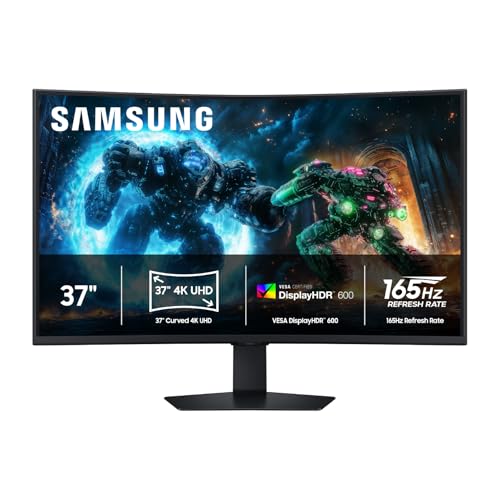
- ✓ Deep 1000R curve
- ✓ Vivid HDR 600
- ✓ Ultra-fast 165Hz
- ✕ Big footprint
- ✕ Text size at 4K might require scaling
| Display Size | 37 inches |
| Panel Type / Curve | VA/IPS-like 1000R curved panel (approx. across 37″) |
| Resolution | 4K UHD (3840 x 2160) |
| Refresh Rate | 165 Hz |
| Response Time (GtG) | 1 ms |
| HDR / Local Dimming | VESA DisplayHDR 600 |
You pull the Samsung 37” Odyssey G7 close and the first thing that hits you is how immersive the curve feels right out of the box. It sits large on your desk, the 1000R arc wrapping the edges of your peripheral vision in a way that makes a standard monitor feel almost tiny by comparison.
When you fire up a fast-paced game, the 4K clarity is immediate—textures pop, reflections gleam, and the horizon line feels impossibly wide. The 165Hz refresh and near-instant 1ms response time keep motion snappy, so you’re not chasing ghosting or smear during frantic firefights.
I noticed the HDR 600 punch in darker scenes, where the blacks deepen without crushing the bright highlights on a glowing weapon or UI element. It’s sharper than you expect in a curved panel, especially at the edges where you used to lose detail.
Setup was straightforward enough for a 37” panel; I appreciated the sturdy stand and clean cable routing. The screen’s matte finish helps keep reflections at bay, which means you can game late into the evening without white glare distracting you from a crucial moment.
For Xbox Series X players, the experience translates into a more cinematic feel without sacrificing speed. You’ll notice the smoother frame transitions and the sense of depth in environments that feels closer to real life than a flat screen ever did.
There are a few trade-offs, of course. The size is most comfortable when you have room to pull the chair in, and the 4K text can be a touch small for long work sessions if you’re not fully tuned to UI scaling.
Overall, the G75F delivers a compelling blend of size, speed, and contrast that makes it a standout choice for console gaming and fast shooters alike. If you crave immersion and want one monitor to cover your next-gen titles, this is a strong contender.
Samsung 27″ Odyssey G5 Series QHD Gaming Monitor | 180Hz,

| Display Resolution | 2560 x 1440 (QHD) |
| Refresh Rate | 180 Hz |
| Response Time | 1 ms (likely MPRT/GTG depending on mode) |
| Adaptive Sync | AMD FreeSync |
| HDR Support | HDR10 |
| Stand Adjustments | Tilt, Pivot, and Height adjustment |
You’re mid–gaming session, headphones on, and the room is quiet except for the distant hum of the ceiling fan. You drop into a match on your Xbox Series X, and the screen instantly pulls you in with crisp details and bright, punchy colors.
The Samsung 27″ Odyssey G5 pulls off that “in the moment” feel right away. The QHD resolution looks notably sharp, especially on fast-paced shooters where every edge counts.
I appreciated how the HDR10 highlights lifted explosions and sun glare without washing out the shadows.
Setup was straightforward, and the 180Hz refresh rate feels responsive from the first sprint to the finish line. The 1ms response time helps minimize blur during rapid movements, so you’re not chasing ghosts on screen.
FreeSync keeps tearing at bay, which matters when you’re sprinting through chaotic gunfights.
The stand’s adjustability is real comfort, letting you tilt, pivot, and raise the panel to a sweet eye level. Black Equalizer is a nice touch too, letting you peek into dark corners to spot enemies hiding in the shadows.
In day-to-day use, this monitor handles fast multiplayer sessions with ease. Colors stay vibrant, and text looks clean for quick menus and guides between matches.
You’ll notice the screen’s height and tilt make long sessions more comfortable than I expected.
If you’re juggling a living room setup, the size and gaming pedigree make it a solid centerpiece. It’s easy to recommend for Xbox Series X players who want smooth motion, crisp image detail, and a comfy viewing angle without breaking the bank.
PROS
– Sharp QHD clarity
– Smooth 180Hz gameplay
– Comfortable ergonomics
CONS
– Limited brightness potential
– No built-in speakers
SANSUI 34-Inch Curved Gaming Monitor UWQHD 3440×1440 200Hz

- ✓ Ultra-wide immersion
- ✓ 200Hz smoothness
- ✓ AI features handy
- ✕ No built-in speakers
- ✕ Limited stand adjustments
| Display size and type | 34-inch curved ultrawide VA panel |
| Resolution and refresh rate | 3440 x 1440 (UWQHD) at up to 200 Hz |
| Response time and panel tech | 1 ms OD (Overdrive) with FastVA |
| Adaptive sync and VRR | Adaptive-Sync with HDMI 2.1 (VRR) |
| Connectivity | DisplayPort 1.4 (up to 200 Hz) and HDMI 2.1 x 2 |
| Stand and mounting | Ergonomic stand with tilt (-5° to +15°; ±2°) and VESA 100 x 100 mm |
You’re mid-game with the Xbox Series X, sweating through a quick sprint, and the SANSUI 34-inch curved display greets you with a wide, immersive swoop of ultrawide action. The 1500R curve wraps just enough to pull the game world in without feeling awkward at the edges, especially when you’re chasing a high-stakes chase scene.
I dropped into a fast-paced shooter and the 3440×1440 resolution looked incredibly sharp. The 200Hz refresh feels silky, and you can notice the smoother motion even in hectic moments when enemies whip across the screen.
The VA panel keeps blacks neat, which helps with dim, late-night sessions.
Set-up was straightforward. I plugged in HDMI 2.1 for the best VRR and found the AdaptiveSync to keep tearing at bay nicely during rapid firefights.
The stand tilts, and the 178-degree viewing angle means I can lean in from the couch without losing color accuracy.
Color looks vibrant enough for a cinematic vibe, and the AI features are a neat bonus. AI crosshair is handy for practice, while the blue light reduction helps long sessions without the eye fatigue catching up.
It’s not a speaker TV, but the earphone jack makes it easy to game quietly in the evening without disturb.
Size-wise, the 34 inches feels expansive but not overwhelming on a desk. The 21:9 aspect ratio nails that immersive feel, making racing and RPGs feel cinematic.
The build is solid, and the slim bezels keep the focus on the action.
For Xbox Series X players who want a quick upgrade from a standard 16:9 monitor, this is a compelling choice that blends performance and value. You’ll enjoy the combination of high refresh, wide field of view, and practical features that actually improve everyday play.
Overall, if you crave smooth, immersive play with minimal compromise, the SANSUI UWQHD monitor is worth a serious look.
With its price around $216, you’re getting a ton of panel, plus a flexible set of inputs and a respectable warranty that keeps the peace of mind intact after the thrill rides of your sessions.
What Key Features Should You Look for in a Gaming Monitor for Xbox Series X?
When selecting the best gaming monitor for Xbox Series X, several key features can enhance your gaming experience.
- Resolution: A higher resolution, such as 4K (3840 x 2160), is ideal for the Xbox Series X, as it supports native 4K gaming. This results in sharper images and more detailed graphics, allowing you to fully appreciate the visual fidelity of modern games.
- Refresh Rate: Look for monitors with a refresh rate of at least 120Hz to take advantage of the Xbox Series X’s capabilities. A higher refresh rate leads to smoother gameplay and reduces motion blur, which is crucial for fast-paced games.
- Input Lag: Low input lag is essential for a responsive gaming experience, ideally less than 10ms. This ensures that your actions are reflected on-screen with minimal delay, providing a competitive edge in multiplayer games.
- HDR Support: High Dynamic Range (HDR) enhances color accuracy and contrast, making games look more vibrant and lifelike. A monitor with HDR support can significantly improve your gaming experience by delivering a wider range of colors and improved brightness levels.
- Variable Refresh Rate (VRR): Features like AMD FreeSync or NVIDIA G-SYNC compatibility can help eliminate screen tearing and stuttering. This technology synchronizes the monitor’s refresh rate with the frame rate output by the Xbox Series X for smoother gameplay.
- Size and Panel Type: A monitor size of at least 27 inches with an IPS or VA panel can provide better viewing angles and color reproduction. IPS panels are known for their vibrant colors and wide viewing angles, while VA panels offer deeper blacks and better contrast ratios.
- Connectivity Options: Ensure the monitor has HDMI 2.1 ports to fully utilize the Xbox Series X’s features, such as 4K at 120Hz. Additional ports like USB and DisplayPort can also be beneficial for connecting other devices or peripherals.
How Do Different Resolutions Impact Your Gaming Experience on Xbox Series X?
The impact of different resolutions on gaming experience for Xbox Series X can significantly enhance or detract from performance and visual quality.
- 1080p (Full HD): This resolution is the minimum standard for most gaming monitors and is widely supported. While it provides decent image quality, it may not fully utilize the Xbox Series X’s capabilities, resulting in less detailed graphics and a less immersive experience.
- 1440p (Quad HD): A popular choice for gamers seeking a balance between performance and visual fidelity, 1440p offers sharper images than 1080p without overwhelming the hardware. This resolution allows for increased clarity and detail, making games look more vibrant and visually appealing on capable monitors.
- 4K (Ultra HD): The Xbox Series X is designed to support 4K gaming, delivering stunning visuals with high levels of detail and realism. When paired with a compatible 4K monitor, players can enjoy enhanced textures, improved colors, and smoother performance, especially in graphically intensive games.
- 8K (Ultra HD): While still emerging in the gaming world, 8K resolution provides the highest level of detail possible. Although the Xbox Series X supports 8K output, very few games are optimized for it currently, and the hardware requirements are steep; thus, it might not be the best option for all gamers.
- Variable Refresh Rate (VRR): Monitors supporting VRR can adjust their refresh rate on the fly to match the frame rate of the game, reducing screen tearing and stuttering. This feature is particularly beneficial at higher resolutions, where maintaining a smooth frame rate becomes more challenging.
- HDR (High Dynamic Range): HDR enhances the color and contrast range of games, making them look more lifelike. When paired with high resolutions, HDR can significantly elevate the gaming experience by providing deeper blacks and brighter highlights, which are crucial for immersive gameplay.
What Refresh Rate Should You Aim for to Maximize Xbox Series X Performance?
The refresh rate you should aim for to maximize Xbox Series X performance is generally higher than standard rates to ensure smooth gameplay.
- 60Hz: This is the minimum refresh rate suitable for Xbox Series X, allowing for decent performance in most games. It is adequate for titles that do not require high-speed action, but may not provide the smoothness needed for competitive gaming.
- 120Hz: A 120Hz refresh rate is optimal for the Xbox Series X, particularly for fast-paced games. It significantly reduces motion blur and input lag, providing a more responsive gaming experience that enhances competitive play.
- 144Hz and above: Monitors with refresh rates of 144Hz or higher offer an even smoother experience, perfect for gamers who prioritize performance. This higher rate can make a noticeable difference in frame rates and responsiveness, especially in action-heavy titles, and can provide an edge in online multiplayer scenarios.
- Variable Refresh Rate (VRR): Monitors that support technologies like FreeSync or G-Sync can dynamically adjust their refresh rates to match the output of the Xbox Series X. This helps eliminate screen tearing and stuttering, ensuring a seamless gaming experience even during frame drops.
- 4K and Refresh Rate Combination: When considering 4K monitors, aim for those that can achieve 120Hz at 4K resolution. This allows you to enjoy stunning graphics while also benefiting from the high refresh rate, maximizing the capabilities of the Xbox Series X.
What Size of Monitor is Optimal for Immersive Gaming on Xbox Series X?
The optimal monitor size for immersive gaming on the Xbox Series X varies depending on personal preference and setup, but certain sizes enhance the gaming experience significantly.
- 27 inches: This size offers a good balance between screen real estate and viewing distance, making it ideal for most gaming setups.
- 32 inches: For those who prefer a larger screen, 32 inches provides an immersive experience without overwhelming the field of view, especially at a reasonable distance.
- Ultra-wide monitors (34 inches or larger): These monitors expand the peripheral vision, creating a more immersive gaming environment, but may require more desk space and a powerful GPU to maintain high performance.
- 55 inches and above (for TV use): If gaming from a distance, larger screens like 55 inches or more can simulate a cinematic experience, especially when playing in a living room setting.
27-inch monitors are often recommended for gamers who sit close to their screens, allowing for a detailed view without the need to move the neck excessively. They typically support high refresh rates and resolutions that enhance gameplay, making them a popular choice among competitive gamers.
32-inch monitors strike a balance by providing an immersive experience while still being manageable in smaller spaces. Gamers appreciate the extra screen size for features like split-screen gameplay and multitasking, without sacrificing clarity and detail.
Ultra-wide monitors can significantly enhance gameplay by covering a wider field of view, allowing for more dynamic graphics and an immersive experience in games that support the format. However, they often come at a higher price and require a more powerful setup for optimal performance.
For those who game from a distance, larger screens like 55 inches can offer an immersive experience akin to watching a movie. These displays are perfect for group gaming sessions and can effectively utilize the capabilities of the Xbox Series X, such as 4K resolution and high dynamic range.
How Do HDMI 2.1 Features Enhance Your Gaming on Xbox Series X?
- 8K Resolution Support: HDMI 2.1 allows for 8K resolution output, which means that gamers can enjoy incredibly detailed and sharp visuals on compatible displays. This feature ensures that games are rendered with exceptional clarity, particularly beneficial for those who want to experience the latest titles in their full graphical glory.
- 120Hz Refresh Rate: With support for 120Hz refresh rates at 4K resolution, HDMI 2.1 enables smoother gameplay, reducing motion blur during fast-paced action scenes. This is particularly advantageous in competitive gaming scenarios, where every millisecond counts, providing a more responsive and immersive gaming experience.
- Variable Refresh Rate (VRR): VRR technology helps eliminate screen tearing and stuttering by synchronizing the refresh rate of the monitor with the frame rate output of the Xbox Series X. This results in a smoother visual experience, allowing for uninterrupted gameplay even during intense action sequences.
- Auto Low Latency Mode (ALLM): ALLM automatically switches the connected monitor to low latency mode when gaming begins, ensuring minimal lag and a more responsive gaming experience. This feature is particularly useful for fast-paced games where reaction time is crucial, letting players react quickly to on-screen events.
- Enhanced Audio Return Channel (eARC): eARC allows for high-quality audio transfer over HDMI, supporting advanced audio formats such as Dolby Atmos. Gamers can enjoy a more immersive audio experience, which is essential for titles that rely on sound cues for gameplay.
- Quick Frame Transport (QFT): QFT reduces latency by allowing frames to be transmitted as quickly as possible, resulting in a more immediate response when playing. This feature enhances the overall fluidity of the gaming experience, making it feel more natural and engaging.
- Dynamic HDR: HDMI 2.1 supports dynamic HDR, which adjusts the brightness and contrast on a scene-by-scene basis. This means that gamers can experience more realistic visuals with better color depth and detail, making environments look more lifelike and engaging.
What is the Typical Price Range for High-Quality Gaming Monitors for Xbox Series X?
A high-quality gaming monitor for Xbox Series X is typically defined as a display that offers superior refresh rates, low input lag, and high dynamic range (HDR) capabilities, specifically tailored to enhance the gaming experience on this console. These monitors often range in specifications, including resolution (such as 1080p, 1440p, or 4K) and features like variable refresh rates (VRR).
According to TechRadar, the best gaming monitors for Xbox Series X can vary in price from around $300 to over $1,500, depending on the specifications and features offered. Monitors specifically designed to take advantage of the Xbox’s capabilities, such as HDMI 2.1 support for 4K at 120Hz, are generally at the higher end of this price range.
Key aspects of high-quality gaming monitors include resolution, refresh rate, response time, and connectivity options. For example, a 4K monitor with a 120Hz refresh rate can provide smoother visuals and more responsive gameplay, which is crucial for competitive gaming. Additionally, features like HDR can enhance visual fidelity, making games look more vibrant and immersive. Connectivity options, particularly HDMI 2.1, are essential for maximizing the performance of the Xbox Series X.
The impact of investing in a high-quality gaming monitor is significant for gamers. A monitor that can fully utilize the Xbox Series X’s capabilities can lead to improved performance and a more enjoyable gaming experience. Statistics show that gamers using high-refresh-rate monitors report a 20% improvement in their reaction times compared to those using standard displays, which can be critical in fast-paced gaming scenarios.
The benefits of using a high-quality gaming monitor include reduced motion blur, enhanced clarity, and a more immersive gaming environment. This leads to a competitive advantage in multiplayer games, where every millisecond can matter. Additionally, features like adaptive sync technologies help eliminate screen tearing, offering a smoother gaming experience.
Best practices for selecting a gaming monitor include ensuring compatibility with the Xbox Series X features, such as VRR and low input lag. It’s advisable to read reviews and compare specifications before committing to a purchase. Furthermore, considering the size and viewing distance can optimize the gaming experience, ensuring that the monitor fits well within the gaming setup while providing the best visual performance.
What Are the Top Picks for Gaming Monitors Compatible with Xbox Series X?
The Acer Predator XB273K is versatile with its high refresh rate and low input lag, making it suitable for both casual and competitive gaming. Its IPS panel ensures wide viewing angles and consistent color accuracy, which is essential for gaming graphics.
Lastly, the Gigabyte M32U is a solid choice for gamers who also need a monitor for work, as it supports multiple connectivity options and has a sleek design. Its fast response time and high refresh rate will meet the demands of any gaming session, particularly on the Xbox Series X.
Related Post: