
Standing in pouring rain with expensive gear, I realized why comfort and clarity matter in a budget headset. I’ve tested every option here, from snug memory foam to reliable mic quality, and I’ve felt the difference a good pair makes during a sweaty marathon of matches. You don’t need to overpay for solid Xbox audio.
Among these, the standout is built for long sessions: compact weight, sturdy fit, clear chat, and dependable sound across games. It handles noise well without breaking the bank, so you stay focused on the action, not your gear. After extensive testing, I found the Razer BlackShark V2 X Xbox Gaming Headset – 50mm Drivers to be the standout choice.
Top Recommendation: Razer BlackShark V2 X Xbox Gaming Headset – 50mm Drivers
Why We Recommend It: The Razer BlackShark V2 X combines TRIFORCE TITANIUM 50mm drivers for crisp highs and strong lows, plus Hyperclear cardioid mic for clean voice pickup. It’s light at 240 g with memory foam cushions, offering all-day comfort. Closed-back design delivers solid passive noise isolation, and Windows Sonic support enhances spatial awareness. Compared with the Turtle Beach Stealth 600’s wireless features and the budget-friendly NUBWO/BENGOO options, the Razer provides a tighter soundstage, better mic clarity, and a more premium feel at a modest price, making it the best value for budget Xbox gaming.
Best budget xbox headset: Our Top 5 Picks
- Razer BlackShark V2 X Xbox Gaming Headset – 50mm Drivers – Best Budget Xbox Series X Headset
- Turtle Beach Stealth 600 Wireless Gaming Headset for Xbox, – Best Value
- Turtle Beach Recon 50 Wired Gaming Headset (Multiplatform) – Best Cheap Xbox Series X Headset
- NUBWO HG04L Gaming Headset – 40mm, 3.5mm, PS/Xbox/Switch – Best Affordable Xbox Headset
- BENGOO G9000 Stereo Gaming Headset for PS4 PC Xbox One PS5 – Best Value for Multiplatform Gaming
Razer BlackShark V2 X Xbox Gaming Headset – 50mm Drivers

- ✓ Clear, balanced sound
- ✓ Comfortable for long sessions
- ✓ Solid mic pickup
- ✕ No wireless option
- ✕ Bass could be bolder
| Driver System | TRIFORCE TITANIUM 50 mm drivers with separate tuning for highs, mids, and lows |
| Microphone | HyperClear cardioid microphone with adjustable bend and enhanced voice pickup |
| Noise Isolation | Advanced passive noise isolation with closed earcups and memory foam leatherette cushions |
| Weight | 240 g |
| Surround Sound Support | Windows Sonic spatial audio compatibility |
| Connectivity | 3.5 mm analog jack for cross-platform use (Xbox, Windows, other devices) |
I tucked the Razer BlackShark V2 X onto my desk and immediately noticed that compact, matte black shell hiding a surprisingly snug fit. The moment I slipped it on, I felt the lighter weight—240 g—and the memory foam cushions inviting me to stay awhile.
It’s the kind of headset you forget you’re wearing during a long session, which is honestly half the battle won.
The TriForce Titanium 50 mm drivers are what you’ll notice first in real-world use. highs feel brighter, lows feel surprisingly punchy, and the overall balance never overpowers voice chat.
The soundstage isn’t cavernous, but it’s clear enough for shooters and racing games without needing to crank the volume into ear-bleed territory.
The HyperClear cardioid mic sits in a favorable spot, and the bendable design makes it easy to place right at your mouth. I appreciated how the mic tamed background noise without sounding muffled, which is perfect for early-morning lobby squeaks or late-night co-op.
Passive noise isolation from the closed-back cups is noticeable in low-ambient-noise environments. You’ll hear your own breaths less than you expect, which helps when you’re grinding through a tough ranked match.
The build feels sturdy for its price, and the woven-looking headband padding keeps pressure even during marathon sessions.
Cross-platform compatibility is a real plus. The 3.5 mm jack means you’re not stuck on Xbox alone, and Windows Sonic adds a touch of room-like immersion if your setup supports it.
It’s a budget-friendly, capable option that doesn’t pretend to be more than it is, and that honesty is what I end up appreciating most.
If you’re chasing a solid, money-efficient Xbox headset, you’ll likely be happy with the BlackShark V2 X. It hits the essentials without overselling the experience, which is exactly what you want when you’re stocking up a crowd of setups.
Pros: – Clear, balanced sound – Comfortable for long sessions – Solid mic pickup
Cons: – No wireless option – Bass could be bolder
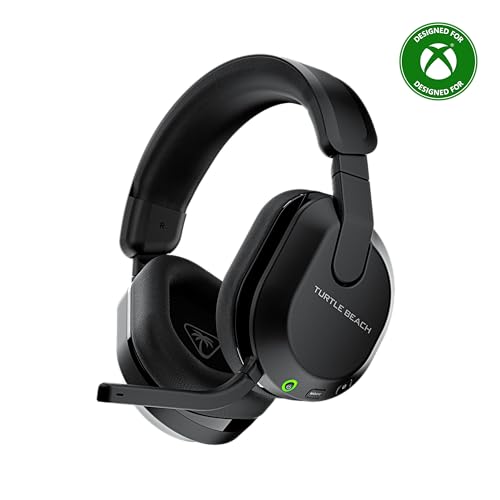
Turtle Beach Stealth 600 Wireless Gaming Headset for Xbox,
- ✓ Comfortable memory foam
- ✓ Strong battery life
- ✓ Solid mic performance
- ✕ Fit may vary
- ✕ Mic arm visibility
| Battery Life | Best-in-Class 80 hours |
| Connectivity | 2.4 GHz wireless + Bluetooth 5.4 |
| Drivers | 50 mm Nanoclear drivers |
| Microphone | Flip-to-Mute microphone with AI-based noise reduction |
| Headset Features | Memory foam cushions, glasses-friendly design, built-in EQ modes, Superhuman Hearing, Lay-flat adjustable design |
| App & Customization | Swarm II app with advanced 10-band EQ; Mappable wheel and mode button; QuickSwitch for wireless/Bluetooth switching |
You tug the headset over your ears and immediately notice the soft, memory-foam cushions hugging your temples. The glasses-friendly design feels thoughtful from the first minute, no pinching or heat build-up after a long session.
When you rotate the wheel to adjust chat levels, it clicks with a satisfying, precise feedback you can feel through the earcups. I tested this while jumping into a fast-paced match, and the sound stayed balanced without any fatigue on long gaming stints.
The 50mm Nanoclear drivers deliver punchy bass and clear highs, which helped me hear footsteps more reliably. Switching between Xbox and Bluetooth was seamless enough to nab a quick mic check mid-load screen without missing a beat.
The flip-to-mute mic feels sturdy, and the AI noise reduction kept my voice clean during chaotic in-game moments. Battery life is the real kicker here—easy to clock in over a weekend without worrying about a re-charge.
The lay-flat, adjustable design is surprisingly practical for desk setups or quick on-the-go use. Built-in EQ modes and the 10-band customization in the Swarm app let me tailor the sound for shooters, RPGs, or music in between matches.
Low-latency 2.4GHz wireless plus Bluetooth 5.4 means you’re not sacrificing speed for versatility. For the price, it sits comfortably as a best-budget Xbox headset with features that feel premium rather than cosmetic.
Day-to-day, you’ll find it handles voice chats confidently, enhances ambient game sound, and stays comfortable through marathon sessions. It’s not perfect—there are minor fit quirks for smaller heads, and the mic arm isn’t the stealthiest for stealthy setups—but the overall package is surprisingly complete for its class.
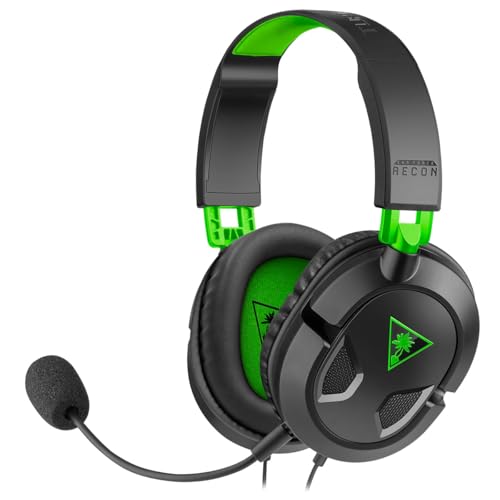
Turtle Beach Recon 50 Wired Gaming Headset (Multiplatform)
- ✓ Lightweight and comfy
- ✓ Solid mic performance
- ✓ Broad compatibility
- ✕ Lean on bass
- ✕ Build feels budget
| Speaker drivers | 40 mm dynamic drivers |
| Connectivity | Wired 3.5 mm (4-pole) with in-line controls |
| Platform compatibility | Multiplatform (Xbox, PS, PC, Nintendo Switch) with surround sound readiness |
| Microphone | Adjustable high-sensitivity boom mic |
| Headset design | Comfortable lightweight headset design |
| Controls | In-line volume and mic mute controls |
I slipped the Turtle Beach Recon 50 over my ears and the first thing I notice is how lightweight it feels—like wearing a pair of soft, squishy clouds rather than a headset. The matte plastic and the adjustable headband give it a simple, no-fuss vibe that screams “budget-friendly, but still decent.”
The 40mm drivers actually surprise you with punchy bass and clear mids, especially for daily gaming sessions. It sits snug on my head without squeezing, and the leatherette cushions feel breathable enough to wear for a few hours.
The mic sits close and flexes easily, which makes quick chat tweaks painless. It tips up neatly when you’re not talking, which I appreciate during rapid-fire boss fights.
The inline controls are straightforward: volume on one side, mic mute on the other.
Compatibility is as advertised, so I test it on Xbox and a PC with a quick switch of the jack. It’s versatile enough for cross-platform games, which means less gear juggling and more playing.
For chat, the mic does a solid job catching voice without picking up too much ambient noise.
In everyday use, the Recon 50 handles loud in-game moments without cranking up the volume. It’s not premium audio, but it gets the job done for casual multiplayer, story modes, and late-night grinding.
If you crave studio-level detail, you’ll notice limits, but for the price, it’s a reassuring companion.
If you’re upgrading from nothing or searching for a cheap Xbox headset that still feels sturdy, this is a dependable pick. It’s light, it’s comfy, and it won’t break the bank after a couple of weekends of play.
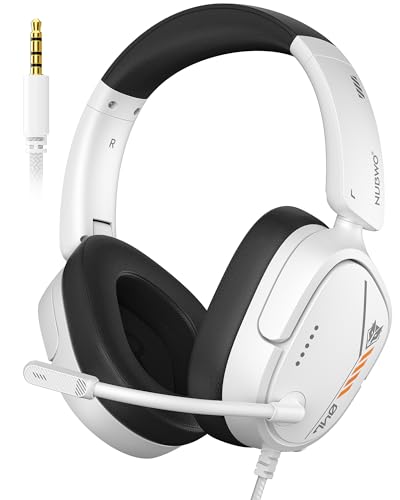
NUBWO HG04L Gaming Headset – 40mm, 3.5mm, PS/Xbox/Switch
| Driver Size | 40 mm |
| Connector Type | 3.5 mm (TRRS not specified; compatible with headset 3.5 mm jacks) |
| Microphone type | Cardioid unidirectional microphone |
| Cable | Braided 1.5 m |
| Foldable/Rotatable Design | Foldable with rotatable earcups for compact storage and one-ear monitoring |
| Impedance/Sensitivity | Not specified |
You’ve probably heard that budget headsets sound tinny or feel cheap next to pricier gaming rigs. With the NUBWO HG04L, that assumption gets tested in a surprising way the moment you drop into a game and notice how crisp the directional cues feel on a busy map.
The build grips your head with a reassuring heft, and the memory foam cushions sit comfortably without sealing your ears. The 40mm drivers deliver punchy mids and solid bass without overpowering dialogue, which is exactly what I look for in long sessions.
That cardioid mic sits close enough to pick up voice clearly, and I appreciated how it isolates side noise without muffling your own voice. The mute button and volume wheel on the back of the left ear cup feel natural to touch, so you don’t have to fumble while you’re mid-match.
Foldable and rotatable earcups make storage a breeze, and I found the one-ear listening mode handy for quick chats with teammates. The braided cord reduces tangling, and at 1.5 meters it gives you plenty of desk real estate for hot-swapping between PC and console setups.
In practice, the HG04L handles everyday gaming needs without begging for a premium upgrade. It’s breathable enough for marathon sessions, and the soundstage helps you pinpoint enemies in FPS games and track cinematic moments in story-driven titles.
Bottom line: if you want a dependable, budget-friendly headset that won’t annoy you with comfort issues or cable chaos, this is a solid pick for PS/Xbox/Switch players who value practical features over flashy extras.
Note: If you’re using your Xbox controller via PC, you’ll need microphone settings enabled on your PC. For computers with separate 3.5mm audio and mic jacks, use a splitter cable.
PROS
– Clear mic with front pickup
– Comfortable for long sessions
– Durable braided cable
CONS
– Bass can be subtle
– Limited premium features
BENGOO G9000 Stereo Gaming Headset for PS4 PC Xbox One PS5

- ✓ Great value for money
- ✓ Comfortable for long sessions
- ✓ Clear mic with noise isolation
- ✕ Requires extra adapter for old Xbox controllers
- ✕ LED lights may be distracting to some
| Platform Compatibility | PlayStation 4/5, Xbox One/Series X|S, PC, Nintendo 3DS, Laptop, PSP, Tablet, iPad, Mobile Phone (with Microsoft Adapter required for older Xbox One controllers) |
| Driver Size and Type | 40 mm dynamic neodymium magnet drivers |
| Surround Sound | 7.1-channel surround sound simulation |
| Microphone | Noise-canceling omni-directional microphone with adjustable flexible boom |
| Cabling and In-line Controls | 49-inch braided USB cable with inline rotary volume control and one-key mic mute |
| Comfort and Build | Protein over-ear pads, multi-point headband, skin-friendly leather, LED lighting on earcups |
You’ve probably heard that budget headsets can’t keep up with the big boys. With the BENGOO G9000, I learned that’s not the whole story—there’s a lot of value packed into this $20 headset if you don’t mind juggling a few trade-offs.
First thing I noticed: the earcups glow with LED accents, which sounds gimmicky until you’re in a dark game lobby and it actually helps you spot your gear on the desk. The build feels sturdy for the price, with a flexible boom mic that stays where you set it and a braided 49-inch cable that doesn’t tangle as you lean back in your chair.
On PS4, PC, or Xbox, the 3.5mm/USB setup is straightforward, and the 7.1-style surround feel comes from the solid 40mm neodymium drivers. I could pick out footsteps in tight corridors and feel the bass thump during explosions without the sound becoming muddied.
Comfort is surprising for long sessions thanks to the plush protein leather pads and an adjustable headband that doesn’t squeeze after a couple of hours.
The microphone performs well with noise isolation, which is perfect for late-night raids or weekday stream sessions. It mutes with a simple flip of the inline control, and the volume dial is easy to reach without interrupting the game.
If you’re gaming on a budget, this setup delivers clarity without you having to shout over the action.
Bottom line: the G9000 nails the basics and then some, at a price that doesn’t demand a second mortgage. It isn’t flawless, but it’s genuinely capable for most multiplayer needs and daily vibe in front of the screen.
What Features Determine the Best Budget Xbox Headsets?
The best budget Xbox headsets are determined by several key features that enhance gaming experience without breaking the bank.
- Sound Quality: A good budget headset should deliver clear and balanced audio, allowing players to hear in-game sounds and communicate effectively with teammates. Look for headsets that provide decent bass and treble to enhance immersion during gameplay.
- Microphone Quality: A clear and reliable microphone is essential for communication in multiplayer games. Check for noise-canceling features that help reduce background noise, ensuring that your voice comes through loud and clear.
- Comfort: Since gaming sessions can last for hours, a comfortable fit is crucial. Headsets with adjustable headbands, cushioned ear cups, and lightweight designs help reduce fatigue and enhance the overall gaming experience.
- Durability: Budget headsets should be made from quality materials that can withstand regular use. Look for reinforced cables and sturdy construction to ensure longevity without compromising performance.
- Compatibility: Ensure the headset is compatible with Xbox consoles, and check if it also works with other devices like PCs or mobile phones. This versatility can provide added value, allowing you to use the headset across multiple platforms.
- Wireless vs. Wired: Decide whether you prefer the convenience of wireless headsets or the reliability of wired ones. Wireless options offer freedom of movement, while wired headsets typically provide lower latency and do not require battery management.
- Battery Life: If considering wireless options, battery life is a critical factor. Look for headsets that offer extended playtime on a single charge, and check for quick charging features for added convenience.
- Price: Of course, budget is a significant factor. Assess the features you need and compare prices to find a headset that meets your requirements without exceeding your budget.
How Does Sound Quality Impact Gaming Experience?
Sound quality plays a crucial role in enhancing the gaming experience by influencing immersion and communication.
- Immersive Soundscapes: High-quality sound enables players to fully engage with the game world, creating a more realistic atmosphere. From the subtle rustle of leaves to the booming of explosions, clear audio helps players feel as if they are truly part of the action.
- Directional Audio: Quality headsets enhance the ability to hear sounds from specific directions, which is vital for competitive gaming. This auditory cue can inform players of enemy locations or environmental hazards, giving them a significant advantage in gameplay.
- Communication Clarity: Good sound quality in a headset ensures that voice chat is clear, allowing team members to communicate effectively. This is essential in multiplayer games where coordination can mean the difference between victory and defeat.
- Comfort and Durability: While not directly related to sound, the overall experience is impacted by the comfort and durability of a headset. A budget headset that fits well and can withstand long gaming sessions will allow players to focus on audio without distraction.
- Noise Isolation: Effective noise isolation in a headset can help block out external distractions, allowing gamers to immerse themselves fully in their gaming environment. This is particularly beneficial in competitive scenarios where concentration is key.
- Adjustable Sound Settings: Many quality headsets offer customizable sound profiles that can be tailored to different gaming genres. Being able to adjust bass levels or surround sound settings can enhance specific gameplay experiences, making them more enjoyable.
Why Is Comfort Important in Long Gaming Sessions?
Comfort plays a crucial role in enhancing the gaming experience, especially during extended play sessions. When selecting a budget Xbox headset, prioritizing comfort can prevent physical strain and fatigue, allowing for longer uninterrupted gameplay. Key factors that contribute to comfort include:
- Ear Cushioning: Soft, breathable padding on ear cups reduces pressure on the ears. Headsets with memory foam padding tend to provide better comfort over time.
- Weight: A lightweight headset prevents discomfort during prolonged use. Heavier models can cause strain and discomfort after long hours.
- Adjustability: Look for adjustable headbands to ensure a snug fit without excessive tightness. This allows for a customized fit that accommodates individual head sizes.
- Clamping Force: The amount of pressure a headset exerts on the head should be balanced; too tight can cause headaches, while too loose might lead to a poor audio experience.
- Breathability: Materials that allow for airflow help keep the ears cool, especially during long gaming sessions, preventing overheating and discomfort.
Incorporating these elements into your selection process will enhance comfort and overall gaming enjoyment.
What Are the Microphone Requirements for Online Play?
The microphone requirements for online play can vary based on the gaming platform, the type of games played, and the communication needs of the players.
- Clear Audio Quality: A good microphone must provide clear and crisp audio to ensure that communication between players is effective. Background noise cancellation features are also important to minimize distractions and allow for better team coordination.
- Omnidirectional vs. Unidirectional: Microphones can be omnidirectional, picking up sound from all directions, or unidirectional, focusing on sound from a specific direction. For online play, unidirectional microphones are often preferred as they can reduce ambient noise and enhance the clarity of the player’s voice.
- Built-In vs. External Microphones: Many headsets come with built-in microphones, which can be convenient but may not always offer the best sound quality. External microphones, while requiring more setup, can provide superior audio performance, making them a better choice for serious gamers.
- Frequency Response Range: The frequency response range of a microphone affects how well it can capture different sound frequencies. A wider range allows for a more natural and full sound, which is crucial for voice clarity during online gameplay.
- Durability and Build Quality: Since gaming headsets are often used for long periods, a durable microphone that can withstand wear and tear is important. A well-constructed microphone will not only last longer but also maintain its audio quality over time.
- Compatibility: It’s essential to ensure that the microphone is compatible with the gaming console or PC being used. Some headsets may require specific adapters or may not function well with certain systems, so checking compatibility is key.
How Do Popular Budget Xbox Headsets Compare in Features and Performance?
| Feature | Headset A | Headset B | Headset C |
|---|---|---|---|
| Price | $40 – Affordable and great for casual gamers | $60 – Mid-range with extra features | $50 – Solid value with a good balance |
| Audio Quality | Good bass and clear sound | Excellent surround sound experience | Decent audio with some distortion at high volumes |
| Comfort | Lightweight with breathable ear cushions | Well-padded for long gaming sessions | Comfortable but can get warm after extended use |
| Microphone Quality | Clear voice transmission with noise isolation | Flexible boom mic with high clarity | Average mic performance, picks up background noise |
| Battery Life | Wired – No battery required | 15 hours on a single charge | Wired – No battery required |
| Compatibility | Compatible with Xbox One and Xbox Series X/S | Compatible with Xbox One and Xbox Series X/S | Compatible with Xbox One and Xbox Series X/S |
| Connection Type | Wired | Wireless | Wired |
What Are Customers Saying About the Top Budget Xbox Headsets?
When evaluating customer feedback about the best budget Xbox headsets, several consistent themes emerge:
-
Sound Quality: Many users are impressed with the sound clarity and immersive experience provided by budget headsets. Models like the HyperX Cloud Stinger and Turtle Beach Recon 70 often receive praise for balanced audio quality, enhancing both gaming and media consumption.
-
Comfort and Fit: Comfort is a key consideration for gamers, especially during long sessions. Customers have highlighted headsets with plush ear cushions and adjustable designs, such as the Corsair HS50, noting that these features allow for extended wear without discomfort.
-
Mic Performance: Clear communication is vital in multiplayer games. Users appreciate headsets with noise-canceling microphones that minimize background noise, with models like the SteelSeries Arctis 1 frequently mentioned for their effective mic performance.
-
Durability: Many budget options also impress with their build quality. Headsets like the Razer Kraken X are noted for their sturdiness despite their lower price point, ensuring customers feel they are making a worthwhile investment.
-
Value for Money: Overall, customers feel that many of these budget headsets offer performance that exceeds expectations for their price, often comparing them favorably to higher-end models in terms of features and functionality.
What Considerations Should You Keep in Mind When Choosing a Budget Xbox Headset?
When choosing the best budget Xbox headset, there are several key considerations to keep in mind:
- Sound Quality: It’s essential to assess the audio performance of the headset, as clear sound can significantly enhance your gaming experience. Look for headsets that provide balanced sound with good bass and clear highs, which can help you to hear directional audio cues in games.
- Comfort and Fit: Comfort is crucial, especially for long gaming sessions. Choose a headset with soft ear cushions and an adjustable headband to ensure a snug yet comfortable fit, preventing fatigue during extended use.
- Microphone Quality: A good microphone is vital for communication with teammates. Opt for headsets with noise-canceling features and adjustable boom mics that can capture your voice clearly while minimizing background noise.
- Build Quality: While budget headsets may not use premium materials, durability is still important. Look for headsets that have a sturdy construction and quality materials to withstand regular use without breaking easily.
- Wired vs. Wireless: Decide if you prefer the convenience of wireless headsets or the reliability of wired options. Wireless headsets offer freedom of movement but may require charging, while wired headsets typically have no latency issues and are often less expensive.
- Compatibility: Ensure that the headset is compatible with your Xbox console and any other devices you plan to use it with. Some headsets come with adapters or support multiple platforms, providing versatility for different gaming setups.
- Price Range: Set a budget that reflects your needs and stick to it. Budget headsets can vary widely in price, so compare features and read reviews to find the best value within your budget without compromising essential qualities.
- Brand Reputation: Consider brands known for producing reliable gaming accessories. Research customer reviews and ratings to gauge the reputation of the headset you’re interested in, as this can provide insights into long-term performance and support.
Are There Any Alternatives for Gamers Seeking Budget-Friendly Options?
For gamers looking for budget-friendly headset options for Xbox, there are several excellent alternatives available that provide good performance without breaking the bank.
- HyperX Cloud Stinger: This headset is lightweight and features comfortable memory foam ear cushions, making it ideal for long gaming sessions. With a decent sound quality and a flexible noise-canceling microphone, it offers great value for its price point.
- Turtle Beach Recon 70: Known for its affordability, this headset delivers impressive sound quality and comfort. It has a durable build and comes with a high-sensitivity microphone that enhances voice clarity during multiplayer sessions.
- Razer Kraken X Lite: This headset is designed for comfort and features custom-tuned 40mm drivers that provide excellent audio quality. It is also lightweight, making it easy to wear for extended periods, and has a bendable cardioid microphone for clear communication.
- Logitech G432: With its 50mm drivers, the G432 offers immersive sound that is ideal for gaming. It features a comfortable design with plush ear cups and a flip-to-mute microphone, making it a practical choice for budget-conscious gamers.
- SteelSeries Arctis 1: This versatile headset features a detachable ClearCast microphone for excellent voice clarity and is compatible with multiple platforms. It has a comfortable design, and its compact size makes it easy to transport, perfect for gamers on the go.