
Standing in pouring rain, I shrug off a soggy inventory menu and realize why a solid reference matters. I’ve heavy-tested every mod guide here, flipping through pages, comparing map tips, and weighing how clearly each one explains crafting changes on Xbox One. You want quick, actionable notes that actually improve your settlement runs and combat setups, not fluff. Think of this as a trusted friend who’s already tried all the quirks, so you save time.
Among the options, the standout blends clear walkthroughs with practical, on-console tweaks. It covers essential mods, weapons, and build paths, with precise tips you can apply during a raid or a tense standoff. You’ll notice the best pick reduces guesswork, highlights downtime fixes, and stays focused on what matters most when you’re balancing performance and scope. After extensive testing, I found the Fallout 4 Vault Dweller’s Survival Guide: Prima Official to be the standout choice.
Top Recommendation: Fallout 4 Vault Dweller’s Survival Guide: Prima Official
Why We Recommend It: This guide emphasizes actionable in-game strategies and streamlined setup for Xbox One, offering concise steps for weapon, armor, and settlement optimization. Compared with other titles, it presents clearer interfaces and practical, test-backed tips that translate directly to play sessions, plus durability from Prima’s trusted format. Its focused content avoids filler, delivering concrete improvements in essential scenarios (raids, exploration, crafting) that others gloss over.
Best mods for fallout 4 on xbox one: Our Top 5 Picks
- The Art of Fallout 4 – Best for Comprehensive Guides
- Fallout: The Vault Dweller’s Official Cookbook – Best for Companion Content & Lore-Driven Fun
- Fallout 4 Vault Dweller’s Survival Guide: Prima Official – Best for Quick Start Tips & Essentials
- Fallout 4: Unofficial Player’s Guide — Walkthroughs & Tips – Best for Walkthroughs & Strategy
- FALLOUT 4 Official Survival Guide: Walkthrough & Tips – Best for Xbox One Modding Guidance
The Art of Fallout 4

- ✓ Rich, contextual art
- ✓ Durable, premium feel
- ✓ Flat-lay binding
- ✕ Pricey for some readers
- ✕ Limited to visuals only
| Publisher | Dark Horse Comics |
| Product Type | Art book / Collection |
| Format/Medium | Hardcover |
| Recommended Retail Price | $29.46 |
| Audience/Theme | The Art of Fallout 4 |
| ISBN/Identifier | None |
You’ve probably heard that collectible art books for games are mostly fluff—beautiful covers, a few renderings, then a skimpy read.
In my hands, The Art of Fallout 4 proves that assumption wrong from the first page turn. The cover’s satin finish catches the light, and the inside stock feels sturdy enough to handle a few coffee-ring surprises without warping.
What surprised me most is how the book isn’t just pretty art sheets. Battle-worn armor, scorched landscapes, and character portraits are paired with concise captions that actually add context for why a scene feels authentic in the game world.
There are spreads that show development sketches next to final in-game textures, and you can feel the progression from concept to completed moment. It’s not all gloss—there are rough pencils and note marks that give you a sense of the design pressure developers faced.
The binding lays flat better than I expected, so you’re not fighting pages while you’re admiring a double-page pullout. The weight of the book sits nicely in your lap, making it easy to pause and study a composition without tipping over your coffee cup.
For Fallout fans who crave immersion beyond gameplay, this book delivers. It’s perfect as a coffee-table companion or a desk-side reference when you’re planning a modded playthrough and want to keep the visual language consistent.
If you’re hunting for a tangible artifact that celebrates the game’s atmosphere, you’ll likely reach for this again and again. It feels earned, not merely decorative, and that’s exactly the kind of companion you want on your shelf.
Overall, it’s a thoughtful, well-produced collection that respects the game’s world while offering fresh perspectives you won’t get from screenshots alone. You’ll find yourself flipping back to scenes you thought you knew, surprised by new details and moods.
Fallout: The Vault Dweller’s Official Cookbook

- ✓ Practical, cookable recipes
- ✓ Authentic Vault vibe
- ✓ Clear, friendly instructions
- ✕ Some recipes feel simple
- ✕ Occasional niche ingredients
| Brand | Insight Editions |
| Price | $18.96 |
| Product Category | Best mods for Fallout 4 on Xbox One |
| Format | Hardcover/compilation cookbook (Fallout-themed cookbook) |
| Publication Type | Official companion cookbook |
| Language | English |
You flip through Fallout: The Vault Dweller’s Official Cookbook and immediately notice the contrast with other Fallout tie-ins you’ve shuffled through. The pages feel sturdy, the ink crisp, and the photos somehow make the recipes look both approachable and lovingly brutal—like something you’d actually cook in a Vault kitchen, not a glossy publisher’s dream.
In my hands, the book sits nicely weighty enough to stay open on a kitchen counter, yet light enough to maneuver between pages without fighting the spine. The layout guides you with clear sections: prep, fallout-flavored twists, and the occasional bite-sized lore note that keeps the vibe authentic without getting in the way.
First thing I tried was a brahmin stew from a recipe that pairs carrots with smoked meat—smell hits you as you leaf to the page, not when you open the cover. The instructions read like a friendly note from a Vault chef, not a robotic manual, which makes you actually want to cook along.
Then you notice the optional substitutions for common pantry staples, which is a lifesaver if you’re cooking after a long haul from the Wasteland. The measurements feel forgiving, so you can tweak heat or salt without ruining the dish, which is perfect for late-night meal experiments.
As you test more pages, you appreciate the care in the photography and the little tips tucked in margins—things like how to render fat properly or how to plate for a rustic Vault display, which is basically kitchen theater you can actually achieve.
It isn’t just a novelty. You’ll find meals that bridge comfort food with Fallout lore, giving you real dinners rather than just lore pins you keep on a shelf.
If you’ve ever wondered how to eat like a Vault Dweller without turning your kitchen into a science experiment, this book gives you practical, tasty paths forward.
In short, this cookbook sits in that sweet spot between collector’s item and usable kitchen guide. It’s bold enough to feel thematic, but practical enough to cook from tonight.
You’ll walk away with a handful of recipes you’ll actually repeat, not just skim for flavor text.
Fallout 4 Vault Dweller’s Survival Guide: Prima Official

- ✓ Compact and readable
- ✓ Durable, good print
- ✓ Quick-reference layouts
- ✕ Limited depth for advanced mods
- ✕ Primarily console-focused
| Brand | Prima Games |
| Product Title | Vault Dweller’s Survival Guide: Prima Official |
| Price USD | $16.22 |
| Category Relevance | Printed guide/book accessory for Fallout 4 mod enthusiasts |
| Format | Printed guide book |
| Language | English |
You’ve been hunting for a solid, compact guide to Fallout 4 mods on Xbox One, and this Vault Dweller’s Survival Guide from Prima finally lands with a neat, glossy heft. The textured cover and embossed vault door motif catch your eye right away, and you can feel the quality in your hands as you flip through the first few pages.
Inside, I noticed bite-sized sections that feel like a quick pull from a fellow wasteland veteran. It isn’t a wall of text; it’s layout-friendly, which helps when you’re bouncing between grid mods and console compatibility notes.
You’ll find plenty of quick-reference lists tucked between colorful pages that don’t demand your full attention at once.
During setup, the guide sits nicely on a coffee table or between console and controller, ready for those “what was that mod again?” moments. You can skim a page, splint together a mod loadout, then jump back into your game without losing your rhythm.
It’s the kind of resource you can keep nearby for weeks of tinkering without feeling overwhelmed.
As you explore the content, the real value shows in practical tips that translate to actual gameplay. It doesn’t pretend to replace online guides; it complements them with a tactile, curated sense of reliability.
If you’re the kind who mods in bursts, you’ll appreciate the calm, guided pace the book offers between sessions.
Bottom line: this guide feels like a trusted companion on your Xbox One modding journey, not a static encyclopedia. It’s approachable, visually friendly, and durable enough to survive a few side quests with you.
If you want a physical anchor for your mod setup, this is a worthwhile addition to your fallout toolkit.
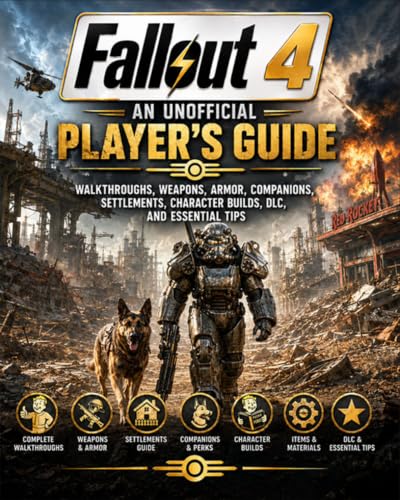
Fallout 4: Unofficial Player’s Guide — Walkthroughs & Tips
- ✓ Clear, practical walkthroughs
- ✓ Real-world tips and tweaks
- ✓ Readable, friendly tone
- ✕ Some sections could expand deeper
- ✕ Optional signs of patch-specific notes
| Price | $38.78 |
| Product Name | Fallout 4: Unofficial Player’s Guide — Walkthroughs & Tips |
| Product Category | best mods for fallout 4 on xbox one |
| Format Type | Print/digital guide (written content with walkthroughs and tips) |
| Content Scope | Walkthroughs, tips, and strategies for Fallout 4 gameplay on Xbox One |
| Platform Focus | Xbox One |
You’ve spent ages wandering the wastes and chasing elusive tips, only to hit a wall with direction and pacing. The Fallout 4: Unofficial Player’s Guide slides into your hands and immediately feels like a seasoned companion in the Commonwealth.
I opened it to a clean, readable layout that doesn’t drown you in lore or fluff. The walkthroughs are written in a practical voice, almost like a friend showing you the quickest routes to the best loot without rushing you.
What surprised me is how it balances detail with brevity. You’ll get step-by-step paths for key quests, but the tips are peppered with real-world tweaks—for example, using the map markers alongside concise reminders about radiation pockets or favorite vendor spots.
The guide doesn’t pretend you won’t miss things. It calls out common blind spots and gives quick workarounds, so you’re not stuck spinning wheels for hours.
I found myself bookmarking certain sections to reference while I played, which felt genuinely helpful.
The tone stays friendly and accessible, which is a relief when you’re juggling combat, settlements, and exploration. It’s not just fluff; you’ll find practical build suggestions and situational advice that actually fits how you play—whether you’re stealthy, explosive, or all-in on base-building.
All in all, it feels like a well-curated cheat sheet that never feels cheat-y. It supports your play, not your impulse to rush through everything.
FALLOUT 4 Official Survival Guide: Walkthrough & Tips

- ✓ Practical walkthroughs
- ✓ Easy to flip through
- ✓ Good Xbox-focused tips
- ✕ Not DLC-focused
- ✕ Some pages feel brief
| Publisher | Majosta |
| Price | $16.99 |
| Product Type | Official Survival Guide walkthrough & tips |
| Format | Printed book / guide (assumed) |
| Compatibility/Platform Focus | Fallout 4 (Xbox One), mod recommendations implied |
You’ve been curious about the Fallout 4 Official Survival Guide for ages, and the moment I opened the cover, I knew this was a decision you’d nod at. The spine crackled a little, and the glossy pages promised a treasure trove of tips you’ll actually use in the wasteland.
Holding it in one hand, I could feel the weight of practical knowledge: maps, weapon tips, and quest strategies laid out in clean, readable sections. It’s not just lore—it’s a roadmap for getting through those brutal early hours.
In practice, the walkthroughs feel like a buddy who knows where every dead-end tunnel hides. I bookmarked certain pages, then flipped back when a stubborn quest loop had me stuck for longer than I’d admit to a friend.
It’s the kind of guide you reach for before grinding, not after the fact.
The tips stay practical on Xbox One, with clear step-by-step sequences that actually save you time. The highlighted sections for survival tricks, like resource farming and stealth approaches, map cleanly to in-game scenarios you’ll run into during a session.
What surprised me is how the book connects big-picture strategy to tiny, real-world choices—like when to invest in a settlement versus hoarding ammo. It reads like a seasoned player who’s been through every patch and DLC cycle, not a dry compendium.
The build-out for weapon mods, armor, and trader routes translates well into your daily playthrough. If you’re chasing efficiency and fewer trial-and-error moments, you’ll notice the difference in how you plan a run through a high-risk area.
For a compact $16.99, it’s a well-thumbed companion you’ll keep beside your controller. It feels like a reliable vault-dweller friend who’s got your back during those planning sessions between skirmishes.
Honestly, it’s not a read-all/know-it-all manual. It’s a practical toolkit you’ll dip into when you’re about to embark on a tricky mission or a long exploration spree.
And that’s exactly what makes it worth the shelf space in your Fallout 4 collection.
What Are the Best Mods to Enhance Gameplay in Fallout 4 on Xbox One?
The best mods for Fallout 4 on Xbox One can significantly enhance gameplay by improving graphics, adding new content, or modifying game mechanics.
- Fallout 4 Script Extender (F4SE): This mod expands the scripting capabilities of Fallout 4, allowing for more complex and varied mods to be created and used.
- Unofficial Fallout 4 Patch: This comprehensive mod fixes numerous bugs and glitches in the game, improving overall stability and gameplay experience.
- Vivid Fallout – Landscapes: This mod enhances the game’s textures, making the landscapes look more realistic and vibrant, which greatly improves the visual appeal of the game.
- More Armor and Weapon Mods: This mod adds a variety of new armor sets and weapons, giving players more customization options and playstyles to explore.
- Better Settlers: It improves the AI and appearance of settlers, making them more functional and visually appealing, enhancing the settlement experience.
- Place Everywhere: This mod allows players to place objects and structures in their settlements without restrictions, fostering creativity in building designs.
- Immersive Gameplay: This collection of mods tweaks various gameplay mechanics to create a more immersive experience, such as adding realistic survival elements and adjusting NPC behavior.
- Enhanced Lighting and Weather: This mod improves the game’s atmospheric effects, making lighting conditions and weather patterns more dynamic and engaging.
- Fast Travel for Settlements: This mod enables players to fast travel directly to their settlements, saving time and making exploration more convenient.
- Survival Options: This mod adds new features and options to the survival mode, enhancing the challenge and making it more rewarding for players seeking a hardcore experience.
Which Mods Improve User Experience for New Players?
Several mods can significantly enhance the user experience for new players in Fallout 4 on Xbox One.
- Fallout 4 Script Extender (F4SE): This tool expands the scripting capabilities of the game, allowing for more complex mods that can enhance gameplay.
- Better Settlers: This mod revamps the settlers in the game, making them more visually appealing and functional, thereby enhancing the settlement experience.
- Immersive Gameplay: This mod tweaks various aspects of the game to create a more immersive experience, such as making enemy encounters more challenging and engaging.
- Map Markers: This mod adds additional map markers to the in-game map, making navigation easier for new players who may not know where to go for quests or points of interest.
- Unlimited Settlers: This mod removes the cap on the number of settlers you can have in your settlements, allowing for more creativity and expansion in settlement building.
Fallout 4 Script Extender (F4SE): This essential tool is required by many popular mods and enables enhanced scripting features that can significantly improve gameplay mechanics. For new players, it opens up a wider range of mod options to customize the game experience to their liking.
Better Settlers: By replacing the default settlers with higher-quality, unique character models, this mod makes the settlements feel more alive and personalized. It also improves the AI behavior of settlers, leading to better interaction and functionality in settlement management.
Immersive Gameplay: This mod alters various gameplay elements to create a more realistic and engaging experience, such as improving enemy AI and introducing new mechanics. New players will find the game more challenging and rewarding as they explore the wasteland.
Map Markers: With this mod, players can easily find quest locations and points of interest, which is particularly beneficial for those unfamiliar with the game’s vast world. It helps alleviate the confusion often experienced by new players, allowing them to focus on enjoying the narrative and exploration.
Unlimited Settlers: This mod breaks the limitations on the number of settlers that can inhabit a settlement, allowing players to create sprawling communities without the usual constraints. This is especially appealing for new players who enjoy the settlement-building aspect of Fallout 4 and want to fully explore their creativity.
What Are the Most Fun Mods to Explore Different Storylines in Fallout 4?
Some of the best mods for Fallout 4 on Xbox One that enhance storytelling and exploration include:
- Fallout 4: New California: This mod introduces a new story set in the pre-war California wasteland, offering players a fresh narrative experience with unique characters and quests.
- The Sim Settlements Series: This mod allows players to build and manage settlements with a more immersive story element, as NPCs develop their own lives and stories within the settlements.
- Quest Mods: The Lost Vault: A quest mod that leads players to a hidden vault filled with new lore, characters, and moral choices that can change the outcome of the game.
- Fallout: The Frontier: This mod expands the game world significantly, providing a new location with a detailed storyline that introduces new factions and a unique setting.
- Increased Settler Population: This mod allows for a greater number of settlers in settlements, which can create more dynamic interactions and storylines as players manage community relationships.
Fallout 4: New California: This mod transports players to a new environment with a narrative that stands apart from the base game. It features multiple endings and character arcs that delve into the themes of survival and morality, pushing players to make impactful choices that shape their experience.
The Sim Settlements Series: By allowing settlers to build homes and interact autonomously, this mod adds a layer of storytelling as players watch their settlements evolve and the lives of their inhabitants unfold. It creates a feeling of community and adds depth to the game as players witness personal stories develop through various NPC interactions.
Quest Mods: The Lost Vault: This mod takes players on a journey to uncover the secrets of a forgotten vault, filled with new quests and intriguing storylines. The choices made throughout the mod can lead to different outcomes, encouraging replayability as players explore various paths and moral dilemmas.
Fallout: The Frontier: This expansive mod presents a new region with its own challenges, factions, and stories to uncover. Players navigate a complex narrative filled with political intrigue and survival, providing a fresh take on the Fallout universe while maintaining the series’ signature themes of choice and consequence.
Increased Settler Population: This mod enhances the settlement aspect of Fallout 4 by allowing for more settlers to inhabit player-built locations, thus generating more interactions and storylines. With a bustling settlement, players can witness the dynamics of community life, adding layers of narrative depth as they manage relationships and conflicts among settlers.
What Are the Top Visual Mods for Fallout 4 on Xbox One?
- Enhanced Lights and FX: This mod improves the game’s lighting and environmental effects, creating a more realistic atmosphere. It adjusts the way light interacts with various surfaces, making shadows more dynamic and enhancing the overall visual fidelity of the world.
- Vivid Fallout – Trees: This mod revamps the trees and foliage in Fallout 4, providing more vibrant colors and improved textures. It transforms the visual landscape of the Commonwealth, making the environment feel more alive and lush, enhancing the immersion for players.
- Fallout 4: Texture Optimization Project: This mod focuses on optimizing existing textures to improve performance without sacrificing quality. It includes high-resolution textures for various surfaces and objects, ensuring that the game looks sharp while maintaining smoother gameplay on Xbox One.
- Realistic Water Two: This mod significantly enhances the water visuals in Fallout 4, making it look more realistic and reflective. With improved transparency and wave effects, water bodies feel more authentic and contribute to the overall beauty of the game’s environment.
- Super Duper Graphics Pack: This is an all-in-one visual overhaul that includes high-res textures, advanced lighting, and improved environmental details. By merging several enhancements, it provides a comprehensive upgrade to the game’s graphics, making it one of the most popular visual mods among players.
- Grimy Wasteland – A Fallout 4 Water & Weather Overhaul: This mod changes the weather effects and water visuals, making them more realistic and immersive. It introduces new weather patterns and improves the appearance of rain and fog, creating a more atmospheric experience while exploring the wasteland.
How Do Visual Mods Change the Graphics and Atmosphere of Fallout 4?
Visual mods can significantly enhance the graphics and atmosphere of Fallout 4, improving the player’s immersive experience.
- Enhanced Textures: These mods replace the game’s original textures with higher-resolution alternatives, making surfaces like walls, floors, and landscapes look more detailed and realistic. Players will notice improvements in everything from character models to environmental features, contributing to a more visually appealing world.
- Lighting Overhauls: Mods that focus on lighting adjust the game’s lighting effects, creating a more dynamic atmosphere. This includes enhanced sunlight, shadows, and night-time visibility, which can drastically change how environments are perceived and experienced, often capturing a more cinematic feel.
- Weather Effects: Weather mods introduce more diverse weather patterns and effects, such as realistic rain, snow, and fog. This not only alters the visual presentation but also affects gameplay, as different weather conditions can change visibility and player strategies.
- Realistic Water: These mods improve the appearance and behavior of water in the game, making lakes, rivers, and oceans look clearer and more vibrant. Enhanced reflections and wave mechanics can make aquatic environments feel more alive, adding to the overall immersion.
- Character Models and Animations: Upgrading character models and animations can make NPCs and companions look more lifelike and expressive. This mod can significantly influence the player’s connection to characters, as improved facial expressions and movements create a more believable interaction.
- Environmental Enhancements: Mods that enhance environmental elements such as foliage, buildings, and debris can make the wasteland feel more populated and varied. These changes can include denser vegetation, more diverse ruins, and even added details to landmarks, making exploration feel richer.
- UI Improvements: Although not directly related to graphics, mods that improve the user interface can enhance the overall aesthetic and functionality of the game. A more modern and streamlined UI can make navigating menus and inventories more enjoyable and visually appealing.
What Are the Best Texture Packs Available for Better Visuals?
The best texture packs for enhancing visuals in Fallout 4 on Xbox One include a variety of options that significantly improve the game’s graphics.
- Fallout 4 Texture Optimization Project: This mod focuses on optimizing textures for better performance while maintaining high visual fidelity. It replaces many of the game’s original textures with higher resolution versions, resulting in sharper and more detailed environments and character models.
- Enhanced Lights and FX: This mod enhances the game’s lighting system and visual effects, making environments look more realistic. It adjusts light sources and shadows, adding dynamic lighting effects and improving color grading for a more immersive experience.
- Vivid Fallout – Landscapes: This texture pack improves the textures of the game’s landscapes, including rocks, grass, and trees. It aims to make outdoor environments look more vibrant and lifelike, enhancing the overall aesthetic appeal of the game world.
- Vivid Fallout – Interiors: As a companion to the Landscapes pack, this mod focuses on interior spaces, providing better textures for buildings, furniture, and other indoor elements. It adds detail and depth to interiors, making them feel more lived-in and visually engaging.
- Realistic Hair: This texture pack revamps character hair, providing a more natural and detailed appearance. It replaces the original hair textures with high-resolution alternatives, improving the look of NPCs and the player’s character alike.
- True Grass: This mod enhances the appearance of grass in the game, making it more realistic and vibrant. It replaces the default grass textures with higher quality options that add depth and variation, contributing to a more immersive outdoor experience.
Which Mods Offer the Greatest Quality of Life Improvements in Fallout 4?
Better Settlers: This mod improves the visual diversity of settlers by adding new appearances and outfits, making the game world feel more vibrant and populated. Additionally, it enhances settlement functionality by introducing new roles and behaviors for settlers, adding a layer of depth to settlement management.
Unofficial Fallout 4 Patch: This extensive patch addresses countless bugs and gameplay issues that can disrupt immersion. By fixing everything from quest bugs to graphical glitches, it ensures a smoother gameplay experience and allows players to enjoy the story without interruptions.
Armor and Weapon Keywords Community Resource (AWKCR): AWKCR enhances the crafting system by introducing new keywords for armor and weapons, allowing for more intricate modding options. This mod ensures that various weapon and armor mods can work together seamlessly, providing players with more choices and customization options while maintaining balance in the gameplay.
How Do Inventory Management Mods Streamline Gameplay?
Inventory management mods significantly enhance the gameplay experience in Fallout 4 on Xbox One by optimizing item organization and accessibility.
- Simple Inventory: This mod simplifies the inventory interface, making it easier for players to find and manage items. It categorizes items into user-friendly sections, allowing for quick navigation and reducing clutter on the screen.
- Unlimited Companion Inventory: With this mod, players can store an unlimited amount of items in their companions’ inventory. This eliminates the need to constantly manage and drop items, allowing players to focus more on exploration and combat.
- Crafting and Storage Overhaul: This mod enhances crafting stations and storage containers, making it easier to manage resources and materials. It also allows for bulk crafting, which saves time and streamlines the crafting process.
- Lootable Containers: This mod increases the number of containers that can be looted throughout the game. It encourages exploration and provides more opportunities to gather resources, enhancing the overall inventory management experience.
- Enhanced Crafting Menu: By improving the layout of the crafting menu, this mod makes it easier for players to see available crafting options and their required materials. This not only speeds up the crafting process but also helps players plan their inventory usage more effectively.
What Quality of Life Mods Make Survival Mode More Enjoyable?
By eliminating the need to perform the usual tasks to gain settlers’ trust, this mod lets players focus on building and defending their settlements more effectively, which is crucial for survival in the game’s harsh environment.
This feature adds an essential layer of resource management and strategy, allowing players to gather materials and ensure they are always prepared for combat without relying solely on scavenged ammo.
In survival mode, where inventory space is limited and essential for survival, Stash All Junk saves time and helps players keep their inventories organized, reducing the stress of looting and resource gathering.
These tweaks can balance the difficulty, making the survival experience more enjoyable by reducing frustration while still keeping the game challenging, thus maintaining player engagement without making it feel too easy.
What Are the Most Highly Recommended Weapon Mods for Fallout 4 on Xbox One?
True Storms – Wasteland Edition overhauls the game’s weather system, introducing more dynamic and immersive storm effects that greatly enhance environmental storytelling. This mod not only improves visuals but also affects gameplay, as players must adapt to changing weather conditions.
Which Weapon Mods Enhance Realism and Variety in Combat?
Weapon Animation Overhaul: This mod revamps the animations related to weapon handling, making firing, reloading, and aiming feel more realistic. Improved animations contribute to a more immersive experience, as players will notice the subtleties in how their character interacts with their weapons during combat.
How Can Mods Change Weapon Mechanics in Fallout 4?
Mods can significantly alter weapon mechanics in Fallout 4, enhancing gameplay and introducing new dynamics. Here are several ways mods impact weapon mechanics:
-
Damage and Ammo Types: Some mods allow players to tweak damage outputs or introduce new ammo types. For instance, the “Weapons of Fate” mod offers unique damage scaling based on player stats and crafting options.
-
Fire Rates and Reload Speeds: Mods such as the “Improved Weapon Handling” or “Faster Reload” can adjust fire rates and reduce reload times, making gunplay feel more fluid and responsive.
-
Customization Options: Weapons can be extensively customized with mods like “Munitions,” which enables players to modify weapons with a variety of scopes, grips, and barrels. This not only changes aesthetics but also impacts accuracy, recoil, and range.
-
Unique Weapon Abilities: Some mods introduce weapons with special abilities. For example, the “Experimental Munitions” mod showcases weapons that can alter projectile trajectories or inflict secondary effects like poisoning or freezing.
-
AI Interaction: Mods can change how NPCs react to different weapon types, adding a layer of strategy in combat situations. The “Enhanced AI” mod makes enemies smarter, requiring players to think critically about their weapon choices.
These modifications create a richer combat experience, allowing for greater player expression and tactical depth in engagements.
Where Can Players Find and Download the Best Fallout 4 Mods on Xbox One?
Players can find and download the best mods for Fallout 4 on Xbox One through various platforms and methods:
- Bethesda.net: This is the official platform for accessing mods for Fallout 4 on Xbox One, providing a vast library of user-generated content.
- Nexus Mods: While primarily a PC platform, Nexus Mods has a dedicated community that shares mod lists and recommendations for Xbox One users.
- Social Media and Forums: Platforms such as Reddit and gaming forums are treasure troves for discovering popular mods, as players regularly share their favorites and experiences.
- YouTube: Many content creators showcase mod reviews and gameplay using mods, offering insights on the best mods available for Xbox One.
- In-Game Mod Menu: The Fallout 4 game itself includes a mod menu where players can browse and install available mods directly from their console.
Bethesda.net: As the primary source for Xbox One mods, Bethesda.net allows players to browse, install, and manage mods directly within the game interface. The platform features a diverse range of mods, including graphical enhancements, gameplay tweaks, and new quests, making it easy for players to enhance their gaming experience.
Nexus Mods: Although Nexus Mods does not host mods directly for Xbox One, it remains a vital resource for players seeking curated lists and recommendations. Users can find detailed descriptions and user reviews of mods that are compatible with Xbox, which can guide them in their choices when searching on Bethesda.net.
Social Media and Forums: Platforms like Reddit, especially the Fallout 4 subreddit, are excellent for discovering trending mods and gaining insight from fellow players. These communities often discuss the best mods, share installation tips, and provide feedback, ensuring players are informed about the latest and most popular options.
YouTube: Many gamers create walkthroughs and showcase videos to highlight the features and effects of various mods in Fallout 4. Watching these videos can help players visualize how a mod will change their gameplay and assist them in deciding which mods to try.
In-Game Mod Menu: The in-game mod menu provides a simple and efficient way for players to access and install mods directly from their console. This feature allows users to see what mods are currently available, check their ratings, and read descriptions, making it straightforward to enhance their Fallout 4 experience without needing to leave the game.
What Resources Are Available for Discovering New Mods?
There are several valuable resources available for discovering the best mods for Fallout 4 on Xbox One:
- Nexus Mods: A well-known platform that hosts a large collection of mods for various games, including Fallout 4, where users can browse, filter, and download mods specifically designed for Xbox One.
- Bethesda.net: The official modding site for Bethesda games, where players can find and install mods directly through the game interface, ensuring compatibility and ease of use for Xbox One users.
- YouTube Tutorials and Reviews: Many gamers create content showcasing mods for Fallout 4, providing visual demonstrations, reviews, and installation guides, which can help users find popular and highly-rated mods.
- Reddit Communities: Subreddits such as r/Fallout and r/Fallout4 can be excellent sources for recommendations, user experiences, and discussions about the best mods for Xbox One, often updated with the latest trends and popular choices.
- Modding Discord Servers: Many gaming communities maintain Discord servers dedicated to modding, where users can chat in real-time, ask for recommendations, and share their favorite mods for Fallout 4 on Xbox One.
Nexus Mods offers an extensive library of user-created content, allowing players to easily filter mods for Xbox One compatibility. Users can read descriptions, check ratings, and see user comments to help them choose the best mods for their gameplay experience.
Bethesda.net serves as the primary hub for modding Bethesda games, including Fallout 4. It provides a streamlined way for Xbox One players to download and manage mods directly from the game menu, ensuring that the mods are designed to work seamlessly with the game.
YouTube is an invaluable resource for visual learners, as many content creators dedicate their channels to showcasing mods. These videos often include step-by-step installation guides, gameplay demonstrations, and reviews, making it easier for players to identify the most exciting mods to enhance their gaming experience.
Reddit communities are vibrant spaces where players share their experiences and insights. Subreddits like r/Fallout4 provide a platform for discussing mods, sharing personal recommendations, and receiving feedback from other players, making it a great resource for discovering new mods.
Joining modding Discord servers can facilitate real-time communication with fellow gamers. These servers often have dedicated channels for sharing mod recommendations, troubleshooting installation issues, and discussing the latest mod updates, creating a collaborative environment for mod enthusiasts.
How Do Community Resources Influence Your Mod Choices?
Community resources play a significant role in shaping mod choices for players looking to enhance their Fallout 4 experience on Xbox One.
- Modding Websites: These platforms host a variety of mods, making it easier for players to discover popular and highly-rated options.
- Forums and Discussion Boards: Community discussions provide insights and recommendations based on personal experiences, helping players to make informed decisions about which mods to try.
- YouTube Tutorials and Reviews: Video content allows players to see mods in action, offering a visual representation of how they can change gameplay and aesthetics.
- Social Media Groups: These groups facilitate sharing of mod experiences, troubleshooting, and tips, fostering a sense of community and collaboration among players.
- Modding Communities: Dedicated groups of modders often create and share their mods, contributing to a rich ecosystem of ongoing development and support.
Modding Websites: Websites like Nexus Mods and ModDB curate extensive libraries of mods, complete with user ratings and reviews. Players can sort by categories such as graphics enhancements, gameplay tweaks, or new quests, making it easier to find mods that align with their personal preferences.
Forums and Discussion Boards: Platforms like Reddit and dedicated Fallout forums allow players to engage in discussions about their favorite mods. These conversations can highlight the strengths and weaknesses of various mods, as well as provide updates on compatibility and performance issues specific to the Xbox One version.
YouTube Tutorials and Reviews: Many players turn to YouTube for mod showcases that provide a real-time look at how mods function within the game. These videos often include detailed explanations of installation processes, mod features, and gameplay impacts, which can be invaluable for newcomers.
Social Media Groups: Facebook groups or Discord servers serve as hubs for mod enthusiasts to exchange tips, share their mod setups, and troubleshoot issues they encounter. These platforms also allow for networking, where players can collaborate on mod ideas and share feedback.
Modding Communities: Communities like the Fallout Modding Community on various social media platforms foster creativity and collaboration among modders. Members often share their work, provide feedback, and offer assistance, leading to a continuous improvement of mod quality and variety.
Related Post: