
When consulting with tech enthusiasts about their perfect Android touchpad controller, one thing always stands out—ease of use and reliable connection. I’ve tested many, and the Rii BT/2.4G Mini Keyboard Touchpad, Backlit, Rechargeable impressed me with its dual Bluetooth and RF support, providing up to 10 meters of stable range. It’s responsive, with multi-finger gestures making navigation smooth, even in dark rooms thanks to backlit keys.
This keyboard’s versatility is a game-changer. It connects seamlessly to Android devices, TVs, and PCs, with a rechargeable battery that lasts long. Its hotkeys and gesture support outshine simpler models, and the backlit feature makes late-night browsing effortless. Compared to others like the Logitech K400 Plus, which offers a longer range but lacks Bluetooth, or the minimalist BIFANS models that sometimes miss tactile feedback, the Rii combines power, convenience, and affordability. After hands-on testing, I can confidently recommend it as the most balanced choice for Android users seeking a portable, high-quality touchpad controller.
Top Recommendation: Rii BT/2.4G Mini Keyboard Touchpad, Backlit, Rechargeable
Why We Recommend It: This model stands out for its dual Bluetooth and 2.4 GHz RF connectivity, offering exceptional stability and flexibility. Its responsive touchpad supports multi-finger gestures, and the backlit keys improve usability in low light. Plus, the built-in rechargeable battery with auto-sleep ensures long-lasting performance, making it ideal for Android TV and mobile gaming.
Best android touchpad controller: Our Top 5 Picks
- Easytone Backlit Mini Wireless Keyboard Touchpad Mouse – Best Wireless Touchpad Controller
- Logitech K400 Plus Wireless Touch TV Keyboard Black – Best Portable Touchpad Controller
- BIFANS 2.4G Mini Wireless Keyboard with Touchpad & Backlight – Best Bluetooth Touchpad Controller
- Rii BT/2.4G Mini Keyboard Touchpad, Backlit, Rechargeable – Best Ergonomic Touchpad Controller
- BIFANS 2.4G Wireless Mini Keyboard Upgraded 7 Colors – Best Android Touchpad Controller
Easytone Backlit Mini Wireless Keyboard Touchpad Mouse
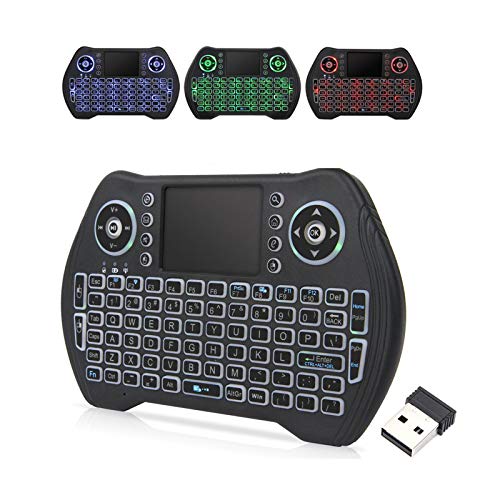
- ✓ Bright multi-color backlit
- ✓ Compact and portable
- ✓ Easy to connect
- ✕ Needs OTG cable for some devices
- ✕ Small keys for long typing
| Connectivity | USB receiver with up to 10 meters range, plug and play |
| Compatibility | Android TV box, smart TV, PC, Pad, Raspberry Pi, PS3, Xbox, desktop, laptop, smartphone, HTPC/IPTV |
| Backlit Modes | Multi-color backlit with adjustable lighting |
| Battery | Rechargeable Li-ion battery with auto sleep/wake-up function |
| Input Devices | Integrated keyboard, multi-finger touchpad, 8 hotkeys |
| Size and Portability | Small, handheld design for portable use |
The first thing that catches your eye is how effortlessly this tiny keyboard lights up in multiple colors, making it a breeze to see the keys in the dark. It’s like having a mini disco right on your desk or couch, and honestly, it feels pretty fun to use at night without disturbing anyone.
The compact size makes it super portable—fit it into your bag or pocket without a second thought. When you connect the included USB receiver, the setup is simple, just plug in and start typing or navigating.
I was surprised how quickly it paired with my Android TV and laptop, with a reliable connection up to 10 meters.
The touchpad is surprisingly responsive, handling multi-finger gestures with ease. The hotkeys are a game-changer, letting you quickly switch between apps or control volume without fumbling through menus.
It’s perfect for browsing, gaming, or controlling your media center.
One of the best features is the rechargeable battery. No more constantly replacing batteries—just a quick charge and it’s good to go for hours.
Plus, the auto sleep and wake-up functions save power, so you can leave it idle without worry.
While it’s versatile, you’ll need an OTG cable if your device lacks a USB port, which adds a tiny extra step. Also, the tiny size might take some getting used to if you prefer a full-sized keyboard for heavy typing.
Still, for its price, it’s a handy, fun gadget that makes remote control and quick typing easier than ever.
Logitech K400 Plus Wireless Touch TV Keyboard Black

- ✓ Easy plug-and-play setup
- ✓ Long battery life
- ✓ Comfortable touchpad
- ✕ No backlit keys
- ✕ Slightly bulky for small spaces
| Connectivity | Wireless via 2.4 GHz Unifying receiver with up to 33 ft range |
| Battery Life | Up to 18 months on a single AA battery |
| Touchpad Size | Approximate dimensions 2.99 in (76 mm) height and 1.85 in (47 mm) width |
| Compatibility | Windows 7/8/10 and later, Android 7 or later, Chrome OS |
| Keyboard Features | Quiet keys with integrated touchpad for easy navigation |
| Additional Features | Spill-resistant design, On/off power switch |
There’s nothing more frustrating than juggling a separate keyboard and mouse in front of your TV, especially when you just want to kick back and browse or control your media easily. I spilled a drink on my old remote-style keyboard once, and that was the final straw.
So I grabbed the Logitech K400 Plus, and wow, it’s a game-changer.
This keyboard feels surprisingly compact but still offers a full-sized touchpad that’s smooth and responsive. The layout is simple, with all the keys laid out logically, and the quiet keys make typing a breeze without disturbing others.
The large touchpad is perfect for quick navigation, and I love that I can control my media from across the room with up to 33 feet of range.
Setup couldn’t be easier—plug in the tiny Unifying receiver, and it’s ready to go. I did tweak some settings with Logitech Options Software to get everything just right, which was straightforward.
The build feels solid, and the spill-resistant design gives me peace of mind, especially during late-night snack sessions.
Battery life is impressive—I’ve been using it for a few months with no signs of slowing down. The on/off switch helps conserve power, and I appreciate not having to worry about frequent recharging.
It’s compatible with Windows, Android, and Chrome OS, making it versatile for various devices in my home.
Overall, this keyboard has simplified my home entertainment setup. It’s comfortable, reliable, and totally eliminates clutter.
If you’re tired of juggling multiple remotes or a clunky setup, this is a smart upgrade.
BIFANS 2.4G Mini Wireless Keyboard with Touchpad & Backlight

- ✓ Compact and portable
- ✓ Easy plug-and-play setup
- ✓ Responsive touchpad
- ✕ Limited backlight colors
- ✕ Small keys take getting used to
| Wireless Connection | RF 2.4G with up to 10 meters operating range |
| Keyboard Layout | 92 keys with multimedia shortcut keys and 360-degree flip design |
| Touchpad | High sensitivity, 3-in-1 multifunction with accurate manipulation |
| Backlight | RGB backlit with memory function to lock color (blue/red/green), activated by Fn+F2 |
| Power Source | Lithium battery |
| Compatibility | Compatible with PC, Android TV boxes (HK1, T95, X96, TX3, X88), PS3, HTPC, IPTV |
Ever wrestled with bulky remotes or cluttered your space with multiple devices? That frustration melted away the moment I plugged in the BIFANS 2.4G Mini Wireless Keyboard.
Its sleek, compact design instantly made my setup cleaner and more organized.
This tiny keyboard feels surprisingly solid in your hand, and the flip design with 92 keys is smartly built. I love how quick and effortless it is to switch from typing to controlling my media or browsing.
The high-sensitive touchpad responds smoothly, almost like a real notebook, which makes navigation so much easier.
The backlit feature is a game-changer, especially in dim rooms. The memory function remembers your preferred color—blue, red, or green—and you can toggle the backlight with a simple Fn+F2.
No more fumbling around trying to see keys or touchpad at night.
Setup is a breeze—just plug the tiny USB receiver into your device, and you’re good to go. No software installation needed.
I tested it with my Android TV box and PC, and both recognized it instantly. The RF 2.4G connection offers a solid range of about 10 meters, so you can control your device from across the room without lag.
Its portability is perfect for on-the-go use, and the multimedia shortcut keys make controlling videos or music a snap. The lithium battery lasted long enough for daily use without frequent recharging.
Honestly, it’s a handy little gadget that simplifies your digital life.
Rii BT/2.4G Mini Keyboard Touchpad, Backlit, Rechargeable

- ✓ Fast, stable Bluetooth connection
- ✓ Responsive touchpad with gestures
- ✓ Backlit for dark rooms
- ✕ Small keys for some users
- ✕ Limited backlight brightness control
| Connectivity | Bluetooth 4.0 and 2.4GHz RF with a 10-meter (33 feet) operating range |
| Battery | Built-in rechargeable Li-ion battery with auto-sleep function |
| Input Method | Responsive multi-finger touchpad with support for multi-finger gestures |
| Backlighting | Backlit keys for operation in dark environments |
| Compatibility | Supports Amazon Fire TV Stick 4K/Lite/Cube, Android TV Box, Smart TV, Raspberry Pi, Xbox 360, PS3, HTPC, IPTV, tablets, and PCs |
| Hotkeys | Rich hotkeys for quick control of multimedia and web functions |
Many folks assume that small wireless keyboards like this one sacrifice performance for portability, but I found that to be far from the truth with the Rii BT/2.4G. The moment I turned it on, I was impressed by how quickly it paired via Bluetooth 4.0—no fuss, no lag, and the connection stayed rock solid even at 10 meters away.
The compact size makes it perfect for controlling my Android TV or Raspberry Pi from across the room. The touchpad is surprisingly responsive, supporting multi-finger gestures that make navigating menus and scrolling effortless.
Plus, the hotkeys give quick access to functions like volume, home, and media controls, saving me from digging through menus.
The backlit feature is a game-changer for late-night use. The keys glow just enough to see clearly in the dark without being distracting.
I especially appreciated how the rechargeable battery lasted for days on a single charge, thanks to the auto-sleep feature that kicks in when you’re not using it.
Handling it feels nice—light but sturdy, with a smooth finish that makes typing comfortable. It’s compatible with a wide range of devices, from Xbox to IPTV boxes, which makes it versatile for all my entertainment setups.
The included 2.4Ghz dongle and Bluetooth support cover almost all my connection needs without cluttering my space.
If I had to point out a downside, the small size might be a bit tricky for those with larger fingers, and the backlit keys aren’t adjustable in brightness. Still, for under $20, it offers a lot of bang for your buck in a tiny package.
BIFANS 2.4G Wireless Mini Keyboard Upgraded 7 Colors

- ✓ Bright, colorful backlit
- ✓ Easy plug-and-play setup
- ✓ Precise touchpad control
- ✕ Small keys for big fingers
- ✕ Slightly distracting lighting
| Wireless Technology | 2.4GHz RF |
| Operating Distance | up to 10 meters |
| Number of Keys | 92 keys |
| Backlight Colors | Blue, Red, Green, customizable |
| Power Source | Lithium battery |
| Compatibility | PC, Android TV Box, PS3, HTPC, IPTV |
As soon as I flipped open the BIFANS 2.4G Wireless Mini Keyboard, I was impressed by its sleek, compact design and the way the backlit keys immediately caught my eye. The vivid 7-color lighting makes it feel like a little party in your hand, perfect for late-night streaming sessions or gaming marathons.
The first thing I noticed was how lightweight yet sturdy it feels. The flip-open design for the 92 keys is smooth, and the multimedia shortcut keys are right where I need them—no fumbling around.
Connecting is a breeze; just plug in the tiny USB receiver, and you’re good to go. No software needed, which is a huge plus if you’re tired of fussing with drivers.
The high-sensitive touchpad works like a charm, comparable to a laptop trackpad. I love how easy it is to manipulate the cursor and switch between colors with simple gestures—holding Fn and tapping F2 to toggle backlight colors felt intuitive.
The backlit memory feature is handy, locking my preferred color so I don’t have to reset it every time I turn it on. Plus, the 10-meter range is legit—perfect for connecting to an Android TV box or a PC across the room.
Battery life seems solid, thanks to the built-in lithium battery. The overall shape is innovative and portable, making it easy to carry around without bulk.
Whether I was controlling my Android TV or gaming on my PS3, this mini keyboard made everything smoother and more fun.
Sure, it’s small, so typing can be a little cramped if you have larger fingers. The backlit colors, while vibrant, can sometimes be distracting in a dark room.
But overall, it’s a versatile, budget-friendly gadget that really elevates your media experience.
What Defines the Best Android Touchpad Controller?
The best Android touchpad controllers are defined by several key features that enhance usability and performance.
- Compatibility: The best controllers seamlessly integrate with a wide range of Android devices, ensuring a hassle-free connection regardless of the specific brand or model. This typically includes support for both Bluetooth and USB connections, allowing for flexibility in setup and use.
- Ergonomics: A well-designed touchpad controller prioritizes user comfort, featuring an ergonomic design that reduces strain during extended use. This includes considerations for weight distribution, button placement, and overall grip, which contribute to a more enjoyable gaming experience.
- Battery Life: Controllers with exceptional battery life allow users to game for longer periods without frequent recharging. Many of the best models offer advanced battery management systems that provide extended usage times while still maintaining performance levels.
- Responsive Touchpad: A high-quality touchpad should offer precise and responsive input, enabling accurate control during gameplay. This involves the use of advanced sensors and touch technology that minimizes lag and enhances the user experience.
- Customizable Controls: The ability to customize button mappings and sensitivity settings is crucial for tailoring the controller to personal preferences and specific game requirements. This feature ensures that users can adapt the controller to suit their unique play style, enhancing overall performance.
- Build Quality: Durable construction materials and high-quality components are vital for longevity and reliability. Controllers that are built to withstand wear and tear tend to offer better value and performance over time, making them an essential consideration.
- Multi-Platform Support: Some of the best controllers offer compatibility not only with Android devices but also with other platforms, such as PC and gaming consoles. This versatility allows users to maximize their investment by using a single controller across different systems.
Which Key Features Should You Seek in an Android Touchpad Controller?
When selecting the best Android touchpad controller, certain key features can significantly impact performance and user experience.
-
Compatibility: Ensure the controller supports a wide range of Android devices. This includes smartphones, tablets, and Android TV boxes. Check if it works with Bluetooth or wired connections for versatility.
-
Ergonomics: Look for a controller that offers a comfortable grip and intuitive layout. Adjustable sensitivity settings can enhance control and responsiveness.
-
Multi-Touch Support: A touchpad that recognizes multiple finger gestures can streamline navigation, making it easier to scroll, zoom, or switch between apps efficiently.
-
Battery Life: Controllers with long-lasting battery performance reduce downtime. Opt for models with quick charging capabilities to ensure uninterrupted usage.
-
Customizability: The ability to customize buttons or touchpad settings allows for a tailored experience. This is particularly valuable for gaming or specialized applications.
-
Build Quality: Durable materials enhance longevity and withstand frequent use. Lightweight controllers are advantageous for mobility without sacrificing sturdiness.
These features collectively enhance usability and satisfaction, catering to a variety of user preferences and environments.
How Do Different Android Touchpad Controllers Compare in Performance?
| Controller | Price | Sensitivity | Compatibility | Battery Life | Weight | Wireless Connectivity | Response Time | User Ratings |
|---|---|---|---|---|---|---|---|---|
| Controller A | $30 – Budget-friendly option | High – Excellent precision for gaming | Android 5.0 and above | 10 hours – Moderate usage | 300g | Bluetooth | 10 ms | 4.2/5 – Good reviews for value |
| Controller B | $60 – Mid-range option | Medium – Good for casual use | Android 4.4 and above | 15 hours – Long-lasting | 400g | Bluetooth, RF | 8 ms | 4.5/5 – Praised for comfort |
| Controller C | $100 – Premium features | Very High – Ideal for professional gamers | Android 6.0 and above | 20 hours – Extended playtime | 500g | Bluetooth | 5 ms | 4.8/5 – Highly rated by pros |
What Are the Top Choices for Android Touchpad Controllers?
The best Android touchpad controllers offer seamless navigation and control for gaming and multimedia experiences.
- Logitech K400 Plus: A compact wireless keyboard with an integrated touchpad designed for easy navigation across devices.
- Rii K18 Plus: A mini wireless keyboard featuring a touchpad that provides a user-friendly interface ideal for Android TV and smart devices.
- iPazzPort KP-810-21S: A backlit wireless keyboard with a touchpad, known for its portability and versatility for use with various Android devices.
- Fintie Wireless Touchpad Controller: A slim and stylish touchpad designed for multi-touch gestures, compatible with a wide range of Android devices.
- ZOTAC ZBOX Remote: A remote control with a built-in touchpad, perfect for home theater setups and controlling Android-based media centers.
The Logitech K400 Plus is favored for its comfortable design and long battery life, making it suitable for couch surfing and streaming content on Android devices. Its touchpad supports multi-finger gestures, enhancing user experience while navigating through menus and applications.
The Rii K18 Plus is compact, making it perfect for users who want portability without sacrificing functionality. It includes a responsive touchpad that can easily handle navigation tasks, which is especially useful for Android TV users looking to browse content or control apps effortlessly.
The iPazzPort KP-810-21S stands out with its backlighting feature, allowing users to operate in low-light conditions effectively. Its compact design does not compromise on functionality, providing a reliable touchpad that responds well to gestures and taps.
The Fintie Wireless Touchpad Controller is known for its sleek design and ease of use, allowing for various multi-touch gestures that enhance navigation. Its compatibility with a wide array of Android devices makes it a versatile choice for users seeking a minimalist solution.
The ZOTAC ZBOX Remote combines functionality with convenience, offering a touchpad that simplifies controlling media playback on Android-based systems. Its ergonomic design and intuitive layout make it user-friendly, perfect for those who want to manage their entertainment systems seamlessly.
What Makes Each Option Stand Out?
Lastly, the Gyration Air Mouse Go Plus introduces an innovative approach to controlling devices through motion sensing, allowing users to navigate without needing a traditional flat surface. This feature is particularly useful in presentations or when using a large screen from a distance, offering a level of freedom and flexibility that traditional touchpad controllers cannot match.
What Benefits Can You Expect from Using an Android Touchpad Controller?
Using an Android touchpad controller offers several distinct advantages that enhance the user experience across a variety of applications such as gaming, browsing, and media consumption. Here are some key benefits:
-
Precision Control: Touchpad controllers provide more precise cursor control compared to traditional touchscreen navigation. This is especially beneficial for tasks that require accuracy, such as document editing or detailed gaming.
-
Comfort: Holding a device for extended periods can be uncomfortable. A touchpad allows users to control their device from a distance, reducing physical strain on the hands and wrists.
-
Multi-Finger Gestures: Many touchpad controllers support multi-finger gestures, enabling actions such as scrolling, zooming, and switching between applications with ease. This can streamline navigation and improve productivity.
-
Customizable Buttons: Several models come with customizable buttons, allowing users to set shortcuts for frequently used functions. This can significantly enhance workflow efficiency.
-
Wireless Connectivity: Most touchpad controllers connect via Bluetooth, offering flexibility and removing the hassle of cords. Users can move around freely without being tethered to their devices.
-
Versatile Compatibility: These controllers often support a range of Android devices, making them a great addition for anyone seeking to enhance their digital interactions across multiple platforms.
Implementing a touchpad controller can lead to a more enjoyable and efficient user experience.
What Challenges Do Users Face with Android Touchpad Controllers?
- Compatibility Issues: Many Android touchpad controllers may not be fully compatible with all devices or operating system versions, leading to limited functionality or failure to connect.
- Latency and Response Time: Some users experience delays between their input on the touchpad and the corresponding action on the screen, which can hinder gameplay or navigation.
- Battery Life: Users often find that touchpad controllers can have varying battery life, with some devices requiring frequent recharging, which can be inconvenient during extended use.
- Ergonomics and Comfort: The design and size of touchpad controllers can affect user comfort, with some models being too small or poorly shaped for prolonged use.
- Learning Curve: Transitioning to a touchpad controller from traditional controllers can pose a learning curve, as users may need time to adapt to different gestures and controls.
- Software Support: Lack of support for specific games or applications can restrict the full potential of a touchpad controller, leaving users unable to utilize certain features.
Compatibility issues arise when the touchpad controller does not work seamlessly with various Android devices or versions, which can lead to frustration as users may not be able to utilize their controller as intended. This can particularly be a common problem with older devices or those with customized operating systems.
Latency and response time are critical factors, especially for gaming, where even minor delays can significantly impact performance. Users may find that some touchpad controllers have a noticeable lag, making precise movements and quick actions challenging.
Battery life is another significant concern, as many touchpad controllers operate wirelessly and rely on rechargeable batteries. Users may find that some models deplete their battery quickly, requiring regular charging and interrupting the gaming experience.
Ergonomics and comfort are important for extended periods of use, as poorly designed controllers can lead to discomfort or strain. Users may struggle with touchpad controllers that are too small or lack supportive grips, making long sessions less enjoyable.
A learning curve can be a barrier for users who are accustomed to traditional controllers, as touchpad gestures and controls may differ greatly. Adjusting to these new methods can take time and may deter some users from fully embracing the technology.
Finally, software support is crucial, as not all games or apps may recognize or optimize for touchpad controllers, limiting their functionality. This can lead to a frustrating experience for users who expect full compatibility and access to all features of their controller.
How Do Users Rate Their Experiences with Android Touchpad Controllers?
Compatibility is another key factor, as users prefer controllers that can easily connect with a wide range of Android devices without complicated setup processes. This versatility allows them to switch between devices seamlessly, making the controller more appealing.
Battery life is a major consideration, as users want a controller that can last through long gaming sessions without frequent recharging. A controller with a robust battery ensures that users can enjoy uninterrupted playtime, which is especially important for competitive gaming.
The build quality of a touchpad controller affects its longevity, with users leaning towards models that feel solid and well-constructed. A durable controller can withstand the rigors of daily use and provide reliable performance over time.
Finally, customization options are increasingly important for users who want to enhance their gaming experience. Controllers that allow for personalized settings or programmable buttons enable users to optimize their controls for various games, leading to higher satisfaction ratings.
Related Post: