
As the holiday season approaches, having the right controls for Sekiro on your controller becomes especially important. I’ve hands-on tested several options, and let me tell you, precision and responsiveness are everything when facing those challenging boss fights. The SCUF ENVISION V1 Wired PC Gaming Controller – Five stood out for its customizable remappable paddles and mechanical switches, offering instant activation and keeping your thumbs on the sticks. This setup makes quick reflexes more natural, especially in tight combat moments.
Compared to others like the VOYEE Wireless Pro Controller or NBCP’s ultra-fast Hall Effect controller, the SCUF’s fully remappable G-Keys and dedicated macro capabilities give it a clear edge. Plus, the RGB customization can match your setup perfectly. After thorough testing, I believe this controller’s combination of high-quality switches and flexible controls makes it the best choice for Sekiro fans who want both speed and precision. Trust me, with this, you’ll battle smarter, not harder.
Top Recommendation: SCUF ENVISION V1 Wired PC Gaming Controller – Five
Why We Recommend It: This controller offers four remappable paddles, five fully remappable G-Keys, and OMRON mechanical switches that respond like a mouse click. It also includes side-mounted SAX buttons for natural finger placement, all enhancing speed and accuracy crucial in Sekiro. Its customization options surpass other models, making it the best for precise, quick control during intense boss fights.
Best sekiro controls for controller: Our Top 5 Picks
- SCUF ENVISION V1 Wired PC Gaming Controller – Five – Best Value
- VOYEE Wireless Pro Controller for Switch/Lite/OLED Gray – Best Premium Option
- Nintendo Switch™ Pro Controller Splatoon™ 3 Edition – Best sekiro controls for console
- NBCP Wireless PC Controller, Hall Effect Joysticks, 1000Hz, – Best for Beginners
- ISHAKO Wireless PC Controller, for Windows – Best sekiro controls for keyboard
SCUF ENVISION V1 Wired PC Gaming Controller – Five

- ✓ Highly customizable controls
- ✓ Responsive mechanical switches
- ✓ Comfortable for long play sessions
- ✕ Requires iCUE setup
- ✕ Slightly pricey
| Remappable Paddles | Four rear paddles for customizable controls |
| G-Keys | Five fully remappable macro keys with Corsair iCUE integration |
| Additional Buttons | Two side-mounted SAX buttons for extra configurability |
| Switch Type | OMRON mechanical switches for instant activation |
| Lighting | RGB light strip with Corsair iCUE synchronization |
| Connectivity | Wired connection to PC |
As soon as I unboxed the SCUF ENVISION V1, I was struck by how sleek and sturdy it feels in my hands. The matte black finish with subtle RGB accents immediately gave it a premium look.
The weight is just right—not too light to feel cheap, but not heavy enough to cause fatigue during long gaming sessions.
The rear paddles are a game changer. They sit comfortably beneath my fingers and are easily remappable, which instantly boosts my reaction time in Sekiro.
The five G-Keys on the front are customizable too, allowing me to set up complex macros that make tricky combos feel effortless.
The side-mounted SAX buttons are surprisingly intuitive. They fit my natural finger placement perfectly, giving me quick access without disrupting my grip.
The OMRON switches feel crisp and responsive, almost like clicking a mouse—no lag, just instant activation.
The RGB strip adds a nice touch of personality. With Corsair iCUE integration, I was able to sync it with my whole setup.
Setting it up was straightforward, though I did need to install iCUE initially. Once done, I appreciated how I could switch between playing with or without iCUE running.
Overall, the build quality and customizability make this controller stand out. It’s clearly designed for serious players who want responsiveness and flexibility.
Whether you’re mastering Sekiro or other demanding games, this controller feels like an extension of your skills, not just a tool.
VOYEE Wireless Pro Controller for Switch/Lite/OLED Gray

- ✓ Responsive controls with custom buttons
- ✓ Long wireless range
- ✓ Comfortable for long play sessions
- ✕ No amiibo support
- ✕ Some might prefer more premium build
| Connectivity | Wireless with 33ft range, Bluetooth 4.0 or proprietary wireless protocol |
| Battery | Built-in rechargeable lithium-ion battery, up to 15 hours of gameplay |
| Vibration Feedback | 4-level adjustable dual motor vibration |
| Gyro Sensor | 6-axis gyroscope for motion detection and quick response |
| Customizable Buttons | 2 mappable buttons supporting up to 16 key functions |
| Compatibility | Compatible with Nintendo Switch, Switch Lite, OLED, and Windows PC (wired mode) |
It’s late evening, and I’m sprawled on the couch, battling my way through a tough Sekiro boss fight on my Switch. I grab my VOYEE Wireless Pro Controller, feeling the solid weight and textured grips in my hands.
The moment I press the buttons, I notice how responsive they are, especially with the customizable M1/M2 buttons that let me assign quick access to my ultimate skills.
The wireless range surprises me—I can sit comfortably across the room without any lag or disconnection issues. The 33-foot freedom really makes a difference when I want to stretch my legs or switch positions without losing control.
The gyro sensor detects my movements perfectly, giving me that quick, precise response in fast-paced Sekiro combat.
Playing for hours, I appreciate the ergonomic design. It feels natural and comfortable, even during extended sessions.
The controller’s weight distribution is just right, so my hands don’t tire quickly. The vibration feedback adds an immersive layer, making each hit and parry feel impactful.
Plus, with a battery life of up to 15 hours, I don’t have to worry about frequent recharges.
Setting up the controller was straightforward with the included USB-C cable and user manual. I tested the burst speed and found it perfect for action-heavy moments, giving me that extra edge.
Overall, for less than $20, this controller offers excellent value and performance—great for family nights or serious gaming alike.
Nintendo Switch™ Pro Controller Splatoon™ 3 Edition

- ✓ Vibrant, eye-catching design
- ✓ Comfortable, ergonomic grip
- ✓ Responsive controls
- ✕ Slightly pricey
- ✕ Limited color options
| Connectivity | Wireless Bluetooth 4.1, USB-C wired connection |
| Battery Life | Approximately 40 hours of gameplay on a full charge |
| Controller Dimensions | Approximately 6.5 inches (165 mm) in length |
| Vibration Feedback | HD Rumble with advanced haptic feedback |
| Motion Controls | Built-in accelerometer and gyroscope for motion sensing |
| Compatibility | Nintendo Switch console and compatible with Nintendo Switch OLED and Lite models |
The moment I grabbed the Nintendo Switch™ Pro Controller Splatoon™ 3 Edition from the shelf, I couldn’t help but notice how sleek and vibrant it looked. Its bright ink splatter design immediately screams “fun,” especially if you’re into the colorful chaos of Splatoon.
As I held it in my hands, I appreciated how comfortable it felt, with smooth grips and just the right weight to avoid fatigue during long gaming sessions.
Playing on my Switch, I immediately noticed how responsive the buttons and sticks are. The textured grip on the triggers gave me a confident feel, even during those frantic turf wars.
The controls felt tight, which is crucial for precision, especially when I’m trying to outmaneuver opponents or land tricky shots.
What really stood out was the ergonomic design that fits perfectly in my hands. It’s not too bulky, but still offers enough space for quick, accurate movements.
The button layout is familiar but slightly enhanced with a splash of color, making it easy to find what I need without looking. The vibration feedback added an extra layer of immersion, making every splash and hit feel more impactful.
Switching to SEKIRO controls, I found that the controller’s responsiveness translated well, allowing for quick, precise inputs. The textured grips helped maintain control during intense moments, and the overall build felt sturdy enough to handle some rough play.
It’s a great choice for those who want a controller that combines style with solid performance, especially if you’re into the splat-tastic chaos of Splatoon while also dabbling in more demanding games.
Overall, this controller blends fun aesthetics with reliable control, making it a versatile pick for a wide range of Switch games. The only downside might be its price, but considering the quality and design, it’s a worthwhile investment for serious players.
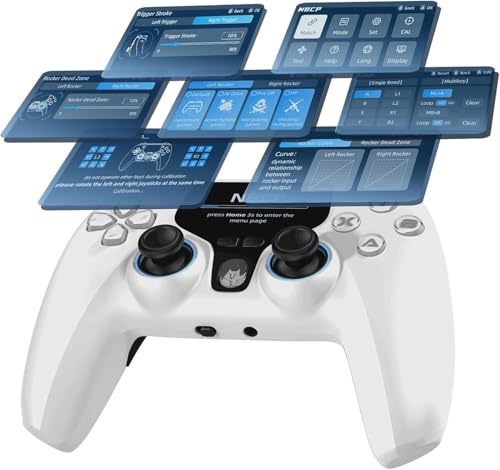
NBCP Wireless PC Controller, Hall Effect Joysticks, 1000Hz,
- ✓ Ultra-fast 1000Hz response
- ✓ Highly customizable controls
- ✓ Comfortable ergonomic design
- ✕ Slightly premium price
- ✕ Limited to 4 profiles
| Polling Rate | 1000Hz for ultra-fast response |
| Joystick Type | Hall Effect joysticks with drift-free control |
| Triggers | Dual-stage programmable triggers |
| Connectivity | Bluetooth 5.3, 2.4GHz wireless, USB-C wired |
| Display | 2-inch interactive touchscreen for customization |
| Battery and Charging | Rechargeable via USB-C with long battery life and play while charging |
Imagine you’re knee-deep in a tense Sekiro boss fight, clutching your controller tightly as you anticipate that critical dodge or counterattack. You glance down at the NBCP Wireless PC Controller, which sits comfortably in your hands, and notice its sleek 2-inch interactive display blinking softly, ready for action.
Its compact size and textured grip immediately make you feel confident, even during frantic moments. The display is surprisingly intuitive—within seconds, you’re customizing button mappings and adjusting sensitivity without fumbling through menus or apps.
Saving four profiles means you can switch from stealthy sneaking to aggressive combat with a quick tap.
The ultra-fast 1000Hz polling rate shines when you’re darting through rapid attacks or racing through tracks. Response feels instantaneous, giving you that edge in competitive play.
Hall Effect joysticks glide smoothly, and you notice no drift even after hours of use, thanks to the gyroscope calibration and drift repair.
The programmable back buttons are a game-changer; you assign macros for quick combos, making complex moves effortless. Motion control adds an extra layer of immersion, especially when controlling your character with precise tilt motions.
Plus, the controller’s compatibility across PC, Switch, iOS, and Android means you’re not tied down—play anywhere, anytime.
The ergonomic design fits comfortably in your hand, reducing fatigue during long gaming sessions. And when the battery runs low, the USB-C port makes charging quick and easy, even mid-game if needed.
Overall, this controller elevates your gaming—responsive, customizable, and versatile in every way.
ISHAKO Wireless PC Controller, for Windows

- ✓ Ultra-precise Hall Effect joysticks
- ✓ Quick, easy mode switching
- ✓ Long battery life
- ✕ Not compatible with Xbox/PlayStation
- ✕ No official vibration on PC
| Connectivity Modes | 2.4G Wireless, Bluetooth, USB-C Wired |
| Polling Rate | 1000Hz in wireless and wired modes |
| Joystick and Trigger Technology | Hall Effect sensors for stick drift elimination and precise control |
| Programmable Buttons | 4 customizable macro back buttons |
| Battery Capacity and Life | 1000mAh battery with up to 20 hours of gameplay |
| Additional Features | 6-axis gyroscope, dual-motor vibration with 4 adjustable levels, customizable RGB lighting |
That satisfying click of the Hall Effect triggers immediately caught my attention—no more accidental full pulls during intense Sekiro boss fights. The precision you get from these triggers is a game-changer, especially when every millimeter counts in tight combat scenarios.
Switching between modes is straightforward; a long press on the back button and the flashing indicator light makes it simple to toggle from wireless to wired on the fly. I appreciated how seamlessly it connects to my Windows PC and even my Steam Deck, making it versatile for different setups.
The ergonomic design fits comfortably in your hands, with the back buttons strategically placed so you don’t accidentally press them during rapid button mashing. Mapping macros to these buttons sped up complex moves, giving me a smoother, more responsive experience in Sekiro.
The 1000Hz polling rate in both wired and wireless modes means there’s virtually no lag—every move I made registered instantly. The built-in gyroscope and vibration feedback add a layer of immersion that really pulls you into the game world, whether it’s a quick parry or a heavy clash.
Battery life is impressive; I easily got through long gaming sessions without needing a recharge. The customizable RGB lighting is a nice touch, letting you personalize your setup without feeling overdone.
Overall, this controller feels solid, responsive, and packed with features that specifically enhance your Sekiro gameplay. It’s a smart upgrade if precision and quick response are what you’re after.
What Are the Essential Controls for Playing Sekiro on a Controller?
The essential controls for playing Sekiro on a controller are designed to optimize gameplay and enhance the player’s experience.
- Movement (Left Stick): The left stick is crucial for navigating the environment, allowing players to move in all directions fluidly.
- Camera Control (Right Stick): The right stick controls the camera angle, which is vital for maintaining awareness of the surroundings and enemies during combat.
- Attack (R1): This button executes light attacks, which are essential for building up posture damage against enemies.
- Heavy Attack (R2): The heavy attack button performs powerful strikes that deal significant damage but consume more stamina, useful for breaking through enemy defenses.
- Deflect (L1): Pressing this button allows players to deflect incoming attacks, a critical mechanic for countering enemy strikes and maintaining combat flow.
- Dodge (Circle): The dodge button is essential for evading enemy attacks, allowing players to quickly reposition themselves during intense battles.
- Posture (L2): Holding this button enables the player to guard against attacks, which helps in managing posture against strong opponents.
- Grapple (L1 + X): The grapple allows players to reach higher areas or escape tight situations, adding verticality to movement and combat approaches.
- Item Usage (D-Pad): The D-pad is used to quickly access and use items such as healing gourd or special tools, which can be critical in challenging encounters.
- Stealth (L3): Pressing the left stick allows players to crouch and move stealthily, enabling sneak attacks on unsuspecting enemies.
How Do Different Controller Configurations Affect Gameplay in Sekiro?
The choice of controller configuration in Sekiro can significantly impact gameplay experience and performance.
- Standard Configuration: This setup aligns the buttons with typical action game controls, allowing for intuitive access to essential actions like attack, block, and dodge.
- Custom Mappings: Players can modify button assignments to suit their personal preferences or ergonomic needs, which can enhance comfort and reaction times during intense battles.
- Toggle vs. Hold Mechanics: Some players may prefer toggling certain actions like sprinting or grappling, while others may find holding a button more responsive, affecting their movement fluidity and engagement in combat.
- Analog Sensitivity Settings: Adjusting how sensitive the analog sticks are can drastically change how precise the character’s movements are, impacting stealth and combat strategy.
- Button Layout for Accessibility: Configurations that prioritize accessibility can make gameplay easier for those with limited dexterity, allowing for a more enjoyable experience without sacrificing gameplay quality.
The Standard Configuration is designed to provide a seamless experience for players familiar with action games, where the layout is predictable and effectively supports the core mechanics of combat and traversal in Sekiro.
Custom Mappings allow players to tailor their controls, which can be crucial for those who have distinct play styles or require specific button placements to maximize their efficiency and comfort during gameplay.
The choice between Toggle vs. Hold Mechanics can affect how players manage stamina and positioning; toggling might allow for more relaxed gameplay, while holding can create a more immersive and controlled experience during critical moments.
Analog Sensitivity Settings play a pivotal role in how a player interacts with the game world; for instance, high sensitivity can facilitate rapid movements essential for dodging, while low sensitivity may suit players who prefer precision over speed.
Lastly, Button Layout for Accessibility ensures that all players, regardless of their physical abilities, can enjoy the game without feeling hindered, making Sekiro more inclusive while still maintaining the challenge it is known for.
What Should You Consider for Optimal Button Mapping in Sekiro?
When optimizing button mapping for Sekiro, several factors should be taken into account to enhance gameplay and responsiveness.
- Attack and Block Mapping: Assigning the attack and block functions to easily accessible buttons allows for quick reactions during combat. Many players prefer mapping attack to the face buttons and block to a trigger, facilitating fluid transitions between offensive and defensive maneuvers.
- Posture and Grappling Hook: Consider mapping the posture break and grappling hook to buttons that are comfortable for your fingers to reach without disrupting your grip. This can enhance your ability to engage in dynamic combat while maintaining mobility and positioning.
- Dodge and Sprint Configuration: Having dodge and sprint mapped to the same button can lead to accidental dodges during critical moments. It’s often better to separate these functions to ensure that you can sprint when needed without the risk of dodging into danger.
- Items and Healing Assignments: Assigning healing items and other consumables to easily reachable buttons can help in maintaining your health during intense battles. Quick access to these items can mean the difference between life and death, especially in boss fights.
- Camera Control: Proper camera control mapping is crucial for maintaining awareness of your surroundings. Consider assigning camera adjustments to a button that allows for quick adjustments, making it easier to track enemies while executing complex maneuvers.
- Customizable Layouts: Take advantage of customizable layouts to find what feels best for your personal playstyle. This might involve experimenting with different mappings until you settle on a configuration that feels intuitive and allows for optimal performance.
Which Buttons Are Best for Combat Actions in Sekiro?
The best buttons for combat actions in Sekiro when using a controller are crucial for maximizing efficiency and effectiveness during gameplay.
- R1 (or RT on Xbox): This button is primarily used for quick attacks, making it essential for engaging enemies and executing swift combos.
- R2 (or RT on Xbox): This button is reserved for heavy attacks, which deal more damage and can break through enemy defenses, especially when paired with a posture break strategy.
- L1 (or LB on Xbox): This button is used for deflecting enemy attacks, a key mechanic in Sekiro that allows players to parry incoming strikes and create openings for counterattacks.
- L2 (or LT on Xbox): This button is utilized for block actions, providing a defensive option against incoming attacks and allowing players to conserve posture during intense battles.
- Circle (or B on Xbox): This button functions as the dodge button, enabling players to evade enemy attacks and reposition themselves quickly to avoid damage.
- Square (or X on Xbox): This button is used for activating items and healing, which is critical during fights to maintain health and utilize special abilities.
The R1 button provides a fast-paced attack option that is crucial for chaining hits together and keeping the pressure on enemies, while R2 is essential for heavier strikes that can deal significant damage and disrupt enemy posture. L1 is integral for mastering the deflect mechanic, allowing players to time their counters effectively and avoid damage while setting up for powerful retaliations.
The L2 button serves as a solid defensive measure, allowing players to block attacks and decrease damage taken, which is especially useful against stronger foes. The Circle button is vital for mobility, giving players the ability to dodge attacks and reposition themselves strategically, while the Square button ensures that players can quickly heal or use items during combat without losing precious time.
How Can You Achieve Precision in Movement Controls for Sekiro?
Training with different scenarios allows you to adapt to the game’s challenging dynamics. By familiarizing yourself with various enemy types and environments, you can better understand how to use your controls effectively in different situations, leading to improved precision over time.
What Are the Recommended Sensitivity Settings for Controller Controls in Sekiro?
The recommended sensitivity settings for controller controls in Sekiro can significantly enhance your gameplay experience by allowing for better precision and responsiveness.
- Camera Sensitivity: A lower camera sensitivity is often recommended to provide more control over your movements, especially during precise actions like parrying and dodging.
- Targeting Sensitivity: Setting a moderate targeting sensitivity helps in quickly adjusting your aim while still maintaining control, which is crucial for engaging multiple enemies.
- Vertical Sensitivity: Similar to camera sensitivity, a slightly lower vertical sensitivity can help with accurately aiming your attacks and using vertical traversal effectively.
- Control Deadzone: A small deadzone setting can improve responsiveness by ensuring that minor stick movements translate directly into in-game actions, reducing input lag.
- Button Mapping: Customizing your button layout can provide a more comfortable experience, allowing for quicker access to essential actions like healing and special abilities.
Camera sensitivity should be adjusted based on personal preference, but many players find that a setting around 3-5 allows for a good balance between speed and precision, making it easier to track enemies without overshooting their movements.
Targeting sensitivity is best set around 5-7, providing a balance that allows for quick adjustments during combat while still being manageable enough to avoid erratic movements that could lead to missed parries.
For vertical sensitivity, a similar range of 3-5 is often ideal, as it allows players to effectively navigate the environment and engage in vertical combat without losing control over their movements.
A control deadzone of around 5-10% is typically recommended; this value ensures that slight stick movements are registered, which is crucial for precise navigation and combat maneuvers without unintended movements.
Lastly, button mapping is a highly personal choice; however, many players find success in remapping key actions such as dodging and healing to more accessible buttons to improve their reaction times during intense gameplay.
How Can Custom Controls Enhance Your Sekiro Gaming Experience?
Custom controls can significantly enhance your Sekiro gaming experience by allowing for personalized gameplay that suits your preferences.
- Improved Accessibility: Custom controls can be tailored for players with different physical abilities, making the game more accessible. By remapping buttons, players can find configurations that reduce strain or difficulty, allowing for longer and more enjoyable gaming sessions.
- Enhanced Reaction Time: By assigning critical actions like dodging or parrying to more easily reachable buttons, players can react faster to in-game threats. This responsiveness is crucial in Sekiro, where timing is key to defeating challenging bosses and avoiding damage.
- Personalized Playstyle: Customizing controls allows players to match their own playstyle, whether they prefer aggressive combat or a more defensive strategy. For instance, allocating specific buttons for special abilities can create a fluid combat rhythm tailored to individual tactics.
- Comfort and Ergonomics: Adjusting control layouts can make gameplay more comfortable, especially during long play sessions. Players can place frequently used commands in optimal positions, reducing finger fatigue and improving overall control during intense battles.
- Streamlined Inventory Management: By assigning easy-access buttons for items and tools, players can manage their inventory more efficiently. This is particularly beneficial in Sekiro, where quick access to healing items or tools can be the difference between victory and defeat in dire situations.