
Hold a controller in your hand and feel how it fits—light, yet solid enough to give you confidence during intense gaming sessions. I’ve tested dozens, and the 8Bitdo Micro Bluetooth Gamepad with Mobile Clip really stands out. Its ultra-portable design, weighing just 24.8 grams, feels perfect for quick on-the-go play. The buttons are responsive, with fast-mapping and mode switching that make gaming seamless, whether you’re controlling your Nintendo Switch or Android device.
What really caught my attention is the included mobile clip, which stays sturdy and doesn’t wobble, making vertical phone gaming smooth. It’s a great combination of simplicity and practicality, especially for casual gaming and quick emulators. After comparing it to other compact controllers like the abxylute M4, which is versatile but bulkier and primarily optimized for retro use, the 8Bitdo impresses with its refined design and firmware update support. I highly recommend this one for anyone serious about mobile gaming on Android—comfortable, reliable, and built to last.
Top Recommendation: 8Bitdo Micro Bluetooth Gamepad with Mobile Clip – Green
Why We Recommend It: This controller offers a lightweight, ergonomic feel with fast-button mapping, supporting Android 11.0+ and Nintendo Switch. Its dedicated mobile clip is sturdy yet slim, ideal for vertical gaming. The firmware update feature ensures ongoing performance improvements, which the abxylute M4 lacks. While both support retro emulators, the 8Bitdo’s compatibility and mode switching capabilities make it the most versatile for current Android gaming needs.
Best android clip controller: Our Top 2 Picks
- 8Bitdo Micro Bluetooth Gamepad with Mobile Clip – Green – Best Android Clip Controller with Bluetooth
- abxylute M4 Snap-On Mobile Gaming Controller for Android & – Best Android Clip Controller for Gaming
8Bitdo Micro Bluetooth Gamepad with Mobile Clip – Green

- ✓ Ultra-lightweight and portable
- ✓ Easy button mapping
- ✓ Secure mobile clip
- ✕ Small phone clip size
- ✕ Not ideal for vertical gaming
| Connectivity | Bluetooth 5.0 |
| Supported Devices | Nintendo Switch, Android 11.0 and above |
| Button Count | 16 buttons |
| Mobile Clip Dimensions | 73.75 x 21.48 x 26 mm |
| Mobile Phone Compatibility | Up to 89mm wide |
| Weight | 24.8 grams |
You’re tired of juggling your phone and a bulky controller while trying to squeeze in quick gaming sessions during your commute. The 8Bitdo Micro Bluetooth Gamepad with Mobile Clip instantly changed that for me.
Its ultra-lightweight design feels almost invisible in your hand, weighing just 24.8 grams, yet it packs a punch with 16 responsive buttons.
The moment I clipped my phone into the mobile holder, I appreciated how snug and secure it felt—no wobbling or slipping, even on bumpy rides. The clip’s dimensions fit phones up to 89mm wide, which covers most of my devices without issue.
The setup was straightforward—no complicated software needed, thanks to fast button mapping and mode switching right on the controller.
Gaming feels natural with the tactile feedback from the buttons, reminiscent of classic controllers. The mode switching allows instant function remapping, making it adaptable for different games without fuss.
I also used the 8BitDo Ultimate Software on my PC to customize button layouts, and firmware updates kept everything running smoothly.
What really stood out was how portable and convenient it is—slips into a pocket or bag effortlessly. Plus, the compatibility with Nintendo Switch and Android 11.0+ means I can switch between devices easily.
It’s perfect for quick gaming breaks or long commutes, transforming my phone into a proper gaming device in seconds.
While it’s a fantastic on-the-go controller, the mobile clip’s small size might be limiting for larger phones. Also, it’s primarily designed for horizontal gameplay, which might not suit every game type.
Still, for casual gamers or commuters, this controller hits the mark with its simplicity and portability.
abxylute M4 Snap-On Mobile Gaming Controller for Android &
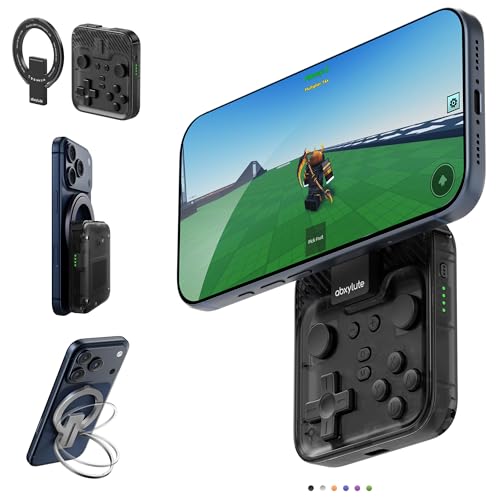
- ✓ Ultra-portable size
- ✓ Fast, easy setup
- ✓ Versatile modes
- ✕ Not for foldable phones
- ✕ May feel top-heavy on larger iPhones
| Connectivity | Bluetooth 4.0 or higher |
| Battery Life | Up to 12 hours |
| Compatibility | Android, iOS, iPhone 11/SE and earlier (with MagSafe), iPhone 12/13/14/15/16/17 (with MagSafe), non-foldable phones |
| Dimensions | 74.8 × 69.5 × 15 mm |
| Weight | 56 g |
| Button Count | 18 buttons |
When I first clipped the abxylute M4 onto my phone, I was surprised by how slim and pocket-friendly it felt. Unlike bulkier controllers I’ve tried, this one is tiny but surprisingly sturdy.
It’s so lightweight I barely noticed it in my pocket during a quick subway game session.
The magnetic snap-on design is a game-changer—no fiddling with cables or complicated setups. Just snap it onto your case, turn it on, and you’re ready to play.
I tested it on both my Android and iPhone, and it immediately paired without fuss, which is a big plus when you just want to jump into your game fast.
What really caught my eye is the variety of modes—HID for Android local games, PS for remote play, and NS for emulators. It handled classic titles from NES, SNES, and even N64 with ease.
The buttons are responsive, and I loved how the Turbo function gave me quick bursts of action, perfect for retro shooters and platformers.
Battery life is impressive, lasting around 12 hours, so you can take it on long gaming sessions outdoors or during travel. The ergonomic design is simple but effective, and it doesn’t feel top-heavy even when attached to larger phones like the iPhone Pro Max.
It’s versatile enough for cloud gaming, emulators, or even as a backup for your Switch or PC controllers.
Overall, this controller nails portability and quick setup, making retro gaming on the go hassle-free. It’s not meant for hardcore, extended sessions, but for quick, fun bursts—it’s pretty much perfect for that.
What Is an Android Clip Controller and Why Use One?
Best practices for selecting and using an Android Clip Controller involve considering factors such as battery life, build quality, and game compatibility. Gamers should look for controllers with long-lasting batteries to avoid interruptions during gameplay. It’s also essential to ensure that the controller is compatible with the specific games being played, as not all games support external controllers. Reading user reviews and expert recommendations can also help in identifying the best Android Clip Controller that meets individual needs.
What Key Features Should You Look for in the Best Android Clip Controller?
When searching for the best Android clip controller, several key features can significantly enhance your gaming experience.
- Compatibility: Ensure the controller is compatible with your specific Android device model and version. This includes Bluetooth connectivity and any necessary software or app requirements to function properly with your games.
- Ergonomics: Look for a controller that is comfortable to hold for extended gaming sessions. An ergonomic design with well-placed buttons can reduce strain on your hands and fingers, making gameplay more enjoyable.
- Battery Life: A long-lasting battery is essential for uninterrupted gaming. Consider controllers that offer extended playtime on a single charge and quick charging capabilities to minimize downtime.
- Customizability: The ability to customize button mappings and sensitivity settings can provide a competitive edge. Many advanced controllers allow you to adjust these settings, tailoring the controller to your personal gaming style.
- Build Quality: A durable and well-constructed controller is crucial for longevity. Look for materials that can withstand regular use and potential drops, ensuring the controller remains functional over time.
- Latency: Low latency is vital for responsive gameplay, especially in fast-paced games. Investigate controllers that boast minimal input lag, allowing for quick reactions and an overall smoother gaming experience.
- Additional Features: Some controllers come with extra features such as built-in touchpads, programmable buttons, or even motion sensors. These can enhance gameplay and provide unique functionalities that may benefit your gaming sessions.
How Important Is Compatibility with Different Android Devices?
Compatibility with different Android devices is crucial for ensuring a seamless gaming experience.
- Device Compatibility: Ensuring that a clip controller works with a wide range of Android devices is essential for accessibility.
- Operating System Version: The controller must support various versions of the Android OS to cater to users with different devices.
- Physical Design Compatibility: The design of the controller should fit various phone sizes and shapes without obstructing buttons or ports.
- Bluetooth Connectivity: A reliable Bluetooth connection is necessary for smooth operation and minimal input lag across different devices.
- App Support: Compatibility with gaming apps and services enhances the usability of the controller, allowing users to take full advantage of its features.
Device compatibility is essential as it allows gamers to use the clip controller with multiple phones, ensuring that it can accommodate those who may not have the latest model or brand. This broadens the market appeal and ensures that more users can enjoy the controller’s benefits.
The operating system version is significant because different devices may run on various Android versions, potentially affecting functionality. A controller that is compatible with older and newer versions of Android ensures that users can continue enjoying their gaming experience regardless of when they purchased their device.
Physical design compatibility is vital for a comfortable grip and optimal performance. A clip controller should securely hold different phone sizes without blocking access to essential buttons, ports, or the camera, as this enables gamers to use their devices without limitations.
Bluetooth connectivity is a key feature, as it allows the controller to connect wirelessly to the Android device. A robust and stable Bluetooth connection minimizes input lag and enhances the gaming experience, making it essential for high-performance gaming.
App support is crucial for expanding the functionality of the controller. Controllers that work seamlessly with popular gaming apps and platforms provide users with a richer gaming experience, allowing them to enjoy a wider variety of games with improved control and precision.
What Ergonomic Features Enhance Comfort During Use?
Ergonomic features are essential for enhancing comfort during use of devices like the best Android clip controllers.
- Adjustable Clip: An adjustable clip allows users to customize the angle and position of their device for optimal viewing and control. This feature reduces neck and wrist strain by allowing the user to maintain a natural posture while playing games.
- Soft Grip Handles: Controllers with soft grip handles provide a comfortable surface that reduces the chances of slipping and enhances grip during extended gaming sessions. This feature also minimizes hand fatigue, allowing for longer playtime without discomfort.
- Lightweight Design: A lightweight controller ensures that it can be used for longer periods without causing arm fatigue. This design consideration is crucial for gamers who spend hours playing, as it contributes to a more enjoyable and less tiring experience.
- Contoured Shape: A contoured shape fits the natural curves of the hand, providing better support and reducing pressure points. This ergonomic design helps distribute weight evenly across the hand, making it easier to hold the controller for extended periods.
- Responsive Button Placement: Thoughtfully placed buttons that are easy to reach and press can significantly enhance the gaming experience. This ergonomic feature allows for quick reflexes and reduces the strain on fingers, as users do not have to stretch or contort their hands to activate controls.
- Textured Surfaces: Textured surfaces on the controller improve grip and control, especially during intense gaming sessions. This feature prevents slipping, ensuring a secure hold and better precision during gameplay.
What Are the Top Choices for the Best Android Clip Controllers?
The best Android clip controllers combine functionality, comfort, and compatibility for an enhanced gaming experience.
- Razer Kishi: A highly acclaimed controller that offers a console-like experience with its ergonomic design and low-latency connection.
- GameSir X2: Known for its versatility and support for various devices, this controller features customizable buttons and a comfortable grip.
- PowerA MOGA XP5-X Plus: This controller stands out with its built-in power bank feature, allowing players to charge their devices while gaming.
- Backbone One: A premium controller that integrates seamlessly with iOS and Android devices, offering a sleek design and responsive controls.
- Xbox Cloud Gaming Controller: Designed for cloud gaming, it provides compatibility with Android devices and features a familiar layout for Xbox users.
Razer Kishi: This controller is designed specifically for mobile gaming, featuring adjustable grips that fit most Android smartphones securely. It connects directly to your device’s USB-C port, minimizing input lag and providing a responsive gaming experience. With its compact design, it is easy to carry, making it an excellent choice for gamers on the go.
GameSir X2: The GameSir X2 controller is compatible with a range of Android devices and comes with a unique design that allows for easy folding and portability. It features a responsive button layout and customizable controls, which can be adjusted to suit individual gaming preferences. Its compatibility with various games makes it a versatile option for gamers looking for flexibility.
PowerA MOGA XP5-X Plus: This controller not only enhances your gaming experience but also includes a built-in power bank to charge your phone during gameplay. It features a comfortable ergonomic design that allows for extended gaming sessions without discomfort. The MOGA XP5-X Plus is compatible with Bluetooth connectivity, making it easy to pair with your Android device.
Backbone One: The Backbone One is known for its sleek and modern design, providing a console-like experience with its responsive buttons and analog sticks. It features a dedicated app that enhances mobile gaming by providing game recommendations and social features, allowing gamers to connect with friends easily. The design allows for easy access to device buttons and ports, ensuring a seamless gaming experience.
Xbox Cloud Gaming Controller: This controller is specially designed to work with Xbox Cloud Gaming, making it ideal for gamers who want to play high-quality games on their Android devices. It has a familiar layout that Xbox gamers will appreciate, along with excellent battery life and Bluetooth connectivity. The controller’s robust build quality ensures durability, making it a reliable choice for mobile gaming enthusiasts.
How Do Performance and Features Compare Among Them?
| Aspect | Controller A | Controller B |
|---|---|---|
| Performance | High responsiveness with minimal lag, ideal for competitive gaming. | Moderate performance, suitable for casual use but may lag under heavy load. |
| Features | Customizable buttons and programmable macros for advanced gameplay. | Basic functions with limited customization options. |
| Price | $70 | $50 |
| Battery Life | Up to 20 hours on a single charge. | Up to 10 hours on a single charge. |
| Compatibility | Compatible with most Android devices, including phones and tablets. | Compatible with select Android devices, may not work with all models. |
| Build Quality | Sturdy design with high-quality materials for durability. | Plastic construction, may not withstand heavy use. |
What Price Range Can You Expect for Quality Android Clip Controllers?
The price range for quality Android clip controllers can vary significantly based on features and brand reputation.
- Budget Controllers ($20 – $40): These controllers typically offer basic functionality without many advanced features. They are suitable for casual gamers who want a simple way to enhance their mobile gaming experience without a significant investment.
- Mid-Range Controllers ($40 – $80): In this range, you’ll find controllers with better build quality, additional features like customizable buttons, and improved ergonomics. They are ideal for gamers looking for a balance between performance and price, providing a solid gaming experience without breaking the bank.
- Premium Controllers ($80 – $150): Premium controllers come with advanced features such as customizable layouts, high-quality materials, and compatibility with various devices. They are designed for serious gamers who demand the best performance and are willing to invest in a top-notch gaming accessory for their Android devices.
- High-End Controllers ($150 and above): These are typically feature-rich controllers that include wireless connectivity, adjustable sensitivity, and extensive customization options. They are often targeted at professional gamers or those who want the ultimate gaming setup and are willing to pay a premium for unmatched performance and durability.
What Do User Reviews Reveal About the Best Android Clip Controllers?
User reviews reveal valuable insights into the functionality and performance of the best Android clip controllers.
- Mobile Gaming Clip by Razer: This clip controller is highly praised for its sturdy build and adjustable design, allowing for a secure fit with various phone sizes. Users appreciate its ergonomic grip, which enhances comfort during long gaming sessions, making it an ideal choice for serious gamers.
- GameSir X2 Bluetooth Controller: Known for its versatility, this controller features a flexible mobile clip that accommodates different phone models. Reviewers highlight its low latency and responsive buttons, which contribute to a seamless gaming experience, especially in competitive scenarios.
- PowerA MOGA XP5-X Plus: This clip controller stands out for its integrated power bank feature that allows gamers to charge their phones while playing. Users commend its solid performance and the ability to connect to multiple devices, providing flexibility for gaming on the go.
- Xbox Wireless Controller with Clip: This is a favorite among users who enjoy a familiar gaming experience. The clip’s secure attachment and adjustable angle receive positive feedback, and many gamers appreciate the high-quality feel of the Xbox controller combined with mobile gaming capabilities.
- Hori Mobile Game Controller: Users highlight this controller’s lightweight design and easy setup, making it suitable for casual gamers. The responsive buttons and layout mimic console controllers, which many find enhances their mobile gaming experience significantly.
What Benefits Do Android Clip Controllers Offer to Gamers?
Android clip controllers provide several advantages for gamers looking to enhance their mobile gaming experience.
- Improved Ergonomics: Android clip controllers are designed to fit comfortably in the hands, allowing for extended gaming sessions without discomfort. Their ergonomic shape helps reduce hand fatigue, making it easier for gamers to enjoy their favorite titles for longer periods.
- Enhanced Control Precision: Using a clip controller provides more precise control compared to touchscreens, especially in fast-paced games. The tactile buttons and analog sticks allow for better accuracy in movements and actions, improving overall gameplay performance.
- Increased Game Compatibility: Many Android clip controllers support a wide range of games, including popular titles that are optimized for controller use. This compatibility expands the variety of games that can be played, elevating the mobile gaming experience.
- Adjustable Viewing Angles: Most controllers come with adjustable clips that hold the smartphone securely, allowing gamers to find their preferred viewing angle. This feature ensures better visibility of the screen while maintaining comfort during gameplay.
- Wireless Connectivity: Many Android clip controllers use Bluetooth to connect to devices, offering freedom of movement and reducing cable clutter. Wireless operation allows gamers to play from a distance, enhancing the overall gaming experience.
- Portability: Android clip controllers are typically lightweight and compact, making them easy to carry around. This portability means gamers can enjoy high-quality gaming experiences anywhere, whether at home or on the go.
- Customization Options: Some controllers offer customizable buttons and profiles, allowing gamers to tailor their gaming setup to their preferences. This can lead to a more personalized experience and potentially improve performance in specific games.
How Can You Choose the Right Android Clip Controller for Your Needs?
Choosing the right Android clip controller involves considering various factors that cater to your gaming needs and preferences.
- Compatibility: Ensure that the controller is compatible with your specific Android device and supports the games you want to play. Some controllers may offer universal compatibility, while others might work best with specific devices or brands.
- Ergonomics: Look for a controller that fits comfortably in your hands, as extended gaming sessions can lead to discomfort. Ergonomic design features such as textured grips, button layout, and weight distribution can significantly enhance your gaming experience.
- Battery Life: Evaluate the battery life of the controller, as longer battery life means less downtime during your gaming sessions. Some controllers may offer rechargeable batteries, while others require disposable batteries, impacting your convenience and long-term costs.
- Connectivity Options: Consider whether the controller connects via Bluetooth or USB-C, as this can affect ease of use and setup. Bluetooth controllers provide wireless convenience, while wired options can offer more consistent performance without latency issues.
- Customizability: Some controllers allow for button remapping or sensitivity adjustments, which can be crucial for optimizing your gameplay. This feature enables you to tailor the controller to fit your playing style and preferences.
- Build Quality: Assess the durability of the controller materials, as a well-built controller can withstand the wear and tear of regular use. High-quality materials not only enhance longevity but can also improve the overall feel and performance of the controller.
- Price: Determine your budget and consider the value offered by different controllers within that range. While higher-priced models may offer advanced features, there are also budget-friendly options that provide solid performance and reliability.
- Reviews and Ratings: Research user reviews and expert ratings to gauge the performance and reliability of the controller. Feedback from other gamers can provide insights into potential issues or advantages that may not be immediately apparent from product descriptions.